Introducció
Thank you for choosing the HyperGear Bunny Tracks Kids Bluetooth Wireless Headphones. These headphones are designed to provide a fun and immersive audio experience for children, featuring wireless Bluetooth connectivity, LED rabbit ears, and multiple playback options. This manual provides essential information for setting up, operating, and maintaining your headphones to ensure optimal performance and longevity.

The image displays the HyperGear Bunny Tracks Kids Bluetooth Wireless Headphones in white, featuring LED rabbit ears. The product packaging is also visible, highlighting key features like Bluetooth connectivity, kid-friendly sizing, comfortable fit, and mic/volume control.
Producte acabatview
Característiques clau
- Connectivitat sense fil Bluetooth: Seamless audio streaming from compatible devices.
- LED Rabbit Ears: Fun, illuminated design element.
- Disseny plegable: Millora la portabilitat i l'emmagatzematge.
- Micròfon integrat: Per a trucades de mans lliures i comunicació en línia.
- Multi-Mode Playback: Supports Bluetooth, 3.5mm Aux, microSD card, and FM radio.
- Ajust còmode: Adjustable headband and soft over-ear cushions.
- Temps de joc de 10 hores: Escolta prolongada amb una sola càrrega.
Controls i Ports
The headphones feature intuitive controls and versatile input options for various audio sources.

Aquesta imatge ofereix un detall view of the control buttons located on the headphone ear cup. Labels indicate functions for power on/off, next track/volume up, play/pause/answer call, previous track/volume down, and mode switch.
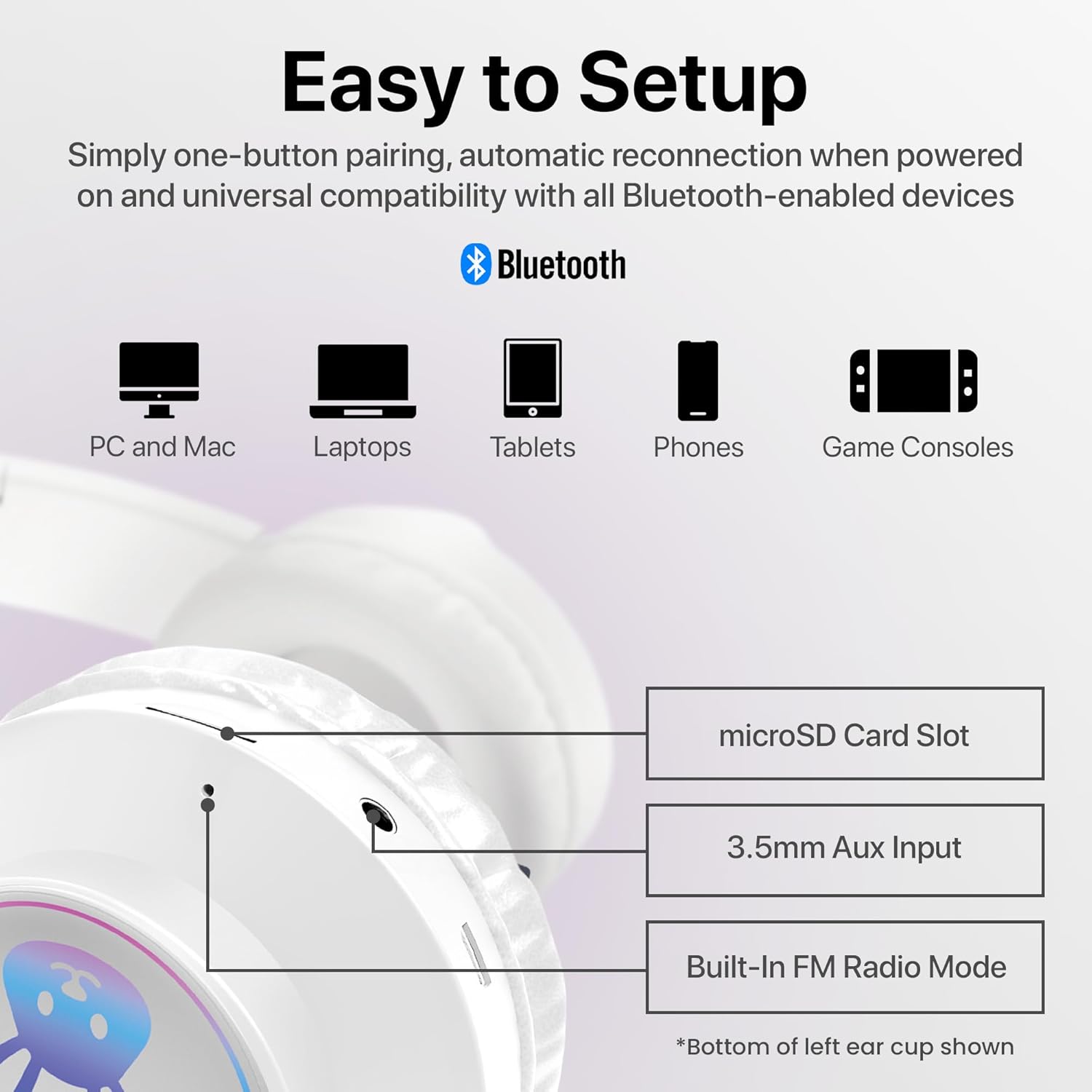
The image shows the various input ports on the bottom of the left ear cup, including a microSD card slot for direct audio playback, a 3.5mm Aux input for wired connections, and an indication of the built-in FM radio mode.
Instruccions de configuració
1. Càrrega dels auriculars
- Connect the included charging cable to the charging port on the headphones.
- Plug the other end of the charging cable into a USB power source (e.g., computer USB port, USB wall adapter).
- The LED indicator will illuminate during charging and turn off or change color when fully charged. A full charge takes approximately 2 hours.
2. Encès / apagat
- Per encendre: Press and hold the Power button (usually combined with Play/Pause) until the LED indicator lights up and you hear an audible prompt.
- Per apagar: Premeu i manteniu premut el botó d'engegada fins que l'indicador LED s'apagui i sentiu un missatge audible.
3. Emparellament Bluetooth
- Assegureu-vos que els auriculars estiguin completament carregats i apagats.
- Premeu i manteniu premut el botó d'engegada durant aproximadament 3-5 segons fins que l'indicador LED parpellegi en blau i vermell, cosa que indica el mode d'emparellament.
- Al dispositiu (telèfon intel·ligent, tauleta, ordinador), activeu el Bluetooth i cerqueu els dispositius disponibles.
- Select "HyperGear Bunny Tracks" from the list of found devices.
- Once paired, the LED indicator will typically show a solid blue light or flash blue slowly, and you will hear a confirmation tone.
4. Connexió per cable (mode auxiliar)
Per utilitzar els auriculars en mode cablejat:
- Connect one end of a 3.5mm audio cable (not always included, check packaging) to the Aux input port on the headphones.
- Connecteu l'altre extrem a la presa de sortida d'àudio del vostre dispositiu.
- The headphones will automatically switch to Aux mode. Bluetooth functionality will be disabled in this mode.
5. Reproducció amb targeta microSD
To play audio directly from a microSD card:
- Insert a microSD card with MP3 audio files into the microSD card slot on the headphones.
- The headphones will automatically switch to microSD mode and begin playing audio.
6. Mode de ràdio FM
Per utilitzar la ràdio FM integrada:
- Enceneu els auriculars.
- Press the 'M/EQ' button (Mode/Equalizer) to switch to FM radio mode.
- Use the Volume Up/Down buttons to scan for stations. A short press may change frequency, while a long press might auto-scan. Refer to the control image for specific button functions.

This image depicts a young girl wearing the headphones while interacting with a laptop, suggesting use for online learning or entertainment.
Instruccions de funcionament
Basic Controls (Bluetooth/microSD Mode)
| Botó/Acció | Funció |
|---|---|
| Botó d'engegada (pressió curta) | Play/Pause music; Answer/End phone calls. |
| Botó d'engegada (premció llarga) | Encès / apagat. |
| '+' Button (Short Press) | Pista següent. |
| '+' Button (Long Press) | Puja el volum. |
| '-' Button (Short Press) | Pista anterior. |
| '-' Button (Long Press) | Baixa el volum. |
| 'M/EQ' Button (Short Press) | Switch Audio Mode (Bluetooth, FM, microSD, Aux). |
| 'M/EQ' Button (Long Press) | Activate Equalizer (if available, check product specifications for details). |
Gestió de trucades telefòniques
- Respon a la trucada: Premeu breument el botó d'engegada quan rebeu una trucada.
- Finalitzar la trucada: Premeu breument el botó d'engegada durant una trucada.
- Rebutja la trucada: Premeu llargament el botó d'engegada quan rebeu una trucada.
LED Rabbit Ears
The LED rabbit ears illuminate automatically when the headphones are powered on, adding a visual element to the listening experience. There are no specific controls for the LED lights; they operate in conjunction with the headphone's power state.

A boy is shown wearing the headphones and holding a game controller, illustrating the headphones' suitability for gaming.
Manteniment
Neteja
- Netegeu els auriculars amb un drap suau, sec i sense borrissol.
- No utilitzeu netejadors abrasius, dissolvents ni productes químics forts.
- Eviteu que entri humitat a cap obertura.
Emmagatzematge
- Guardeu els auriculars en un lloc fresc i sec, allunyat de la llum solar directa i de temperatures extremes.
- Utilize the foldable design for compact storage and to protect the ear cups.
Cura de la bateria
- Carregueu els auriculars regularment, fins i tot si no els feu servir amb freqüència, per mantenir la bateria en bon estat.
- Eviteu descarregar completament la bateria durant períodes prolongats.
Resolució de problemes
| Problema | Possible solució |
|---|---|
| Els auriculars no s'engeguen. | Assegureu-vos que els auriculars estiguin completament carregats. Connecteu-los a una font d'alimentació i torneu-ho a provar. |
| No se sent so dels auriculars. | Check volume levels on both the headphones and the connected device. Ensure headphones are correctly paired via Bluetooth or properly connected via Aux cable. Verify the correct audio mode is selected. |
| No es pot emparellar per Bluetooth. | Ensure headphones are in pairing mode (flashing blue/red LED). Turn off and on Bluetooth on your device. Move headphones closer to the device. Clear previous Bluetooth connections on your device. |
| Mala qualitat de so. | Ensure the headphones are within Bluetooth range (10 meters). Check for interference from other wireless devices. Try a different audio source or file. |
| LED rabbit ears not lighting up. | Ensure the headphones are powered on. If the issue persists, contact customer support. |
Especificacions
| Característica | Detall |
|---|---|
| Nom del model | Bunny Tracks Headphones |
| Número de model de l'article | 15866 |
| Tecnologia de connectivitat | Sense fil (Bluetooth) |
| Tecnologia de comunicació sense fils | Bluetooth 4.0 |
| Interval Bluetooth | 10 metres |
| Forma de l'auricular | Sobre l'orella |
| Tipus de controlador d'àudio | Dynamic Driver (40mm, inferred from image) |
| Interval de freqüència | 20 Hz - 20,000 Hz |
| Durada de la bateria | Fins a 10 hores |
| Temps de càrrega | Approximately 2 Hours (inferred from A+ content) |
| Tipus de control | Control multimèdia, tàctil |
| Característiques especials | Adjustable Comfy Fit, Ultra-Soft Plush Memory Foam Ear Cushions, LED Light-Up Rabbit Ears, Easy One-Button Setup, Foldable & Portable, Microphone Included |
| Material | Plàstic |
| Pes de l'article | 7.2 unces (0.45 lliures) |
| Dimensions del producte | 7.1 x 2.9 x 10.6 polzades |
| UPC | 633755158667 |

Un intern view of the headphone ear cup, illustrating the 40mm dynamic driver responsible for audio output, designed for clear sound and bass.
Garantia i Suport
For warranty information or technical support, please refer to the official HyperGear website or contact HyperGear customer service directly. Keep your purchase receipt as proof of purchase for any warranty claims.
Fabricant: HIPEREQUIPMENT


