1. Introducció
The TYLT Folio Trio is a versatile 3-in-1 magnetic foldable wireless charging station designed to power your iPhone (12 series and newer), AirPods, and Apple Watch simultaneously. Its compact, foldable design makes it ideal for travel and everyday use. This manual provides essential instructions for setup, operation, maintenance, and troubleshooting to ensure optimal performance of your device.
2. Contingut del paquet
- TYLT Folio Trio 3-in-1 Wireless Charger
- Cable de càrrega USB-C a USB-C
- Manual d'usuari (aquest document)
Note: An Apple Watch charging cable is required for Apple Watch charging and is not included in the package.
3. Producte acabatview
The TYLT Folio Trio features a unique foldable design with three distinct charging pads for your devices.

Figure 3.1: TYLT Folio Trio charger in its compact, folded state.

Figure 3.2: TYLT Folio Trio charger fully unfolded, showing the three charging pads.
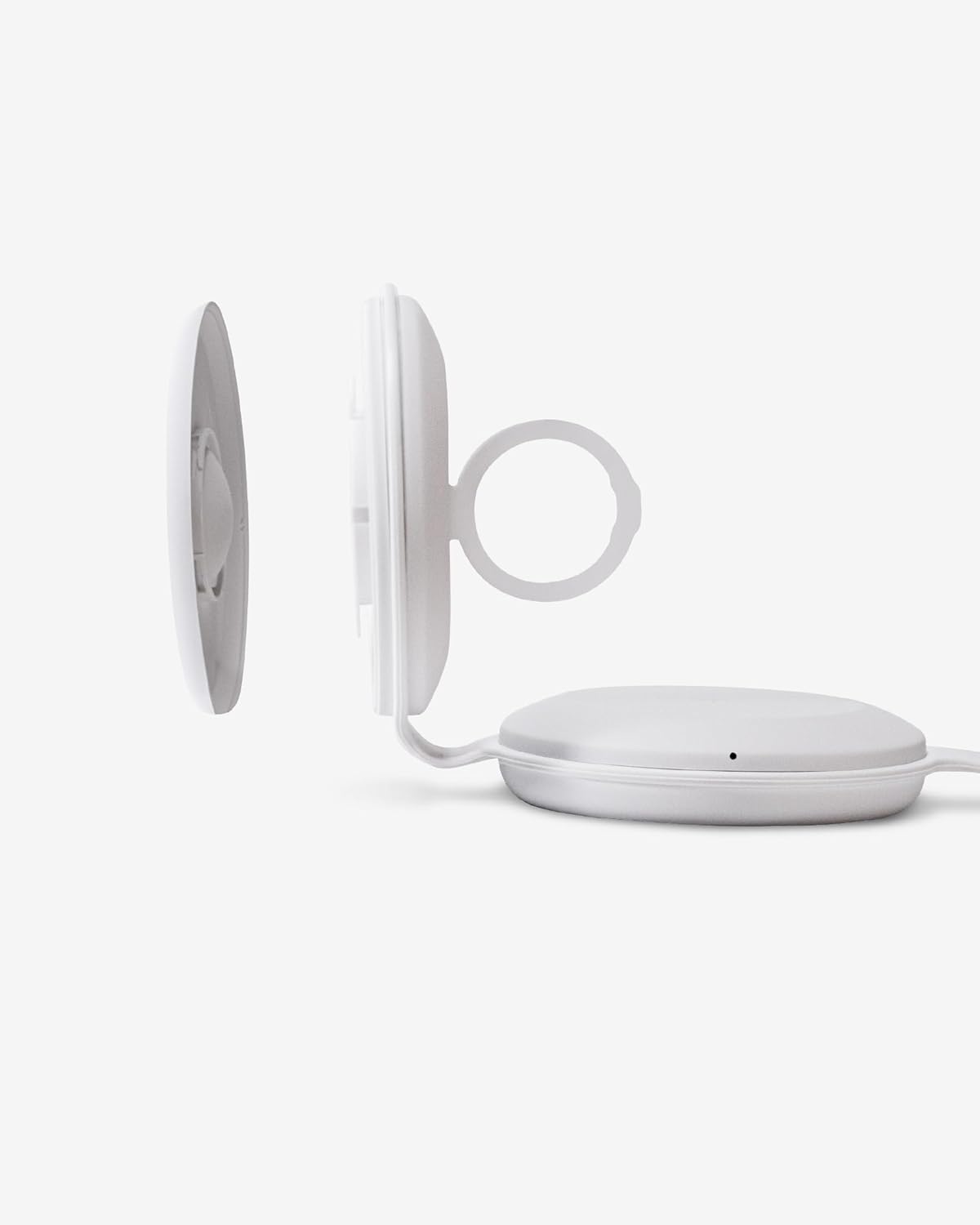
Figura 3.3: Primer pla view of the Apple Watch charging module, detached to show the internal cable routing.

Figure 3.4: TYLT Folio Trio charger in use, simultaneously charging an iPhone, AirPods, and an Apple Watch.
4. Instruccions de configuració
- Connexió d'alimentació: Connect the provided USB-C to USB-C cable to the charging port on the TYLT Folio Trio. Connect the other end of the cable to a compatible USB-C power adapter (not included) with a minimum output of 15W for optimal performance.
- Apple Watch Cable Installation:
- Gently detach the Apple Watch charging module from the main unit.
- Carefully route your own Apple Watch charging cable (not included) into the designated channel within the module.
- Ensure the charging puck is securely seated in the module and the cable is properly aligned to avoid damage.
- Reattach the Apple Watch charging module to the main unit.
This step is crucial for Apple Watch charging functionality as the necessary cable is user-supplied.
- Desplegueu el carregador: Unfold the TYLT Folio Trio to its desired configuration. It can be laid flat or used in a stand mode.
5. Instruccions de funcionament
Once the charger is powered on and unfolded, you can begin charging your devices.
- Càrrega d'iPhone: Place your MagSafe-compatible iPhone (iPhone 12 series or newer) onto the magnetic charging pad. The phone will snap into place, and charging will begin automatically. The LED indicator on the charger will illuminate to confirm charging.
- Càrrega d'AirPods: Place your AirPods (with wireless charging case) onto the designated wireless charging pad. Ensure the AirPods case is centered on the pad for effective charging. The LED indicator will confirm charging.
- Càrrega d'Apple Watch: Place your Apple Watch onto the installed Apple Watch charging puck. Ensure it is properly aligned. The LED indicator will confirm charging.
Indicadors LED: The charger features LED indicators that provide status updates:
- Blanc sòlid: El dispositiu s'està carregant.
- Blanc intermitent: Foreign object detected or device is not properly aligned. Remove the object or reposition the device.
- Apagat: No device detected or charging is complete.
6. Manteniment
- Neteja: Disconnect the charger from power before cleaning. Use a soft, dry cloth to wipe the surface. Avoid using abrasive cleaners, solvents, or harsh chemicals.
- Emmagatzematge: Quan no l'utilitzeu, plegueu el carregador fins que quedi compacte i guardeu-lo en un lloc fresc i sec, allunyat de la llum solar directa i de temperatures extremes.
- Manipulació: Avoid dropping the charger or subjecting it to strong impacts. Do not attempt to disassemble or modify the device.
7. Solució De Problemes
- El dispositiu no es carrega:
- Assegureu-vos que el carregador estigui connectat correctament a una font d'alimentació.
- Verify that your device is compatible with wireless charging and is correctly aligned on the charging pad.
- Traieu qualsevol funda gruixuda del telèfon o objecte metàl·lic que pugui interferir amb la càrrega.
- Check the LED indicator for flashing white light, indicating a foreign object or misalignment.
- Apple Watch not charging:
- Confirm that your own Apple Watch charging cable is correctly installed within the Apple Watch module as per Section 4.2.
- Ensure the Apple Watch is properly seated on its charging puck.
- Verify the Apple Watch cable itself is functional when used independently.
- Càrrega lenta:
- Ensure you are using a power adapter with sufficient wattage (at least 15W recommended).
- Avoid using your device while it is charging, as this can slow down the process.
8. Especificacions
| Característica | Especificació |
|---|---|
| Número de model | QITRIOMSW-T |
| Dimensions del producte | 4 x 1.5 x 5 polzades |
| Pes de l'article | 10.6 unces |
| Wattage | 15 watts |
| Ampedat | 5 Amps |
| Especificació Met | Qi |
| Dispositius compatibles | iPhone 12 series and newer (MagSafe), AirPods with wireless charging case, Apple Watch (with user-supplied cable) |
9. Garantia i Suport
TYLT products are designed for reliability and performance. This product is covered by a limited manufacturer's warranty against defects in materials and workmanship. Please refer to the warranty card included with your purchase or visit the official TYLT weblloc web per obtenir informació detallada sobre els termes i condicions de la garantia.
For technical support, troubleshooting assistance, or warranty claims, please contact TYLT customer service through their official weblloc web o la informació de contacte proporcionada amb la documentació del producte.


