1. Introducció
Thank you for choosing the Docooler Smart Biometric Fingerprint Cabinet Lock. This device provides a secure and convenient keyless access solution for your cabinets, drawers, wardrobes, and other furniture. Utilizing advanced fingerprint recognition and Bluetooth app control, it offers enhanced security and ease of use. Please read this manual thoroughly before installation and operation to ensure proper functionality and safety.
2. Producte acabatview i Característiques
The Docooler Smart Biometric Fingerprint Cabinet Lock integrates modern technology to protect your personal items and documents. Its compact design allows for discreet installation within various furniture types.
Característiques principals:
- Múltiples mètodes de desbloqueig: Access your belongings using fingerprint recognition, Bluetooth app control, or emergency USB key.
- Alta seguretat: Advanced biometric technology ensures only authorized fingerprints can unlock the device.
- Control de l'aplicació Bluetooth: Connect via Bluetooth to manage fingerprints, view unlock records, and monitor battery status directly from your smartphone.
- Quick Unlock: Features a 0.5-second reaction time for rapid access.
- Bloqueig automàtic: The lock automatically secures itself after closing, preventing accidental oversight.
- Avís de baixa potència: An indicator light signals when the battery level is low, prompting replacement.
- Font d'alimentació d'emergència: In case of complete battery depletion, the lock can be temporarily powered via a USB connection for emergency unlocking.
- Aplicació àmplia: Suitable for various wooden furniture including cabinets, drawers, wardrobes, and storage boxes.

Figura 2.1: Mésview of Docooler Smart Electronic Cabinet Lock features.

Figure 2.2: Docooler Smart Biometric Fingerprint Cabinet Lock components and usage scenarios.
3. Contingut del paquet
Si us plau, verifiqueu que tots els elements que s'enumeren a continuació estiguin inclosos al vostre paquet:
- Front Panel (Fingerprint Panel)
- Caixa de pany
- Manual d'usuari (Aquest document)
- Bossa de cargols
- Bloquejar Captura
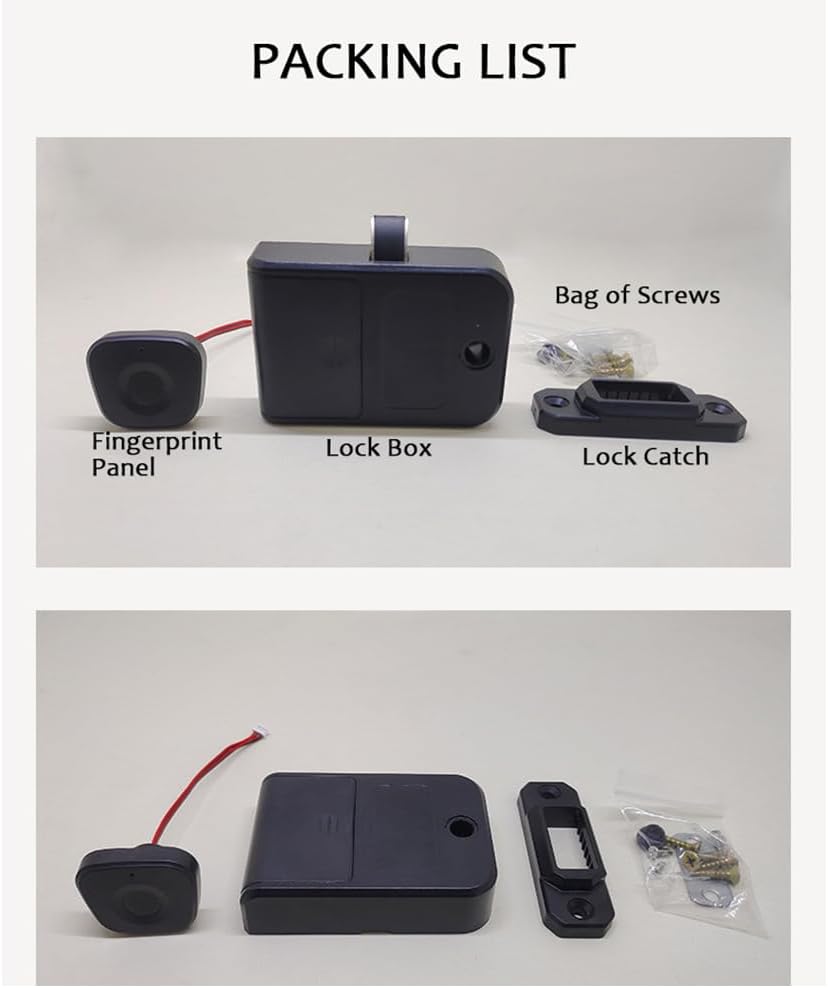
Figure 3.1: Package contents of the Docooler Smart Biometric Fingerprint Cabinet Lock.
4. Especificacions
| Característica | Descripció |
|---|---|
| Marca | Docooler |
| Característica especial | empremta digital |
| Tipus de bloqueig | Biomètric |
| Material | Acrilonitril butadiè estirè, acer inoxidable |
| Usos recomanats | Cabinets, Drawers, Wardrobes, Storage Boxes, Furniture |
| Estil | Modern |
| Color | Negre |
| Tipus de controlador | Aplicació |
| Mètode de control | Aplicació, Toc |
| Protocol de connectivitat | Bluetooth |
| Pes de l'article | 4.2 unces |
| Dimensions del paquet | 4.45 x 3.78 x 2.56 polzades |

Figura 4.1: Dimensions i paràmetres del producte.
5. Instal·lació
The Docooler Smart Biometric Fingerprint Cabinet Lock is designed for easy installation on various wooden furniture. A screwdriver is typically the only tool required.
Passos d'instal·lació:
- Prepara la superfície: Ensure the installation surface on your cabinet or drawer is clean and dry.
- Position the Fingerprint Panel: Determine the desired location for the fingerprint panel on the exterior of your furniture. Mark the screw holes and the cable entry point.
- Install the Fingerprint Panel: Secure the fingerprint panel using the provided screws. Route the connecting wires through the pre-drilled hole to the interior of the furniture.
- Mount the Lock Box: On the interior of the furniture, align the lock box with the fingerprint panel's wires. Secure the lock box with screws.
- Attach the Lock Catch: Install the lock catch on the frame of the furniture, ensuring it aligns properly with the lock box mechanism when the door/drawer is closed.
- Connecteu els cables: Connect the fingerprint panel wires to the lock box.
- Instal·leu les bateries: Open the battery cover on the lock box and insert 3 AAA batteries (not included), observing correct polarity.
- Funcionalitat de prova: Close the door/drawer and test the lock's operation.

Figure 5.1: Simple installation process diagram.

Figura 5.2: Instal·lació examples for drawers and single-door cabinets.

Figure 5.3: Internal lock box placement within a drawer.
6. Configuració
6.1. Initial Setup and Administrator Fingerprint Enrollment
- After installing the batteries, the lock will be in initial setup mode.
- Place your finger on the fingerprint sensor. The indicator light will flash.
- Lift and place your finger repeatedly (typically 5-8 times) until the indicator light turns solid green, indicating successful enrollment of the administrator fingerprint.
- The first enrolled fingerprint will automatically be designated as the administrator.
6.2. Adding User Fingerprints
- Use the administrator fingerprint to unlock the device.
- While the lock is open, place the administrator finger on the sensor and hold it until the indicator light flashes blue.
- Then, have the new user place their finger on the sensor repeatedly until the light turns solid green.
- Repeat for additional user fingerprints. The lock can store up to 20 fingerprints.
6.3. Bluetooth App Connection and Control
The lock supports control via a dedicated mobile application (e.g., Tuya Smart app).
- Descarrega l'aplicació: Cerca and download the recommended smart home app (e.g., Tuya Smart) from your device's app store.
- Registra't/Iniciar sessió: Creeu un compte o inicieu sessió a l'aplicació.
- Afegeix un dispositiu: Ensure your phone's Bluetooth is enabled. In the app, select 'Add Device' or the '+' icon. The app should automatically detect the lock. If not, you may need to manually select 'Lock' or 'Security Sensor' and follow the in-app instructions.
- Maridatge: Follow the app's prompts to pair your lock. This may involve pressing a button on the lock or performing an action with the administrator fingerprint.
- Funcions de l'aplicació: Once connected, you can use the app to:
- Unlock the cabinet remotely.
- Add or delete fingerprints.
- View unlock records (who unlocked and when).
- Monitor the current battery level.

Figure 6.1: Tuya App interface for lock control.

Figure 6.2: Fingerprint and Bluetooth app unlock methods.
7. Funcionament
7.1. Desbloqueig amb empremta digital
Place your enrolled finger on the fingerprint sensor. The indicator light will flash green, and the lock will disengage, allowing you to open the cabinet or drawer. The lock will automatically re-engage when the door/drawer is closed.

Figure 7.1: Unlocking the cabinet with a registered fingerprint.
7.2. Unlocking with Bluetooth App
Open the connected mobile app on your smartphone. Tap the unlock icon within the app interface. The lock will disengage, and you can open the cabinet or drawer.
7.3. Bloqueig automàtic
After successfully unlocking and opening the cabinet/drawer, the lock mechanism will automatically retract. When you close the cabinet/drawer, the lock will automatically extend and secure the furniture.
8. Manteniment
8.1. Substitució de la bateria
The lock is powered by 3 AAA batteries (not included). When the battery level is low, the indicator light will flash red 3 times continuously during operation. Replace the batteries promptly to ensure continuous functionality.
- Locate the battery compartment on the lock box (interior of the furniture).
- Traieu la tapa de la bateria.
- Replace the old AAA batteries with new ones, ensuring correct polarity (+/-).
- Tanqueu de manera segura la tapa de la bateria.

Figure 8.1: Low power warning indicator.

Figure 8.2: Battery compartment and emergency USB power supply.
8.2. Font d'alimentació d'emergència
If the batteries completely run out and you cannot unlock the device, you can connect an external power bank via the Type-C USB port on the fingerprint panel for temporary emergency power. This will allow you to unlock the device and replace the internal batteries.
8.3. Neteja
Wipe the fingerprint sensor and the lock's exterior with a soft, dry cloth. Avoid using abrasive cleaners or solvents, as these can damage the surface or electronic components.
9. Solució De Problemes
- Lock does not respond to fingerprint:
- Assegureu-vos que el vostre dit estigui net i sec.
- Try different angles or positions of your finger on the sensor.
- Verify that the fingerprint is correctly enrolled. If not, re-enroll it.
- Comproveu el nivell de la bateria. Canvieu les piles si estan baixes.
- Cannot connect to Bluetooth app:
- Assegureu-vos que el Bluetooth estigui habilitat al vostre telèfon intel·ligent.
- Make sure the lock is within Bluetooth range.
- Reinicia l'aplicació i intenta emparellar-ho de nou.
- Check battery level of the lock.
- Lock is completely unresponsive:
- The batteries may be completely depleted. Use the emergency USB power supply to temporarily power the lock and then replace the internal batteries.
- Assegureu-vos que totes les connexions de cable estiguin segures.
- Lock mechanism is stuck:
- Check for any obstructions preventing the lock from engaging or disengaging.
- Ensure the lock catch is properly aligned with the lock box.
10. Demostració de vídeo del producte
Watch this video for a visual demonstration of the Docooler Smart Biometric Fingerprint Cabinet Lock's features and operation.
Video 10.1: Fingerprint Lock Product Display. This video demonstrates the installation and usage of the Docooler Smart Biometric Fingerprint Cabinet Lock, including fingerprint and app unlocking methods.
11. Garantia i Suport
Docooler products are designed for reliability and performance. For specific warranty information, please refer to the warranty card included with your purchase or contact Docooler customer support directly. If you encounter any issues not covered in this manual, please reach out to our support team for assistance.
Informació de contacte: Please refer to the product packaging or the official Docooler weblloc web per obtenir les dades de contacte d'atenció al client més actualitzades.


