1. Instruccions de seguretat importants
Please read and understand all safety instructions before operating this product. Keep this manual for future reference.
- No exposeu la unitat a la pluja, la humitat o les temperatures extremes.
- Avoid placing the unit near heat sources such as radiators, heat registers, stoves, or other apparatus that produce heat.
- Utilitzeu només accessoris/accessoris especificats pel fabricant.
- Desconnecteu aquesta unitat durant les tempestes amb llamps o quan no la feu servir durant llargs períodes de temps.
- Demaneu tot el servei a personal de servei qualificat. Cal fer servei quan l'aparell s'hagi fet malbé d'alguna manera.
- Assegureu-vos que hi hagi una ventilació adequada al voltant de la unitat. No bloquegeu cap obertura de ventilació.
- Eviteu que el cable d'alimentació sigui trepitjat o pessigat.
2. Contingut del paquet
Verifiqueu que tots els elements que s'enumeren a continuació s'inclouen al vostre paquet:
- 1x syitren PARON II Record Player
- 1 x manual d'usuari
- 1x Funda antipols
- 1x 12V AC Power Adapter

3. Producte acabatview
Familiarize yourself with the main components of your syitren PARON II Record Player.


4. Configuració
- Desempaquetar la unitat: Carefully remove the record player and all accessories from the packaging.
- Place the Dust Cover: Position the dust cover onto the hinges at the back of the unit.
- Connectar l'alimentació: Plug the 12V AC power adapter into the DC IN port on the back of the record player, then plug the adapter into a wall outlet.
- Adjust Counterweight: The tonearm features an adjustable counterweight. Carefully balance the tonearm so it floats horizontally. Then, rotate the counterweight to the recommended tracking force (refer to cartridge specifications, typically around 2.5g for the AT3600L). This ensures optimal sound quality and prevents record damage.
- Ajust antipatinatge: The anti-skating system helps prevent the stylus from skipping. Adjust this setting according to the instructions provided with the cartridge or by testing with a blank record.

5. Instruccions de funcionament
5.1 Reproducció d'un disc de vinil
- Encès: Turn the power knob to switch on the unit.
- Seleccioneu la velocitat: Choose the appropriate speed (33 or 45 RPM) for your vinyl record using the speed selector switch.
- Registre del lloc: Carefully place your vinyl record on the platter. If playing a 45 RPM single, use the included adapter.
- Elevació del braç: Utilitzeu la palanca d'elevació del braç per aixecar el braç.
- Position Stylus: Gently move the tonearm over the desired starting groove of the record.
- Braç inferior: Slowly lower the tonearm using the lift lever. The stylus will make contact with the record and playback will begin.
- Ajustar el volum: Use the volume knob to set the desired listening level.
The record player features an auto-stop function that will stop the platter approximately three minutes after the record ends. The tonearm will not auto-return.

5.2 Connectivitat Bluetooth
The syitren PARON II Record Player can receive audio wirelessly from Bluetooth-enabled devices.
- Activa el Bluetooth: Switch the function selector to Bluetooth mode. The indicator light will flash, indicating it's in pairing mode.
- Parella el dispositiu: On your smartphone, tablet, or other Bluetooth device, enable Bluetooth and search for available devices. Select "syitren PARON II" (or similar name) from the list.
- Confirmació: Once paired, the indicator light on the record player will stop flashing and remain solid. You can now stream audio from your device to the record player's built-in speakers.
5.3 External Audio Connections
The unit supports both Aux-in and RCA output for versatile audio connections.
- Entrada auxiliar: Connect an external audio source (e.g., MP3 player, CD player) to the AUX IN port using a 3.5mm audio cable. Select AUX mode on the record player to play audio from the connected device.
- Sortida RCA: Connect the RCA output jacks on the back of the record player to an external amplifier or powered speakers using RCA cables. This allows you to use the record player as a source for a larger audio system.
6. Manteniment
6.1 Cleaning the Stylus
A clean stylus ensures optimal sound quality and extends the life of your records. Use a soft brush designed for stylus cleaning, brushing gently from back to front.
6.2 Neteja de la unitat
Wipe the unit with a soft, dry cloth. For stubborn marks, a slightly damp es pot fer servir un drap, seguit d'un drap sec. Eviteu productes de neteja o dissolvents abrasius.
6.3 Dust Cover Care
The dust cover protects your turntable. Clean it with a soft, lint-free cloth. Avoid harsh chemicals that may scratch or cloud the plastic.
7. Solució De Problemes
Si teniu problemes, consulteu els següents problemes i solucions habituals:
| Problema | Possible solució |
|---|---|
| Sense poder | Assegureu-vos que l'adaptador de corrent estigui connectat correctament a la unitat i a una presa de corrent que funcioni. |
| No hi ha so dels altaveus | Check volume level. Ensure correct input mode (Phono, Aux, Bluetooth) is selected. |
| Skipping or distorted sound | Clean the record and stylus. Re-adjust the tonearm counterweight and anti-skating. Ensure the record player is on a stable, level surface. |
| Bluetooth no emparellat | Ensure the record player is in Bluetooth pairing mode. Disable and re-enable Bluetooth on your device. Move closer to the record player. |
Si els problemes persisteixen, poseu-vos en contacte amb l'atenció al client per obtenir ajuda.
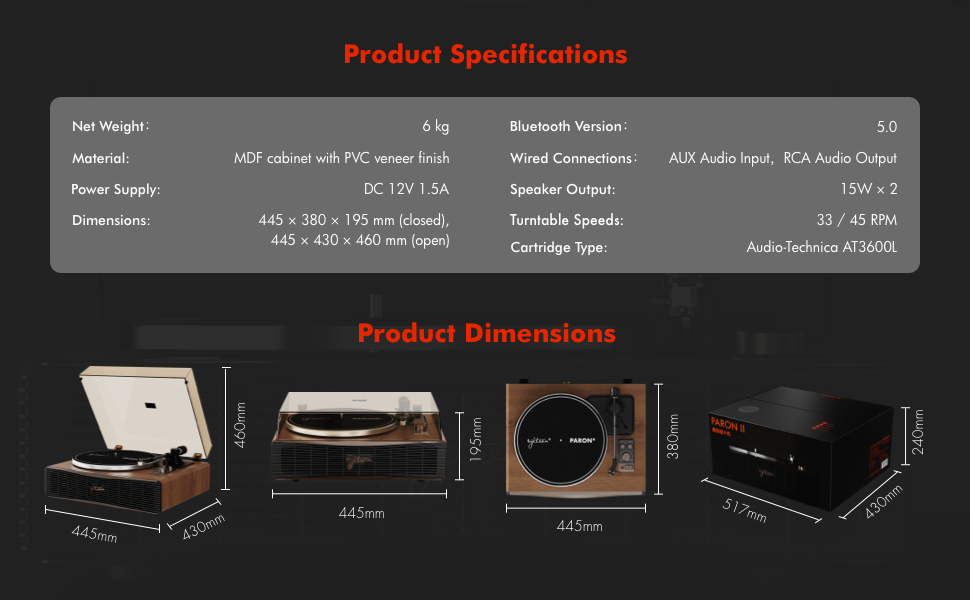
8. Especificacions
| Característica | Detall |
|---|---|
| Nom del model | PARON II |
| Número de model de l'article | SN13 |
| Dimensions del producte | 17.4 x 14.96 x 7.48 inches (445 x 380 x 195 mm closed) |
| Pes de l'article | 16 lliures (6 kg) |
| Material | MDF cabinet with PVC veneer finish (Wood, Metal, Plastic) |
| Velocitats de la placa giratòria | 33 1/3, 45 RPM |
| Tipus de cartutx | Audio-Technica AT3600L (Magnet-type) |
| Versió Bluetooth | 5.0 |
| Connexions per cable | AUX Audio Input, RCA Audio Output |
| Sortida de l'altaveu | 15W x 2 (Built-in 2.5" woofer and 2" tweeter) |
| Font d'alimentació | DC 12V 1.5A |
| Característiques especials | Adjustable Counterweight, Built-In Speaker, Built-In Bluetooth Receiver, RCA Output, Suspension Shock Absorption System, S5 Motor System |
9. Garantia i Suport
The syitren PARON II Record Player is designed for reliable performance. For warranty information or technical support, please refer to the contact details provided with your purchase documentation or visit the official syitren weblloc.
Si us plau, conserveu el comprovant de compra per a qualsevol reclamació de garantia.


