1. Introducció
This manual provides essential information for the safe and efficient operation of your new Exquisit WA7014-020A washing machine. Please read these instructions carefully before installation and use, and keep them for future reference. Proper use and maintenance will ensure optimal performance and extend the lifespan of your appliance.

Davant view of the Exquisit WA7014-020A washing machine with the loading door open, showing the drum interior.
2. Instruccions de seguretat
Always adhere to the following safety guidelines to prevent accidents and ensure safe operation:
- Assegureu-vos que l'aparell estigui ben connectat a terra.
- No permeteu que els nens juguin amb la rentadora ni la facin funcionar.
- No forceu mai la porta durant el funcionament.
- Desendolleu l'aparell abans de netejar-lo o fer-ne el manteniment.
- No instal·leu la màquina en zones exposades a temperatures de congelació.
- The Aquastop system provides enhanced safety against water leaks.
3. Configuració i instal·lació
3.1 Desembalatge
Traieu amb cura tots els materials d'embalatge. Inspeccioneu la màquina per detectar qualsevol dany que hagi patit durant el transport. Mantingueu els materials d'embalatge fora de l'abast dels nens.
3.2 Extracció dels cargols de transport
Before using the washing machine, you must remove all transport bolts located at the rear of the appliance. Failure to do so will cause severe vibration and damage during operation. Store the bolts for future transport.
3.3 Ubicació i anivellament
Place the washing machine on a firm, level surface. Adjust the adjustable leveling feet to ensure the machine is perfectly stable and balanced. This prevents excessive vibration and noise during the spin cycle.

The Exquisit WA7014-020A washing machine showing its dimensions: 85.0 cm height and 59.5 cm width.
3.4 Connexió d'aigua
Connect the water inlet hose to a cold water tap with a 3/4-inch thread. Ensure all connections are tight to prevent leaks. Position the drain hose into a standpipe or over the edge of a sink, ensuring it is securely fixed to prevent displacement during drainage.
3.5 Connexió elèctrica
Connecteu el cable d'alimentació a una presa de corrent amb connexió a terra. Assegureu-vos que el volumtage and frequency match the specifications on the rating plate of the appliance. Do not use extension cords or adapters.
4. Instruccions de funcionament
4.1 Tauler de control acabatview

Close-up of the control panel featuring the program dial, digital display, and function buttons.
The control panel consists of a program selector dial, a digital display showing remaining time, and various function buttons for options like temperature, spin speed, delay start, and child lock.
4.2 Càrrega de la roba
Open the washing machine door and load laundry into the drum. Do not overload the machine; ensure there is enough space for the clothes to move freely. Close the door firmly.
4.3 Addició de detergent
Pull out the detergent drawer located on the top left of the control panel. Add the appropriate amount of detergent and fabric softener to the designated compartments. Refer to your detergent packaging for dosage recommendations.
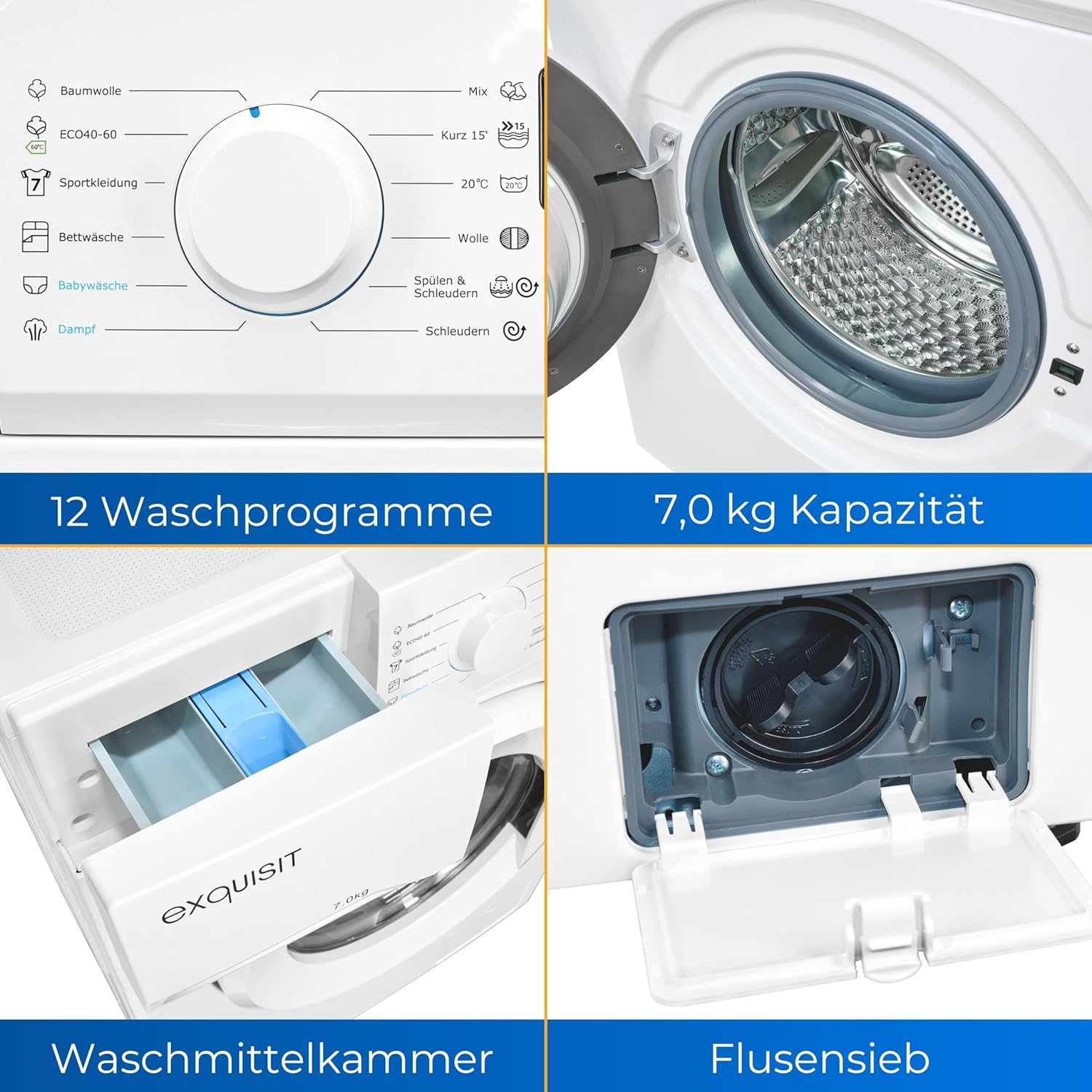
Detallada view of the detergent compartment and the lint filter access panel.
4.4 Selecció d'un programa
Turn the program selector dial to choose the desired wash program. The digital display will show the default settings for the selected program.
4.5 Ajust d'opcions
Use the function buttons to adjust temperature, spin speed, or other available options for the selected program. The display will update to reflect your choices.
4.6 Inici retardat
To set a delayed start, press the 'Delay Start' button repeatedly to select the desired delay time. The machine will start the cycle after the set delay.
4.7 Bloqueig infantil
To activate the child lock, press and hold the designated button (often marked with a lock icon) for 3 seconds. This prevents accidental changes to settings during operation. Repeat the action to deactivate.
4.8 Inici del cicle de rentat
Press the 'Start/Pause' button to begin the wash cycle. The machine will automatically proceed through the selected program.
4.9 Fi de cicle
Once the program is complete, the machine will signal with an audible alert and the display will indicate the end of the cycle. Open the door and remove your laundry promptly.
5. Programs Overview
The Exquisit WA7014-020A offers 12 distinct wash programs to cater to various fabric types and soil levels:
- Cotó: Per a articles de cotó resistents.
- ECO 40-60: Energy-efficient program for normally soiled cotton garments washable at 40°C or 60°C.
- Roba esportiva: Designed for synthetic sports clothing.
- Roba de llit: For larger items like sheets and duvet covers.
- Baby Clothes: Gentle wash for baby garments.
- Vapor: Program utilizing steam for enhanced cleaning or wrinkle reduction.
- Càrrega mixta: Per a una combinació de diferents tipus de teixits.
- 15' ràpids: Un cicle de rentat ràpid per a peces lleugerament brutes.
- 20 °C: Low-temperature wash for delicate items or energy saving.
- Llana: Gentle program for woolens and hand-washable items.
- Esbandida i centrifugació: An additional rinse and spin cycle.
- Gira: Escorre l'aigua i centrifuga la roba.
6. Manteniment
Un manteniment regular garanteix la longevitat i l'eficiència de la teva rentadora.
6.1 Neteja de l'exterior
Netegeu les superfícies exteriors amb un damp tela. No utilitzeu netejadors abrasius ni dissolvents.
6.2 Neteja del calaix de detergent
Periodically remove and clean the detergent drawer under running water to prevent residue buildup.
6.3 Neteja del tambor
Run a maintenance wash cycle (e.g., a hot wash with no laundry and a descaling agent) every few months to clean the drum and remove any odors.
6.4 Neteja del filtre de borrissol
The lint filter (also known as the drain pump filter) should be cleaned regularly to prevent blockages. Open the access panel at the bottom front of the machine, carefully unscrew the filter, and remove any lint or debris. Ensure to place a shallow container underneath to catch any residual water.
7. Solució De Problemes
Abans de contactar amb el servei d'atenció al client, consulteu els següents problemes comuns i les seves solucions:
- La màquina no arrenca: Comproveu si el cable d'alimentació està connectat, si la porta està correctament tancada i si s'ha premut el botó "Inici/Pausa".
- Sense ingesta d'aigua: Assegureu-vos que l'aixeta d'aigua estigui oberta i que la mànega d'entrada d'aigua no estigui doblegada ni bloquejada.
- Vibració/soroll excessiu: Verify that the transport bolts have been removed and the machine is level.
- Fuga d'aigua: Check all hose connections for tightness and inspect the lint filter for proper sealing.
- Codis d'error que es mostren: Consult the full user manual (if available) or contact customer support with the specific code.
8. Especificacions
| Característica | Especificació |
|---|---|
| Marca | Exquisit |
| Número de model | WA7014-020A (813072700) |
| Dimensions (L x A x A) | 48 x 59.5 x 85 cm |
| Pes | 60 quilos |
| Capacitat | 7 quilos |
| Velocitat de centrifugat | 1400 rpm |
| Nivell de soroll | 76 dB |
| Tipus d'instal·lació | Autònom |
| Característiques especials | Delay Start, Adjustable Leveling Feet, Child Lock, Aquastop |
| Color | Blanc |
| Nombre de programes estàndard | 12 |
| Tipus de càrrega | Carregador frontal |
| Voltage | 240 Volts |
| Components inclosos | Power cable, Drain hose |

The Exquisit WA7014-020A washing machine displaying its energy label, indicating an A-class energy efficiency rating.
For detailed energy information, please visit: Informació del producte EPREL
9. Garantia i Suport
Your Exquisit WA7014-020A washing machine comes with a standard manufacturer's warranty. Please refer to the warranty card included with your purchase for specific terms and conditions. For technical support, spare parts, or service inquiries, please contact your retailer or the Exquisit customer service department. Keep your proof of purchase for warranty claims.


