1. Introducció
The Acogedor LGA 1151 H310 Micro ATX Motherboard is designed to provide a stable and efficient platform for your desktop PC. It supports 8th and 9th generation Intel Core processors, offering a balance of performance and value for various computing needs. This manual will guide you through the installation, setup, and maintenance of your motherboard.
Característiques principals:
- Wide CPU Compatibility: Utilizes the LGA 1151 socket, supporting 8th and 9th generation Intel Core processors.
- Dual Channel DDR4 Memory: Features 2 DIMM slots, supporting up to 32GB per slot (64GB total) of DDR4 memory at various frequencies (up to 2666MHz, depending on CPU and module).
- Subministrament d'energia estable: Equipped with a three-phase power supply, all-solid-state capacitor design, and 24+8 pin power sockets for reliable operation.
- High-Speed Intel H310 Chipset: Ensures stable performance for diverse computing tasks.
- Integrated Graphics Support: Includes DVI, HDMI, and VGA display ports for multi-monitor setups.
- Opcions d'emmagatzematge: Supports NVMe M.2 and SATA 6Gb/s connectors.
Note: This motherboard is not officially compatible with Windows 11.
2. Informació de seguretat
Please read and follow these safety guidelines to prevent damage to the motherboard or injury to yourself:
- Desconnecteu sempre l'alimentació de la presa de corrent abans d'instal·lar o treure qualsevol component.
- Feu servir una corretja antiestàtica al canell o toqueu sovint un objecte metàl·lic connectat a terra per descarregar l'electricitat estàtica abans de manipular els components.
- Manegeu la placa base per les vores per evitar tocar els components sensibles.
- Assegura't de ventilar adequadament la carcassa del teu PC per evitar que es sobreescalfi.
- Mantingueu la placa base allunyada de la humitat i de les temperatures extremes.
3. Contingut del paquet
Verifiqueu que tots els elements siguin presents al vostre paquet:
- Acogedor LGA 1151 H310 Micro ATX Motherboard
- I/O Shield (Back Panel)
- SATA Data Cable (Quantity may vary)
Note: Additional accessories such as a user manual or driver CD may not be included. Drivers can typically be downloaded from the manufacturer's weblloc.
4. Configuració i instal·lació
Placa base 4.1view
Familiarize yourself with the layout of the motherboard and its various connectors.

Figure 4.1: Motherboard layout with key components and ports labeled.
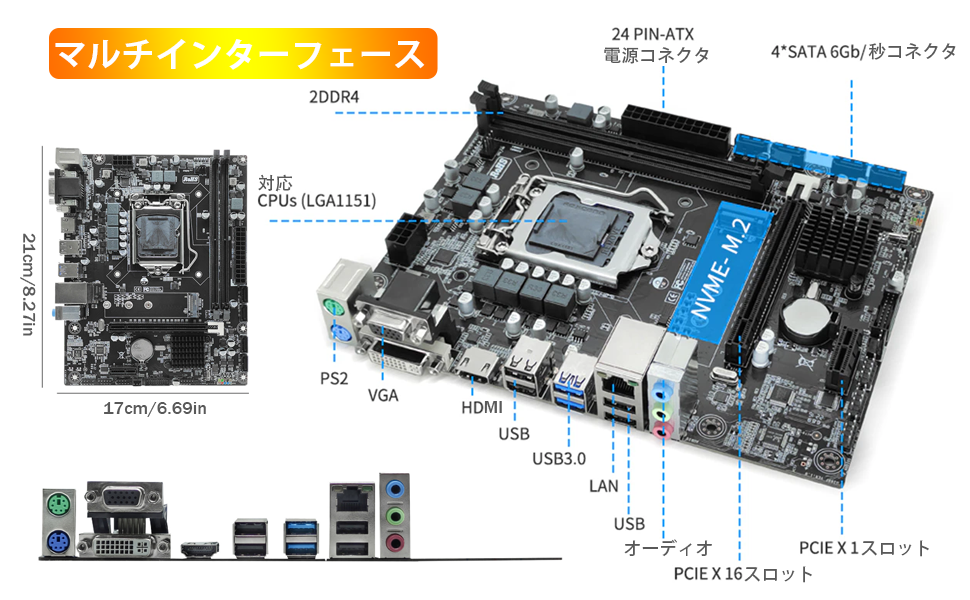
Figura 4.2: Detallada view of motherboard ports and connectors.
4.2 Instal·lació de la CPU
Carefully install your LGA 1151 processor into the CPU socket.

Figure 4.3: LGA 1151 CPU Socket.
- Obriu la palanca del sòcol de la CPU.
- Alineeu la CPU amb el sòcol, assegurant-vos que el triangle daurat de la CPU coincideixi amb el triangle del sòcol.
- Col·loca suaument la CPU al sòcol sense forçar-la.
- Tanqueu la palanca del sòcol per fixar la CPU.
4.3 Instal·lació del refrigerador de CPU
Apply thermal paste and install the CPU cooler. Refer to the cooler's specific instructions for detailed steps.
Video 4.1: SYY Thermal Paste Application and Cooler Installation Guide (Intel & AMD). This video demonstrates the general process of applying thermal paste and installing a CPU cooler, which is applicable to this motherboard.
4.4 Instal·lació de memòria (RAM)
Install DDR4 memory modules into the DIMM slots.

Figure 4.4: DDR4 Memory Slots.
- Obriu els clips dels dos extrems de la ranura DIMM.
- Alineeu el mòdul de memòria amb la ranura, assegurant-vos que l'osca del mòdul coincideixi amb la clau de la ranura.
- Premeu fermament els dos extrems del mòdul fins que els clips encaixin al seu lloc.
4.5 Storage Device Installation (NVMe M.2 / SATA)
Connect your storage devices.
- SSD NVMe M.2: Locate the M.2 slot. Insert the NVMe M.2 SSD at an angle and secure it with the provided screw.
- Unitats SATA: Connecteu els cables de dades SATA dels vostres SSD/HDD als ports SATA de 6 Gb/s de la placa base. Connecteu els cables d'alimentació de la font d'alimentació a les unitats.
Important: This motherboard's M.2 slot supports NVMe SSDs only. SATA M.2 SSDs are not compatible.
4.6 Connexions de la font d'alimentació
Connect the main power cables from your power supply to the motherboard.
- Connect the 24-pin ATX main power connector.
- Connect the 8-pin CPU power connector (EPS12V).
4.7 Connexions del panell frontal
Connect the front panel headers for power button, reset button, HDD LED, power LED, and USB ports.
- Refer to your PC case manual for specific front panel cable identification.
- Carefully align the small connectors with the corresponding pins on the motherboard's front panel header (JFP1). Note that while the pins may be color-coded, printed labels might be absent, requiring careful attention to the pinout.
4.8 I/O Shield Installation
Install the I/O shield into your PC case before mounting the motherboard.
Video 4.2: H310 LGA 1151 Motherboard OverviewAquest vídeo ofereix una visió generalview of the motherboard and its components, including the I/O shield.
5. Instruccions de funcionament
5.1 Primer arrencada i configuració de la BIOS
After assembling your PC, connect a monitor, keyboard, and mouse. Power on the system.
- Press the designated key (usually DEL or F2) during startup to enter the BIOS/UEFI setup.
- Configure boot order, date/time, and other system settings as needed.
- Desa els canvis i surt de la BIOS per iniciar l'instal·lador del sistema operatiu.
5.2 Instal·lació del controlador
For optimal performance and stability, install the latest drivers for your motherboard components.
- Visita l'oficial website of the chipset manufacturer (Intel) to download the latest H310 chipset drivers.
- Download and install drivers for integrated graphics, LAN, and audio.
- For Windows operating systems, many drivers may be automatically installed via Windows Update. Check for updates after OS installation.
6. Manteniment
Un manteniment regular ajuda a garantir la longevitat i el funcionament estable de la placa base.
- Eliminació de pols: Netegeu periòdicament la pols de la placa base i els components amb aire comprimit. Assegureu-vos que el sistema estigui apagat i desendollat.
- Actualitzacions de la BIOS: Comproveu el del fabricant website for BIOS updates. Only update BIOS if necessary and follow instructions carefully to avoid system instability.
- Actualitzacions de controladors: Keep your drivers updated to the latest versions for improved performance and compatibility.
7. Solució De Problemes
Aquesta secció tracta problemes comuns que podeu trobar.
- Sense pantalla: Ensure all power cables (24-pin ATX, 8-pin CPU, GPU) are securely connected. Check monitor cable connections. Reseat RAM modules.
- El sistema no arrenca: Verify CPU and RAM installation. Check front panel connections, especially the power button header.
- SSD M.2 no detectat: Confirm that you are using an NVMe M.2 SSD, as SATA M.2 SSDs are not supported by this motherboard. Check if the M.2 SSD is properly seated and secured.
- No Sleep Mode (S3 Suspend to RAM): This motherboard does not support S3 sleep mode. Attempting to use it may result in system unresponsiveness, requiring a hard reset.
- Problemes del controlador: If experiencing issues with peripherals or system stability, ensure all necessary drivers are installed and updated. Use Windows Update or download directly from Intel's weblloc.
- Windows 11 Installation: While the product is not officially compatible with Windows 11, some users have reported successful installations after manually updating drivers via Windows Update. However, full compatibility and stability are not guaranteed.
8. Especificacions
| Característica | Especificació |
|---|---|
| Marca | Acogedor |
| Fabricant | Acogedor |
| Número de model de producte | Acogedorbg74n2apwi |
| Socket de CPU | LGA 1151 |
| Compatible CPUs | Processadors Intel Core de 8a i 9a generació |
| Chipset | Intel H310 |
| Tipus de memòria | DDR4 |
| Ranures de memòria | 2 x DIMM (doble canal) |
| Capacitat màxima de memòria | Up to 64GB (32GB per slot) |
| Velocitat de rellotge de memòria | Up to 2666 MHz (CPU dependent) |
| Interfícies d'emmagatzematge | 1 x NVMe M.2, 4 x SATA 6Gb/s |
| Gràfics integrats | Yes (CPU dependent) |
| Sortides de visualització | VGA, DVI, HDMI |
| Factor de forma | Micro ATX (17 cm x 21.5 cm) |
| Pes del producte | 550 g |
| ASIN | B0CP6BT5CT |
9. Garantia i Suport
For warranty information and technical support, please refer to the documentation provided with your purchase or contact Acogedor customer service. Keep your proof of purchase for warranty claims.


