1. Introducció
Thank you for choosing the Fosmon Wall Mount Kit with Fast Charging Controller Charger Station. This product is designed to optimize your gaming space by securely mounting your PlayStation 5 console and providing a convenient, illuminated charging solution for two controllers. Its robust metal construction ensures durability and stability, while the integrated RGB lighting adds a customizable aesthetic to your setup.

Image: The Fosmon Wall Mount Kit, showcasing the PS5 console mounted and two controllers charging on the illuminated station.
This wall mount is compatible with all PS5 editions, including Disc, Digital, Slim Disc, Slim Digital, and Pro versions, offering a versatile solution for various console models.

Image: Visual representation of the wall mount's compatibility with various PlayStation 5 console models.
2. Contingut del paquet
Si us plau, verifiqueu que tots els elements que s'enumeren a continuació estiguin inclosos al vostre paquet:
- 1 x suport de paret
- 1 moll de càrrega
- 6 cargols de paret
- 6x àncores
- 1x PS5 Base Screw
- 1x USB-C to USB-C Cable (3.28ft)
- 1 x manual d'usuari

Imatge: Una completa view of all components included in the Fosmon Wall Mount Kit package.
3. Configuració i instal·lació
Follow these steps to properly install your Fosmon Wall Mount Kit:
- Level and Mark the Holes: Choose your desired wall location. Use a level to ensure the mount is straight, then mark the positions for the screw holes on the wall.
- Drill Holes and Insert Anchors: Drill pilot holes at the marked locations. Insert the 6 included wall anchors into the drilled holes. These high-quality anchors are designed to support up to 50lbs, ensuring maximum stability.
- Instal·leu el suport de paret: Align the wall mount with the inserted anchors and secure it to the wall using the 6 wall screws. Ensure the mount is firmly attached.
- Secure the PS5 Console: Place your PS5 console onto the wall mount. Use the provided PS5 base screw to secure the console to the mount from the bottom. This ensures the console remains stable and safe.
- Hang the Charging Dock: The charging dock is designed to hang securely on the hook of the metal wall mount. Connect the USB-C cable from the charging dock to a power source (e.g., a USB port on your PS5 or a USB wall adapter).
- Place PS5 Controllers: Once the charging dock is powered, place your PS5 DualSense controllers onto the charging points. The controllers will begin charging automatically.

Image: A visual guide detailing each step of the wall mount installation process.
The metal construction of the wall mount provides superior durability and heat dissipation compared to plastic alternatives, ensuring a robust and stable setup for your console.
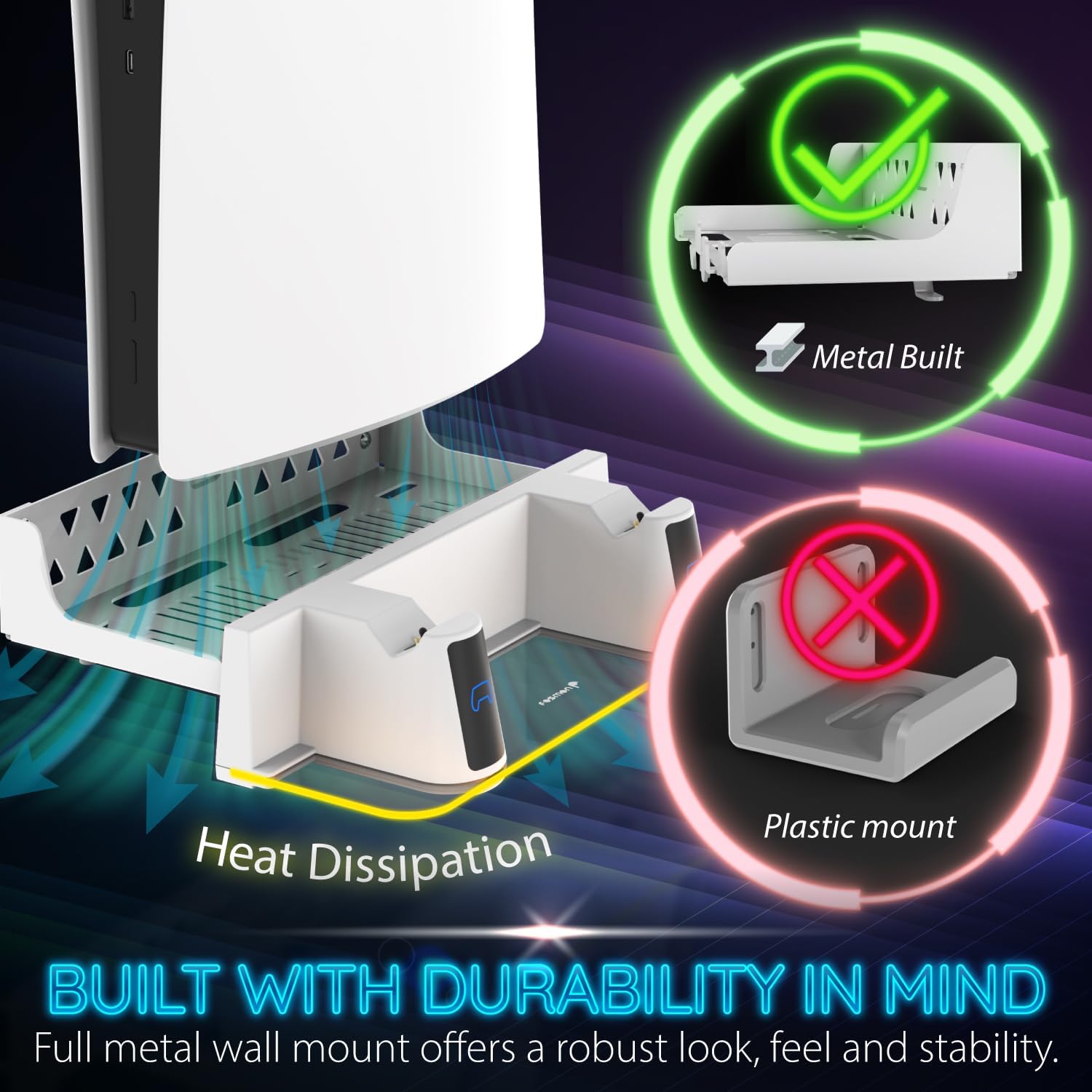
Image: Illustration emphasizing the metal construction and heat dissipation benefits of the Fosmon wall mount.

Image: A visual comparison demonstrating the strength and reliability of the included anchors.
4. Instruccions de funcionament
4.1 Controller Charging
The dual charging station allows you to simultaneously charge two PS5 DualSense controllers. Simply place the controllers onto the designated charging points on the dock. The charging process is indicated by the RGB lights on the dock:
- Indicador taronja: Controller is currently charging.
- Indicador blau: Controller is fully charged.
La càrrega completa sol trigar aproximadament 2.5 hores.

Imatge: Detallada view of the charging indicators and wireless charging feature.
4.2 Personalització de la il·luminació RGB
The charging dock features unique RGB LED lighting with 17 different combinations to personalize your gaming environment. You can cycle through various lighting modes using the dedicated button on the charging dock:
- Mode de respiració: Different neon RGB lights will cycle through, creating a dynamic effect.
- Mode estàtic: The lighting will stop on the current RGB color that is cycling through, providing a constant color.
- Mode dinàmic: Offers various animated lighting patterns.
- Mode desactivat: Turns off the RGB light completely.

Imatge: Visual examples of the various RGB lighting modes available on the charging station.

Image: A vibrant display of the customizable RGB lighting feature.
5. Manteniment
To ensure the longevity and optimal performance of your Fosmon Wall Mount Kit, please follow these maintenance guidelines:
- Neteja: Use a soft, dry cloth to wipe down the wall mount and charging dock regularly. For stubborn marks, a slightly damp cloth can be used, followed by immediate drying. Avoid abrasive cleaners or solvents, as they may damage the finish.
- Contactes de càrrega: Periodically inspect the charging contacts on the dock and your controllers for any dust or debris. Gently clean them with a cotton swab if necessary to ensure efficient charging.
- Gestió de cables: Ensure the USB-C cable is not kinked or strained. Proper cable management helps prevent wear and tear.
- Estabilitat del muntatge: Occasionally check the wall screws and anchors to ensure they remain tight and secure. If any looseness is detected, re-tighten the screws.
6. Solució De Problemes
If you encounter any issues with your Fosmon Wall Mount Kit, please refer to the following common troubleshooting steps:
- Els controladors no es carreguen:
- Ensure the USB-C cable is securely connected to the charging dock and a powered USB port (on the PS5 or a wall adapter).
- Verify that the controllers are correctly seated on the charging contacts. Remove and re-seat them.
- Try using a different USB-C cable or a different USB power source to rule out cable or power supply issues.
- Check if the controller's charging port is clean and free of debris.
- Les llums RGB no funcionen:
- Ensure the charging dock is receiving power.
- Press the RGB mode button on the charging dock to cycle through the modes, ensuring it's not in "Off Mode".
- Wall Mount Feels Unstable:
- Re-check all wall screws and ensure they are tightened securely into the anchors.
- Confirm that the PS5 base screw is properly installed and tightened, securing the console to the mount.
- Ensure the wall material is suitable for mounting and that the anchors were installed correctly.
If these steps do not resolve your issue, please contact Fosmon Customer Service for further assistance.
7. Especificacions
| Característica | Detall |
|---|---|
| Número de model | C-10808FK |
| Dimensions del paquet | 11.61 x 5.08 x 3.94 polzades |
| Pes de l'article | 2.03 lliures |
| Tecnologia de connectivitat | USB |
| Tipus de connector | USB |
| Dispositius compatibles | PlayStation 5 (Disc, Digital, Slim Disc, Slim Digital, Pro) |
| Entrada Voltage | 5 Volts |
| Tipus de muntatge | Muntatge de paret |
| Característiques especials | Charging Indicator, Fast Charging, RGB Lighting |
8. Garantia i Suport
Fosmon stands behind the quality of its products. This product is covered by a Garantia limitada de per vida. For any inquiries or support needs, our experienced and dedicated USA-based customer service team is available to assist you.
For more information or to contact support, please visit the official Fosmon Store on Amazon: Fosmon Store


