Introducció
Thank you for choosing the Dolphin KaraokeBox 85R Portable Karaoke Machine. This versatile system combines powerful audio with a 14-inch tablet, offering voice modulation, HDMI output, Bluetooth, USB, SD, and FM radio capabilities. Designed for portability, it features a built-in rechargeable battery, trolley handle, and wheels, making it ideal for any event. This manual provides essential information for setup, operation, maintenance, and troubleshooting to ensure optimal performance and enjoyment of your device.
Informació de seguretat
- Llegiu totes les instruccions abans d'utilitzar el dispositiu.
- Mantingueu la unitat allunyada de l'aigua i la humitat.
- No bloquejar les obertures de ventilació.
- Utilitzeu només accessoris/accessoris especificats pel fabricant.
- Desendolleu la unitat durant les tempestes llamps o quan no l'utilitzeu durant llargs períodes.
- Demaneu tot el servei a personal de servei qualificat.
- No exposeu les bateries a una calor excessiva.
Contingut del paquet
Marqueu la casella per als elements següents:
- Dolphin KaraokeBox 85R Unit
- Micròfon sense fil
- Adaptador de corrent/cable de càrrega
- Manual d'usuari (aquest document)
- Comandament a distància (si està inclòs)
Producte acabatview
Familiarize yourself with the main components of your Dolphin KaraokeBox 85R.
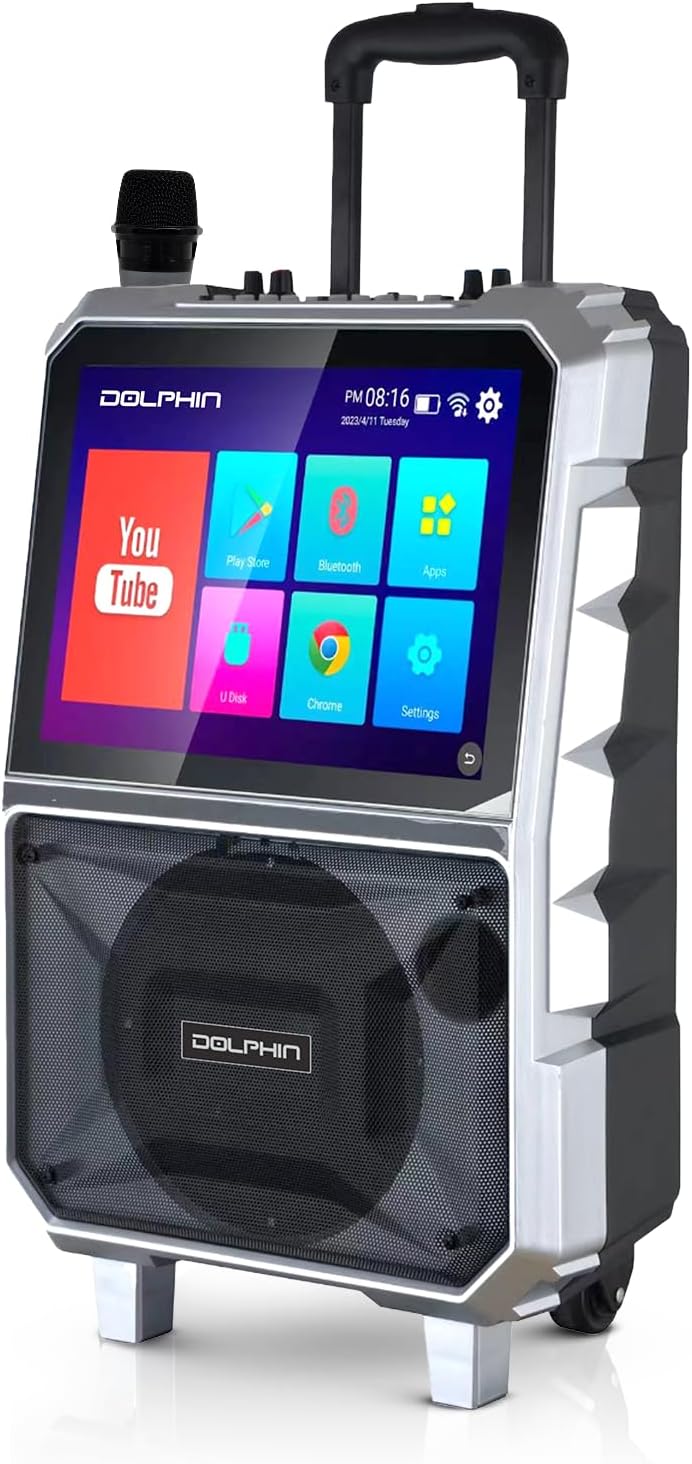
Figura 1: Davant view of the Dolphin KaraokeBox 85R, showing the integrated 14-inch tablet display and the main speaker grille. A wireless microphone is visible on top.

Figura 2: Top control panel of the KaraokeBox 85R, featuring various knobs and ports for microphone inputs, volume control, echo, bass, treble, USB, and HDMI output.
Components clau:
- 14-inch Touchscreen Tablet: Integrated display for accessing apps, media, and settings.
- Woofer de 8 polzades: Delivers powerful 100W RMS audio output.
- Tauler de control: Located on top, with knobs for volume, echo, bass, treble, and various input ports.
- Micròfon sense fils: For vocal performances.
- Trolley Handle & Wheels: Per a una fàcil portabilitat.
- Sortida HDMI: Per connectar a pantalles externes.
- Ranures per a targetes USB i SD: Per a la reproducció de contingut multimèdia.
Configuració
1. Càrrega inicial
Before first use, fully charge the built-in 5400mAh battery. Connect the provided power adapter to the charging port on the unit and plug it into a power outlet. The charging indicator light will show the charging status.
2. Encendre/apagar
Locate the power switch on the control panel (refer to Figure 2). Flip the switch to the "ON" position to power on the unit. The tablet screen will light up. To power off, flip the switch to the "OFF" position.
3. Configuració del micròfon sense fil
The included wireless microphone is pre-paired with the unit. Ensure the microphone has fresh batteries. Power on the microphone, and it should automatically connect to the KaraokeBox 85R.
Instruccions de funcionament
1. Tablet Operation and Connectivity
- Connexió Wi-Fi: On the 14-inch touchscreen, navigate to "Settings" and select "Wi-Fi" to connect to your wireless network. A stable Wi-Fi connection is recommended for streaming content.
- Inici de sessió al compte de Google: For uninterrupted video loading and access to personalized content, log into your Google Account via the YouTube app or system settings.
- Emparellament Bluetooth: To connect external devices via Bluetooth, go to "Settings" on the tablet, select "Bluetooth," and pair with your desired device.
- Sortida HDMI: Connect an HDMI cable from the HDMI output port on the KaraokeBox 85R to an external display (TV, projector) for a larger viewexperiència.
- Reproducció de targetes USB/SD: Insert a USB drive or SD card into the respective slots on the control panel. Use the built-in media player app on the tablet to browse and play audio or video files.
- Android/iOS Mirroring: The unit supports mirroring functions for both Android and iOS devices. Refer to the tablet's mirroring app for specific instructions on connecting your smartphone or tablet.
2. Controls d'àudio
- Volum mestre: Adjust the main volume knob on the control panel to control the overall sound output.
- Volum del micròfon: Use the dedicated microphone volume knob to adjust the level of the wireless microphone.
- Eco: Turn the "Echo" knob to add or reduce reverberation to the microphone sound, enhancing vocal effects.
- Gravs i aguts: Adjust the "Bass" and "Treble" knobs to fine-tune the low and high frequencies of the audio output to your preference.
- Modulació de la veu: The KB-85R offers various voice modulation functions. Access these effects through the tablet interface or dedicated buttons on the control panel (if available), allowing for personalized vocal styles.
3. Característiques de portabilitat
- Mànec del carro: Extend the retractable trolley handle from the top of the unit for easy pulling.
- Rodes: Utilize the built-in wheels at the base of the unit for effortless transportation across flat surfaces.

Figura 3: The Dolphin KaraokeBox 85R showcasing its convenient trolley handle and durable wheels for easy transport.
Manteniment
- Neteja: Use a soft, dry cloth to clean the exterior of the unit. For the touchscreen, use a screen-specific cleaner and a microfiber cloth. Do not use abrasive cleaners or solvents.
- Cura de la bateria: To prolong battery life, avoid fully discharging the battery frequently. Recharge the unit regularly, especially if it will be stored for an extended period. Store in a cool, dry place.
- Emmagatzematge: When not in use, store the KaraokeBox 85R in a dry, dust-free environment, away from direct sunlight and extreme temperatures.
Resolució de problemes
| Problema | Causa possible | Solució |
|---|---|---|
| La unitat no s'encén. | La bateria està esgotada; l'interruptor d'alimentació està apagat. | Charge the unit; Ensure power switch is in the "ON" position. |
| Sense sortida de so. | Volume is too low; Input source not selected; Cables not connected properly. | Increase master volume; Select correct input source on tablet; Check all cable connections. |
| El micròfon no funciona. | Microphone batteries are low/dead; Microphone not powered on; Microphone volume is low. | Replace microphone batteries; Power on microphone; Increase microphone volume. |
| Tablet screen unresponsive or slow. | Too many apps running in background; System error. | Close unnecessary apps; Restart the unit. |
| Problemes de connexió Wi-Fi. | Incorrect password; Out of range; Router issues. | Verify Wi-Fi password; Move closer to router; Restart router and unit. |
Especificacions
| Característica | Detall |
|---|---|
| Model | KaraokeBox 85R |
| Dimensions del producte | 10 x 20 x 25 polzades |
| Pes de l'article | 22.3 lliures |
| Mida del woofer | 8 polzades |
| Potència de sortida | RMS de 100 Watts |
| Mida de la tauleta | 14 polzades |
| Bateria | Built-in 5400mAh (12V) Rechargeable Battery |
| Connectivitat | Bluetooth, Wi-Fi, HDMI Output, USB, SD, FM Radio |
| Característiques especials | Voice Modulation, Android/iOS Mirroring, Trolley Handle & Wheels |
| Color | Negre |
| Fabricant | General Sound Co |
Garantia i Suport
For warranty information and technical support, please refer to the warranty card included with your product or visit the official Dolphin website. You may also contact customer service at the details provided on the product packaging or the manufacturer's weblloc.
Fabricant: General Sound Co
Marca: Dofí



