Beghelli Salvalavita Phone SLV19 User Manual
Emergency GSM Mobile Phone with SOS Function
1. Introducció
This manual provides detailed instructions for the proper use and maintenance of your Beghelli Salvalavita Phone SLV19. Please read this manual carefully before using the device to ensure safe and optimal performance. Keep this manual for future reference.
2. Contingut del paquet
Verifiqueu que tots els elements siguin presents al paquet:
- Beghelli Salvalavita Phone SLV19
- Bateria
- Carregador
- Manual d'usuari (aquest document)

Descripció de la imatge: A black power adapter with a European two-pin plug and an attached black USB-A to Micro-USB charging cable. The charger has "Beghelli" branding.
3. Dispositiu acabatview
The Beghelli Salvalavita Phone SLV19 is a user-friendly flip phone designed for clear communication and emergency assistance. It features large keys, a bright display, and a dedicated SOS button.
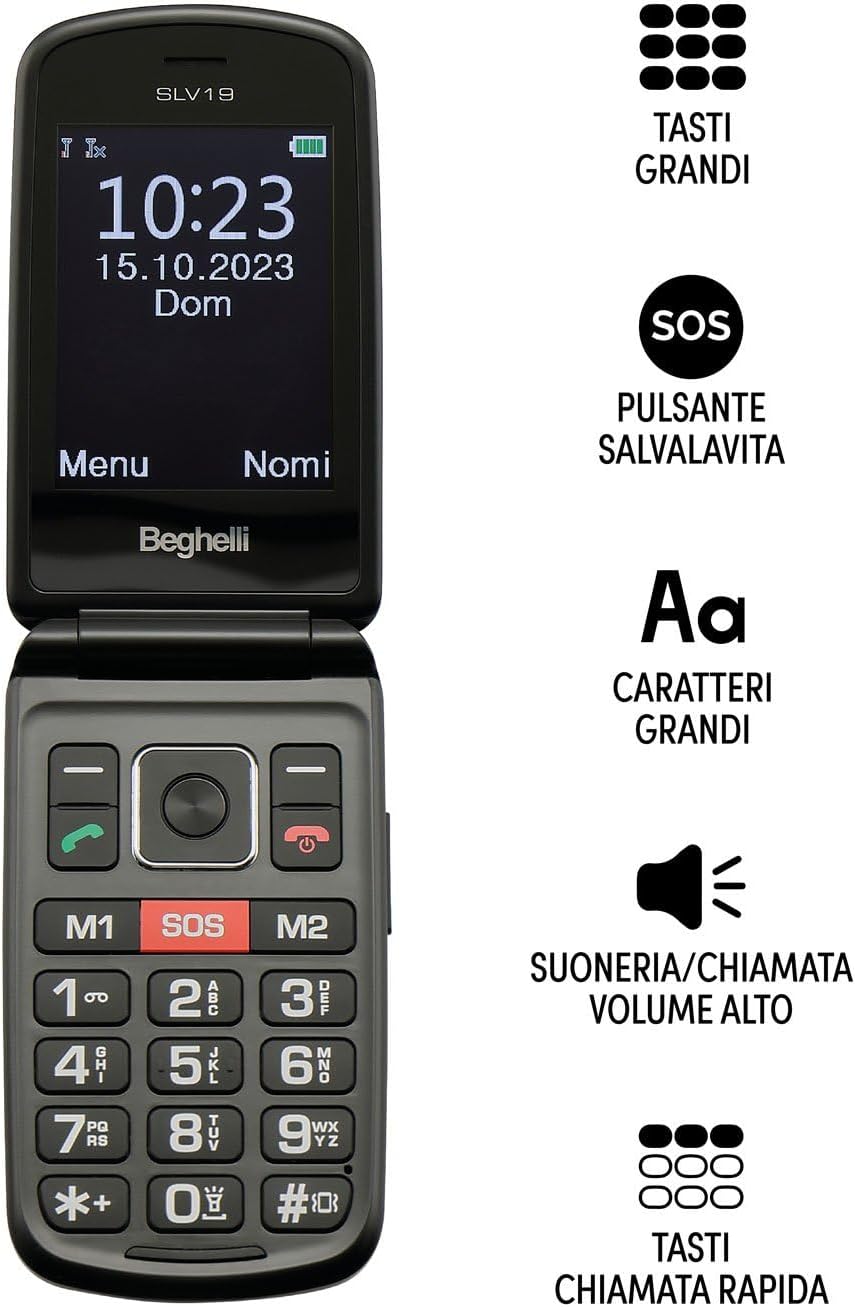
Descripció de la imatge: The Beghelli Salvalavita Phone SLV19 shown open, displaying the screen and keypad. Key features are highlighted: large keys, SOS button, large characters on screen, high volume ringer, and quick dial keys.

Descripció de la imatge: The Beghelli Salvalavita Phone SLV19 shown open, revealing its 2.8-inch color display and large, backlit keypad with clearly labeled buttons.

Descripció de la imatge: The Beghelli Salvalavita Phone SLV19 in its closed, compact flip phone form factor, showing the front casing.

Descripció de la imatge: Un costat view of the Beghelli Salvalavita Phone SLV19 when closed, highlighting its slim profile and side buttons/ports.

Descripció de la imatge: L'esquena view of the Beghelli Salvalavita Phone SLV19 when closed, featuring the Beghelli logo and a smooth finish.

Descripció de la imatge: A composite image showing both the front and back of the Beghelli Salvalavita Phone SLV19 in its closed state, providing a complete view of the device's exterior.
4. Configuració
4.1. Inserció de la targeta SIM
The Beghelli Salvalavita Phone SLV19 requires a Nano SIM card (not included). Ensure the SIM card has voice and SMS traffic enabled.
- Obriu la tapa posterior del telèfon.
- Remove the battery if it is already inserted.
- Carefully insert the Nano SIM card into the designated slot, ensuring correct orientation.
- Torneu a inserir la bateria i tanqueu la tapa posterior.
Nota: A Nano SIM card with active voice and SMS services is required for phone functionality. The SIM card is not included in the package.
4.2. Introducció de la bateria
- Traieu la coberta posterior del telèfon.
- Alineeu els contactes de la bateria amb els terminals del telèfon i premeu suaument la bateria fins que quedi al seu lloc.
- Torneu a col·locar la coberta posterior, assegurant-vos que faci clic correctament.
4.3. Carregant el telèfon
Abans del primer ús, carregueu completament la bateria del telèfon.
- Connect the Micro-USB end of the charging cable to the charging port on the phone.
- Connecteu l'adaptador de corrent a una presa de corrent.
- The charging indicator on the phone will illuminate. Once fully charged, the indicator may change color or turn off.
- Desconnecteu el carregador un cop finalitzada la càrrega.
5. Instruccions de funcionament
5.1. Encès / apagat
- Per engegar: premeu i manteniu premut el botó Red Call End/Power botó fins que la pantalla s'il·lumini.
- Per apagar: premeu i manteniu premut el botó Red Call End/Power button until the power-off options appear, then confirm.
5.2. Fer i rebre trucades
- Per fer una trucada: Dial the number using the keypad and press the Trucada verda botó.
- Per rebre una trucada: Premeu el botó Trucada verda botó quan sona el telèfon.
- Per finalitzar una trucada: Premeu el botó Red Call End/Power botó.
5.3. SOS Emergency Function
The Salvalavita Phone SLV19 features a dedicated SOS button for emergencies. You can set up to 10 emergency numbers.
- Setting Emergency Numbers: Access the phone's settings menu to configure the emergency contact list. Refer to the "Contacts" section for detailed steps on adding and managing numbers.
- Activació de SOS: En cas d'emergència, premeu i manteniu premut el botó Botó SOS (typically located on the back or front of the phone, clearly marked) for 2 seconds.
- The phone will automatically dial the emergency numbers in sequence until one is answered. It will also send an emergency SMS to these contacts.
Optional: Beghelli Salvalavita Center Connection
This device can be connected to the Beghelli Salvalavita Center, a 24/7 monitoring service. Activation of this service requires a separate subscription.
Nota: For details on activating and subscribing to the Beghelli Salvalavita Center service, please refer to the information provided with your device or visit the official Beghelli weblloc.
5.4. Contacts (Phonebook)
Store frequently called numbers in the phonebook for easy access.
- Navigate to the "Contacts" or "Phonebook" menu option.
- Select "Add New Contact" and enter the name and phone number.
- Desa el contacte.
- You can assign quick dial numbers (M1, M2) to important contacts for one-touch dialing.
5.5. Multimedia Functions
The phone includes basic multimedia features. A TF memory card (up to 32GB, not included) is required for storing media files.
- Càmera: Access the camera from the main menu to take photos.
- Reproductor de vídeo: Play MP4/AVI/3GP video files'emmagatzemen a la targeta de memòria.
- Ràdio FM: Tune into FM radio stations. Headphones may be required as an antenna.
- Llanterna: Activate the built-in flashlight from the shortcuts or menu.
- Calculadora: Use the basic calculator function for arithmetic operations.
6. Manteniment
- Neteja: Use a soft, dry cloth to clean the phone's exterior. Avoid liquid cleaners.
- Cura de la bateria: Do not expose the battery to extreme temperatures. If the phone will not be used for an extended period, charge it periodically to maintain battery health.
- Emmagatzematge: Guardeu el telèfon en un lloc fresc i sec, allunyat de la llum solar directa i de la humitat.
7. Solució De Problemes
| Problema | Causa possible | Solució |
|---|---|---|
| El telèfon no s'encén | La bateria està esgotada o no està inserida correctament. | Carregueu la bateria. Assegureu-vos que la bateria estigui inserida correctament. |
| No puc fer ni rebre trucades | No SIM card, SIM card not inserted correctly, or no network signal. | Ensure SIM card is inserted correctly and activated. Check for network coverage. |
| SOS function not working | Emergency numbers not set, or no credit/signal. | Verify emergency numbers are configured. Ensure phone has network signal and sufficient credit. |
| Mala qualitat d'àudio | Low volume setting, obstruction of speaker/microphone, or weak signal. | Adjust volume. Clear any obstructions. Move to an area with better signal. |
8. Especificacions
| Característica | Detall |
|---|---|
| Nom del model | Salvalavita Phone SLV19 |
| Marca | Beghelli |
| Sistema operatiu | Propietari |
| Tecnologia cel·lular | 2G (GSM Quadri Band) |
| Tipus de targeta SIM | Nano SIM (Dual SIM support) |
| Mida de la pantalla | 2.8 polzades |
| Resolució de visualització | 320 x 240 |
| Suport per a targetes de memòria | TF Card, up to 32 GB (not included) |
| Càmera | Yes (1.3 MP with flash) |
| Capacitat de la bateria | 1000 mAh de liti |
| Dimensions (tancat) | 108 x 59 x 19 mm |
| Pes | 106 g |
| Característiques addicionals | Large backlit keys, High volume, Vibration, Flashlight, FM Radio, Calculator, Video Player (MP4/AVI/3GP) |

Descripció de la imatge: The product packaging for the Beghelli Salvalavita Phone SLV19, displaying various features and technical specifications in Italian, including GSM Quadri Band, 2.8-inch display, 1.3 MP camera, 1000mAh battery, and dimensions.
9. Garantia i Suport
For warranty information and technical support, please refer to the official Beghelli weblloc web o poseu-vos en contacte amb el servei d'atenció al client. Conserveu el comprovant de compra per a reclamacions de garantia.
Beghelli Customer Service: Si us plau, visiteu www.beghelli.it per obtenir dades de contacte i més ajuda.


