Introducció
The Alacrity Pet Microchip Scanner is a versatile and portable device designed for efficiently reading animal microchips. It supports multiple common microchip standards and offers flexible connectivity options for data management. This manual provides comprehensive instructions for setting up, operating, and maintaining your scanner.

Image: The Alacrity Pet Microchip Scanner, showcasing its compact design, circular scanning head, and included accessories like the USB cable and 2.4GHz wireless dongle.
Contingut del paquet
Si us plau, verifiqueu que tots els elements siguin presents al paquet:
- 1 x Alacrity Pet Microchip Scanner
- 1 x manual d'usuari en anglès
- 1 x cable USB
- 1 adaptador sense fil de 2.4 GHz

Image: The Alacrity Pet Microchip Scanner, its retail box, USB cable, and 2.4GHz wireless dongle, laid out to show all included components.
Característiques clau
- Compatibilitat universal: Supports ISO11784 / ISO11785 / FDX-B and EMID microchip standards.
- Sortida de dades dual: Provides data in both hexadecimal and decimal formats, selectable by the user.
- 1.44” TFT Screen Display: Clear display of battery level, working mode, connection status, and microchip data. Supports display of pet's name, age, and owner information if pre-uploaded.
- Múltiples modes de connexió: Offers USB wired, 2.4GHz wireless, and Bluetooth connectivity for versatile use.
- Dos modes de treball:
- Upload Instantly Mode: Data is transmitted immediately upon scanning.
- Mode d'emmagatzematge: Can store up to 240 pieces of data internally, which can be uploaded later.
- Bateria de llarga durada: Equipped with an 800mAh rechargeable battery, providing approximately 16 hours of continuous operation.
- Disseny portàtil: Compact and lightweight for easy handling and transport.

Imatge: Un primer pla view of the scanner's 1.44-inch TFT display screen, showing menu options like "Scan," "View History," "Clear Records," and "Upload," with a small puppy in the background.
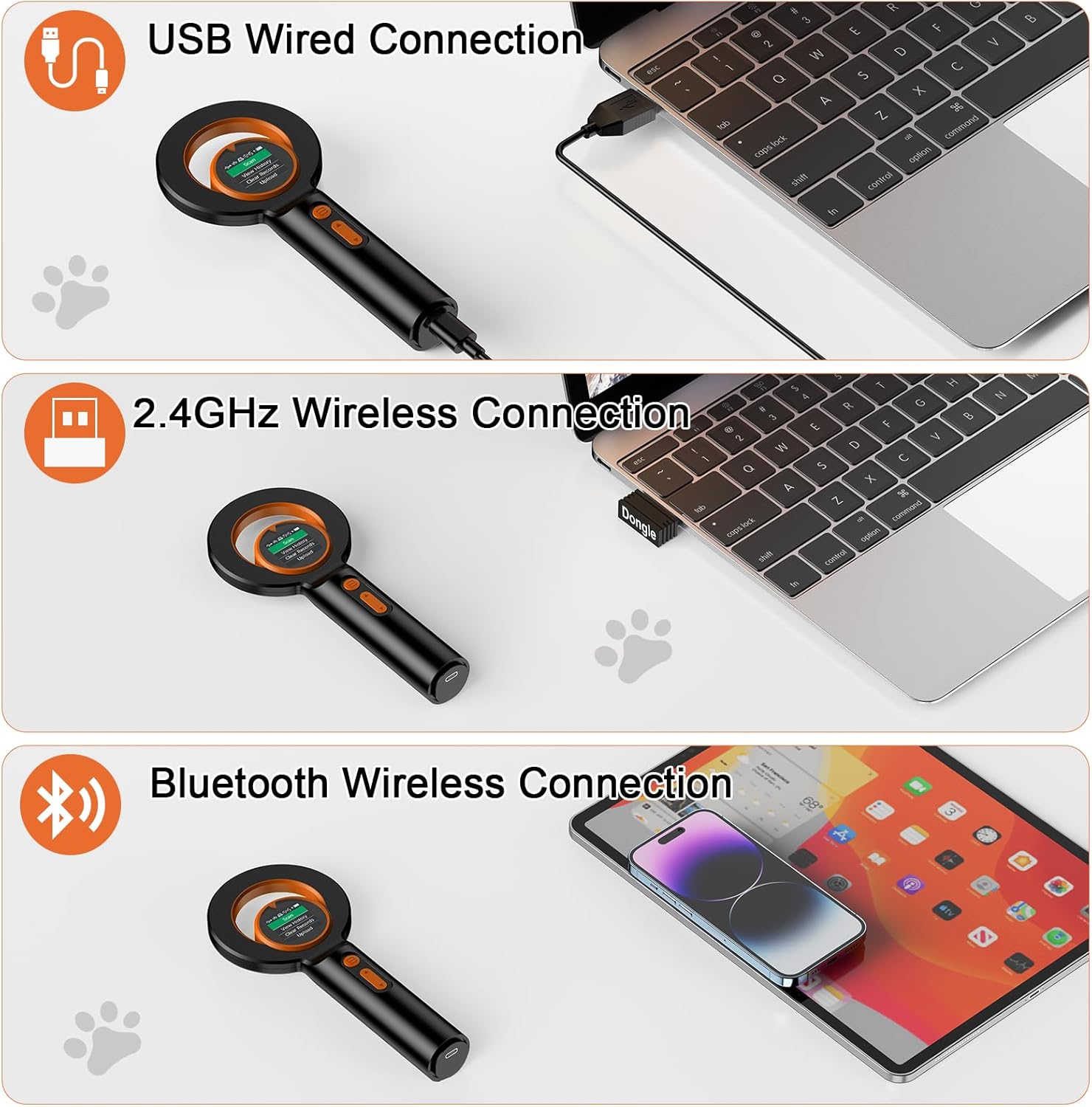
Image: Three panels illustrating the scanner's connectivity options: USB wired connection to a laptop, 2.4GHz wireless connection using a dongle, and Bluetooth wireless connection to a tablet.

Image: The scanner next to a cloud icon with "240" indicating data storage capacity, and various operating system logos (Linux, Windows, Mac OS, iOS, Android) suggesting compatibility for data upload.
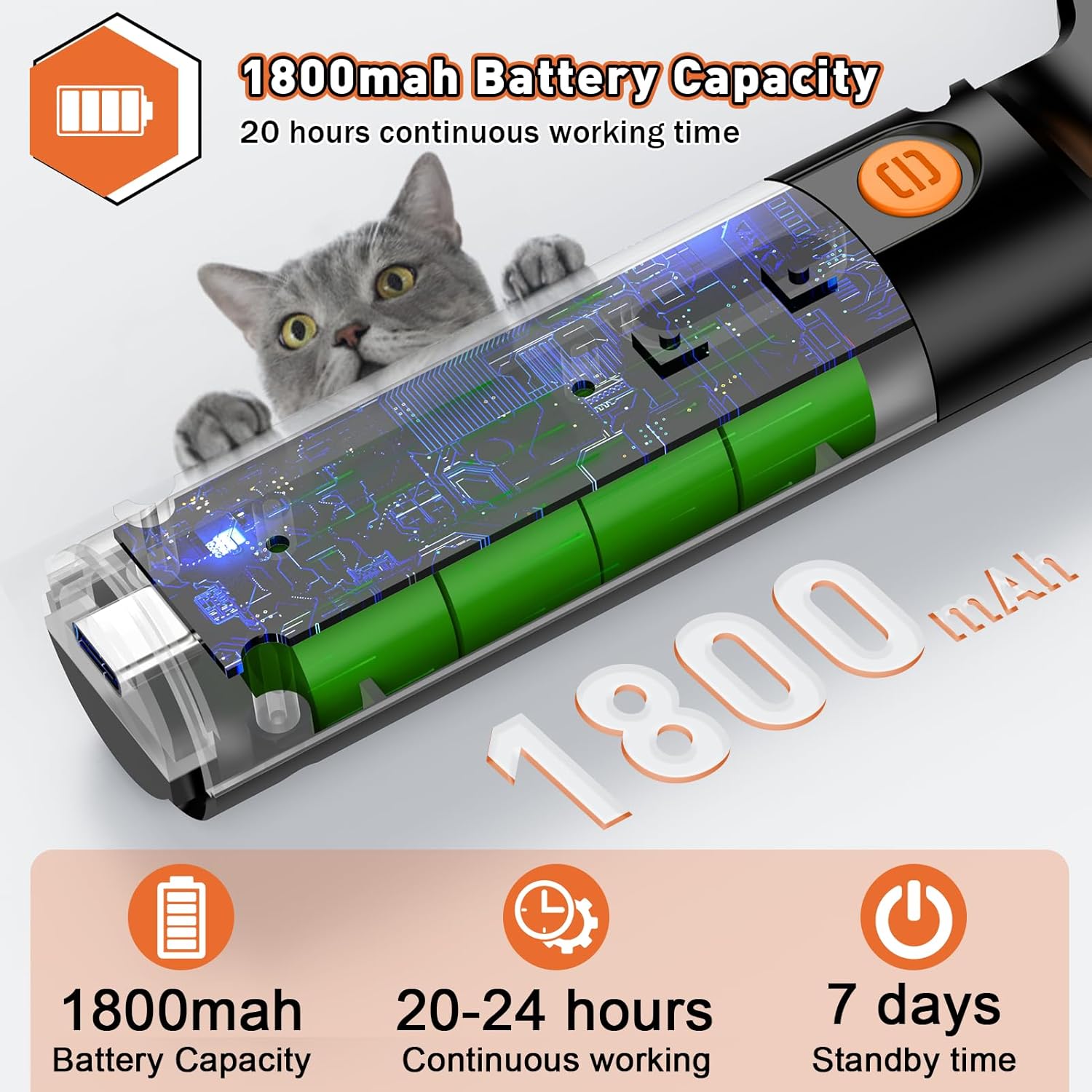
Image: An illustration showing the internal battery of the scanner, highlighting its 1800mAh capacity and indicating 20-24 hours of continuous working time and 7 days of standby time.
Configuració
1. Càrrega del dispositiu
Before first use, fully charge the scanner using the provided USB cable. Connect the USB cable to the scanner's charging port and plug the other end into a standard USB power adapter or computer USB port. The battery indicator on the TFT screen will show charging status.
2. Encès / apagat
Press and hold the power button (usually the top button) for a few seconds to turn the scanner on. To turn off, navigate to the "Shutdown" option in the menu and confirm, or press and hold the power button again.
3. Connecting to a Device (Optional)
The scanner supports three connection methods for data transfer:
- Connexió per cable USB: Connect the scanner directly to your computer using the USB cable. The scanner will typically be recognized as a storage device or input device.
- Connexió sense fil de 2.4 GHz: Insert the 2.4GHz wireless dongle into a USB port on your computer. The scanner should automatically connect. Select "2.4G Connect" from the scanner's menu if manual connection is needed.
- Connexió Bluetooth: Enable Bluetooth on your computer or mobile device. On the scanner, select "BT Connect" from the menu. Pair the scanner with your device through your device's Bluetooth settings.
No specific driver or software installation is required for basic operation, but for advanced data management (like uploading pet information to the scanner), you may need to contact the seller for software components.

Image: A visual representation of the three connection modes: 2.4GHz Wireless, Bluetooth Wireless, and USB Wired, showing the scanner connecting to a laptop and a tablet.
Instruccions de funcionament
1. Navegant pel menú
Use the navigation buttons on the scanner to scroll through menu options on the TFT screen. The top button typically acts as a selection/confirmation button, and the bottom button for navigation.
Opcions del menú principal:
- Escaneig: Initiates the microchip scanning process.
- View Registres: Et permet tornarview previously scanned microchip data stored on the device.
- Esborra els registres: Erases all stored microchip data from the device. Use with caution.
- Carrega: Transfers stored data to a connected computer or device.
- BT Connect: Inicia el mode d'emparellament Bluetooth.
- 2.4G Connect: Initiates 2.4GHz wireless connection mode.
- Configuració: Accesses device settings (e.g., data output format - hexadecimal/decimal).
- Tancament: Powers off the device.
2. Scanning a Microchip
- Assegureu-vos que l'escàner estigui engegat.
- Select "Scan" from the main menu.
- Hold the scanning head close to the area where the animal's microchip is implanted (typically between the shoulder blades).
- Move the scanner slowly over the area. The device will emit a sound or display the microchip ID on the screen once a chip is detected.
- The reading time is typically less than 100ms.

Image: A person using the Alacrity Pet Microchip Scanner to scan a cat, demonstrating the proper technique of holding the scanner close to the animal's body. Insets show examples of microchip types (glass tube and ear tag).
3. Gestió de dades
The scanner can operate in two modes for data handling:
- Upload Instantly Mode: When connected via USB, 2.4GHz, or Bluetooth, scanned data can be sent directly to the connected device.
- Mode d'emmagatzematge: If not connected, the scanner will automatically save up to 240 scanned microchip IDs. These can be uploaded later by connecting the scanner to a computer and selecting the "Upload" option.
To input additional pet information (name, age, owner details) and have it display on the scanner's screen, you will need specific software. Please contact Alacrity customer support or the seller for details on obtaining and using this software.

Image: A diagram showing a software interface on a laptop for inputting pet microchip data, name, telephone, and address, and how this information can then be displayed on the scanner's screen after scanning.
Manteniment
- Neteja: Use a soft, dry cloth to clean the scanner's exterior. For the screen, use a microfiber cloth. Avoid abrasive cleaners or solvents.
- Emmagatzematge: Guardeu l'escàner en un lloc fresc i sec, allunyat de la llum solar directa i de temperatures extremes.
- Cura de la bateria: Per allargar la durada de la bateria, eviteu descarregar-la completament amb freqüència. Carregueu el dispositiu regularment, fins i tot si no l'utilitzeu.
- Manipulació: Handle the device with care to prevent drops or impacts, which could damage internal components or the screen.
Resolució de problemes
| Problema | Possible causa/solució |
|---|---|
| L'escàner no s'encén. | Battery may be depleted. Connect to power source and charge for at least 30 minutes before attempting to power on again. |
| Cannot read microchip. |
|
| Cannot connect via Bluetooth/2.4GHz. |
|
| Scanner screen freezes. | Press and hold the power button for an extended period (e.g., 10-15 seconds) to force a restart. If the issue persists, ensure the battery is adequately charged. |
Especificacions
| Característica | Detall |
|---|---|
| Nom del model | MJ-Q40 |
| Marca | Agilitat |
| Tipus d'escàner | Microxip |
| Microxips compatibles | ISO11784 / ISO11785 / FDX-B, EMID |
| Mostra | Pantalla TFT de 1.44". |
| Tecnologia de connectivitat | Bluetooth, sense fil de 2.4 GHz, USB |
| Bateria | 800mAh Lithium Polymer (rechargeable) |
| Temps de treball continu | Aprox. 16 hores |
| Capacitat d’emmagatzematge de dades | 240 pieces of data |
| Pes de l'article | 6.4 unces (0.18 quilograms) |
| Dimensions del paquet | 8.39 x 4.53 x 1.57 polzades |
| Tipus de font de llum | LED |
| Tecnologia de sensors òptics | CMOS |
| País d'origen | Xina |
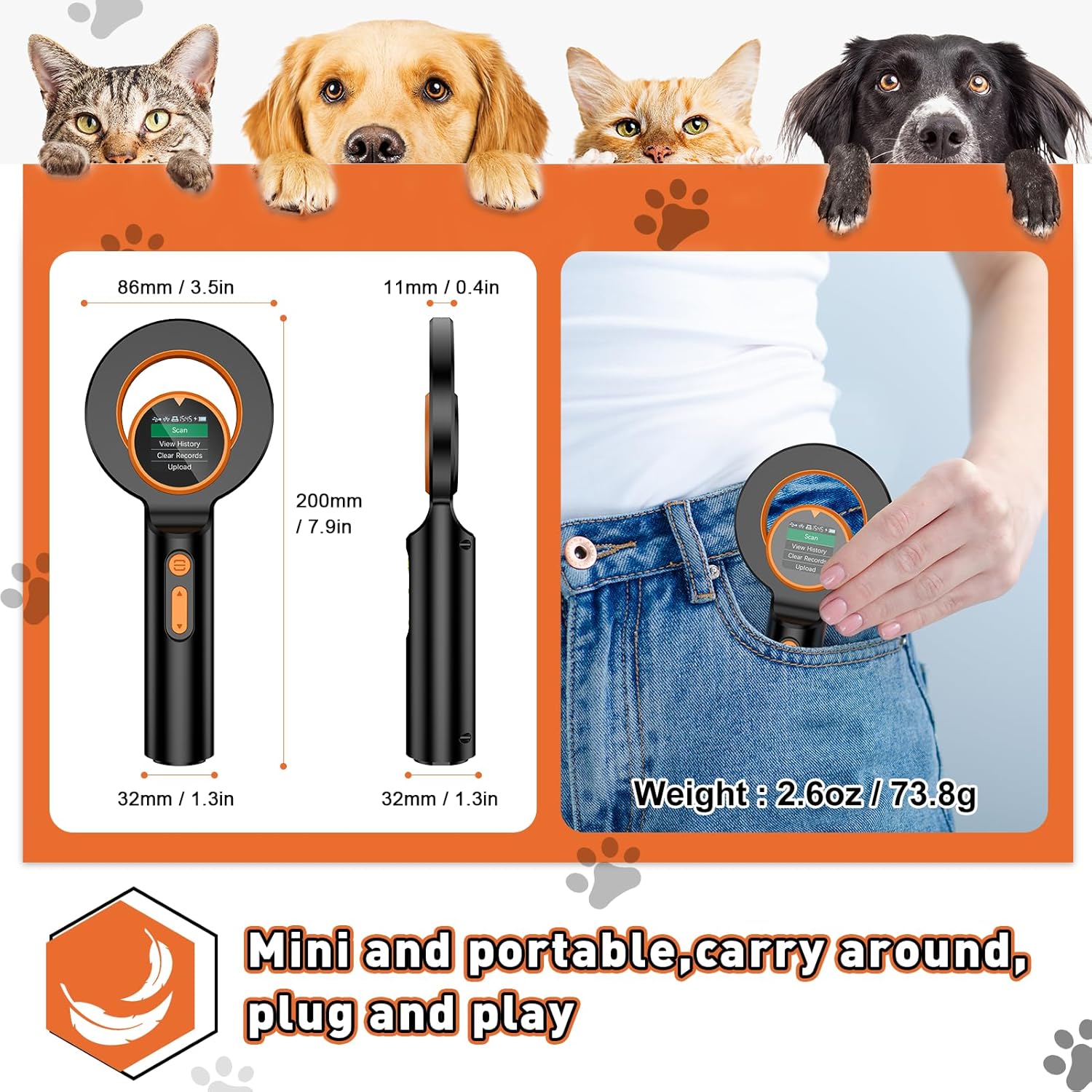
Image: A visual representation of the scanner's dimensions (86mm/3.5in width, 200mm/7.9in height, 32mm/1.3in handle width, 11mm/0.4in thickness) and its lightweight nature (2.6oz/73.8g), shown being carried in a pocket.
Garantia i Suport
For warranty information, technical support, or inquiries regarding software components for advanced features, please contact the manufacturer, Alacrity, or your original seller. Refer to the product packaging or the seller's contact information for specific details.


