Introducció
This manual provides detailed instructions for the setup, operation, and maintenance of your LTC NB981 Nimbleback 98-Key Wired Mechanical Keyboard. The NB981 features a compact 98-key layout, hot-swappable switches, a reliable wired USB-C connection, and dynamic white backlighting, designed for both gaming and general use.

Image: The LTC NB981 Nimbleback 98-Key Wired Mechanical Keyboard, showcasing its compact layout and keycap design.
Contingut del paquet
Si us plau, verifiqueu que tots els elements que s'enumeren a continuació estiguin inclosos al vostre paquet:
- LTC NB981 Nimbleback Mechanical Keyboard
- Cable USB-C a USB-A
- Extractor de tecles
- Tirador de commutació
- 4 x Replacement Switches
- Manual d'usuari / Guia ràpida

Image: All components included in the LTC NB981 keyboard package, including the keyboard, cable, pullers, and spare switches.
Configuració
Connexió del teclat
- Connect the USB-C end of the provided cable to the port on the back of the keyboard.
- Connecteu l'extrem USB-A del cable a un port USB disponible de l'ordinador.
- The keyboard is plug-and-play and should be recognized automatically by your operating system without additional drivers.

Imatge: Un primer pla view of the keyboard's USB-C port and the detachable cable, illustrating the wired connection.
Compatibilitat de sistemes operatius
The LTC NB981 keyboard is compatible with Windows 7, Windows 8, Windows 10, and macOS systems.
To switch between operating system modes:
- For Windows mode: Press Fn+A
- For macOS mode: Press Fn + S

Image: Visual representation of the Fn+A and Fn+S key combinations for switching between Windows and Mac operating system modes.
Instruccions de funcionament
Control de la llum de fons
The keyboard features 20 dynamic white backlight modes. Use the following key combinations to control the backlighting:
- Change Backlight Mode: Press Fn + |\
- Adjust Brightness: Press Fn + ↑ (augmentar) / Fn + ↓ (disminució)
- Adjust Speed: Press Fn + ← (decrease) / Fn + → (augment)
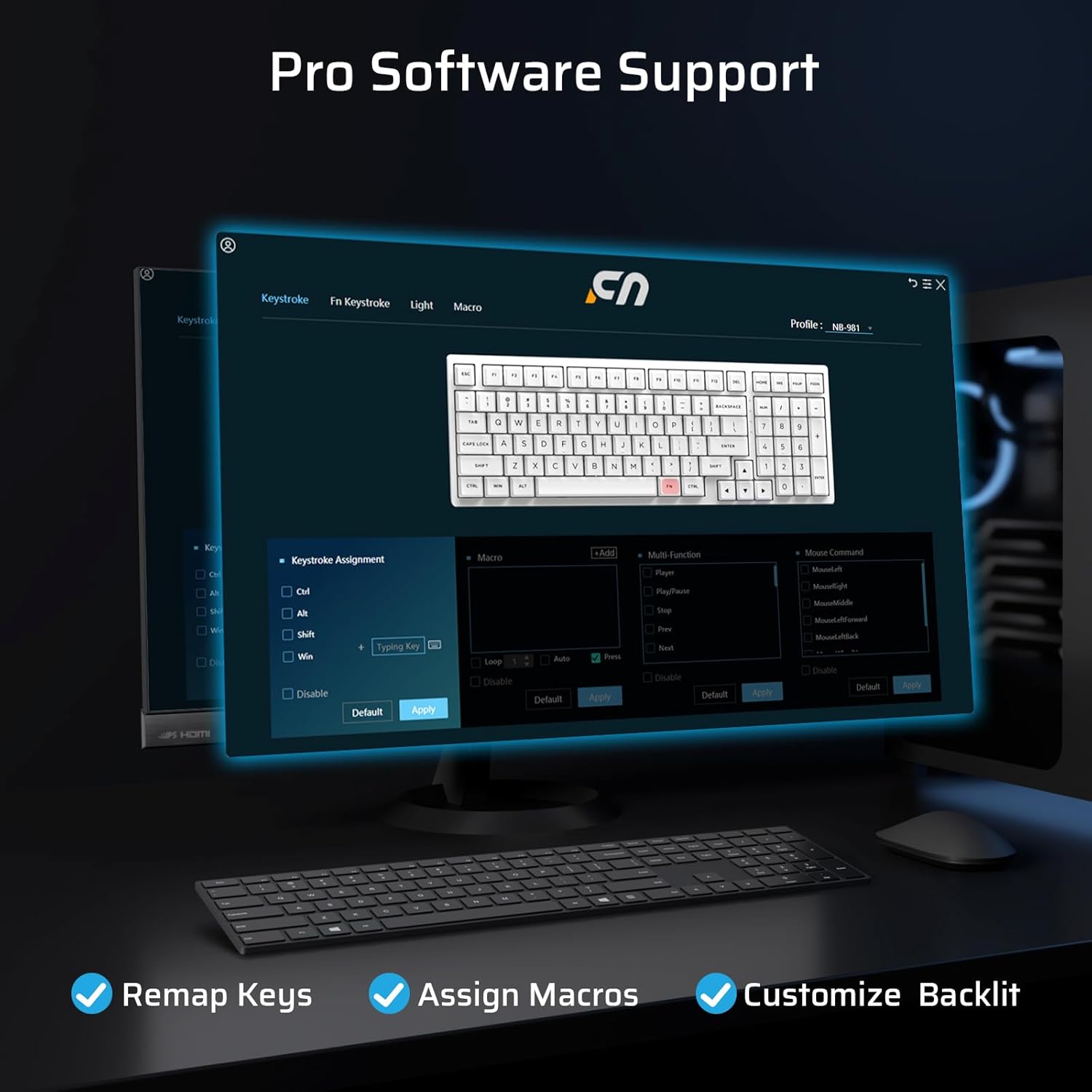
Image: The LTC NB981 keyboard illuminated with its white backlight, demonstrating one of the available lighting modes.
Multimedia and Function Keys
Access various multimedia and system functions by pressing the Fn key in combination with the designated function keys:
| Combinació de tecles | Funció |
|---|---|
| Fn + F1 | Display Brightness - |
| Fn + F3 | Torna a l'escriptori |
| Fn + F4 | Control de missió |
| Fn + F5 | Backlight Brightness - |
| Fn + F8 | Reproduir/Pausa |
| Fn + F9 | Següent Cançó |
| Fn + F10 | Silenciar |
| Fn + F12 | Volum + |
| Fn + Del | Captura de pantalla |
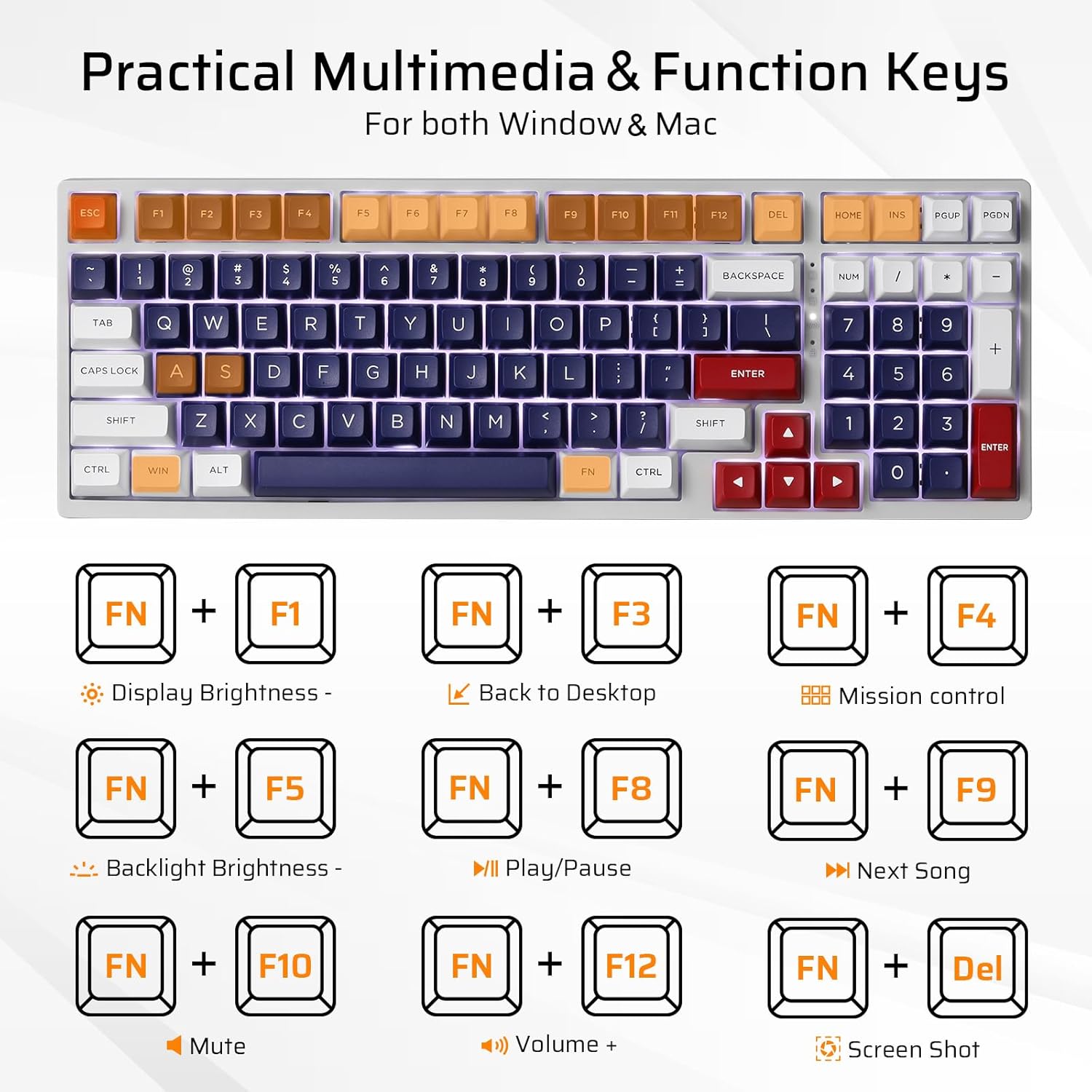
Image: A visual guide to the Fn key combinations for multimedia and system functions on the LTC NB981 keyboard.
Personalització del programari
The LTC NB981 supports professional software for advanced customization. This software allows you to:
- Reassignar les funcions de les tecles.
- Assigna macros per a ordres complexes.
- Personalize lighting effects beyond the built-in modes.
Download the official software from the LTC website for full functionality and to unlock advanced features.

Image: A screenshot of the LTC NB981 customization software interface, showing options for key remapping, macro assignment, and lighting control.
Manteniment
Neteja
Regular cleaning helps maintain the keyboard's performance and appearance:
- Desconnecteu el teclat de l'ordinador abans de netejar-lo.
- Use a soft, dry, lint-free cloth to wipe the keycaps and chassis.
- For deeper cleaning, use the provided keycap puller to carefully remove keycaps. This allows access to the switches and plate for cleaning with compressed air or a small brush.
- Do not use harsh chemicals or abrasive materials, as these may damage the keyboard's finish or keycap legends.
Interruptors intercanviables en calent
The NB981 features a hot-swappable PCB, allowing you to replace 3-pin or 5-pin MX-style mechanical switches without soldering. This is useful for customization or replacing faulty switches.
- Using the provided switch puller, carefully grip the top and bottom tabs of the switch you wish to remove.
- Gently pull the switch upwards until it detaches from the PCB.
- Take the new switch and ensure its pins are straight. Align the pins with the corresponding holes on the PCB.
- Gently press the new switch into place until it clicks. Ensure it is fully seated and the pins are not bent during insertion.
- Test the new switch to confirm proper function.

Image: A demonstration of removing and inserting hot-swappable mechanical switches on the LTC NB981 keyboard using the switch puller.
Resolució de problemes
If you encounter issues with your LTC NB981 keyboard, refer to the following common problems and solutions:
El teclat no respon
- Ensure the USB cable is securely connected to both the keyboard and your computer.
- Prova de connectar el teclat a un port USB diferent de l'ordinador.
- Prova el teclat en un altre ordinador per determinar si el problema és del teclat o del sistema.
- Inspect the USB-C cable for any visible damage. If possible, try using a different USB-C cable.
Backlight Not Working or Incorrect
- Ensure the backlight is not turned off or set to minimum brightness. Use Fn + ↑ per augmentar la brillantor.
- Cycle through backlight modes using Fn + |\ to see if a different mode activates.
- If using custom software, ensure that your lighting settings are correctly applied and saved.
Claus que no es registren o que es teclegen dues vegades
- This may indicate a faulty switch. Use the switch puller to replace the affected switch with one of the spare switches provided or a compatible replacement.
- Ensure the keycap and switch are fully seated and not obstructed by debris.
- If the issue persists across multiple keys, consider reinstalling the keyboard drivers or testing on another computer.
Especificacions
Key technical specifications for the LTC NB981 Nimbleback Mechanical Keyboard:
| Característica | Detall |
|---|---|
| Model | NB981 |
| Disseny | 98-Key (96% Compact) |
| Connectivitat | USB-C amb cable |
| Tipus de canvi | Mechanical (Red Switch, Hot-swappable) |
| Llum de fons | White, 20 Dynamic Modes |
| Taps de claus | PBT |
| Compatibilitat | Windows 7/8/10, macOS |
| Dimensions (L x A) | 14.9 x 5.2 polzades (aprox. 37.8 x 13.2 cm) |
| Pes de l'article | 2.66 lliures (aprox. 1.2 kg) |
| Característiques especials | Hot-Swappable, Programmable Keys, Multimedia Keys |

Image: The LTC NB981 keyboard with its dimensions (14.9 inches length, 5.2 inches width) indicated.
Garantia i Suport
LTC products are covered by a limited manufacturer's warranty. For detailed warranty information, technical support, or service inquiries, please visit the official LTC weblloc web o contacteu directament amb el seu servei d'atenció al client.
Si us plau, conserveu el comprovant de compra per a qualsevol reclamació de garantia.


