1. Informació important de seguretat
Please read all instructions carefully before operating the SYLVOX 22-inch RV TV. Keep this manual for future reference. Failure to follow these safety guidelines may result in fire, electric shock, or other injuries.
- No exposeu el televisor a la pluja o la humitat.
- No bloquegeu les obertures de ventilació. Assegureu-vos que hi hagi prou espai al voltant del televisor per a un flux d'aire adequat.
- Use only the power supply specified for this device (12V DC or provided AC adapter).
- Eviteu que el cable d'alimentació sigui trepitjat o pessigat.
- No intenteu atendre aquest producte vosaltres mateixos. Consulteu tots els serveis a personal de servei qualificat.
- Disconnect the power plug from the outlet during lightning storms or when unused for long periods.
- This TV is designed for mobile environments like RVs and motorhomes. Ensure it is securely mounted to withstand vibrations during travel.
2. Producte acabatview
The SYLVOX 22-inch RV TV (Model RT22R3CNDA-UK) is a Full HD 1080P television designed for versatile use in motorhomes, campervans, kitchens, and homes. It features a built-in DVD player, DVB-C/T2/S2 tuner, and multiple connectivity options.
Característiques principals:
- Pantalla Full HD: 1920x1080 resolution, 250 nits brightness, 3000:1 contrast ratio for clear and delicate picture effects. Includes noise reduction technology.
- Integrated DVD Player & Tuner: Built-in DVD player and DVB-C/T2/S2 tuner for entertainment without external devices, ideal for travel.
- Múltiples opcions de connexió: HDMI, USB, and AV IN ports for connecting game consoles, laptops, smartphones, and other devices.
- Reliable & Durable 12V Design: C robustasing with anti-seismic design to withstand bumps during RV motion. Can be table-mounted or wall-mounted.
- Experiència d'usuari millorada: Features include sleep timer, parental controls, 4 sound modes, and "hotel mode" for personalized settings.

Figura 2.1: Frontal view of the SYLVOX 22-inch RV TV, displaying a caravan campsite scene. The TV features a Full HD 1920x1080 display and a built-in DVD player.

Figure 2.2: Dimensional drawing of the SYLVOX 22-inch RV TV, showing its width (493mm), height (310mm), and depth (125mm).
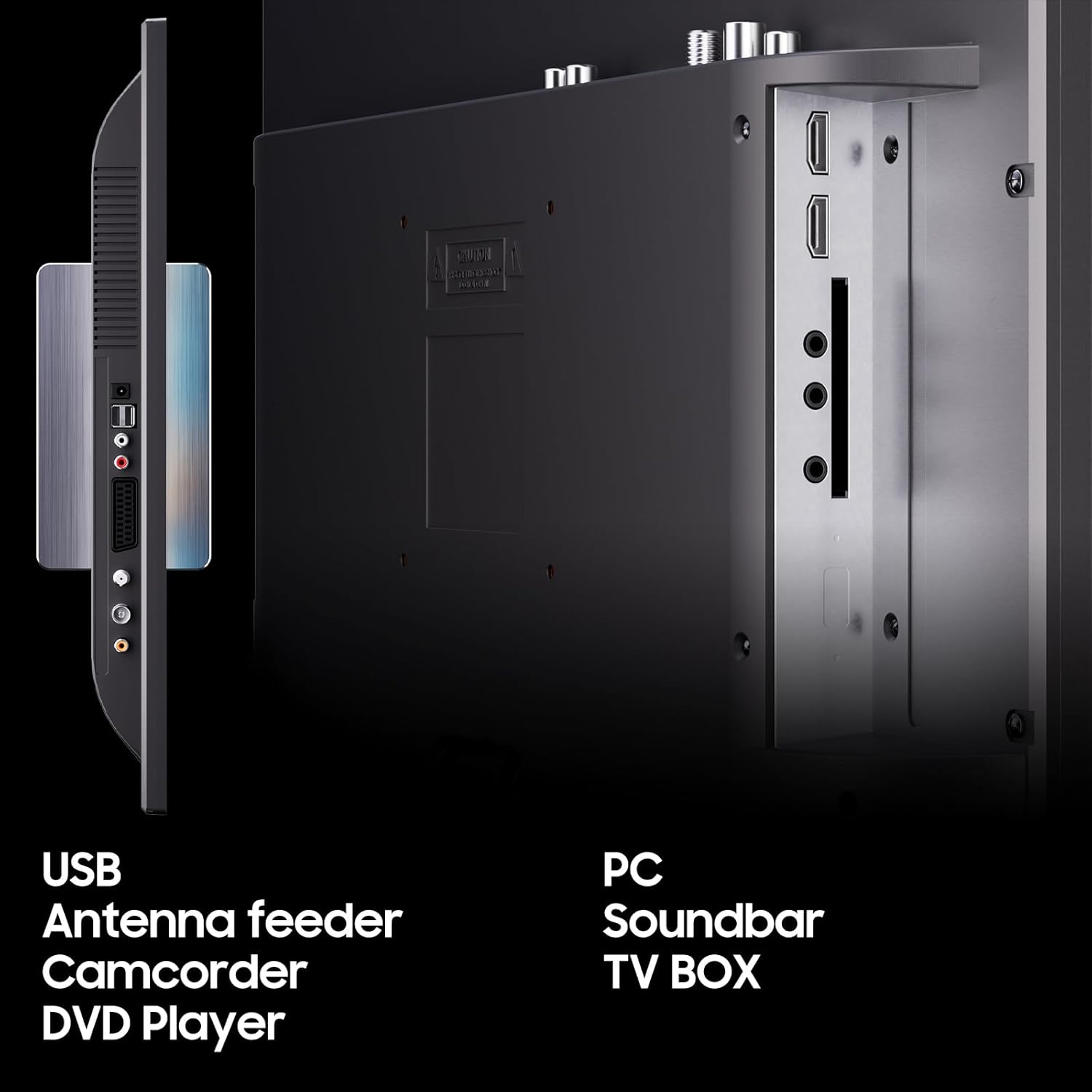
Figure 2.3: Rear panel connections of the SYLVOX RV TV, highlighting ports for USB, Antenna, SCART, HDMI, and AV IN, allowing connection to various external devices.
3. Contingut del paquet
Marqueu la casella per als elements següents:
- SYLVOX 22-inch RV TV
- Control remot
- Manual d'usuari (aquest document)
- Cable carregador de cotxe
- Adaptador de CA
- Power cord (Euro Schuko, AUS, or UK type)
- Base (for table mounting)
- Suport de columna
- Cargols per al muntatge
- Targeta de garantia (si escau)

Figure 3.1: Illustration of all components included in the SYLVOX 22-inch RV TV package.
4. Configuració
4.1 Opcions de muntatge
The SYLVOX RV TV offers flexible mounting solutions:
- Col·locació de la taula: Attach the provided base to the bottom of the TV using the included screws. Ensure the base is securely fastened before placing the TV on a stable, flat surface.
- Muntatge a la paret: The TV is compatible with standard VESA wall mounts (not included). Use the column bracket and screws as indicated in the wall mount instructions. Ensure the wall mount is suitable for the TV's weight and the mounting surface can support it, especially in a moving vehicle.
4.2 Connexió d'alimentació
The TV can be powered by 12V DC or standard AC power.
- For 12V DC (RV/Caravan Use): Connect the provided car charger cable to the 12V DC input port on the TV and plug the other end into your vehicle's 12V power outlet.
- For AC Power (Home Use): Connect the AC adapter to the TV's power input, then connect the appropriate power cord to the AC adapter and plug it into a standard wall outlet.
Note: Always ensure the correct power source is used to prevent damage to the TV.
4.3 Connexió d'antena/satèl·lit
To receive broadcast channels, connect your antenna or satellite dish cable to the "DVB-C/T2/S2" input port on the TV.
4.4 Connexió de dispositius externs
- HDMI: Connect devices like game consoles, laptops, or streaming sticks to the HDMI ports.
- USB: Inseriu una unitat USB al port USB per reproduir contingut multimèdia files (fotos, música, vídeos).
- AV IN (MINI): Use the provided adapter cable to connect older devices with AV outputs.
- Auricular: Connecteu els auriculars per a una escolta privada.
- COAXIAL: For digital audio output to an external sound system.
4.5 Encès inicial
After connecting power and any desired inputs, press the Power button on the TV or remote control. Follow the on-screen prompts for initial setup, including language selection and channel scanning.
5. Instruccions de funcionament
5.1 Funcions bàsiques del televisor
- Encès/apagat: Premeu el botó PODER button on the remote or TV.
- Selecció de canals: Ús CH +/- botons o el teclat numèric del comandament a distància.
- Control de volum: Ús VOL+/- botons del comandament a distància.
- Silenciar: Premeu el botó MUT botó per silenciar l'àudio.
- Font d'entrada: Premeu el botó FONT or ENTRADA button to select between TV, HDMI, AV, USB, or DVD.
5.2 Navegació de menús
Premeu el botó MENÚ button on the remote to access the main menu. Use the arrow keys (A dalt/a baix/esquerre/dreta) per navegar i D'acord/ENTER per confirmar les seleccions. Premeu Sortida or MENÚ de nou per tancar el menú.
5.3 Tuner Operation (DVB-C/T2/S2)
After initial setup and channel scanning, you can switch between DVB-C (cable), DVB-T2 (terrestrial), and DVB-S2 (satellite) modes via the input source menu. Ensure your antenna or satellite dish is properly connected and aligned for optimal signal reception.
5.4 DVD Player Operation
Insert a DVD disc into the slot on the side of the TV. The TV will automatically switch to DVD mode. Use the DVD control buttons on the remote (Play, Pause, Stop, Fast Forward, Rewind, Next/Previous Track) to manage playback.
5.5 Reproducció multimèdia (USB)
Inseriu una unitat flaix USB que contingui suports compatibles files (photos, music, videos) into the USB port. Select "USB" as the input source. Navigate through your files using the remote and select the desired file per jugar.
5.6 Característiques especials
- Temporitzador de son: Set a timer for the TV to automatically turn off. Access this feature through the system settings menu.
- Controls parentals: Set age limits for programs or block specific channels. A PIN may be required to access or change these settings.
- Funció de ràdio FM: Tune into FM radio stations. Refer to the on-screen menu for scanning and saving stations.
- Mode hotel: This mode allows for preset TV functions and personalized settings, useful for fixed installations or managing multiple units.
- Modes de so: Choose from various preset sound modes (e.g., Standard, Music, Movie, User) to optimize audio for different content.
6. Manteniment
6.1 Neteja del televisor
- Pantalla: Netegeu suaument la pantalla amb un drap suau i sense borrissol. Per a marques difícils, dampen the cloth slightly with water or a screen cleaner specifically designed for LCD/LED displays. Do not spray liquid directly onto the screen.
- Casing: Use a soft, dry cloth to wipe the casing. Avoid using abrasive cleaners, waxes, or solvents as they may damage the finish.
- Ventilació: Periodically check and clean the ventilation openings to ensure they are free from dust and debris, which can impede airflow and cause overheating.
6.2 Actualitzacions de programari
From time to time, SYLVOX may release software updates to improve performance or add new features. Check the manufacturer's website or the TV's system settings for information on available updates and instructions on how to install them.
7. Solució De Problemes
If you encounter issues with your SYLVOX RV TV, refer to the following common problems and solutions:
| Problema | Causa possible | Solució |
|---|---|---|
| No hi ha llum / el televisor no s'encén | Power cable not connected; no power from outlet/12V source. | Check power connections. Ensure outlet/12V source is active. Try a different outlet. |
| Sense imatge / Pantalla negra | Incorrect input source selected; loose cable connection; no signal. | Press SOURCE button to select correct input. Check HDMI/AV/Antenna cable connections. Perform channel scan. |
| Sense so / So baix | Volume too low or muted; incorrect audio settings; external audio device issue. | Increase volume. Press MUTE button. Check audio settings in menu. Disconnect/reconnect external audio devices. |
| Mala qualitat d'imatge (borrosa, distorsionada) | Weak signal; incorrect resolution; damaged cable. | Check antenna/satellite signal strength. Ensure input device resolution matches TV. Replace damaged cables. |
| El comandament a distància no funciona | Dead batteries; obstruction; remote sensor blocked. | Replace batteries. Remove obstructions between remote and TV. Ensure remote is pointed at the TV's sensor. |
| El reproductor de DVD no llegeix el disc | Disc is dirty or scratched; disc inserted incorrectly; incompatible disc format. | Clean the disc. Ensure disc is inserted correctly. Try a different disc. |
| Antenna input stopped working (as per user review) | Internal component failure; loose internal connection. | This may indicate a hardware fault. If under warranty, contact customer support. Otherwise, professional repair may be required. |
| Volume control changes channel or turns off TV (as per user review) | Remote control malfunction; software glitch. | Try replacing remote batteries. Perform a factory reset (consult menu for option). If issue persists, contact customer support. |
Si el problema persisteix després de provar aquestes solucions, poseu-vos en contacte amb el servei d'atenció al client de SYLVOX.
8. Especificacions
| Paràmetre | Valor |
|---|---|
| Marca | SYLVOX |
| Número de model | RT22R3CNDA-UK |
| Mida de la pantalla (diagonal) | 22 polzades (55 cm) |
| Resolució | 1920 x 1080 (Full HD 1080p) |
| Relació d'aspecte | 16:9 |
| Freqüència d'actualització | 60 Hz |
| Brillantor (típic) | 250 cd/m2 |
| Relació de contrast (típica) | 3000:1 |
| ViewAngle d'acció (H/V) | Alt: 178°, V: 178° |
| Temps de resposta (típic) | 5 ms |
| Sintonitzador integrat | DVB-C/T2/S2 |
| Sistema operatiu | Android |
| Connexions | COAXIAL, CI+, DVB-C/T/T2, DVB-S2, SCART, HDMI (2), AV IN (MINI), Earphone, USB (2), Infrared |
| Característiques especials | Built-In Speaker, DVD player built in, Parental Controls, Sleep Timer, Wide Viewing Angle, FM Radio Function |
| Dimensions del producte (P x A x A) | 12.5D x 49W x 31.3H centímetres |
| Entrada Voltage | 12V DC / 230V AC (via adapter) |
Informació d'eficiència energètica:

Figure 8.1: EU Energy Label for the SYLVOX 22-inch RV TV (Model RT22R3CNDA-UK), indicating an energy efficiency class of D and an energy consumption of 11 kWh per 1000 hours.
For detailed energy information, refer to the official EPREL database: Informació del producte EPREL
Full d'informació del producte:

Figure 8.2: Official Product Information Sheet providing comprehensive technical details and compliance information for the SYLVOX 22-inch RV TV.
9. Garantia i Suport
SYLVOX products are manufactured to high quality standards. This product comes with a minimum guaranteed product support and general guarantee offered by the supplier for 3 years from the date of placement on the market. Minimum guaranteed availability of software and firmware updates is also 3 years, and minimum guaranteed availability of spare parts is 3 years.
For technical support, warranty claims, or service inquiries, please contact your retailer or visit the official SYLVOX weblloc per obtenir informació de contacte.
Atenció al client: Refer to your purchase documentation or the SYLVOX official weblloc web per obtenir les dades de contacte d'assistència més actualitzades.


