1. Introducció
Welcome to the user manual for your MAXCOM FW67 Titan Pro Smartwatch. This device is designed to enhance your daily life by providing convenient access to notifications, health monitoring, and fitness tracking features directly from your wrist. Please read this manual carefully to ensure proper use and to fully understand the capabilities of your new smartwatch.
2. Informació de seguretat
- No intenteu desmuntar, reparar o modificar el dispositiu. Això pot anul·lar la garantia i causar danys.
- Mantingueu el dispositiu allunyat de temperatures extremes, llum solar directa i flames obertes.
- Eviteu exposar el dispositiu a impactes o vibracions fortes.
- This device is water-resistant (IP69K rating), suitable for splashes and swimming. However, avoid hot water, steam, or prolonged submersion in deep water.
- Consult a medical professional before starting any new exercise regimen or if you have any health concerns. The health data provided by the smartwatch is for reference only and should not be used for medical diagnosis or treatment.
- Feu servir només el cable de càrrega proporcionat i un adaptador de corrent compatible.
3. Contingut del paquet
Si us plau, comproveu el paquet per veure si hi ha els elements següents:
- MAXCOM FW67 Titan Pro Smartwatch (Orange)
- Cable de càrrega
- Manual d'usuari
4. Dispositiu acabatview
Familiarize yourself with the main components of your smartwatch.

Figura 4.1: Davant view of the MAXCOM FW67 Titan Pro Smartwatch, displaying the main watch face with time, date, weather, battery level, and activity metrics like calories burned and step count.

Figura 4.2: lateral view of the smartwatch, highlighting the 'POWER' button at the top and the 'BACK' button below it, both located on the right side of the watch casing.
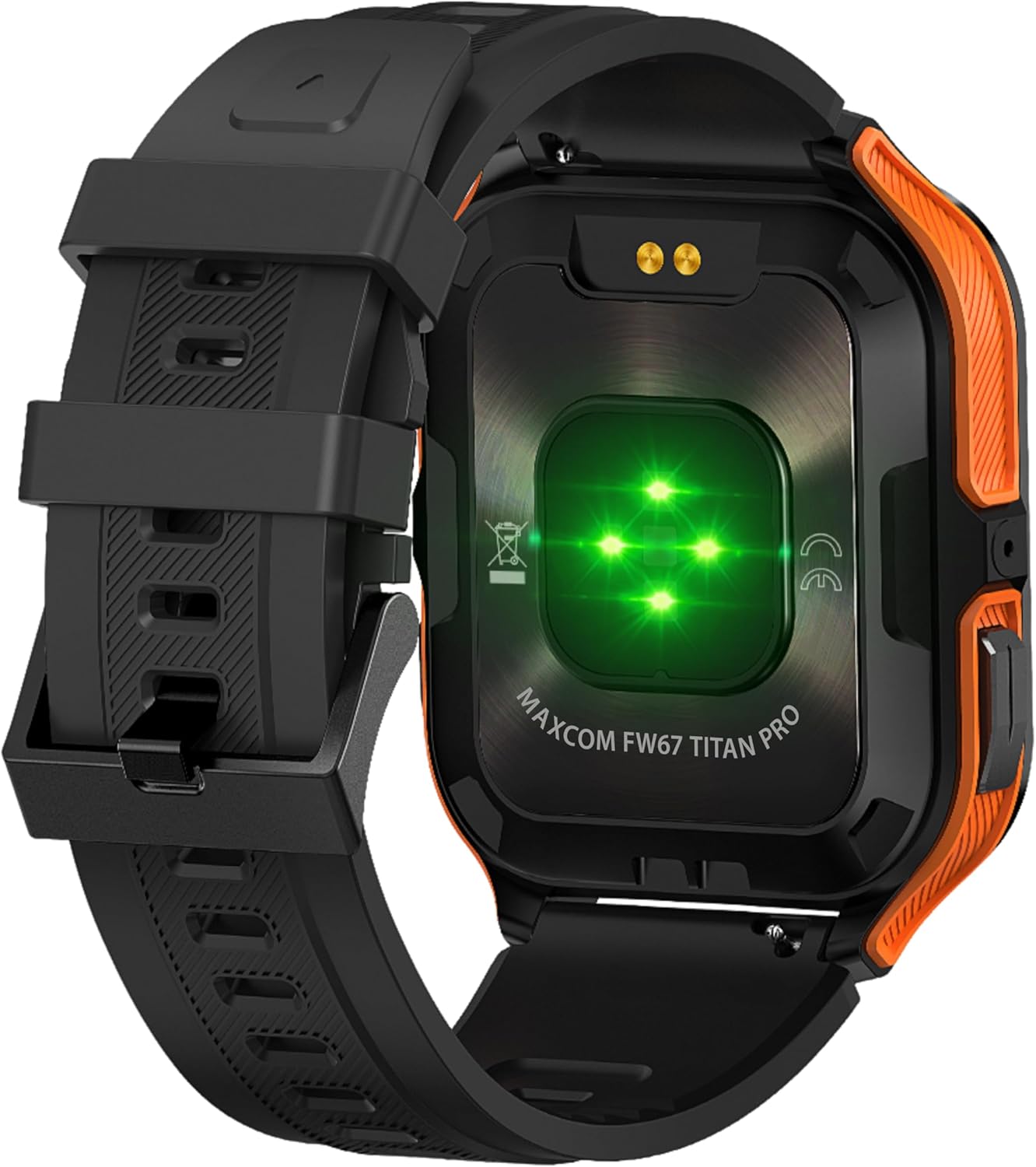
Figura 4.3: posterior view of the smartwatch, showing the optical heart rate sensors (glowing green) and the magnetic charging pins. The model name 'MAXCOM FW67 TITAN PRO' is also visible.
5. Configuració
5.1. Càrrega inicial
Abans del primer ús, carrega completament el teu rellotge intel·ligent.
- Connect the charging cable to the magnetic charging pins on the back of the smartwatch. Ensure the pins align correctly.
- Plug the USB end of the charging cable into a compatible USB power adapter (e.g., 5V/1A) or a computer's USB port.
- The watch display will indicate charging status. A full charge typically takes approximately 2-3 hours.
5.2. Instal·lació i emparellament de l'aplicació
To unlock the full potential of your smartwatch, you need to pair it with your smartphone via the dedicated companion application.
- Descarrega l'aplicació: Cerca the official MAXCOM smartwatch application (e.g., 'GloryFit' or similar, refer to packaging for exact app name) on the Google Play Store (for Android) or Apple App Store (for iOS). Install the app on your smartphone.
- Activa el Bluetooth: Assegureu-vos que el Bluetooth estigui habilitat al vostre telèfon intel·ligent.
- Obriu l'aplicació: Inicieu l'aplicació instal·lada i seguiu les instruccions que apareixen a la pantalla per crear un compte o iniciar la sessió.
- Afegeix un dispositiu: Within the app, navigate to the 'Device' or 'Add Device' section. The app will search for available smartwatches.
- Selecciona el teu rellotge intel·ligent: Select 'FW67 Titan Pro' from the list of discovered devices.
- Confirmeu l'aparellament: És possible que aparegui una sol·licitud d'emparellament tant al telèfon com al rellotge intel·ligent. Confirma l'emparellament en tots dos dispositius.
- Configuració completa: Segueix les instruccions restants de l'aplicació per configurar el teu professionalfile, permissions, and preferences.
6. Com fer funcionar el rellotge intel·ligent
6.1. Navegació bàsica
- Botó d'encesa: Press and hold to power on/off. Short press to wake the screen or return to the main watch face.
- Botó enrere: Short press to go back to the previous screen or exit a function.
- Gestos de la pantalla tàctil:
- Llisca cap amunt: Access quick settings/control center.
- Llisca cap avall: View notificacions.
- Llisca cap a l'esquerra/dreta: Navigate through widgets (e.g., activity, heart rate, weather).
- Toca: Seleccioneu un element o entreu en un menú.
6.2. Característiques clau

Figura 6.1: The smartwatch display showcasing various health metrics including steps taken, calories burned, heart rate, blood oxygen saturation (SpO2), and blood pressure, along with battery status.
- Monitorització de la freqüència cardíaca: The watch continuously monitors your heart rate. Access this feature from the main menu or by swiping to the heart rate widget.
- Seguiment de l'activitat: Tracks steps, distance, and calories burned throughout the day. Set daily goals in the companion app.
- Monitorització del son: Automatically tracks your sleep patterns, including deep sleep, light sleep, and wake times. View anàlisi detallada a l'aplicació.
- Modes esportius: Select from various sports modes (e.g., running, walking, cycling) to track specific workout data. Start a workout from the 'Sport' menu.
- Notificacions: Receive call, message, and app notifications directly on your wrist. Ensure notification permissions are granted in the companion app.
- Blood Oxygen (SpO2) & Blood Pressure: The watch can measure SpO2 and blood pressure. These measurements are for reference only and not for medical use.
- Temps: View current weather conditions after syncing with the app and granting location permissions.
- Control de música: Controla la reproducció de música al teu telèfon intel·ligent directament des del rellotge.
7. Manteniment
- Neteja: Regularly clean your smartwatch and strap with a soft, dry, lint-free cloth. If necessary, use a slightly damp drap amb sabó suau i, a continuació, esbandiu-lo i eixugueu-lo bé.
- Eviteu productes químics: No utilitzeu productes químics agressius, dissolvents de neteja ni detergents forts, ja que poden danyar l'acabat i els segells del rellotge.
- Port de càrrega: Keep the charging pins clean and dry to ensure proper charging.
- Emmagatzematge: When not in use for extended periods, store the smartwatch in a cool, dry place.
- Resistència a l'aigua: While the watch is IP69K water-resistant, it is not recommended for diving or high-pressure water activities. Always dry the watch thoroughly after exposure to water.
8. Solució De Problemes
If you encounter issues with your smartwatch, refer to the following common problems and solutions:
| Problema | Solució |
|---|---|
| Smartwatch won't turn on | Assegura't que el rellotge estigui completament carregat. Connecta'l al carregador durant almenys 30 minuts. |
| No es pot emparellar amb el telèfon intel·ligent | 1. Ensure Bluetooth is enabled on your phone. 2. Make sure the smartwatch is within range. 3. Restart both the smartwatch and your phone. 4. Clear Bluetooth cache on your phone. 5. Try pairing through the app, not directly via phone's Bluetooth settings. |
| Notifications are not received | 1. Check if the smartwatch is connected to the app. 2. Ensure notification permissions are granted for the app on your phone. 3. Verify that app notifications are enabled within the smartwatch app settings. 4. Disable 'Do Not Disturb' mode on both the watch and phone. |
| Dades de salut inexactes | 1. Ensure the watch is worn snugly on your wrist, not too loose or too tight. 2. Clean the sensors on the back of the watch. 3. Avoid excessive movement during measurements. 4. Remember that data is for reference and not medical diagnosis. |
| Durada de la bateria curta | 1. Reduce screen brightness. 2. Limit continuous heart rate monitoring if not needed. 3. Turn off unnecessary notifications. 4. Ensure the watch is fully charged each time. |
9. Especificacions
Key technical specifications for the MAXCOM FW67 Titan Pro Smartwatch:
| Característica | Especificació |
|---|---|
| Marca | MAXCOM |
| Model | FW67 Titan Pro |
| Color | Taronja |
| Sistema operatiu | Proprietary OS (compatible with Android/iOS) |
| Mida de la pantalla | 1.85 polzades |
| Connectivitat | Bluetooth |
| Característiques especials | Heart Rate Monitor, Notifications, SpO2, Blood Pressure, Activity Tracking |
| Dispositius compatibles | Smartphone |
| Composició de la bateria | Ió de liti |
| Capacitat de la bateria | 380 mAh |
| GPS | GPS via telèfon intel·ligent |
| Forma | Rectangular |
10. Garantia i Suport
Your MAXCOM FW67 Titan Pro Smartwatch comes with a standard manufacturer's warranty. Please refer to the warranty card included in your package for specific terms and conditions, including warranty duration and coverage details. For technical support, troubleshooting assistance beyond this manual, or warranty claims, please contact MAXCOM customer service through their official weblloc web o la informació de contacte proporcionada amb la documentació del producte.


