1. Producte acabatview
The ADATA Premier 512GB microSDXC A1 UHS-I Class 10 V10 Memory Card is a high-speed storage solution designed for mobile phones, tablets, and other compatible mobile devices. It offers a substantial 512GB capacity, allowing for extensive storage of applications, photos, and videos. The card is A1 qualified, enhancing app performance on Android devices, and supports read speeds up to 100MB/sec. It comes with a full-size SD adapter for broader compatibility and ease of use with various devices.

Image 1: ADATA Premier 512GB microSDXC Memory Card.
Característiques principals:
- Capacitat d'emmagatzematge de 512 GB: Ample space for high-resolution photos, 4K videos, and applications.
- A1 Performance Rating: Optimized for faster app loading and performance on Android smartphones and tablets.
- UHS-I Class 10 V10: Ensures smooth Full HD and 4K video recording and playback.
- Alta velocitat de lectura: Up to 100MB/sec for quick data transfers.
- Included SD Adapter: Provides compatibility with devices that use standard SD card slots.
- Disseny durador: Features X-ray proof, temperature proof, and magnetic resistance for enhanced data security.
2. Configuració i instal·lació
This section guides you through the proper installation of your ADATA microSDXC card into compatible devices.
2.1 Inserting the microSD Card into a Device
- Identify the microSD Slot: Locate the microSD card slot on your smartphone, tablet, or other compatible device. Refer to your device's user manual if unsure.
- Orienta la targeta: Hold the microSD card with the gold contacts facing down (or as indicated by your device's slot design).
- Inseriu la targeta: Gently push the microSD card into the slot until it clicks into place. Do not force the card.
- Verifica la instal·lació: Your device should recognize the new storage. You may receive a notification or see the storage listed in your device's settings.
2.2 Ús de l'adaptador SD
The included SD adapter allows you to use your microSDXC card with devices that have a standard SD card slot, such as digital cameras, laptops, or desktop computers.

Image 2: ADATA microSDXC Memory Card with its full-size SD Adapter.
- Insert microSD into Adapter: Slide the microSD card into the designated slot on the side of the SD adapter until it locks securely.
- Inseriu l'adaptador al dispositiu: Inseriu l'adaptador SD (amb la targeta microSD a dins) a la ranura per a targetes SD de l'ordinador o la càmera.
- Dades d'accés: Your device will now recognize the card, allowing you to transfer files, view photos, or record data.
Nota: Ensure the write-protection switch on the side of the SD adapter is in the "unlocked" position if you intend to write data to the card.
3. Instruccions de funcionament
The ADATA Premier microSDXC card is designed for seamless operation across various applications.
3.1 Emmagatzematge i transferència de dades
- File Gestió: Utilitza el teu dispositiu file manager or connect to a computer to transfer photos, videos, music, and documents to and from the card.
- Rendiment d'alta velocitat: With read speeds up to 100MB/sec, large files can be transferred efficiently.
3.2 App Storage (A1 Rating)
The A1 Application Performance Class rating means the card is optimized for running applications directly from the memory card, providing faster app launch times and smoother performance on compatible Android devices.
- Dispositius Android: In your Android device settings, you can often move installed applications to the microSD card to free up internal storage.
- Beneficis: This improves device performance by offloading app data and allows for more internal storage for other critical functions.
3.3 Video Recording (V10 Rating)
The V10 Video Speed Class ensures a minimum sustained write speed of 10MB/s, making it suitable for recording Full HD (1080p) video without dropped frames.
- Dispositius compatibles: Ideal for use in smartphones, tablets, action cameras, and drones for recording high-quality video.

Image 3: ADATA microSDXC card in use with multiple electronic devices.
4. Manteniment i cura
To ensure the longevity and optimal performance of your ADATA microSDXC card, follow these maintenance guidelines:
- Eliminació segura: Expulseu sempre la targeta del dispositiu de manera segura abans de treure-la físicament per evitar que les dades es corrompin.
- Protecció física: Store the card in its protective case or the SD adapter when not in use to prevent physical damage to the contacts or card body.
- Protecció del medi ambient: The card is designed to be X-ray proof, temperature proof, and magnetic resistant. However, avoid exposing it to extreme conditions unnecessarily.
- Còpies de seguretat periòdiques: Periodically back up important data from your microSD card to another storage medium (e.g., computer hard drive, cloud storage) to prevent data loss.
- Avoid Formatting: Only format the card when necessary, as formatting erases all data. If formatting is required, use your device's built-in formatting utility or a reliable computer utility.
5. Solució De Problemes
If you encounter issues with your ADATA microSDXC card, consider the following troubleshooting steps:
- Targeta no reconeguda:
- Assegureu-vos que la targeta estigui completament inserida a la ranura.
- Try inserting the card into a different compatible device or using the SD adapter with a computer to rule out a device-specific issue.
- Check if the SD adapter's write-protection switch is in the "unlocked" position if using the adapter.
- Clean the gold contacts on the card with a soft, dry, lint-free cloth.
- Rendiment lent:
- Assegura't que el dispositiu admeti velocitats UHS-I. És possible que els dispositius més antics no aprofitin completament les capacitats de velocitat de la targeta.
- Avoid filling the card to its maximum capacity, as this can sometimes affect performance.
- If using for app storage, ensure your Android device is optimized for A1 performance.
- Corrupció/errors de dades:
- Expulseu sempre la targeta de manera segura abans de treure-la.
- Run a disk check or error-checking utility on a computer to scan for and repair bad sectors.
- If issues persist, back up any recoverable data and then format the card.
- Card Capacity Incorrect:
- Some devices or operating systems may display slightly less than the advertised capacity due to formatting overhead. This is normal.
6. Especificacions
| Característica | Detall |
|---|---|
| Marca | ADATA |
| Nom del model | Premier |
| Capacitat d'emmagatzematge de memòria | 512 GB |
| Tipus de memòria flash | Micro SDXC |
| Classe de velocitat d'Associació Digital Segura | Class 10, UHS-I, V10, A1 |
| Velocitat de lectura | Fins a 100 MB/s |
| Velocitat d'escriptura | 50.0 MB/s (typical, based on V10 rating) |
| Característiques especials | Temperature Proof, X-Ray Proof, Magnetic Resistant |
| Dispositius compatibles | Smartphones, Tablets, Action Cameras, Drones, etc. |
| Color | Negre |
| Pes de l'article | 9.07 g (0.32 unces) |
| Dimensions del paquet | 4.53 x 3.94 x 0.02 polzades |
| Fabricant | Adata |
| UPC | 842243030518 |
| Número de model de l'article | 842243030518 |
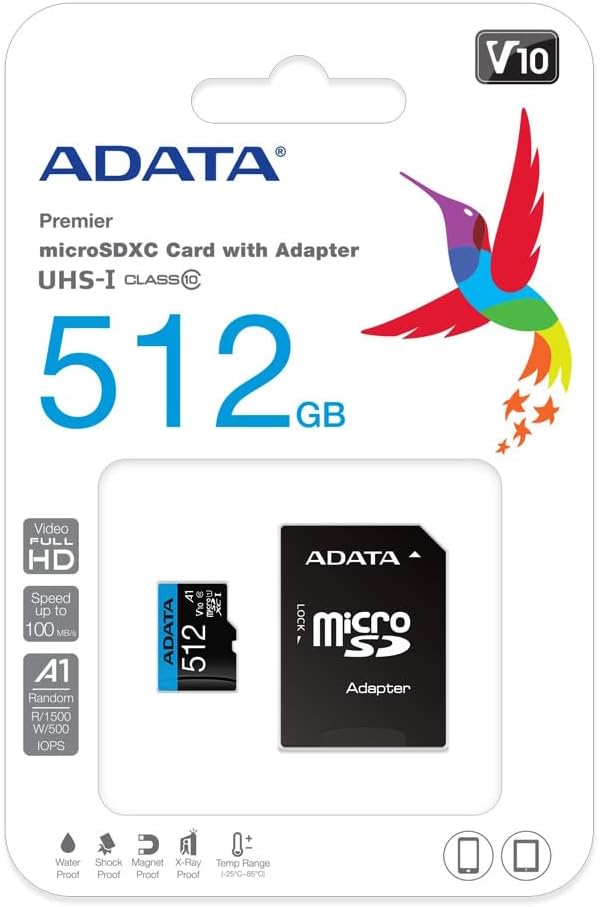
Image 4: Retail packaging of the ADATA Premier microSDXC Memory Card.
7. Garantia i Suport
ADATA offers a Lifetime Warranty for this product, ensuring long-term reliability and customer satisfaction.
- Tipus de garantia: Garantia de per vida
- Suport: For technical assistance, warranty claims, or further inquiries, please visit the official ADATA weblloc o poseu-vos en contacte amb el seu servei d'atenció al client.
8. Vídeos de productes
Watch the official product video for more information on the ADATA 512GB microSDXC card.
Vídeo 1: Presentació oficial del producte en vídeoasing the features and benefits of the 512GB microSD card. This video highlights its storage capacity, speed, and compatibility with various devices.


