Introducció
The Minolta MND65 Digital Camera is designed for capturing high-quality photos and videos in a compact, portable form. This manual provides essential information for setting up, operating, maintaining, and troubleshooting your camera. Please read this manual thoroughly before using your camera to ensure optimal performance and longevity.
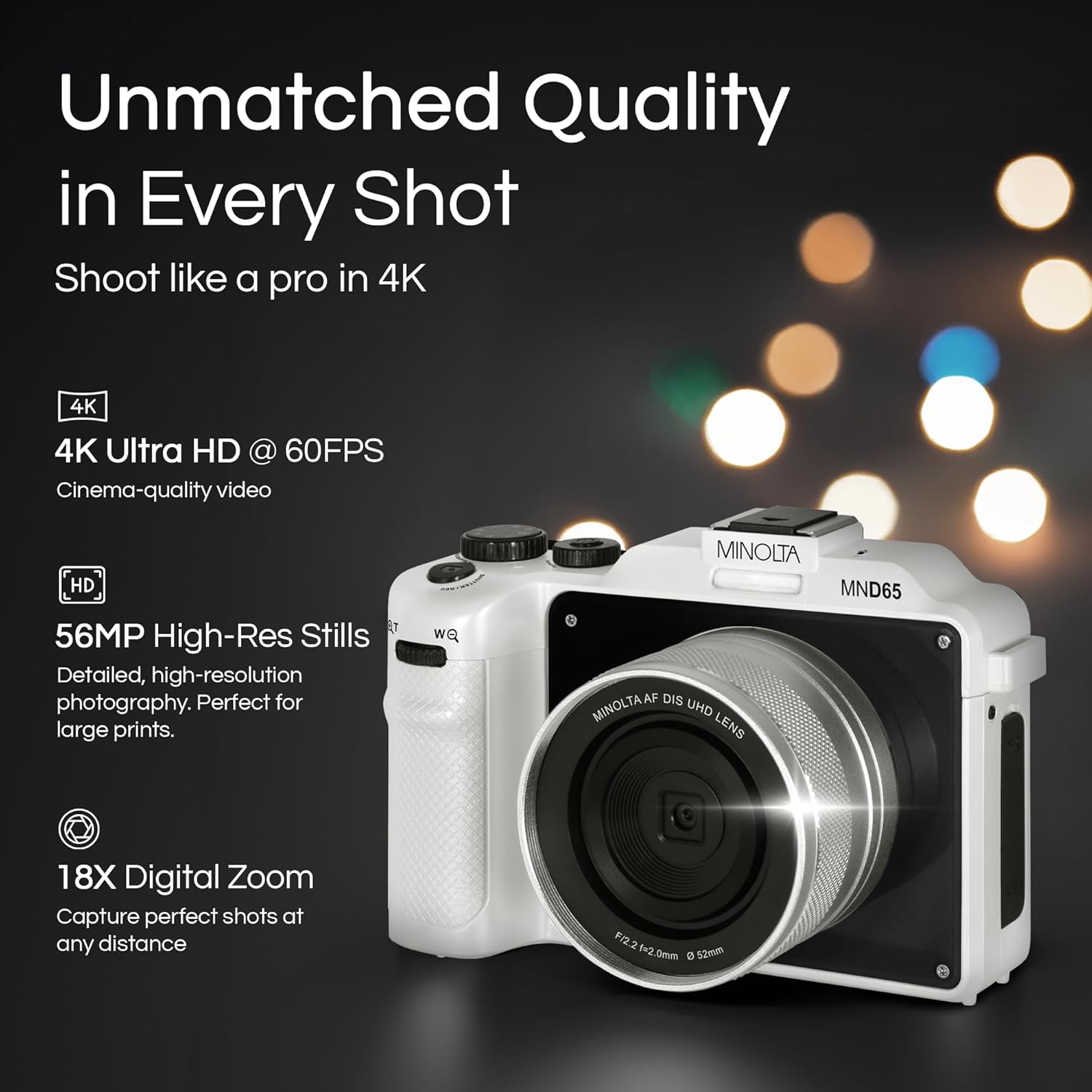
Figura 1: Frontal view of the Minolta MND65 Digital Camera.
Què hi ha a la caixa
Verifiqueu que tots els elements siguin presents al paquet:
- Càmera digital Minolta MND65
- Bossa protectora
- Cable USB
- Bateria de ions de liti
- Corretja de canell
- Targeta de memòria (16 GB)
- Adaptador de CA
- Lens Cap & Keeper
- Screwdriver + Screws (for faceplates)
- 2 Replaceable Faceplates (Black and Teal)
Guia de configuració
1. Instal·lació de la bateria
- Localitzeu la tapa del compartiment de la bateria a la part inferior de la càmera.
- Feu lliscar el pestell de la tapa per obrir el compartiment.
- Insert the Lithium-Ion battery according to the polarity indicators (+/-).
- Tanqueu la tapa del compartiment de la bateria de manera segura fins que encaixi al seu lloc.
2. Instal·lació de la targeta de memòria
- Open the memory card slot cover, usually located near the battery compartment or on the side.
- Insert the provided SD memory card with the metal contacts facing the front of the camera until it clicks.
- Tanqueu la tapa de la ranura de la targeta de memòria.
- Nota: Ensure the camera is powered off before inserting or removing the memory card.
3. Carregant la bateria
- Connecteu el cable USB al port USB de la càmera.
- Connect the other end of the USB cable to the AC adaptor.
- Connecteu l'adaptador de CA a una presa de corrent.
- El llum indicador de càrrega s'il·luminarà. S'apagarà o canviarà de color quan la càrrega s'hagi completat.
- Una càrrega completa sol trigar aproximadament 2-3 hores.
4. Col·locació de la corretja de canell
Thread the wrist strap through the strap lug on the side of the camera and secure it to prevent accidental drops.
5. Customizing Faceplates
Your camera comes with replaceable faceplates (Black and Teal) and a screwdriver kit for customization.
- Using the provided screwdriver, carefully remove the small screws securing the current faceplate.
- Gently detach the faceplate.
- Align the desired new faceplate and secure it with the screws. Do not overtighten.

Figure 2: Customizing your camera with replaceable faceplates.
Funcionament de la càmera
Controls de la càmeraview

Figura 3: posterior view of the camera showing LCD and control buttons.
- Botó d'encesa: Encén/apaga la càmera.
- Botó de l'obturador: Premeu fins a la meitat per enfocar, completament per capturar una foto o iniciar/aturar la gravació de vídeo.
- Selector/botó de mode: Selects shooting modes (e.g., Photo, Video, Playback).
- Botó de menú: Accesses camera settings and options.
- Botons de navegació (amunt/avall/esquerra/dreta): Navega pels menús i ajusta la configuració.
- OK/Set Button: Confirma les seleccions.
- Palanca de zoom: Controls the 18X digital zoom.
- Pantalla LCD: 3.0" IPS display for framing shots, reviewvisualitzar imatges i navegar pels menús.
Fer Fotos
- Engegueu la càmera amb el botó d'engegada.
- Select Photo mode using the Mode button/dial.
- Enquadra la teva foto amb la pantalla LCD de 3.0".
- Press the Shutter button halfway to activate autofocus. The focus indicator will confirm focus.
- Press the Shutter button fully to capture the 56MP image.
- Images are saved in JPEG or RAW format, as selected in the settings.
Gravació de vídeos
- Enceneu la càmera.
- Select Video mode.
- Frame your scene.
- Press the Shutter button fully to start recording 4K 60FPS video. A recording indicator will appear on the screen.
- Press the Shutter button fully again to stop recording.
Using the Selfie Lens
The Minolta MND65 features a dedicated front-facing selfie lens for easy self-portraits and vlogging.
- Activate the selfie lens mode (refer to your camera's on-screen menu for specific activation steps, usually a dedicated button or menu option).
- The camera will switch to the front-facing lens, and the LCD screen will display your reflection.
- Frame your selfie or video.
- Press the Shutter button to capture.

Figure 4: The dedicated selfie lens for convenient self-portraits.
Wi-Fi Connectivity and File Transferència
The built-in Wi-Fi allows for wireless transfer of photos and videos to your smartphone or tablet.
- Download the official Minolta camera app to your mobile device (available on iOS and Android app stores).
- On the camera, navigate to the Wi-Fi settings in the menu and enable Wi-Fi.
- On your mobile device, connect to the camera's Wi-Fi network (SSID and password will be displayed on the camera screen).
- Open the Minolta app. You can now browse, transfer, and share your media wirelessly.
Manteniment
Neteja de la càmera
- Feu servir un drap suau i sense borrissol per netejar el cos de la càmera. Per a la brutícia persistent, netegeu lleugeramentampen el drap amb aigua.
- For the lens, use a lens brush to remove dust, then a lens cleaning cloth with a specialized lens cleaning solution if necessary. Avoid touching the lens surface with your fingers.
- Clean the LCD screen with a soft, dry microfiber cloth.
- No utilitzeu dissolvents orgànics ni netejadors químics forts.
Cura de la bateria
- Guardeu la bateria en un lloc fresc i sec quan no la feu servir.
- Eviteu descarregar completament la bateria amb freqüència per allargar-ne la vida útil.
- Si l'emmagatzemeu durant un període prolongat, carregueu la bateria fins a un 50% de la seva capacitat aproximadament.
Emmagatzematge
- When not in use, store the camera in its protective pouch to shield it from dust and scratches.
- Eviteu guardar la càmera en zones amb temperatures extremes, molta humitat o llum solar directa.
- Traieu la bateria si la càmera no s'utilitzarà durant un període prolongat.
Resolució de problemes
| Problema | Causa possible | Solució |
|---|---|---|
| La càmera no s'encén. | La bateria està esgotada o inserida incorrectament. | Carregueu la bateria completament. Torneu a inserir la bateria correctament. |
| No es poden fer fotos/gravar vídeos. | La targeta de memòria està plena, bloquejada o no està inserida. | Elimineu-les innecessàries files, unlock the memory card, or insert it correctly. |
| Les imatges són borroses. | Tremolor de la càmera, enfocament incorrecte o lent bruta. | Hold the camera steady. Ensure autofocus locks before shooting. Clean the lens. |
| La connexió Wi-Fi falla. | Contrasenya incorrecta, Wi-Fi de la càmera no activat o problema amb l'aplicació. | Verify Wi-Fi password. Ensure camera Wi-Fi is active. Restart camera and mobile app. |
| Green screen appears on LCD. | Software/hardware malfunction. | Power cycle the camera. If the issue persists, contact customer support. |
| Poor image/video quality (not 56MP/4K). | Incorrect resolution settings. | Check camera settings to ensure 56MP for photos and 4K for video are selected. |
If you encounter issues not listed here or if the suggested solutions do not resolve the problem, please contact Minolta Customer Support.
Especificacions
| Nom del model | MND65-WK |
| Resolució del sensor fotogràfic | 56 MP |
| Resolució de vídeo | 4K (2160p) at 60 FPS |
| Zoom digital | 18x |
| Mida de la pantalla | 3 Inches (IPS LCD) |
| Connectivitat | Wi-Fi |
| Admet File Formats | JPEG, RAW (Images); MP4 (Video) |
| Estabilització d'imatge | Digital |
| Tecnologia del sensor fotogràfic | CMOS |
| Tipus de bateria | Ió de liti |
| Distància focal mínima | 18 mil·límetres |
| Apertura màxima | 2.8 mil·límetres |
| Modes de flaix | Flash automàtic |
| Mitjans d'emmagatzematge | SD Card (Class 10, U1 recommended) |
Informació de la garantia
The Minolta MND65 Digital Camera comes with a Limited 1 Year Manufacturer Warranty. This warranty covers defects in materials and workmanship under normal use. It does not cover damage caused by misuse, accident, unauthorized modification, or external causes such as drops or liquid damage.
Please retain your proof of purchase for warranty claims. For detailed terms and conditions, refer to the warranty card included in your product packaging or visit the official Minolta weblloc.
Atenció al client
For technical assistance, warranty service, or general inquiries regarding your Minolta MND65 Digital Camera, please contact Minolta Customer Support.
- Weblloc: Visit the official Minolta weblloc web per a preguntes freqüents, actualitzacions de programari i recursos de suport.
- Correu electrònic: Consulteu l'embalatge del producte o la fitxa oficial weblloc web per a adreces de correu electrònic d'atenció al client.
- Telèfon: Consulteu l'embalatge del producte o la fitxa oficial weblloc web per a números de telèfon d'atenció al client.
When contacting support, please have your camera model number (MND65-WK) and proof of purchase available.


