1. Introducció
This manual provides essential information for the safe and efficient operation of your DOUGH Spectrum One 27-Inch Gaming Monitor. Please read this manual thoroughly before using the product and retain it for future reference.
2. Informació de seguretat
- Assegureu-vos que el monitor estigui col·locat sobre una superfície estable i plana per evitar caigudes accidentals.
- No exposeu el monitor a la pluja, la humitat ni a temperatures extremes.
- Feu servir només l'adaptador de corrent que s'inclou amb el monitor.
- Eviteu bloquejar les obertures de ventilació per evitar el sobreescalfament.
- No intenteu fer la reparació del monitor vosaltres mateixos. Encarregueu-vos de totes les tasques de manteniment a personal qualificat.
- Disconnect the power cable from the outlet during lightning storms or when unused for long periods.
3. Contingut del paquet
Verifiqueu que tots els components siguin presents al vostre paquet:
- DOUGH Spectrum One 27-Inch Gaming Monitor
- Adaptador d'alimentació i cable
- Cable DisplayPort
- Cable USB-C
- Guia d'inici ràpid (no inclosa en aquest manual)

Imatge 3.1: Frontal view of the DOUGH Spectrum One monitor.
4. Configuració
4.1 Configuració física
The DOUGH Spectrum One monitor can be used with its optional stand (if purchased) or a VESA-compatible mount (100x100mm). This manual focuses on the monitor unit itself.
- Desembalatge: Traieu amb cura el monitor i tots els accessoris de l'embalatge.
- Col·locació: Position the monitor on a stable, flat surface. Ensure adequate space for ventilation around the monitor.
- Cables de connexió:
- Connecteu el cable d'alimentació al monitor i després a una presa de corrent.
- Connect your computer or gaming console to the monitor using either an HDMI 2.1 cable, DisplayPort 1.4 cable, or USB-C cable.
- For USB hub functionality, connect a USB-B to USB-A cable from your computer to the monitor's upstream USB-B port.
- For USB-C docking, connect a compatible laptop to the monitor's USB-C port. This single connection can provide video, data, and up to 100W of power delivery.
- Optional: Connect headphones to the 3.5mm audio jack.

Imatge 4.1: posterior view of the monitor showing available ports including HDMI 2.1, DisplayPort 1.4, USB Type-C (100W), USB Type-B, USB Type-A, and 3.5mm AUX.
4.2 Encès inicial
- Ensure all necessary cables are securely connected.
- Premeu el botó d'engegada del monitor. L'indicador lluminós d'engegada s'il·luminarà.
- If no image appears, ensure your input source (computer/console) is powered on and correctly configured to output to the monitor.
5. Instruccions de funcionament
5.1 Navegació en pantalla (OSD)
The monitor features an On-Screen Display (OSD) menu for adjusting various settings. Use the physical buttons or joystick (if present) on the monitor to navigate the OSD. Typically, a central button or joystick allows for menu access and selection, while directional movements adjust values or navigate options.
5.2 Configuració de la imatge
The DOUGH Spectrum One monitor offers advanced picture settings for optimal visual experience:
- Resolució: Supports 4K UHD (3840 x 2160 pixels).
- Freqüència d'actualització: Up to 144Hz for smooth motion.
- Precisió del color: Factory calibrated for Delta E 0.6 average accuracy, covering 98% DCI-P3 and 100% sRGB color gamuts.
- HDR: HDR10 support with a 10 million:1 dynamic contrast ratio for enhanced highlights and deep shadows.
- Brillantor: 450 nits (sustained), 750 nits (peak).

Imatge 5.1: acabatview of the monitor's core display technologies and features.
5.3 Característiques del joc
The monitor includes several features designed to enhance your gaming experience:
- Tecnologia de sincronització adaptativa: Supports AMD FreeSync Premium Pro, NVIDIA G-Sync, and VESA Adaptive-Sync compatibility to reduce screen tearing and stuttering by synchronizing the monitor's refresh rate with the graphics card's frame rate.
- Pixel-Perfect Upscaling: Uses integer-ratio pixel duplication for low-resolution input signals, preserving the look of pixel art and keeping retro games crisp.
- Crosshair Overlay: An on-screen crosshair can be enabled to assist aim in games.
- Frame Rate Counter: Displays the current frame rate on screen to monitor system performance.
- Blur Busters Presets: Pre-tuned settings for optimal motion clarity.

Image 5.2: The monitor displaying a high-performance gaming scene.
5.4 Connectivitat
El monitor ofereix opcions de connectivitat versàtils:
- HDMI 2.1 (x2): For high-bandwidth connections to compatible devices, supporting 4K 144Hz.
- DisplayPort 1.4 (x1): Another high-bandwidth option for video input.
- USB-C 3.2 Gen 2 (x1): Supports video, data transfer (up to 10 Gb/s), and up to 100W power delivery over a single cable for compatible laptops.
- USB-A (x2 side-facing, x1 rear): Per connectar perifèrics.
- Conector d'àudio de 3.5 mm: Per connectar auriculars o altaveus externs.
- Mode de pantalla dividida: The display can show video from two separate sources simultaneously.
6. Manteniment
6.1 Neteja de la pantalla
Per netejar la pantalla del monitor:
- Apagueu el monitor i desconnecteu el cable d'alimentació.
- Netegeu suaument la pantalla amb un drap suau i sense pelusa.
- Per a marques difícils, esbandiu lleugeramentampen the cloth with water or a screen-cleaning solution specifically designed for monitors. Do not spray liquid directly onto the screen.
- Eviteu utilitzar netejadors abrasius, alcohol o solucions amb base d'amoníac, ja que poden danyar la superfície de la pantalla.
6.2 Neteja de la Casing
Netegeu el monitor casing with a soft, dry cloth. If necessary, use a slightly damp tela. No utilitzeu productes químics durs.
7. Solució De Problemes
This section addresses common issues you might encounter with your DOUGH Spectrum One monitor.
| Problema | Possible causa/solució |
|---|---|
| No hi ha imatge a la pantalla / LED d'engegada apagat | Ensure the power cable is securely connected to both the monitor and the power outlet. Check if the power outlet is functional. Press the monitor's power button. |
| Sense imatge / Missatge "Sense senyal" | Verify the video cable (HDMI, DisplayPort, USB-C) is securely connected to both the monitor and your computer/console. Ensure the correct input source is selected in the monitor's OSD. Check if the computer/console is powered on and outputting video. |
| Monitor takes long to wake from sleep / Occasional black screen when changing resolution | This can sometimes be resolved by updating the monitor's firmware. Firmware updates typically require a Windows machine. Refer to the manufacturer's support website for instructions and the latest firmware. |
| Pantalla tènue | Adjust brightness and contrast settings in the OSD menu. Ensure HDR settings are correctly configured for your content and operating system. |
| Pantalla trencada o entretallat | Ensure Adaptive Sync (FreeSync Premium Pro, G-Sync compatible) is enabled on both the monitor and your graphics card settings. Verify your graphics drivers are up to date. |
| Power supply not compatible with region | Ensure you have received the correct power supply for your region. Contact customer support if the provided power supply is incorrect. |
8. Especificacions
| Característica | Especificació |
|---|---|
| Número de model | ES07D03 |
| Mida de la pantalla | 27 polzades |
| Tipus de panell | IPS |
| Resolució | 3840 x 2160 píxels (4K UHD) |
| Freqüència d'actualització | 144 Hz |
| Temps de resposta | 1 ms |
| Relació d'aspecte | 16:9 |
| Brillantor de la imatge | 450 nits (sustained), 750 Nits (Peak) Candela |
| Suport HDR | HDR10 |
| Gamma de colors | 98% DCI-P3, 100% sRGB |
| Sincronització adaptativa | AMD FreeSync Premium Pro, NVIDIA G-Sync Compatible, VESA Adaptive-Sync |
| Connectivitat | 2x HDMI 2.1, 1x DisplayPort 1.4, 1x USB-C 3.2 Gen 2 (100W PD), 1x USB-B, 2x USB-A (side), 1x USB-A (rear), 1x 3.5mm Audio Jack |
| Dimensions del producte | 6 x 27.5 x 17.5 polzades |
| Pes de l'article | 17.76 lliures |
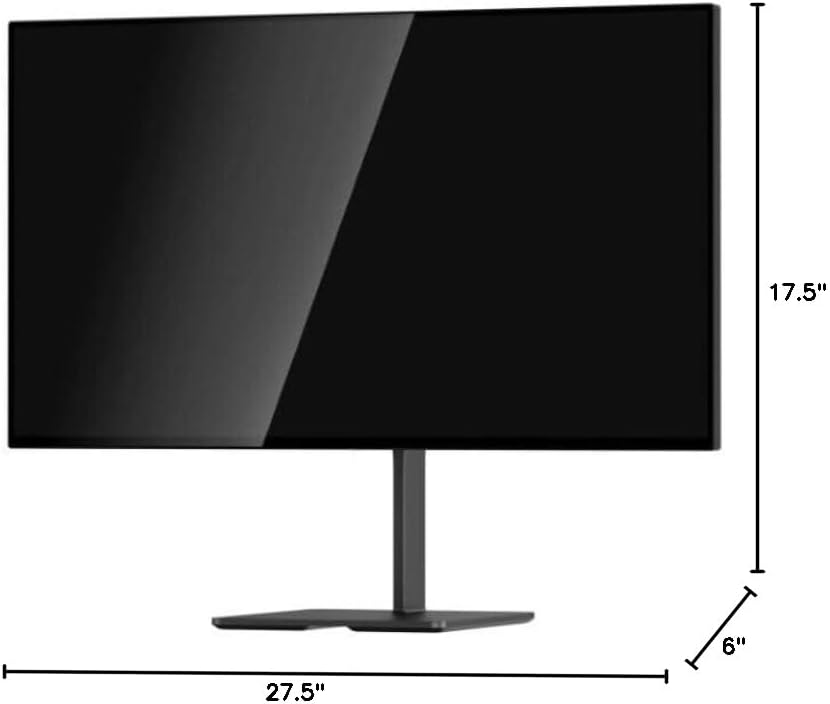
Imatge 8.1: Dimensions del monitor.
9. Garantia i Suport
For warranty information and technical support, please refer to the official DOUGH weblloc web o contacteu directament amb el seu servei d'atenció al client. Conserveu el rebut de compra com a comprovant de compra.
9.1 Coating Comparison
The DOUGH Spectrum One monitor is available in different screen finishes, including Matte, Glossy, and Gorilla Glass. Each finish offers distinct visual characteristics regarding reflections and clarity.
Video 9.1: This video demonstrates the visual differences between Matte, Glossy, and Gorilla Glass screen coatings on the Spectrum One monitor, particularly how they handle reflections from a light source.

Image 9.1: Visual comparison of Matte, Glossy, and Gorilla Glass screen coatings, illustrating how reflections appear on each surface.


