Introducció
This manual provides comprehensive instructions for the setup, operation, maintenance, and troubleshooting of your SABLUTE KL3 PRO Wireless Keyboard and Mouse Combo. Please read this manual thoroughly before using the product to ensure optimal performance and longevity.
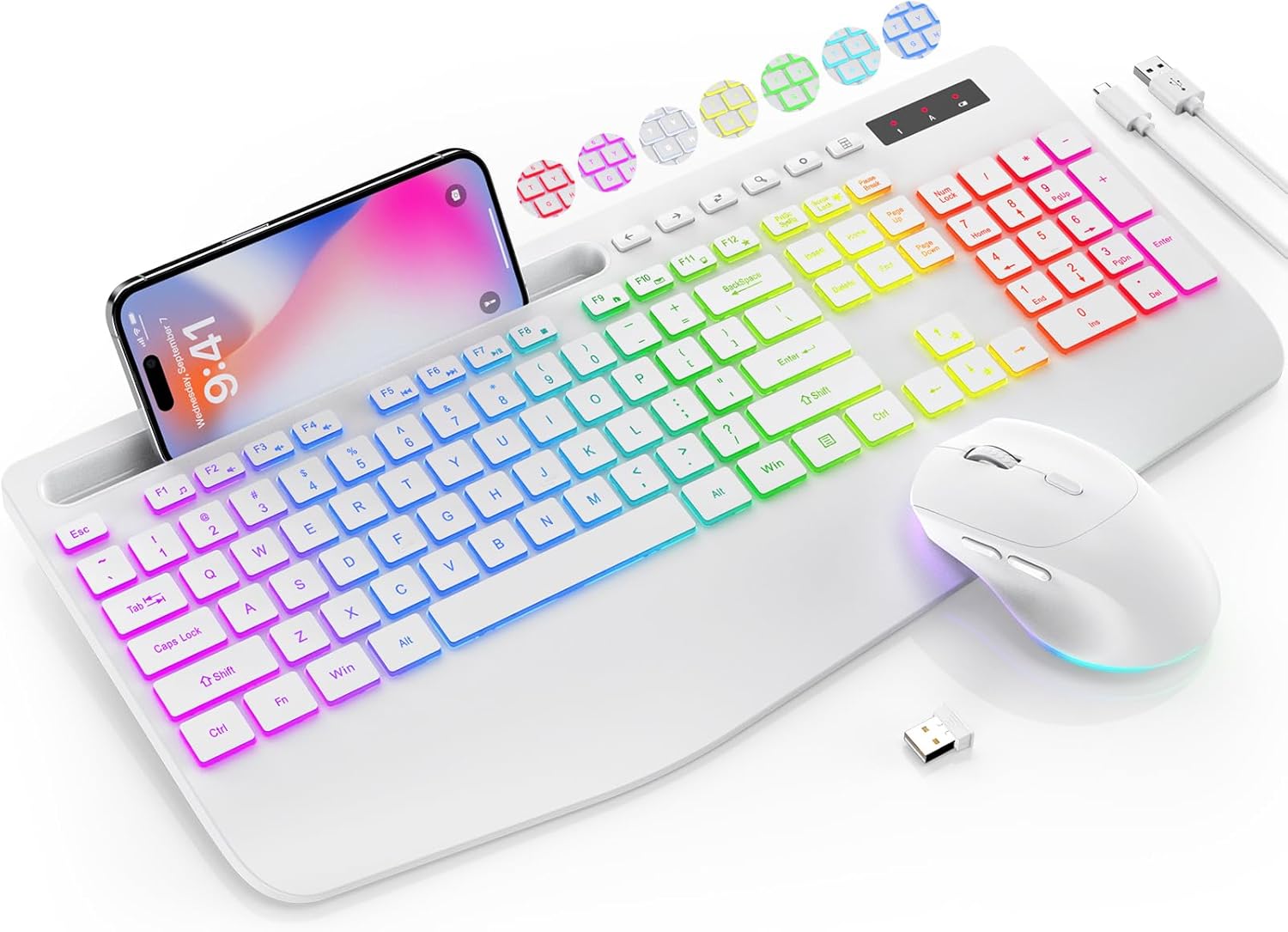
Image: The SABLUTE KL3 PRO Wireless Keyboard and Mouse Combo, featuring a full-size keyboard with a phone holder, a wireless mouse, and a USB receiver.
Contingut del paquet
En obrir el paquet, comproveu que hi hagi tots els elements següents:
- SABLUTE KL3 PRO Wireless Keyboard
- Ratolí sense fil SABLUTE
- 2.4G USB Receiver (Dongle)
- Cable de càrrega USB tipus C
- Manual d'usuari (aquest document)

Image: The SABLUTE KL3 PRO keyboard and mouse, along with the USB receiver and charging cables, as they appear in the package.
Instruccions de configuració
1. Càrrega dels dispositius
Both the keyboard and mouse are rechargeable. Before initial use, it is recommended to fully charge both devices.
- Connect the provided USB Type-C charging cable to the charging port on the keyboard and mouse.
- Connecteu l'altre extrem del cable a una font d'alimentació USB (per exemple, un port USB de l'ordinador, un adaptador de paret USB).
- Charging typically takes 2-3 hours for a full charge. The indicator light will change to show charging status.
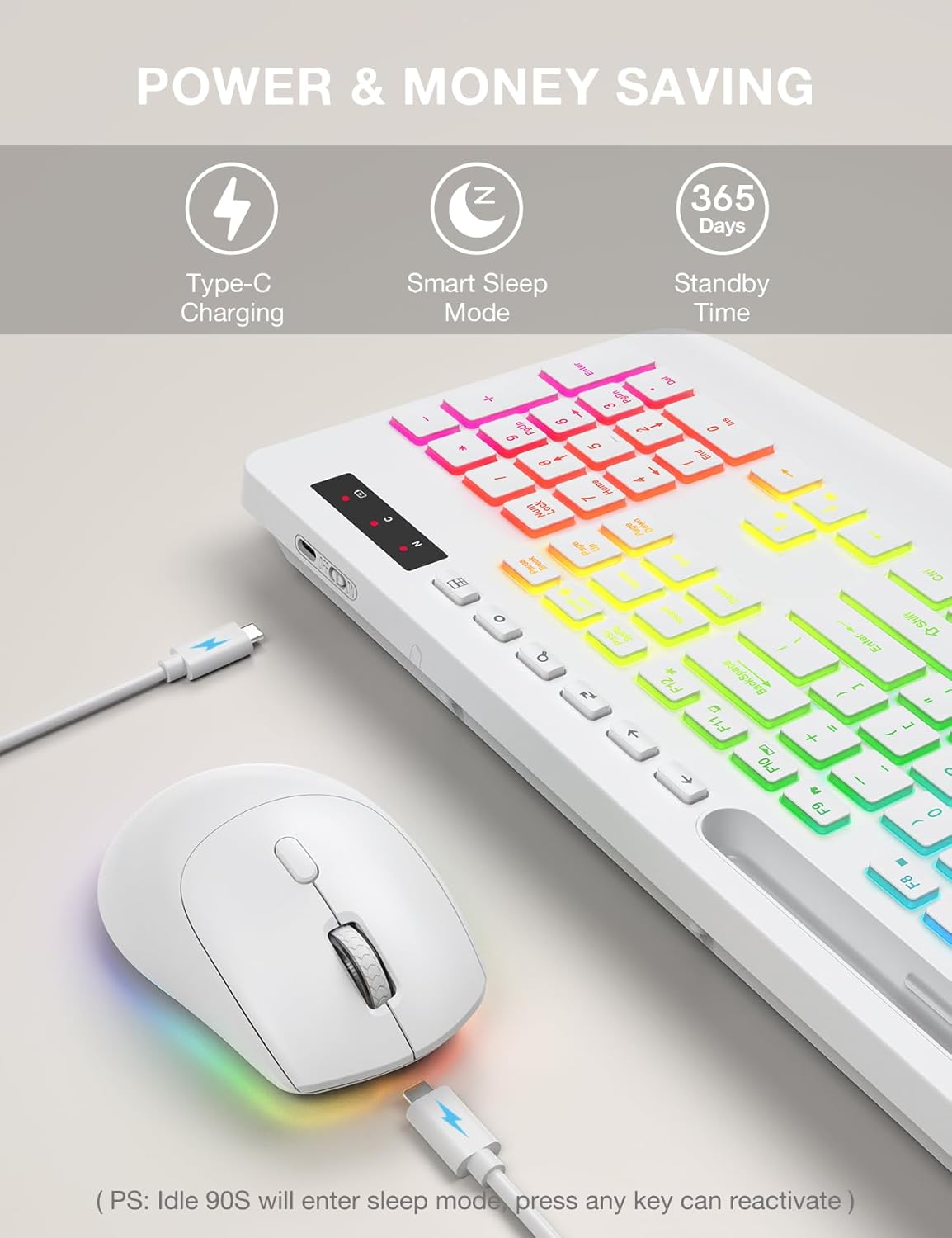
Image: The SABLUTE keyboard and mouse connected to charging cables, illustrating the Type-C charging ports.
2. Connexió al vostre dispositiu
The SABLUTE KL3 PRO combo uses a 2.4G wireless connection via a single USB receiver.
- Locate the 2.4G USB receiver. It is typically stored in the mouse's battery compartment or within the product packaging.
- Connecteu el receptor USB a un port USB-A disponible del vostre ordinador o portàtil.
- Engegueu el teclat i el ratolí utilitzant els seus respectius interruptors d'alimentació.
- The devices should connect automatically within seconds. No additional drivers are usually required for most operating systems.
Compatibilitat: This combo is compatible with Windows, Chrome OS, Linux, and Mac devices. Please note that multimedia keys may have limited functionality on Mac operating systems.
Nota important: A USB-C dongle is not included. This keyboard and mouse combo cannot connect directly to tablets or phones without a compatible USB-A adapter (not included).

Image: The keyboard and mouse operating wirelessly with a laptop and monitor, demonstrating the 2.4G wireless connectivity and plug-and-play setup.
Instruccions de funcionament
Característiques del teclat
- Efectes de contrallum: Choose from 7 solid colors and 1 rainbow backlight color. There are 3 distinct backlight modes available.
- Control de la llum de fons:
- Premeu Fn + PrtSc/SysRq per encendre o apagar la llum de fons.
- Premeu Fn + Bloqueig de desplaçament to switch between different backlight modes.
- Premeu Fn + Fletxa amunt or Fn + Fletxa avall to adjust the backlight brightness (3 levels).
- Reposa-canell ergonòmic: The keyboard features an extra-wide 2.8-inch wrist rest designed to reduce wrist fatigue during extended use.
- Suport de telèfon integrat: A built-in holder accommodates devices up to 11.9 inches, allowing for convenient multitasking.
- Tecles multimèdia: Access 6 one-touch media keys and F1-F12 shortcuts for streamlined daily tasks.
- Escriptura silenciosa: The keyboard is designed for silent operation, minimizing disturbance in shared environments.
- Low-Profile Tecles de tecles: Features 1mm low-profile keycaps for easier cleaning and quieter typing.

Image: Illustration of the keyboard's 7 color options and the key combinations for controlling backlight on/off, mode switching, and brightness adjustment.
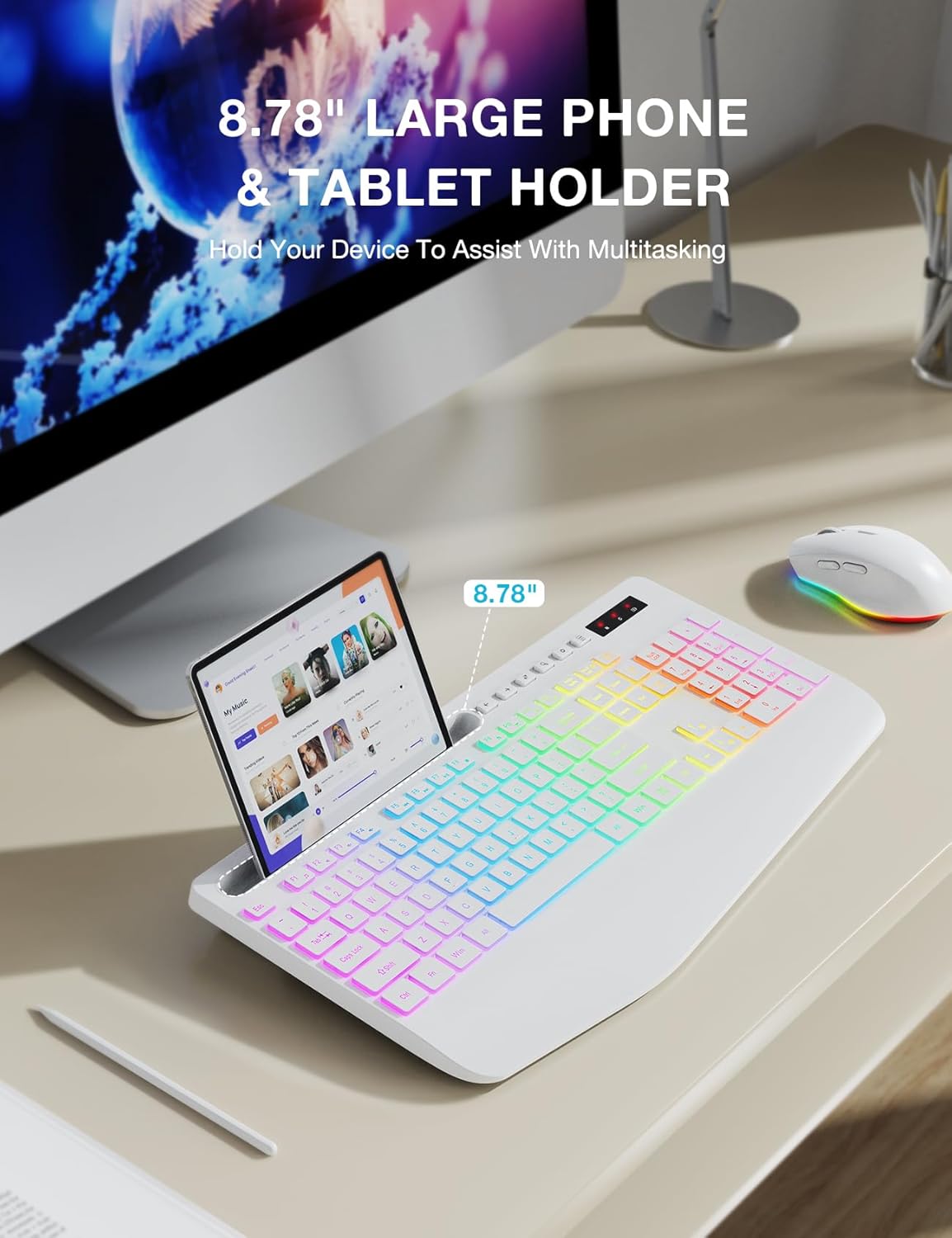
Image: The keyboard displaying a phone securely placed in its integrated holder, highlighting the 8.78-inch capacity for multitasking.
Funcions del ratolí
- Disseny de 6 botons: Includes standard left/right click, scroll wheel, DPI button, and forward/backward buttons for enhanced navigation.
- DPI ajustable: Cycle through 3 DPI levels (800/1200/1600) to adjust tracking speed for different tasks.
- Clic silenciós: The mouse is designed for silent clicks, providing a quiet working environment.
- Efectes de contrallum: Features 15 light effects that can be switched or turned off.

Imatge: Una imatge detallada view of the SABLUTE wireless mouse, labeling its 6 buttons including the scroll wheel, left/right click, DPI button, and forward/backward buttons.
Gestió d'energia
The SABLUTE KL3 PRO combo is designed with energy-saving features to extend battery life.
- Mode de son intel·ligent: If idle for 90 seconds, the devices will enter a smart sleep mode to conserve power. Press any key on the keyboard or move the mouse to reactivate.
- Temps d'espera llarg: With the backlight off, the devices can achieve up to 365 days of standby time on a full charge.

Image: An illustration highlighting the energy-saving features of the SABLUTE keyboard and mouse, including 365 days standby time and smart sleep mode activation after 90 seconds of inactivity.
Manteniment i cura
To ensure the longevity and optimal performance of your SABLUTE KL3 PRO combo, follow these maintenance guidelines:
- Neteja: Feu servir un drap suau i sec per netejar les superfícies del teclat i el ratolí. Per a la brutícia persistent, netegeu lleugerament.amp Es pot fer servir un drap amb sabó suau, assegurant-se que no entri líquid al dispositiu.
- Neteja de les tecles: El low-profile keycaps are designed for easier cleaning. Use compressed air to remove debris from between keys.
- Emmagatzematge: Guardeu els dispositius en un lloc fresc i sec, allunyat de la llum solar directa i de temperatures extremes.
- Eviteu líquids: Do not expose the keyboard or mouse to excessive moisture or liquids.
- Manejar amb cura: Eviteu deixar caure els dispositius ni sotmetre'ls a impactes forts.
Resolució de problemes
If you encounter any issues with your SABLUTE KL3 PRO combo, please refer to the following common solutions:
| Problema | Possible solució |
|---|---|
| El teclat/ratolí no respon |
|
| Retard o resposta retardada |
|
| La llum de fons no funciona |
|
| Missing USB receiver |
|
| Devices enter sleep mode too quickly |
|
Especificacions
| Característica | Detall |
|---|---|
| Número de model | KL3 PRO |
| Dimensions del producte | 16.85 x 8.46 x 1.38 polzades |
| Pes de l'article | 2 lliures |
| Bateries | Necessita 1 bateria de metall de liti (inclosa) |
| Tecnologia de connectivitat | 2.4G USB sense fil |
| Característiques especials | 3-level DPI, Backlit, Ergonomic Wrist Rest, Phone Holder, Shortcut Keys, Low-profile tecla de tecla |
| Dispositius compatibles | Ordinador personal, portàtil |
| Fabricant | SABLUTE |
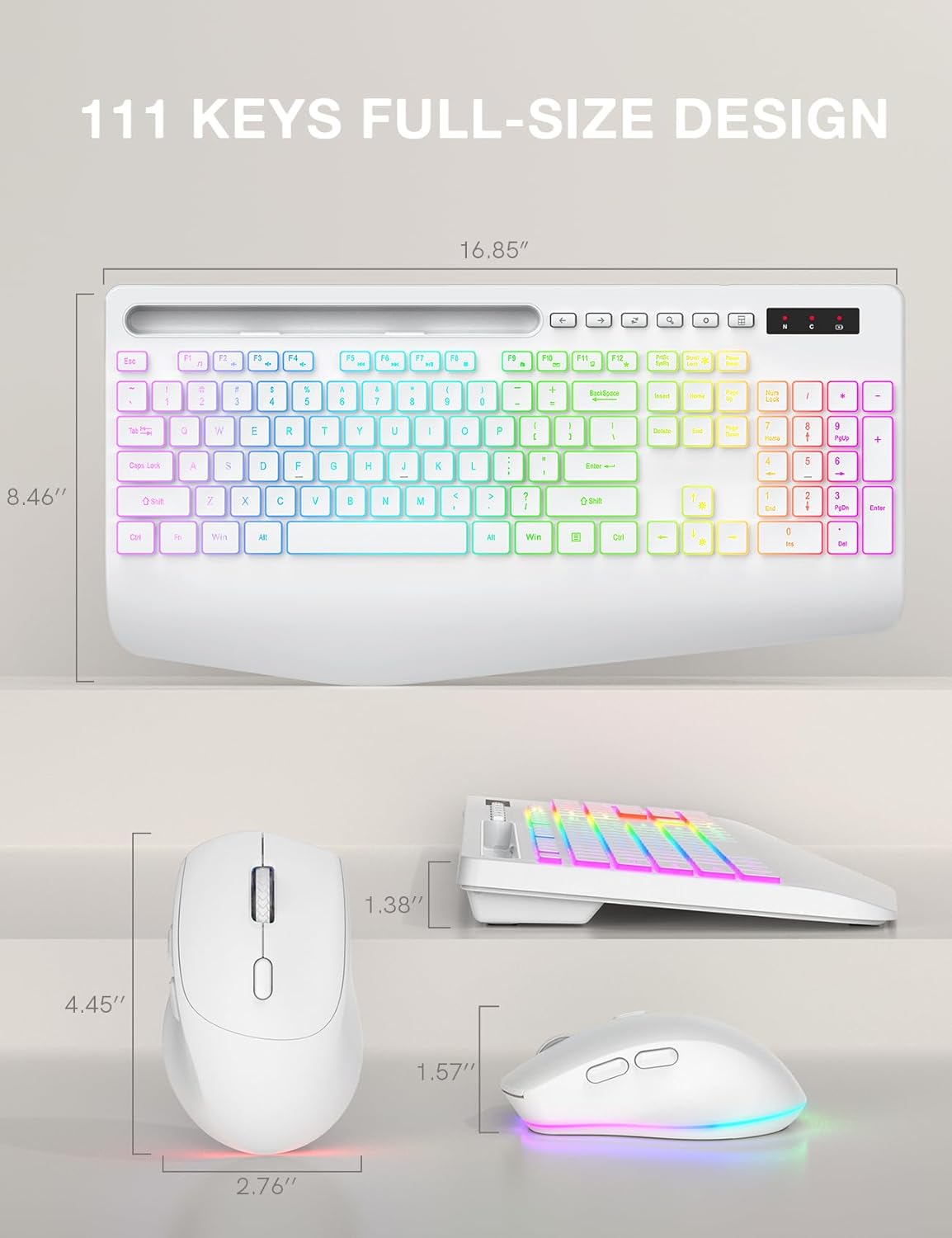
Image: Technical drawing showing the dimensions of the SABLUTE KL3 PRO keyboard and mouse.
Garantia i Suport
SABLUTE is committed to providing quality products and customer satisfaction. Your KL3 PRO Wireless Keyboard and Mouse Combo comes with the following support:
- Substitució de 90 dies: For any manufacturing defects or issues within 90 days of purchase.
- Garantia del fabricant de 360 dies: Cobreix defectes de materials i fabricació durant 360 dies a partir de la data de compra.
Contacta amb l'assistència
For pre-sales questions, troubleshooting assistance, accessory reissue, or returns and exchanges, please contact us:
- Suport per correu electrònic: sabluteservices@outlook.com
- Assistència telefònica (EUA): +1-888-858-1618 (Monday-Friday, 9 AM - 1 PM PST, 2 PM - 6 PM PST)


