Introducció
Thank you for choosing the EMEET S600 4K Webcam. This manual provides comprehensive instructions for setting up, operating, maintaining, and troubleshooting your webcam to ensure optimal performance. The EMEET S600 is designed for high-quality video communication and streaming, featuring 4K resolution, advanced autofocus, noise reduction, and a built-in privacy cover.

Imatge: Frontal view of the EMEET S600 4K Webcàmera, espectacleasing el seu disseny elegant i la seva lent.
Informació de seguretat
- No exposeu el dispositiu a l'aigua ni a una humitat excessiva.
- Eviteu deixar caure o sotmetre el dispositiu a forts impactes.
- No intenteu desmuntar ni reparar el dispositiu vosaltres mateixos. Encarregueu tot el manteniment a personal qualificat.
- Feu servir només els accessoris proporcionats o recomanats.
- Keep the lens clean using a soft, dry cloth. Avoid abrasive cleaners.
Contingut del paquet
Si us plau, comproveu el paquet per veure si hi ha els elements següents:
- EMEET S600 4K Weblleva
- USB Cable (integrated or separate, typically)
- Manual d'usuari (aquest document)
Producte acabatview
Familiarize yourself with the components of your EMEET S600 weblleva:
- 4K UHD Lens: Captures high-resolution video.
- Coberta de privacitat integrada: Rotatable cover for physical privacy.
- Dual Noise Reduction Microphones: For clear audio capture.
- Flexible Adjustable Clip: For mounting on monitors, laptops, or tripods.
- Cable USB: Per connectar-vos al vostre ordinador.

Image: The EMEET S600 webcam demonstrating its flexible adjustable clip for various mounting positions.
Configuració
1. Connexió de Weblleva
- Col·loca el webcam on top of your monitor, laptop screen, or a tripod using the flexible clip. Ensure it is stable.
- Connecteu el cable USB des del webva entrar a un port USB disponible de l'ordinador. El webcam is plug-and-play, meaning no additional drivers are typically required for basic functionality.

Image: Illustration showing the EMEET S600 webcam connected via USB to a laptop, highlighting its USB 3.0/2.0 compatibility.
2. Initial Configuration (Setting Resolution)
Mentre que el webcam is plug-and-play, the default resolution might be 1080P. To utilize the full 4K capabilities or adjust other settings, you may need to configure it through your computer's camera software or the EMEETLINK application.
- After connecting the S600 webcam, launch the Camera software on your PC (e.g., Windows Camera app).
- Access the settings within the camera application. Look for "Photo settings" or "Video settings."
- Within these settings, you can change the resolution to 4K (3840x2160) at 30FPS, or 1080P/720P at 60FPS, as desired.

Image: Step-by-step guide on how to set the resolution to 4K using the computer's camera software.
Instruccions de funcionament
Ús bàsic
The EMEET S600 is compatible with most popular operating systems and video conferencing/streaming software. Simply select the EMEET S600 as your video and audio input device within your chosen application (e.g., Zoom, Skype, OBS Studio, YouTube, Twitch, Face Time).

Image: The EMEET S600 webcam shown with various compatible software logos, including YouTube, Face Time, OBS, Zoom, XSplit, Skype, Twitch, and LINE.
Característiques i ajustaments clau
- 4K UHD Sensor: Experience sharp, high-quality video. The webcam supports 4K and 1080P at 30FPS, or 1080P and 720P at 60FPS for smooth motion.

Image: Comparison showing the superior clarity of 4K 30FPS from the EMEET S600 versus standard 1080P 30FPS from another weblleva.
- TOF Autofocus: The advanced Time-of-Flight autofocus system ensures fast and precise focusing, even when you move.

Image: A user streaming, demonstrating the TOF autofocus keeping the subject clear and in focus.
- Auto Light Balance: El webcam automatically adjusts to balance shadows and highlights, providing clear images even in challenging lighting conditions.

Image: Side-by-side comparison showing the improvement in image quality with auto light balance enabled, correcting overexposed areas.
- Adjustable FOV (Field of View): Adjust the FOV from 65° to 88° to focus on yourself or include more of your background. This can be done via the EMEETLINK software.

Image: Screenshot of the EMEETLINK software interface showing the FOV adjustment slider and other video settings.
- Noise Reduction Microphones: The dual microphones utilize EMEET's algorithm to filter out background noise, ensuring your voice is clear. Noise reduction can be activated via the EMEETLINK app.

Image: Diagram showing the internal components of the webcam, highlighting the dual noise-canceling microphones and sound wave patterns.
- Coberta de privacitat integrada: Rotate the integrated privacy cover to physically block the lens when the webLa càmera no està en ús, garantint la vostra privadesa.

Image: Visual representation of the rotatable privacy cover being turned ON and OFF, with an example of privacy protection.
EMEETLINK Software Customization
For advanced settings and customization, download and install the EMEETLINK software from the official EMEET weblloc. Aquest programari us permet:
- Adjust image parameters (brightness, contrast, saturation).
- Apply various filters.
- Fine-tune zoom and FOV settings.
- Activate noise reduction mode for microphones.

Image: Screenshot of the EMEETLINK software interface, showing options to adjust parameters, zoom, and apply filters.
Manteniment
- Neteja: Feu servir un drap suau i sense borrissol per netejar suaument el webcam lens and body. Do not use liquid cleaners or aerosols directly on the device.
- Emmagatzematge: Quan no s’utilitzi, emmagatzemeu el fitxer webcam in a cool, dry place, away from direct sunlight and extreme temperatures. Utilize the built-in privacy cover to protect the lens from dust and scratches.
- Cura del cable: Eviteu doblegar o engargar excessivament el cable USB per evitar danys.
Resolució de problemes
| Problema | Possible solució |
|---|---|
| Webcàmera no detectada. |
|
| Sense sortida de vídeo. |
|
| Mala qualitat d'imatge (borrosa, fosca). |
|
| No hi ha àudio o hi ha mala qualitat d'àudio. |
|
Especificacions
| Característica | Detall |
|---|---|
| Número de model | E7001 |
| Resolució de vídeo | 4K (3840x2160) @ 30FPS, 1080P @ 60FPS, 720P @ 60FPS |
| Tecnologia del sensor fotogràfic | CMOS |
| Enfocament automàtic | TOF Autofocus |
| Camp de View (FOV) | Adjustable 65° - 88° |
| Micròfons | Dual Noise Reduction Mics |
| Connectivitat | USB (Plug-and-Play) |
| Funció de privadesa | Coberta de privadesa integrada |
| Color | Mitjanit negre |
| Dimensions (Paquet) | 9.4 x 9.3 x 9.2 cm |
| Pes (paquet) | 180 g |
| Fabricant | Shenzhen eMeet Technology Co., Ltd. |
Garantia i Suport
EMEET es compromet a oferir un excel·lent servei al client i assistència tècnica.
- Garantia: The EMEET S600 4K Webcam comes with a 2-year exclusive warranty. Please retain your proof of purchase for warranty claims.
- Suport tècnic: EMEET offers lifetime professional technical team support. For any technical issues or inquiries, please contact our support team.
- Temps de resposta: Tenim l'objectiu de respondre a totes les consultes en un termini de 24 hores.
- Informació de contacte: For support, please visit the official EMEET weblloc web o consulteu les dades de contacte que s'inclouen a l'embalatge del producte.
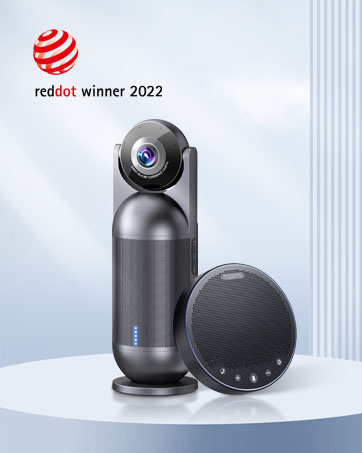
Image: Visual representation of EMEET's support commitments: 24-hour reply, 2-year warranty, and lifetime technical support.


