Introducció
Welcome to the iRobot Roomba i1 (1152) Robot Vacuum user manual. This guide provides essential information for setting up, operating, maintaining, and troubleshooting your robot vacuum. The Roomba i1 is designed to efficiently clean hard floors and carpets, utilizing Wi-Fi connected mapping technology to navigate your home.
Informació important de seguretat
Before using your Roomba i1 robot vacuum, please read all safety instructions carefully. Failure to follow these instructions may result in electric shock, fire, or serious injury.
- Aquest aparell el poden utilitzar nens a partir de 8 anys i persones amb capacitats físiques, sensorials o mentals reduïdes o amb manca d'experiència i coneixements si han rebut supervisió o instruccions sobre l'ús de l'aparell d'una manera segura i entenen els perills que comporta. .
- Children should not play with the appliance. Cleaning and user maintenance shall not be made by children without supervision.
- Utilitzeu només com es descriu en aquest manual.
- No l'utilitzeu a l'aire lliure ni sobre superfícies humides.
- No permetre que s'utilitzi com a joguina. Cal prestar molta atenció quan l'utilitzen nens o a prop dels nens.
- No l'utilitzeu amb un cable o endoll danyats. Si l'aparell no funciona com hauria de fer, s'ha deixat caure, s'ha fet malbé, s'ha deixat a l'aire lliure o s'ha caigut a l'aigua, torneu-lo a un centre de servei.
- No estireu ni porteu el cable, no utilitzeu el cable com a nansa, no tanqueu una porta al cable ni estireu el cable per vores o cantonades afilades. No feu passar l'aparell per sobre del cable. Mantingueu el cable lluny de les superfícies escalfades.
- No desconnecteu estirant del cable. Per desconnectar, agafa l'endoll, no el cable.
- No manipuleu l'endoll o l'aparell amb les mans mullades.
- No introduïu cap objecte a les obertures. No utilitzar amb cap obertura bloquejada; mantenir lliure de pols, pelusa, cabells i qualsevol cosa que pugui reduir el flux d'aire.
- Mantingueu els cabells, la roba solta, els dits i totes les parts del cos lluny de les obertures i les parts mòbils.
- No agafeu res que estigui cremant o fumant, com ara cigarrets, llumins o cendres calentes.
- No l'utilitzeu per recollir líquids inflamables o combustibles, com ara la gasolina, ni l'utilitzeu en zones on puguin estar presents.
- No l'utilitzeu sense la bossa de pols i/o els filtres al seu lloc.
- Eviteu l'arrencada no intencionada. Assegureu-vos que l'interruptor estigui a la posició apagada abans de connectar-lo a la bateria, agafar o transportar l'aparell.
- Recarregueu només amb el carregador especificat pel fabricant. Un carregador adequat per a un tipus de bateria pot generar un risc d'incendi quan s'utilitza amb un altre paquet de bateries.
- Utilitzeu aparells només amb paquets de bateries específicament designats. L'ús de qualsevol altre paquet de bateries pot crear un risc de lesions i d'incendi.
- Quan no utilitzeu la bateria, manteniu-la lluny d'altres objectes metàl·lics, com ara clips, monedes, claus, claus, cargols o altres objectes metàl·lics petits, que puguin connectar-se d'un terminal a un altre. El curtcircuit entre els terminals de la bateria pot provocar cremades o incendis.
- En condicions abusives, es pot expulsar líquid de la bateria; evitar el contacte. Si es produeix un contacte accidental, esbandiu amb aigua. Si el líquid entra en contacte amb els ulls, també busqueu ajuda mèdica. El líquid expulsat de la bateria pot causar irritació o cremades.
- No utilitzeu una bateria o un aparell que estigui danyat o modificat. Les bateries danyades o modificades poden presentar un comportament impredictible que provoca incendi, explosió o risc de lesions.
- No exposeu una bateria o un aparell al foc ni a una temperatura excessiva. L’exposició al foc o a temperatures superiors a 130 ° C (265 ° F) pot provocar explosions.
- Seguiu totes les instruccions de càrrega i no carregueu la bateria o l'aparell fora de l'interval de temperatura especificat a les instruccions. La càrrega inadequada o a temperatures fora de l'interval especificat pot danyar la bateria i augmentar el risc d'incendi.
- Feu que un reparador qualificat us faci servir només peces de recanvi idèntiques. Això garantirà que es mantingui la seguretat del producte.
- No modifiqueu ni intenteu reparar l'aparell o el paquet de bateries (segons el cas) excepte com s'indiqui a les instruccions d'ús i cura.
Contingut del paquet
Verify that all original components are included in your package:
- iRobot Roomba i1 Robot aspirador
- Estació de càrrega base domèstica
- Cordó de línia
- 1 Lithium Ion Battery (pre-installed)
- Pinzell lateral
- Filter (Cloth Type)
- Dual Multi-Surface Rubber Brushes
Configuració
Follow these steps to set up your Roomba i1 robot vacuum for first use:
- Choose a Location for the Home Base: Place the Home Base charging station against a wall in an open, uncluttered area. Ensure there is at least 1.5 feet (0.5 meters) of clear space on each side of the Home Base and 4 feet (1.2 meters) in front of it.
- Connecteu el cable d'alimentació: Plug the line cord into the Home Base and then into a wall outlet. Ensure the Home Base is powered on.
- Carrega el robot: Place your Roomba i1 onto the Home Base. The robot will emit a tone to confirm it is properly docked and charging. Allow the robot to charge for at least 3 hours before its first cleaning mission. The light ring around the CLEAN button will pulse white while charging and turn solid white when fully charged.
- Descarrega l'aplicació iRobot Home: For full functionality, download the iRobot Home App on your smartphone or tablet. The app will guide you through connecting your robot to your Wi-Fi network and setting up cleaning schedules.
- Connecta't a Wi-Fi: Follow the in-app instructions to connect your Roomba i1 to your home Wi-Fi network. This enables smart features like mapping, scheduling, and integration with voice assistants.

Operating Your Roomba i1
Your Roomba i1 is designed for intelligent and efficient cleaning. Here's how to operate it:
Començar una feina de neteja
- Ús del botó NETEJA: Press the large CLEAN button on top of the robot once to wake it up, then press it again to start a cleaning cycle.
- Utilitzant l'aplicació iRobot Home: Open the app and tap the "CLEAN" button to start a cleaning job from anywhere. You can also schedule cleaning times and customize cleaning preferences through the app.
- Control de veu: The Roomba i1 is compatible with Google Home. Once connected via the iRobot Home App, you can use voice commands like "Hey Google, ask Roomba to start cleaning."
Característiques de neteja
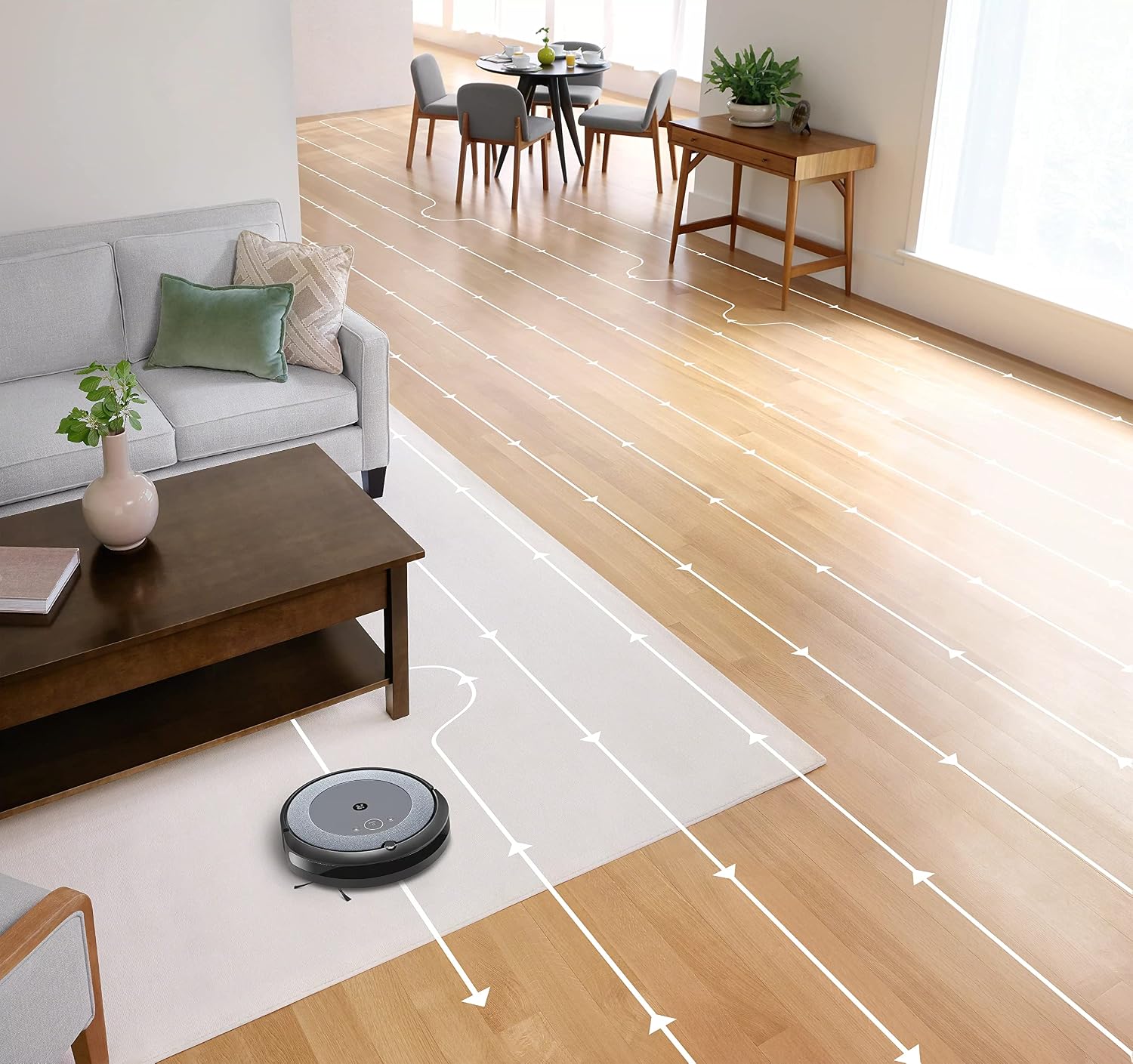
- Navegació intel·ligent: The robot cleans in neat, efficient rows, adapting to different floor types including carpets and hard floors.
- Raspalls de goma multisuperfície dobles: These brushes are designed to prevent tangles with pet hair and effectively pick up dirt and debris from various surfaces.
- Dirt Detect™ Technology: The robot uses acoustic and optical sensors to find dirtier areas and spends more time cleaning them.
- Automatic Dirt Disposal (with compatible Clean Base): If you have a compatible Clean Base (sold separately), the robot will automatically empty its dustbin into an enclosed bag, allowing for weeks of hands-free cleaning.


Manteniment
Regular maintenance ensures your Roomba i1 operates at peak performance. Always turn off the robot and disconnect it from the Home Base before performing any maintenance.
Buidatge de la paperera
- Press the bin release button and pull out the bin.
- Obriu la porta del contenidor i buideu les deixalles en una paperera.
- Colpeja el contenidor contra la paperera per treure les restes atrapades.
Cleaning the Filter (Cloth Type)
- Traieu el filtre del contenidor de pols.
- Colpegeu el filtre contra una paperera per eliminar les restes. No renteu el filtre.
- Replace the filter every 2 months, or more frequently if you have pets.
Neteja dels raspalls
- Pinch the yellow brush release tabs to lift the brush frame.
- Remove the brushes and remove any hair or debris wrapped around them or trapped beneath the yellow caps.
- Torneu a instal·lar els raspalls, assegurant-vos que encaixin al seu lloc.
Neteja del raspall lateral
- Use a coin or small screwdriver to remove the screw holding the side brush.
- Remove the side brush and clean any hair or debris from the brush and its post.
- Torneu a instal·lar el raspall lateral i premeu el cargol.
Neteja dels sensors i contactes de càrrega
- Wipe the charging contacts on the robot and Home Base with a clean, dry cloth.
- Wipe the cliff sensors (located on the bottom of the robot) and the front bumper sensor window with a clean, dry cloth.
Resolució de problemes
If your Roomba i1 encounters an issue, the robot will play an audible alert and the light ring around the CLEAN button will flash. Consult the iRobot Home App for specific error messages and solutions.
Problemes comuns i solucions:
- El robot no es carrega: Ensure the Home Base is plugged in and the robot is properly docked. Clean the charging contacts on both the robot and Home Base.
- Robot stuck or trapped: Clear obstacles from the robot's path. If it frequently gets stuck in the same area, consider using Virtual Wall Barriers (sold separately) or adjusting furniture.
- Mal rendiment de neteja: Empty the dust bin, clean or replace the filter, and clean the main brushes and side brush. Ensure the robot's sensors are clean.
- El robot no es connecta a la Wi-Fi: Ensure your Wi-Fi router is on and within range. Restart your router and the robot. Follow the Wi-Fi setup instructions in the iRobot Home App again.
- Robot making unusual noises: Check the brushes and wheels for any trapped debris or hair. Clean them thoroughly.
For more detailed troubleshooting, refer to the iRobot Home App or the iRobot support weblloc.
Especificacions
| Marca | iRobot |
| Nom del model | Roomba i1 (1152) |
| Característica especial | Smart, Wi-Fi Connected Mapping |
| Color | Negre/Gris |
| Components inclosos | Robot Vacuum, Home Base, Line Cord, Battery, Side Brush, Filter, Dual Multi-Surface Rubber Brushes |
| Tipus de filtre | Tela |
| Font d'alimentació | Funciona amb bateria |
| Bateries | 1 bateria de ions de liti (inclosa) |
| Mètode de control | App |
| Dispositius compatibles | Google Home |
| Factor de forma | Robòtica |
| Dimensions del producte | 13.5 x 3.6 x 13.4 polzades |
| Pes de l'article | 13.2 lliures |
| Recomanació de superfície | Catifes, terres durs |
| UPC | 657768820809 |
| ASIN | B0CPQ3RVDK |
Garantia i Suport
This product is sold as a renewed item. Please refer to the specific warranty terms provided by the seller or Amazon Renewed at the time of purchase. For technical support, troubleshooting assistance, or to purchase replacement parts, please visit the official iRobot support website or contact iRobot customer service. You can also find helpful resources within the iRobot Home App.
Assistència en línia: www.irobot.com/support


