1. Introducció
This manual provides instructions for the iTOMA Model CKS507 Clock Radio. This device combines an alarm clock with a large LED display, FM radio, dual alarms, two USB charging ports, a night light, and both automatic and manual dimmer functions. It also features APP control for enhanced functionality and ease of use.

Figure 1: iTOMA CKS507 Clock Radio overview.
2. Característiques clau
- Ultra Clear 1.4-inch White LED Display: Large numbers for easy readability from any angle, with 4-level manual and auto brightness adjustment.
- Control de l’APP: Manage alarms, radio, and other settings via the dedicated iTOMA App for iOS and Android.
- Alarmes dobles: Set two independent alarms with customizable wake-up modes (radio or buzzer) and 4 alarm week modes (Every day, single day, weekdays, weekends).
- Ràdio FM: Digital tuning with memory storage for up to 20 programmable stations (87.5-108MHz). Features a sleep-to-music timer (10-90 minutes).
- Connectivitat Bluetooth: Reprodueix àudio en streaming sense fil des dels teus dispositius amb Bluetooth.
- Two USB Charging Ports: Includes one USB Type-A and one USB Type-C port (2.1A 5V) for charging mobile devices.
- Llum nocturna: Two-level night light for ambient illumination.
- Funció de posposar: 9-minute snooze, up to 6 times.
- Crescendo Wake-up Control: El volum de l'alarma augmenta gradualment.
3. Contingut del paquet
Verifiqueu que tots els elements siguin presents al paquet:
- 1 x iTOMA CKS507 Clock Radio
- 1 x adaptador de corrent
- 1 x User Manual (Six languages)
4. Configuració
4.1 Connexió d'alimentació
- Unpack the iTOMA CKS507 Clock Radio and its power adapter.
- Connect the power adapter to the DC input port on the back of the clock radio.
- Plug the power adapter into a standard electrical outlet. The clock will automatically set itself to the correct year, month, date, day, and time upon initial power-up and after any power interruption.
4.2 Configuració de control d'aplicacions
The iTOMA App provides convenient control over various clock functions.
- Descarrega l'aplicació: Cerca "iTOMA" in the App Store (iOS) or Google Play Store (Android) and download the application.
- Power On and Bluetooth Activation: Ensure the clock radio is powered on. Press the BT button on the clock. The Bluetooth indicator on the clock display should flash, indicating it is in pairing mode.
- Connecta't mitjançant l'aplicació:
- Open the iTOMA App on your mobile device.
- Tap "Connect" within the App.
- In the pop-up interface, select "Settings" and then connect to the Bluetooth device named "507".
- Confirmació: A successful connection will be indicated by an audible tone from the clock. The App and Bluetooth indicator lights on the clock will remain steadily on.
- Resolució de problemes de connexió: If the App cannot connect, ensure your mobile device's Bluetooth is enabled and the clock's Bluetooth is active (indicator flashing or steady).

Figure 2: Steps for connecting the iTOMA App.
5. Instruccions de funcionament
5.1 Configuració de la data i l'hora
The clock automatically sets the time upon power-up. Manual adjustment is also possible.
- Ajust manual de l'hora: Utilitza el HORA CONFIGURADA button to adjust the year, date, day of the week, and time. Refer to the detailed instructions in the included multi-language manual for specific button sequences.
- Zona horària: Ajusta la zona horària segons la teva ubicació.
- Format 12/24 hores: Seleccioneu el format de visualització de l'hora que preferiu.
5.2 Funcions d'alarma
El ràdio rellotge té dues alarmes independents.

Figure 3: Dual alarm clock functionality.
- Configuració d'alarmes: Use the dedicated alarm buttons or the iTOMA App to set Alarm 1 and Alarm 2.
- Wake-up Modes: Choose to wake up to the FM radio or a buzzer sound.
- Alarm Week Modes: Select from four options: Every day, single day only, weekdays only, or weekends only.
- Volum de l'alarma: Adjust the alarm volume (16 levels). The alarm sound will gradually increase (crescendo wake-up).
- Dormitar: Quan soni una alarma, premeu el botó DORMITAR button to temporarily silence it for 9 minutes. This can be repeated up to 6 times.
- Desactivació de l'alarma: To turn off an alarm, use the physical alarm switch on the back of the unit or disable it via the App. Remember to re-enable it for the next day if needed.
5.3 Ràdio FM
Enjoy your favorite radio stations with digital tuning.

Figure 4: FM Radio tuning and presets via App.
- tuning: Use the tuning controls on the unit or the App to find FM stations (87.5-108MHz).
- Presets: Store up to 20 favorite radio stations for quick access.
- Volum: Adjust the radio volume from 0-16 levels.
- Antena: Ensure the external cable antenna is properly extended for optimal reception.
- Temporitzador de son: Set a programmable sleep-to-music timer (10-90 minutes) to fall asleep to your chosen radio station. The radio will automatically turn off after the set duration.
Transmissió d'àudio Bluetooth 5.4
Connect your mobile device to stream music wirelessly.

Figure 5: Bluetooth music streaming.
- Premeu el botó BT button on the clock radio to enter Bluetooth pairing mode. The Bluetooth indicator will flash.
- On your mobile device, go to Bluetooth settings and select "507" from the list of available devices to pair.
- Once paired, the Bluetooth indicator on the clock will stop flashing and remain steady. You can now stream audio from your device to the clock radio.
5.5 Regulador d'intensitat de la pantalla
Adjust the display brightness for comfort.

Figure 6: Display brightness levels and auto dimmer.
- Manual Dimmer: Utilitza el DIMMER button to cycle through 4 brightness levels (L-1, L-2, L-3, OFF).
- Regulador automàtic: The clock features an auto-dimmer function that adjusts the display brightness based on ambient light conditions, reducing brightness for uninterrupted sleep.
5.6 Llum nocturna
The integrated night light provides soft illumination.
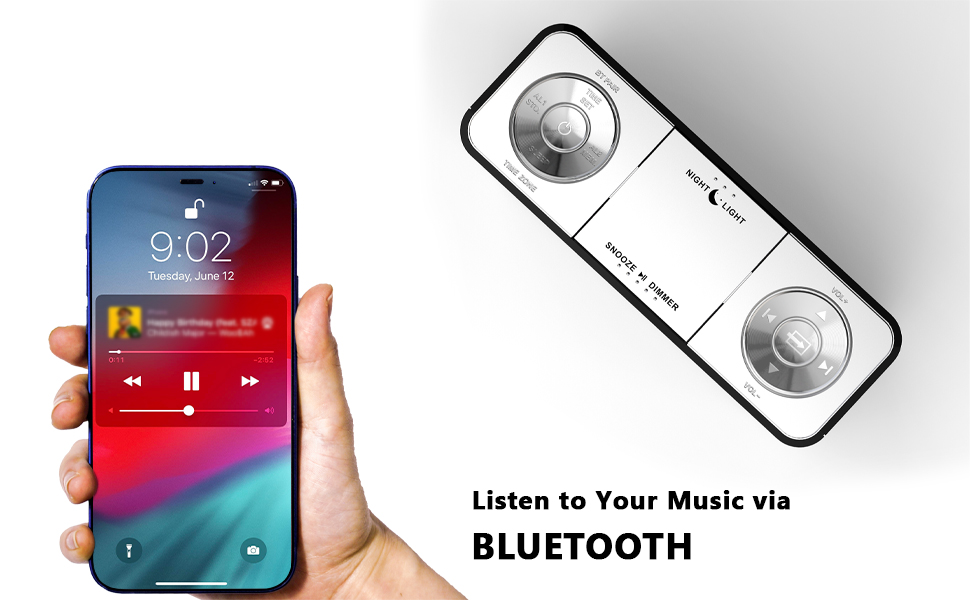
Figure 7: Night light feature.
- Premeu el botó LLUM DE NIT button to activate or adjust the two-level night light.
5.7 ports de càrrega USB
Charge your mobile devices conveniently.
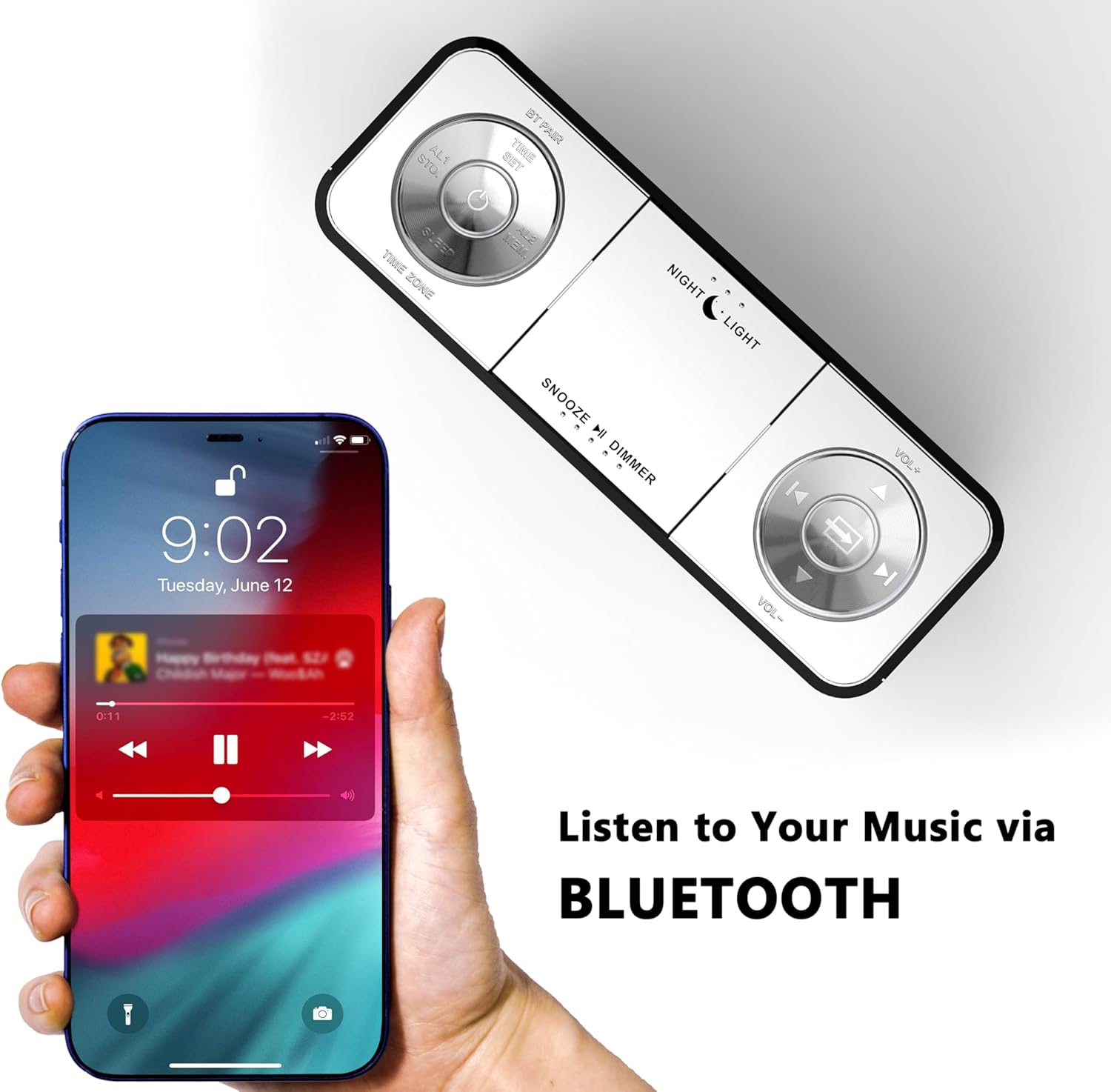
Figure 8: USB charging ports in use.
- The clock radio includes one USB Type-A and one USB Type-C charging port (2.1A 5V total output).
- Connect your mobile phone, tablet, or other USB-powered devices to these ports for charging.
6. Manteniment
- Neteja: Netegeu la unitat amb un drap suau i sec. No utilitzeu productes de neteja abrasius ni dissolvents.
- Desconnexió d'alimentació: Desconnecteu l'adaptador de corrent de la presa de corrent si no heu d'utilitzar la unitat durant un període prolongat.
- Col·locació: Place the clock radio on a stable, flat surface away from direct sunlight, heat sources, and moisture.
7. Solució De Problemes
| Problema | Causa possible | Solució |
|---|---|---|
| La pantalla del rellotge està en blanc o no funciona. | No power or power interruption. | Ensure the power adapter is securely plugged into the clock and a working electrical outlet. |
| Time/Date is incorrect after power interruption. | No battery backup for settings. | The clock automatically resets time upon power restoration. If manual settings were lost, re-enter them using the TIME SET button or App. |
| Cannot connect to the iTOMA App. | Bluetooth is off on the clock or mobile device; incorrect pairing process. | Ensure Bluetooth is enabled on your mobile device. Press the BT button on the clock to activate pairing mode. Follow App connection steps carefully. |
| Mala recepció de ràdio FM. | Antena no estesa o zona amb senyal deficient. | Fully extend the external cable antenna. Try repositioning the antenna or the clock radio for better signal. |
| L'alarma no sona. | Alarm is not set, turned off, or volume is too low. | Verify alarm settings (time, mode, active days) via the clock or App. Ensure alarm volume is set to an audible level. Check the physical alarm switch on the back. |
| La càrrega USB no funciona. | Dispositiu no compatible o cable defectuós. | Ensure your device is compatible with 5V USB charging. Try a different USB cable. Confirm the clock radio is powered on. |
8. Especificacions
| Marca | iTOMA |
| Número de model | CKS 507 |
| Color | Led blanc |
| Tipus de visualització | LED digital |
| Dimensions del producte | 158 mm x 90 mm d'amplada |
| Font d'alimentació | Elèctric amb cable |
| Material del marc | Plàstic |
| Pes de l'article | 1.19 lliures |
| Interval de freqüència FM | 87.5-108 MHz |
| Sortida de càrrega USB | 2.1A 5V (Type-A and Type-C ports) |

Figura 9: Dimensions del producte.
9. Atenció al client
For further assistance, troubleshooting, or warranty information, please contact iTOMA customer support.
- Fabricant: iTOMA
- Assistència en línia: Refer to the official iTOMA website or the contact information provided in your product packaging for the most up-to-date support channels.


