1. Introducció
This manual provides detailed instructions for the installation, operation, and maintenance of your XTRONS 12.3 Inch Android 14 Car Stereo. Please read this manual thoroughly before using the product to ensure proper functionality and to maximize your user experience. Keep this manual for future reference.
2. Models i anys aplicables
This XTRONS car stereo is designed for specific BMW models and years with the CCC system:
- For BMW X5 E70 (2007-2010) with CCC System
- For BMW X6 E71 (2007-2010) with CCC System
Nota important: This unit is compatible ONLY with the original X5 E70 and X6 E71 CCC system. Verify your vehicle's system before installation.

Figure 2.1: Applicable BMW models and visual identification of the CCC system, including the CD/DVD slot, 10-pin LVDS port, and BMW Car Communication Computer Interface.
Notes importants sobre la compatibilitat: If your car comes with NO audio AUX input, you may need to order an FM transmitter (e.g., XTRONS CA/ITR/FM02) to aid in the installation and audio output.
3. Producte acabatview & Característiques
The XTRONS 12.3 Inch Android 14 Car Stereo is an advanced in-car entertainment and navigation system designed to upgrade your driving experience while retaining original vehicle functionalities.

Figure 3.1: Key hardware and software features of the XTRONS Android 14 Car Stereo.
Característiques principals:
- Sistema operatiu: Latest Android 14 with Octa-core processor (2x Cortex-A75, 6x Cortex-A55).
- Memòria i emmagatzematge: 4GB DDR4 RAM and 64GB Solid State ROM for responsive performance and ample app storage.
- Visualització: 12.3-inch IPS Touch Screen with 1920x720 resolution, 178° viewing angle, and fully-laminated design for enhanced clarity and vibrant colors.
- Connectivitat: Global 4G LTE (Micro-SIM card not included, data only), Dual Wi-Fi Band (2.4GHz/5GHz), Bluetooth 5.0 for stable connections, and USB tethering for mobile network sharing.
- Integració del telèfon intel·ligent: Built-in Wireless Car Play and Wireless/Wired Android Auto for seamless smartphone app display and voice commands (Siri/Google Assistant).
- Multitasca: Multi-task Display and Picture-in-Picture (PIP) functionality to run multiple applications simultaneously.
- Àudio: Built-in DSP (Digital Signal Processor) for enhanced audio quality.
- Original Car Function Retention: Seamlessly integrates and retains OEM car-centric functions such as iDrive system, original fiber optic sound system, original radio, original CD player, Bluetooth, backup camera display, and steering wheel controls.
4. Què hi ha a la caixa
Si us plau, comproveu el contingut del vostre paquet amb la llista següent:
- 1 x Arnès de cablejat ISO
- 1 x cable d'àudio
- 1 x Antena GPS
- 1 x pinces
- 1 x antena 4G
- 1 x cable USB
- 1 x manual d'instruccions d'instal·lació
- 1 x Manual d'usuari (aquest document)

Figure 4.1: Contents of the XTRONS car stereo package and unit dimensions.
5. Configuració i instal·lació
Installation of this car stereo requires technical knowledge and experience. It is highly recommended to have the unit installed by a qualified professional to avoid damage to the product or your vehicle. Refer to the included Manual d’instruccions d’instal·lació for detailed, step-by-step guidance.
S'ha acabat el cablejatview:
The wiring harness connects the new head unit to your vehicle's existing electrical system and original components. Familiarize yourself with the connections:

Figure 5.1: Wiring diagram for the XTRONS car stereo, detailing each connection point.
- ISO port: Connects to the original CD player.
- ISO wiring harness: Connexions d'alimentació principal i altaveus.
- SORTIDA D'ÀUDIO: Sortida d'àudio.
- REVERSE-IN: Reversing control cable.
- P. CAM, Camera ACC: Power and control for parking camera.
- ACC: Accessory power.
- MIC: Port de micròfon.
- ENTRADA DE LA CAM: Entrada de càmera.
- USB port1 & USB port2: For USB devices.
- 4G antenna: Per a connectivitat 4G LTE.
- Antena GPS: For GPS navigation.
- LVDS port: For video signal to the display.
- 4G SIM card slot: Insert Micro-SIM for 4G data.
Ensure all connections are secure and correctly routed to prevent damage or malfunction. Pay close attention to cable lengths and routing to avoid strain or interference with other vehicle components.
6. Instruccions de funcionament
6.1 Engegada/apagada
The unit will typically power on automatically with the vehicle's ignition. To manually power off or restart, refer to the on-screen controls or the vehicle's original power button if integrated.
6.2 Smartphone Integration (CarPlay & Android Auto)
The unit supports both Wireless Car Play for iPhones and Wireless/Wired Android Auto for Android phones.

Figure 6.1: Smartphone integration features including Wireless CarPlay, Android Auto, and Screen Mirroring.
- Connexió sense fil: Activa el Bluetooth i el Wi-Fi al teu telèfon intel·ligent. Emparella el telèfon amb l'estèreo del cotxe mitjançant Bluetooth. Un cop emparellat, el sistema et demanarà que activis el CarPlay o Android Auto sense fil.
- Connexió amb cable (Android Auto): Connect your Android phone to one of the USB ports using a compatible USB cable. Follow the on-screen prompts to initiate Android Auto.
- Control de veu: Access Siri or Google Assistant directly from the head unit for navigation, calls, music, and more.
6.3 Internet Access (4G LTE, Wi-Fi, USB Tethering)
The unit offers multiple ways to connect to the internet:

Figure 6.2: Internet connectivity options for the XTRONS car stereo.
- 4G LTE global: Insert a Micro-SIM card (not included) into the designated slot. The unit supports 4G mobile broadband for data access. Note: This is for data only, not phone calls.
- Wi-Fi de doble banda: Connect to available Wi-Fi networks (2.4GHz or 5GHz) for internet access.
- USB Tethering: Connect your smartphone via USB and enable mobile network sharing/tethering on your phone to use its internet connection.
6.4 Funcions originals del cotxe conservades
The XTRONS unit is designed to integrate seamlessly with your BMW's existing systems, retaining many original functions.
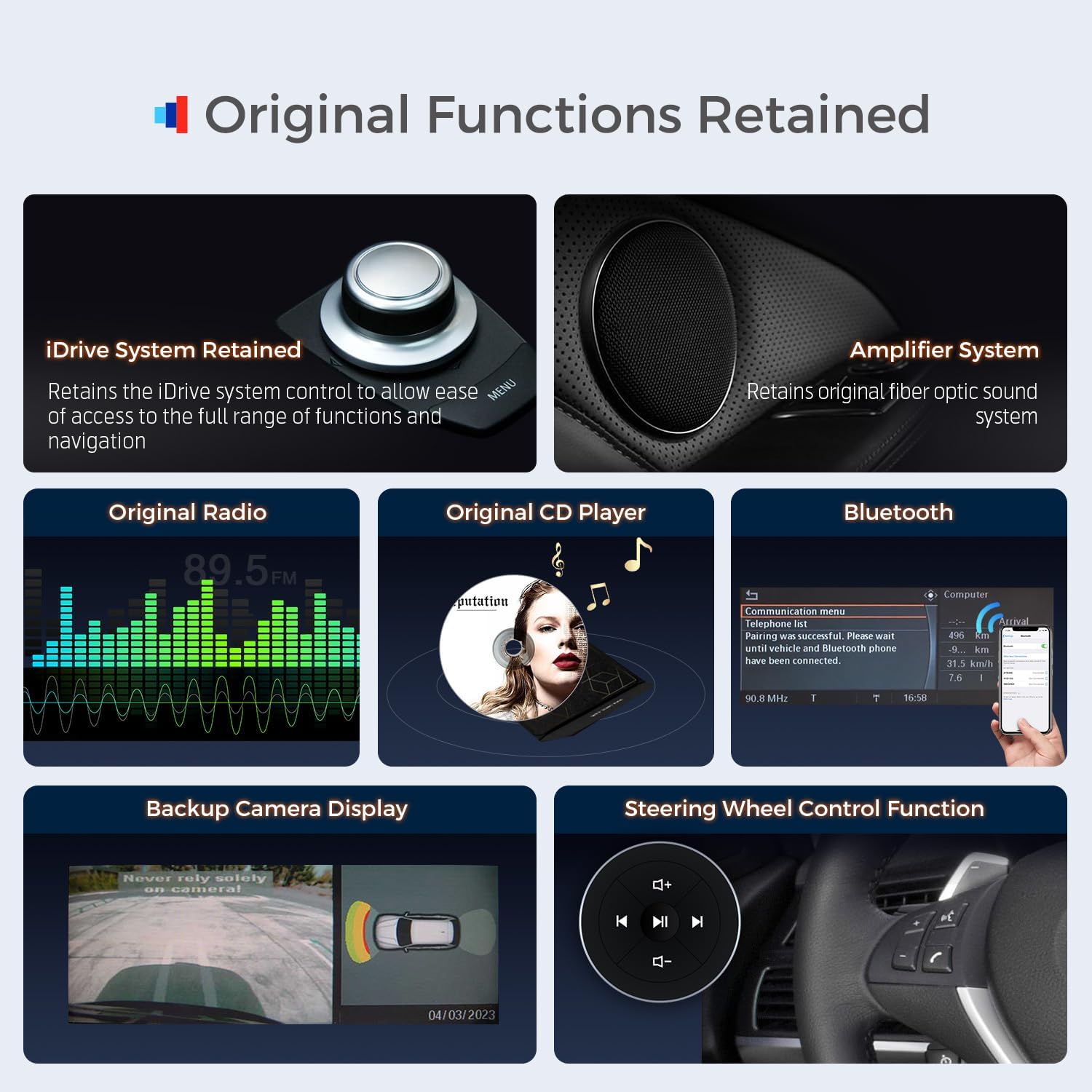
Figure 6.3: Original BMW functions retained after XTRONS car stereo installation.
- iDrive System: Retains the iDrive system control for accessing original functions and navigation.
- AmpSistema més viu: Retains the original fiber optic sound system.
- Original Radio & CD Player: Continue to use your vehicle's original radio and CD player.
- Bluetooth: Original Bluetooth functionality is retained.
- Pantalla de la càmera de marxa enrere: Original backup camera display is supported.
- Controls del volant: Original steering wheel control functions remain operational.

Figure 6.4: Display of original car information on the XTRONS unit.
The unit also displays original car information such as speed, engine speed, fuel level, temperature, parking brake status, and seat belt reminders.
6.5 Funcionament general
- Pantalla tàctil: Navigate the Android interface using the responsive touch screen.
- Pantalla multitasca: Utilize the split-screen feature to run two applications simultaneously (e.g., navigation and music).
- PIP (Imatge en imatge): Watch videos in a small window while using other apps.
7. Manteniment
Un manteniment adequat garanteix la longevitat i el rendiment òptim de l'equip de música del vostre cotxe.
- Neteja de pantalla: Feu servir un drap suau i sense borrissol dissenyat específicament per a pantalles d'electrònica. Dampen the cloth slightly with water or a screen-safe cleaner if necessary. Avoid harsh chemicals or abrasive materials.
- Actualitzacions de programari: Periodically check for software updates provided by XTRONS to ensure you have the latest features, bug fixes, and performance improvements. Follow the on-screen instructions for updating.
- Condicions ambientals: Eviteu exposar la unitat a temperatures extremes, a la llum solar directa durant períodes prolongats o a una humitat excessiva.
- Connexions de cable: Assegureu-vos que tots els cables estiguin ben connectats. Les connexions soltes poden provocar problemes intermitents.
8. Solució De Problemes
If you encounter issues with your XTRONS car stereo, refer to the following common troubleshooting steps:
- Sense energia: Check all power connections, including the ISO wiring harness. Ensure the vehicle's ignition is on. Verify vehicle fuses.
- Sense so: Check audio cable connections. Ensure the volume is not muted or set too low. Verify the correct audio source is selected. If using an FM transmitter for AUX input, ensure it is correctly configured.
- La pantalla tàctil no respon: Prova de reiniciar la unitat. Si el problema persisteix, pot ser necessari restablir les dades de fàbrica (nota: això esborrarà les dades de l'usuari).
- GPS Signal Lost/Inaccurate: Assegureu-vos que l'antena GPS estigui instal·lada correctament i que tingui una vista clara view del cel. Comproveu la connexió de l'antena.
- Problemes de connectivitat Bluetooth/Wi-Fi: Ensure Bluetooth/Wi-Fi is enabled on both the unit and your device. Try unpairing and re-pairing devices. Restart both devices.
- CarPlay/Android Auto no es connecta: Ensure your smartphone is compatible and its operating system is up to date. Check USB cable for damage if using a wired connection. Try restarting both the unit and your phone.
- Funcions originals que no funcionen: Double-check all connections to the original car system (e.g., iDrive, fiber optic cables). Ensure the unit is correctly configured to integrate with your specific BMW CCC system.
- Installation Challenges: Some users have reported challenges with cable length and fuse box placement during installation. Careful planning and routing of cables are essential.
For persistent issues or complex problems, please contact XTRONS technical support.
9. Especificacions
| Característica | Especificació |
|---|---|
| Número de model | B0CQ29PNDT |
| Sistema operatiu | Android 14 |
| Processador | Octa-core (2x Cortex-A75 + 6x Cortex-A55) |
| RAM | 4 GB DDR4 |
| ROM | 64 GB EMMC 5.1 |
| Mida de la pantalla | 12.3 polzades |
| Tipus de visualització | IPS Touch Screen, Fully-laminated |
| Resolució | 1920 x 720 |
| Connectivitat | Global 4G LTE, Dual Band Wi-Fi (2.4GHz/5GHz), Bluetooth 5.0, USB |
| Integració del telèfon intel·ligent | Wireless Car Play, Wireless/Wired Android Auto |
| Característiques especials | Built-in DSP, Multi-task Display, PIP, Retains OEM functions |
| Tipus de muntatge | Muntatge al quadre de comandament |
| Tipus de mapa | North America (pre-loaded/supported) |
10. Garantia i assistència
XTRONS proporciona una 1 any de garantia for this unit, covering manufacturing defects and malfunctions under normal use.
For technical assistance, troubleshooting, or warranty claims, please do not hesitate to contact XTRONS professional technical support. You can reach us via Amazon email, and we will respond promptly to ensure your rights and interests are protected.
Per obtenir recursos addicionals i informació sobre el producte, visiteu Botiga XTRONS a Amazon.
11. Vídeo del producteview
Mireu aquest vídeo per obtenir una visió completaview of the XTRONS 12.3 Inch Android 14 Car Stereo's features and functionality.
Vídeo 11.1: Producte detallat a continuacióview and demonstration of the XTRONS 12.3 Inch Android 14 Car Stereo.


