1. Introducció
This manual provides detailed instructions for the installation, configuration, and operation of your Rebel KOM1031 Dual-Band Wireless Network Repeater. This device is designed to extend the coverage of your existing Wi-Fi network, providing a stronger and more reliable signal in areas with weak or no coverage. It supports both 2.4 GHz and 5 GHz wireless bands, offering flexible connectivity options and high data transfer rates.
2. Contingut del paquet
Si us plau, verifiqueu que tots els elements siguin presents al vostre paquet:
- Rebel KOM1031 Wireless Network Repeater
- Manual d'usuari (aquest document)
- Ethernet Cable (may be included, check packaging)

Figura 2.1: The Rebel KOM1031 Repeater packaging, showing the device and its key features.
3. Producte acabatview
Familiarize yourself with the physical components and indicators of the Rebel KOM1031 Repeater.
3.1. Disseny del dispositiu

Figura 3.1: Davant view of the Rebel KOM1031 Repeater, highlighting the LED indicators and Ethernet ports.

Figura 3.2: lateral view of the Rebel KOM1031 Repeater, showing the four external antennas in an extended position.

Figura 3.3: A baix view of the Rebel KOM1031 Repeater, illustrating the integrated power plug and two RJ45 Ethernet ports.
3.2. Indicadors LED
| Indicador | Estat | Descripció |
|---|---|---|
| SYS/POWER | Encès sòlid | El dispositiu està encès i funciona normalment. |
| 2.4G | Encès sòlid | 2.4 GHz Wi-Fi band is active. |
| 5.8G | Encès sòlid | 5 GHz Wi-Fi band is active. |
| LAN3 / LAN4 | Solid On/Flashing | Indicates an active Ethernet connection and data transfer on the respective LAN port. |
4. Guia de configuració
Follow these steps to set up your Rebel KOM1031 Repeater.
4.1. Initial Placement and Power On
- Trieu una ubicació: Plug the repeater into an electrical outlet in an area between your main router and the location where you need improved Wi-Fi coverage. Ensure it is within the range of your existing Wi-Fi signal.
- Encès: Plug the device directly into a standard wall socket. The SYS/POWER LED should illuminate. Wait approximately 30-60 seconds for the device to boot up.
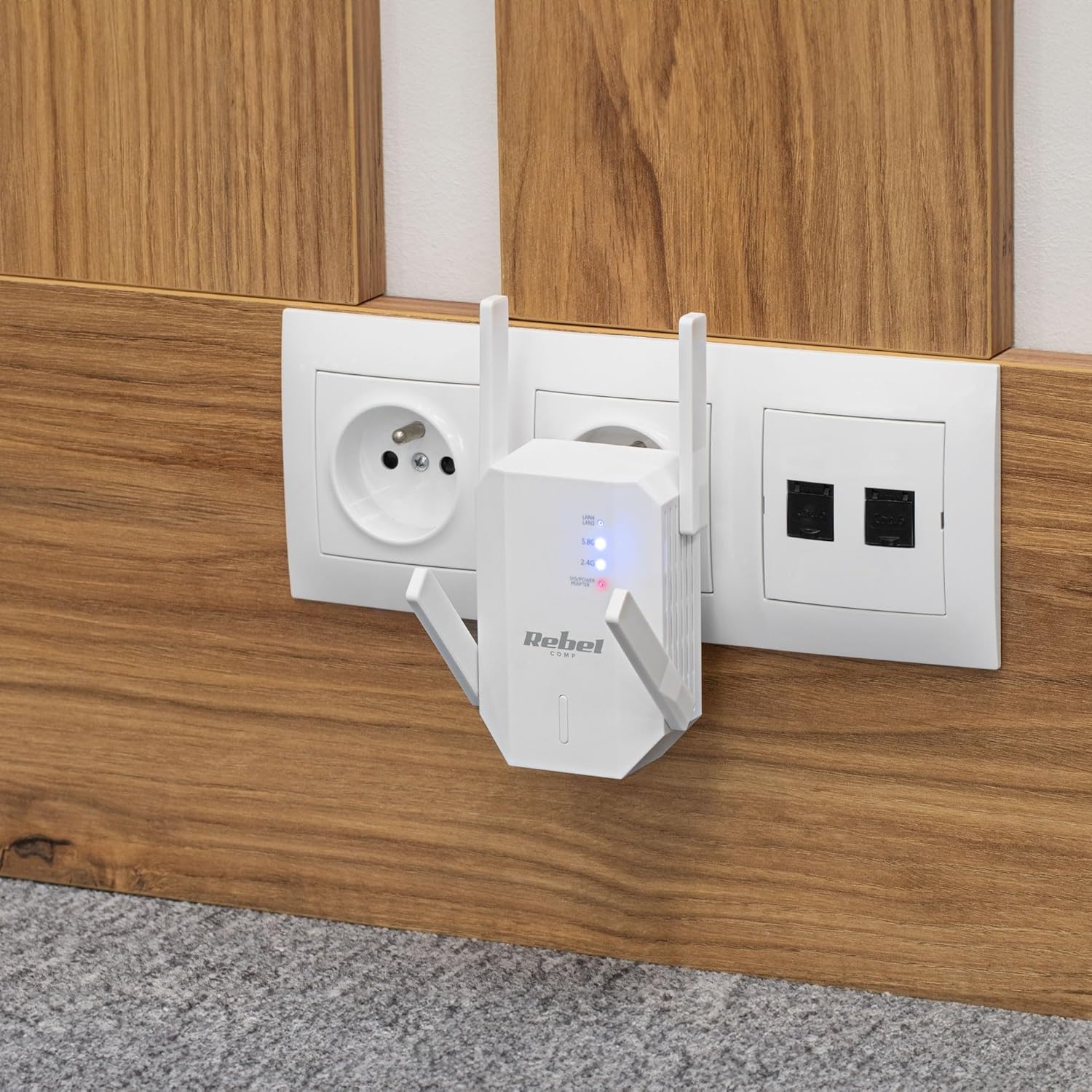
Figura 4.1: The Rebel KOM1031 Repeater plugged into a wall outlet, ready for configuration.
4.2. Connecting to the Repeater
- Connecta't sense fil: On your computer or mobile device, search for available Wi-Fi networks. Connect to the network named "Rebel_XXXX" or similar (check the label on the device for the default SSID). No password is required for the initial connection.
- Accés Web Interfície: Obre a web browser (e.g., Chrome, Firefox, Edge) and enter the default IP address or domain name (usually 192.168.10.1 or rebelrepeater.net) a la barra d'adreces. Premeu Intro.
- Inici de sessió: When prompted, enter the default username and password (usually admin per a tots dos).
4.3. Configuration Wizard (Repeater Mode)
Most users will configure the device in Repeater Mode to extend an existing Wi-Fi network.
- Select Repeater Mode: A la web interface, select "Repeater Mode" or "Wi-Fi Repeater" from the available options.
- Escaneja per a xarxes: The device will scan for available Wi-Fi networks. Select your main Wi-Fi network (SSID) from the list.
- Introduïu la contrasenya: Enter the Wi-Fi password (security key) of your main router.
- Configure Repeater SSID (Optional): You can choose to keep the same SSID as your main network or create a new one (e.g., "MyHome_EXT"). It is recommended to use a different SSID to easily distinguish between networks.
- Aplica la configuració: Click "Apply" or "Save" to confirm your settings. The repeater will restart. This process may take a few minutes.
- Torneu a connectar: After the repeater restarts, disconnect from the repeater's default Wi-Fi network and connect to your newly configured extended network (e.g., "MyHome_EXT") using the password you entered.
Your Rebel KOM1031 Repeater should now be extending your Wi-Fi network. Check the signal strength in previously weak areas.
5. Modes de funcionament
The Rebel KOM1031 supports multiple operating modes to suit various networking needs.
5.1. Repeater Mode (Default)
In Repeater Mode, the device extends the coverage of an existing wireless network. It receives the wireless signal from your main router and re-transmits it, effectively expanding the Wi-Fi range. This is the most common mode for eliminating Wi-Fi dead zones.
5.2. Access Point (AP) Mode
In AP Mode, the device connects to a wired network (via an Ethernet cable) and broadcasts a new wireless network. This is useful for adding Wi-Fi capability to a wired-only network or creating a new Wi-Fi hotspot from a wired internet connection.
- Connecta Ethernet: Connect an Ethernet cable from your router or modem to one of the RJ45 ports on the KOM1031.
- Accés Web Interfície: Follow steps 4.2 to access the web interfície.
- Seleccioneu el mode AP: Choose "AP Mode" or "Access Point" from the configuration options.
- Configura la configuració de Wi-Fi: Set a new SSID (network name) and a strong password for your new wireless network.
- Aplica la configuració: Save the configuration. The device will restart and operate as an Access Point.
6. Manteniment
Un manteniment adequat garanteix la longevitat i el rendiment òptim del vostre dispositiu.
- Neteja: Feu servir un drap suau i sec per netejar el dispositiu. No utilitzeu netejadors líquids ni aerosols.
- Ventilació: Ensure the device is placed in a well-ventilated area. Do not block the ventilation slots.
- Actualitzacions de firmware: Reviseu periòdicament el fabricant website for firmware updates. Updating firmware can improve performance and security.
- Restabliment: If the device malfunctions or you forget the login credentials, you can perform a factory reset. Locate the reset button (usually a small pinhole) and press it with a paperclip for 5-10 seconds while the device is powered on. The device will revert to factory default settings.
7. Solució De Problemes
Si teniu problemes, consulteu els problemes i solucions habituals següents.
7.1. No Internet Access After Setup
- Check Main Router: Assegureu-vos que el vostre encaminador principal tingui una connexió a Internet activa.
- Verifica la contrasenya: Double-check that you entered the correct Wi-Fi password for your main router during setup.
- Relocate Repeater: The repeater might be too far from your main router. Move it closer to ensure it receives a strong signal.
- Reinicieu els dispositius: Restart your main router, the repeater, and your client devices.
7.2. No es pot accedir Web Pàgina de gestió
- Comprova la connexió: Ensure your device is connected to the repeater's Wi-Fi network (either the default "Rebel_XXXX" or your configured extended network).
- Verifica l'adreça IP: Confirm you are using the correct IP address (e.g., 192.168.10.1) or domain name (rebelrepeater.net).
- Esborra la memòria cau del navegador: Try clearing your web browser's cache or using a different browser.
- Restabliment de fàbrica: If all else fails, perform a factory reset (see Section 6. Maintenance) and try setting up again.
7.3. Weak Signal or Slow Speed
- Col·locació òptima: Ensure the repeater is placed optimally, roughly halfway between your router and the dead zone. Avoid physical obstructions like thick walls or metal objects.
- Interferència: Altres dispositius electrònics (microones, telèfons sense fil) poden causar interferències. Intenteu allunyar el repetidor d'aquests dispositius.
- Ajust de l'antena: Adjust the external antennas for better signal reception and transmission.
8. Especificacions tècniques
| Característica | Detall |
|---|---|
| Model | KOM1031 |
| Marca | Rebel |
| Chipset | MTK7612 |
| Estàndards sense fil | IEEE 802.11 a/b/g/n/ac |
| Bandes de freqüència | 2.4 GHz / 5 GHz (Dual-Band) |
| Velocitat de transmissió de dades | Fins a 300 Mbps (2.4 GHz), Fins a 867 Mbps (5 GHz) |
| Antenes | 4 External (2 dBi each) |
| Protocols de seguretat | WEP, WPA/WPA2, WPS (64/128 bit) |
| Ports Ethernet | 2x RJ45 (10/100 Mbps) |
| abast sense fils | Up to 100 meters (environment dependent) |
| Font d'alimentació | 110-240 V; 50/60 Hz; 2 A |
| Dimensions | 87 x 63 x 55 mm |
| Pes | 76 g |
| Usuaris simultanis | Admet fins a 10 usuaris simultàniament |
9. Informació de seguretat
Please read and follow these safety guidelines to prevent damage to the device or injury to yourself.
- No exposeu el dispositiu a l'aigua, la humitat ni a temperatures extremes.
- No intenteu desmuntar ni reparar el dispositiu vosaltres mateixos. Encarregueu tot el manteniment a personal qualificat.
- Ensure the power outlet used is easily accessible and provides the correct voltagi (110-240V).
- Eviteu col·locar el dispositiu a prop de fonts de calor o sota la llum solar directa.
- Mantingueu el dispositiu allunyat dels nens i de les mascotes.
10. Garantia i Suport
For warranty information, technical support, or further assistance, please refer to the official Rebel website or contact your retailer. Please have your product model number (KOM1031) and purchase details ready when seeking support.


