Introducció
This user manual provides comprehensive instructions for the installation, operation, and maintenance of your Kolink Unity Arena Mid-Tower PC Case. Please read this manual carefully before beginning assembly to ensure proper setup and to maximize the performance and longevity of your system. Keep this manual for future reference.
Producte acabatview
The Kolink Unity Arena is a mid-tower PC case designed for high-performance gaming systems. It features a borderless glass side panel for an unobstructed view of internal components and comes with four pre-installed Kolink Umbra X ARGB/PWM fans for efficient cooling and customizable lighting. The spacious interior supports E-ATX motherboards and large graphics cards up to 420mm, including NVIDIA RTX 40 series. It also accommodates up to three radiators for advanced liquid cooling solutions and includes a dedicated half PSU shroud for clean cable management.

Imatge: Davant-esquerra view of the Kolink Unity Arena PC case, showcasing the borderless glass side panel and three pre-installed RGB fans on the front.
- Mid-Tower Design: Optimized for a balance of size and component compatibility.
- Borderless Glass Panels: Provides an uninterrupted view of your internal hardware.
- Extensive Hardware Support: Compatible with E-ATX motherboards and GPUs up to 420mm, including NVIDIA RTX 40 series.
- Refrigeració avançada: Supports up to three radiators and includes four pre-installed Kolink Umbra X ARGB/PWM fans.
- Dedicated PSU Shroud: A half power supply shroud helps maintain a clean and organized interior.
Especificacions
| Marca | Kolink |
| Nom del model | Unity Arena |
| Número de model | UNITYARENABLK |
| Color | Negre |
| Tipus de cas | Torre mitja |
| Material | Acer d'aliatge |
| Compatibilitat amb la placa base | ATX estès |
| Característiques especials | RGB Lighting, Pre-installed Fans |
| Dispositius compatibles | High-performance gaming components |
| Usos recomanats | Jocs |
| Tipus de muntatge de la font d'alimentació | Muntatge inferior |
| Mètode de refrigeració | Aire |
| Mida del ventilador | 120 mil·límetres |
Configuració i instal·lació
Follow these steps to properly set up and install your components into the Kolink Unity Arena PC case.
1. Desembalatge i preparació
- Traieu amb cura la carcassa de l'ordinador del seu embalatge.
- Col·loqueu la caixa sobre una superfície plana i estable.
- Identify the accessory box, which contains screws, zip ties, and other small parts.
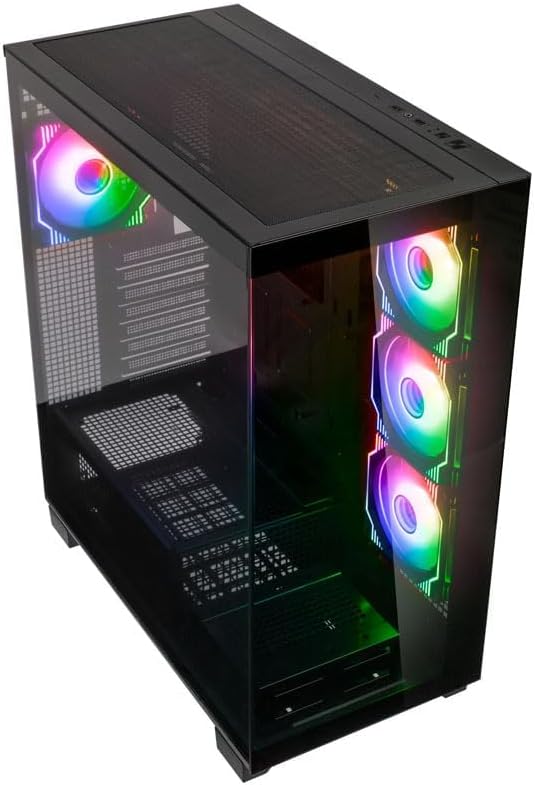
Imatge: Part superior angular view of the Kolink Unity Arena PC case, highlighting the top ventilation and the illuminated RGB fans visible through the front glass panel.
2. Removing Panels
- Glass Side Panel: The borderless glass side panel is typically secured with thumbscrews at the rear. Unscrew these and carefully slide or lift the panel off. Place it on a soft, non-abrasive surface to prevent scratches.
- Solid Side Panel: The solid right-side panel (behind the motherboard tray) is also usually secured with thumbscrews. Remove these to access the cable management area.
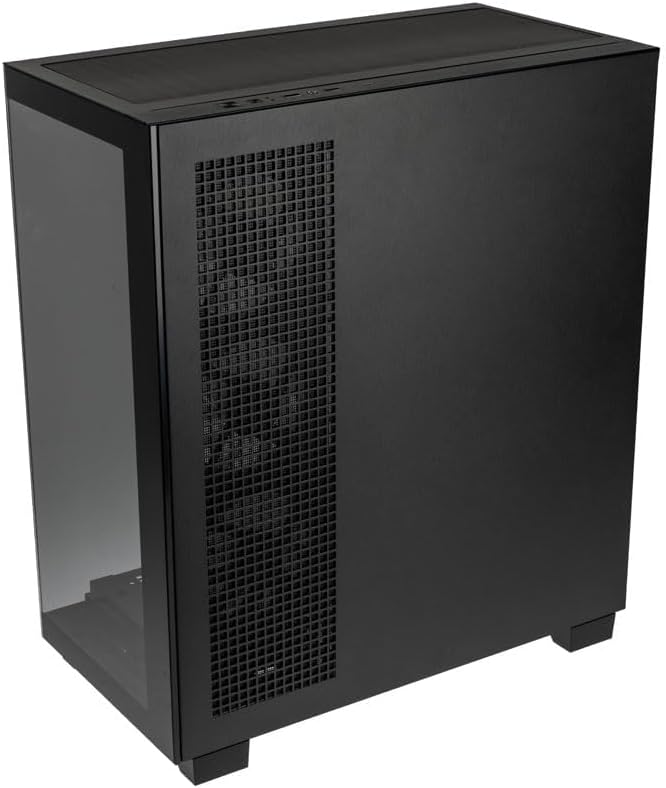
Imatge: Darrera-dreta view of the Kolink Unity Arena PC case, showing the solid right side panel and the rear exhaust fan area.
3. Instal·lació de la placa base
- Install the I/O shield (if not pre-attached to your motherboard).
- Align your E-ATX or smaller motherboard with the standoffs inside the case.
- Fixeu la placa base amb els cargols adequats del kit d'accessoris.

Imatge: Interior view of the Kolink Unity Arena PC case from the front, displaying the motherboard tray, the three front-mounted fans, and the PSU shroud at the bottom.
4. Instal·lació de la targeta gràfica (GPU)
- Traieu les cobertes de les ranures PCIe necessàries a la part posterior de la carcassa.
- Insert your graphics card into the primary PCIe slot on the motherboard.
- Secure the GPU with screws. The case supports GPUs up to 420mm in length.
5. Storage Device Installation (HDDs/SSDs)
Refer to the case's internal layout for specific drive bay locations and mounting mechanisms. Typically, 2.5" SSDs mount on the back of the motherboard tray, and 3.5" HDDs are installed in a drive cage near the PSU shroud.
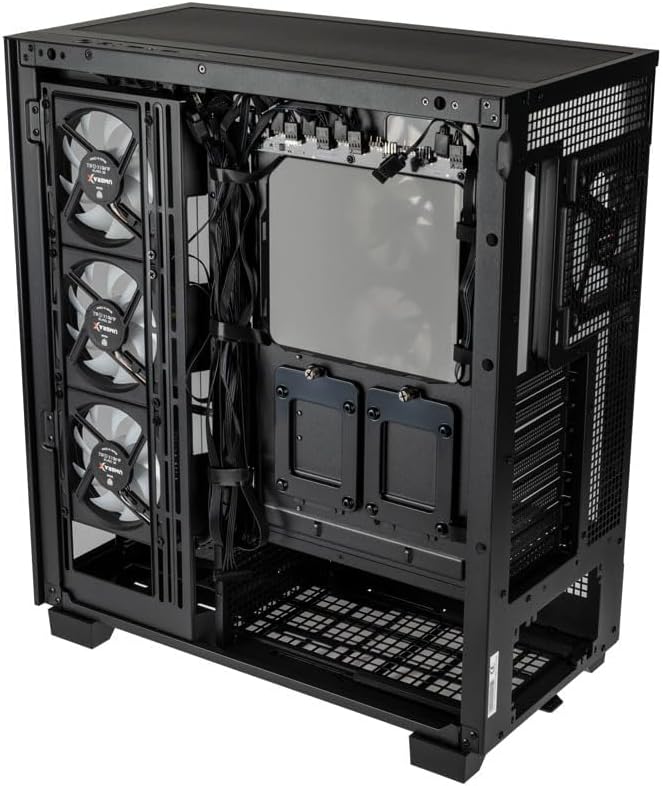
Imatge: Interior posterior view of the Kolink Unity Arena PC case, focusing on the cable management area behind the motherboard tray and drive mounts.
6. Instal·lació de la font d'alimentació (PSU)
- Mount your ATX power supply into the dedicated half PSU shroud at the bottom rear of the case.
- Secure it with screws from the rear of the case.
7. Instal·lació del ventilador i del radiador
- The case comes with four pre-installed Kolink Umbra X ARGB/PWM fans.
- Additional fans or radiators can be installed at the top, front, or rear depending on your cooling needs. The case supports up to three radiators.

Imatge: Close-up of the three pre-installed Kolink Umbra X fans mounted at the front of the Kolink Unity Arena PC case, highlighting their design.
8. Connexió d'E/S frontals
Connect the front panel cables (USB, audio, power switch, reset switch, LED indicators) to the corresponding headers on your motherboard. Refer to your motherboard manual for exact header locations.

Imatge: Close-up of the top I/O panel of the Kolink Unity Arena PC case, featuring USB ports, audio jacks, and power/reset buttons.
9. Gestió de cables
Aprofita els retalls de cables i els punts d'amarratge que hi ha darrere de la safata de la placa base per organitzar els cables. Això millora la circulació del flux i l'estètica.
Instruccions de funcionament
Encès
Once all components are installed and connected, ensure the power supply switch is in the 'ON' position. Press the power button on the front I/O panel to start your system.
Control d'il·luminació RGB
The pre-installed Kolink Umbra X fans feature ARGB lighting. The case includes a built-in controller with a SATA power input. Connect this controller to your power supply. If your motherboard does not support ARGB control, you can typically manage the lighting effects using the reset button on the front I/O panel, which often doubles as an RGB mode switch when connected to the case's controller.
Manteniment
Un manteniment regular ajuda a garantir un rendiment òptim i allarga la vida útil dels components del teu PC.
- Filtres de pols: The Kolink Unity Arena case is equipped with dust filters. Periodically remove and clean these filters (e.g., top, front, bottom) to prevent dust buildup inside the case. Use compressed air or wash them gently with water and allow them to dry completely before reinstallation.
- Neteja interior: With the system powered off and unplugged, carefully open the side panels and use compressed air to remove dust from internal components, especially heatsinks and fan blades.
- Neteja del ventilador: Gently clean the blades of the pre-installed fans with a soft brush or compressed air to maintain efficient airflow.
Resolució de problemes
Si teniu problemes durant o després del muntatge, tingueu en compte els passos habituals següents per resoldre problemes:
- El sistema no s'encén:
- Assegureu-vos que el cable d'alimentació estigui connectat correctament tant a la font d'alimentació com a la presa de corrent.
- Verifiqueu que l'interruptor de la font d'alimentació estigui en la posició "ON".
- Check all power connections to the motherboard (24-pin ATX, 8-pin CPU) and GPU.
- Confirmeu que el cable de l'interruptor d'alimentació del panell frontal estigui connectat correctament a la capçalera de la placa base.
- Els ventiladors no giren / Els RGB no funcionen:
- Comproveu les connexions d'alimentació del ventilador a la placa base o al controlador del ventilador.
- Ensure ARGB cables are properly connected to the motherboard's ARGB header or the case's integrated controller.
- If using the case's controller, verify it is receiving SATA power.
- Sense sortida de pantalla:
- Ensure your monitor cable is connected to the graphics card, not the motherboard's integrated graphics port (unless you are using integrated graphics).
- Torneu a col·locar la targeta gràfica a la ranura PCIe.
- Check GPU power connections.
Garantia i Suport
For warranty information, please refer to the documentation provided with your purchase or contact your retailer. Kolink's official website may also provide details regarding product support and warranty terms.
- Disponibilitat de peces de recanvi: Informació no disponible.
- Actualitzacions de programari garantides fins a: Informació no disponible.
For technical assistance or further inquiries, please visit the official Kolink support weblloc o poseu-vos en contacte amb el seu departament d'atenció al client.


