1. Instruccions de seguretat importants
Please read all instructions carefully before using the ILIFE X1000 Robotic Vacuum Cleaner. Retain this manual for future reference.
- Aquest aparell està pensat per a ús comercial.
- No permeteu que els nens facin servir el robot. Superviseu els nens i les mascotes mentre el robot estigui en funcionament.
- Ensure the charging dock is placed against a wall in an open area, free from obstacles.
- Do not use the robot in wet environments or on surfaces with standing water.
- Remove any loose cables, small objects, or fragile items from the cleaning path to prevent entanglement or damage.
- Use only the original power adapter and charging dock provided by ILIFE.
- Do not attempt to repair or modify the robot yourself. Contact ILIFE customer support for service.
- Always turn off the robot and disconnect it from the power source before performing any maintenance or cleaning.
2. Contingut del paquet
Verifiqueu que tots els elements siguin presents al paquet:
- Aspiradora robòtica ILIFE X1000
- Base de càrrega
- Adaptador d'alimentació
- Raspalls laterals (2 parells)
- High-Efficiency Filter (pre-installed in dustbin)
- Manual d'usuari
3. Producte acabatview
3.1 Components del robot
Familiarize yourself with the main parts of your ILIFE X1000 robot.

Figura 3.1: Davant view of the ILIFE X1000 Robotic Vacuum Cleaner, showing the main body, front bumper, and side brushes.

Figura 3.2: A dalt view of the ILIFE X1000, highlighting the integrated touch screen display and LiDAR sensor module.
- LiDAR Navigation Sensor: Situat a la part superior, s'utilitza per a la cartografia i la navegació precises.
- Pantalla tàctil: Interactive interface for direct control and status updates.
- AI Stereo Camera: Assists in object recognition and obstacle avoidance.
- 3D Time-of-Flight (ToF) Sensors: Enhance environmental perception and mapping accuracy.
- Polvorí: Large 3L capacity, easily detachable for emptying.
- Raspalls laterals: Two brushes to sweep debris from edges and corners into the cleaning path.
- Pinzell principal: Situat a sota, per a la neteja profunda de catifes i terres durs.
- Rodes motrius: Allow the robot to traverse various floor types and small obstacles.
- Contactes de càrrega: On the underside, for automatic recharging at the charging dock.
3.2 Característiques clau
The ILIFE X1000 is designed for efficient and autonomous cleaning in commercial environments.
- Succió potent: Delivers 20,000Pa suction power for thorough cleaning of various debris.
- Navegació avançada: Utilizes 3D ToF Sensors and LiDAR Technology for accurate 3D mapping and navigation.
- AI Object Recognition: AI Stereo Camera identifies and avoids common obstacles like shoes, cables, and socks.
- Cobertura de grans àrees: Capable of cleaning areas up to 1000m² with dual detachable batteries.
- Temps d'execució estès: Provides up to 200 minutes of continuous cleaning on a single charge.
- Neteja personalitzada: Supports app-controlled cleaning schedules, no-go zones, and specific area cleaning.
- Auto-Recharge & Resume: Torna automàticament a la base de càrrega quan la bateria està baixa i reprèn la neteja des d'on ho va deixar.
- Interfície fàcil d'utilitzar: Operates via an intuitive touch screen and a dedicated mobile application.

Figura 3.3: Visual representation of key features: 20000Pa suction, customized cleaning options, 3L dustbox capacity, and sensitive touch screen operation.

Figura 3.4: Illustration of the robot's advanced navigation system, including 3D ToF sensors, LiDAR technology for precise mapping, and AI stereo camera for object recognition.
4. Configuració
4.1 Desembalatge i preparació inicial
- Carefully remove the robot and all accessories from the packaging.
- Traieu totes les pel·lícules o adhesius protectors del robot i de la base de càrrega.
- Attach the side brushes by pressing them onto the square posts on the underside of the robot until they click into place.
4.2 Col·locació de la base de càrrega
Proper placement of the charging dock is crucial for the robot's autonomous operation.
- Place the charging dock against a wall in an area with good Wi-Fi signal.
- Ensure there is at least 1 meter (3 feet) of clear space on both sides of the dock and 2 meters (6 feet) in front of it.
- Connect the power adapter to the charging dock and plug it into a power outlet. The indicator light on the dock will illuminate.
4.3 Càrrega inicial
Abans del primer ús, carregueu completament el robot.
- Place the robot onto the charging dock, ensuring the charging contacts align.
- The robot's display will show charging status. A full charge typically takes 4-6 hours.
- For optimal battery life, allow the robot to fully charge before its first cleaning cycle.
4.4 Connexió a l'aplicació
Download the ILIFE app to unlock full control and advanced features.
- Scan the QR code in the manual or search for "ILIFE" in your app store to download the official app.
- Create an account and follow the in-app instructions to add your X1000 robot.
- Assegureu-vos que la vostra xarxa Wi-Fi sigui de 2.4 GHz per a una connexió correcta.
5. Instruccions de funcionament
5.1 Inici d'un cicle de neteja
- Via Touch Screen: Tap the 'Clean' button on the robot's display.
- Mitjançant l'aplicació: Open the ILIFE app, select your X1000, and tap 'Start Cleaning'.
- The robot will automatically map the area and begin cleaning.
5.2 modes de neteja
The X1000 offers various cleaning modes to suit different needs:
- Neteja automàtica: The default mode, where the robot intelligently navigates and cleans the entire accessible area.
- Neteja de punts: Directs the robot to intensively clean a specific small area. Activate via app or touch screen.
- Neteja de vores: The robot cleans along walls and furniture edges. Selectable via app.
- Customized Area Clean: Use the app to draw specific areas on the map for the robot to clean or avoid (no-go zones).
5.3 Programació de la neteja
Set up recurring cleaning schedules using the ILIFE app.
- Open the ILIFE app and navigate to the scheduling section.
- Establiu els dies i horaris de neteja desitjats.
- El robot començarà la neteja automàticament a les hores programades.

Figura 5.1: The ILIFE X1000 supports smart app and voice control, offering up to 200 minutes of runtime, making it suitable for various commercial environments like workshops, warehouses, and offices.
6. Manteniment
Regular maintenance ensures optimal performance and extends the lifespan of your ILIFE X1000.
6.1 Buidar el contenidor d'escombraries
- Press the dustbin release button and pull out the 3L dustbin.
- Obriu la tapa de la paperera i buideu-ne el contingut en un contenidor d'escombraries.
- Esbandiu el contenidor de pols amb aigua si cal, assegurant-vos que estigui completament sec abans de tornar-lo a inserir.
6.2 Neteja de filtres
The X1000 uses a 4-layer filter system, including HEPA and Microfilters.
- Remove the filters from the dustbin.
- Tap the filters gently to remove loose dust. Do not wash HEPA filters with water.
- Canvieu els filtres cada 3-6 mesos, depenent de l'ús.
6.3 Neteja dels raspalls laterals i del raspall principal
- Periodically check side brushes for tangled hair or debris. Pull them off to clean.
- Remove the main brush cover on the underside of the robot. Lift out the main brush and use the cleaning tool (if provided) to remove hair and debris.
6.4 Neteja dels sensors i els contactes de càrrega
- Wipe the cliff sensors, anti-collision sensors, and charging contacts on both the robot and the charging dock with a clean, dry cloth.
- Ensure the LiDAR sensor window is clean and free from obstructions.
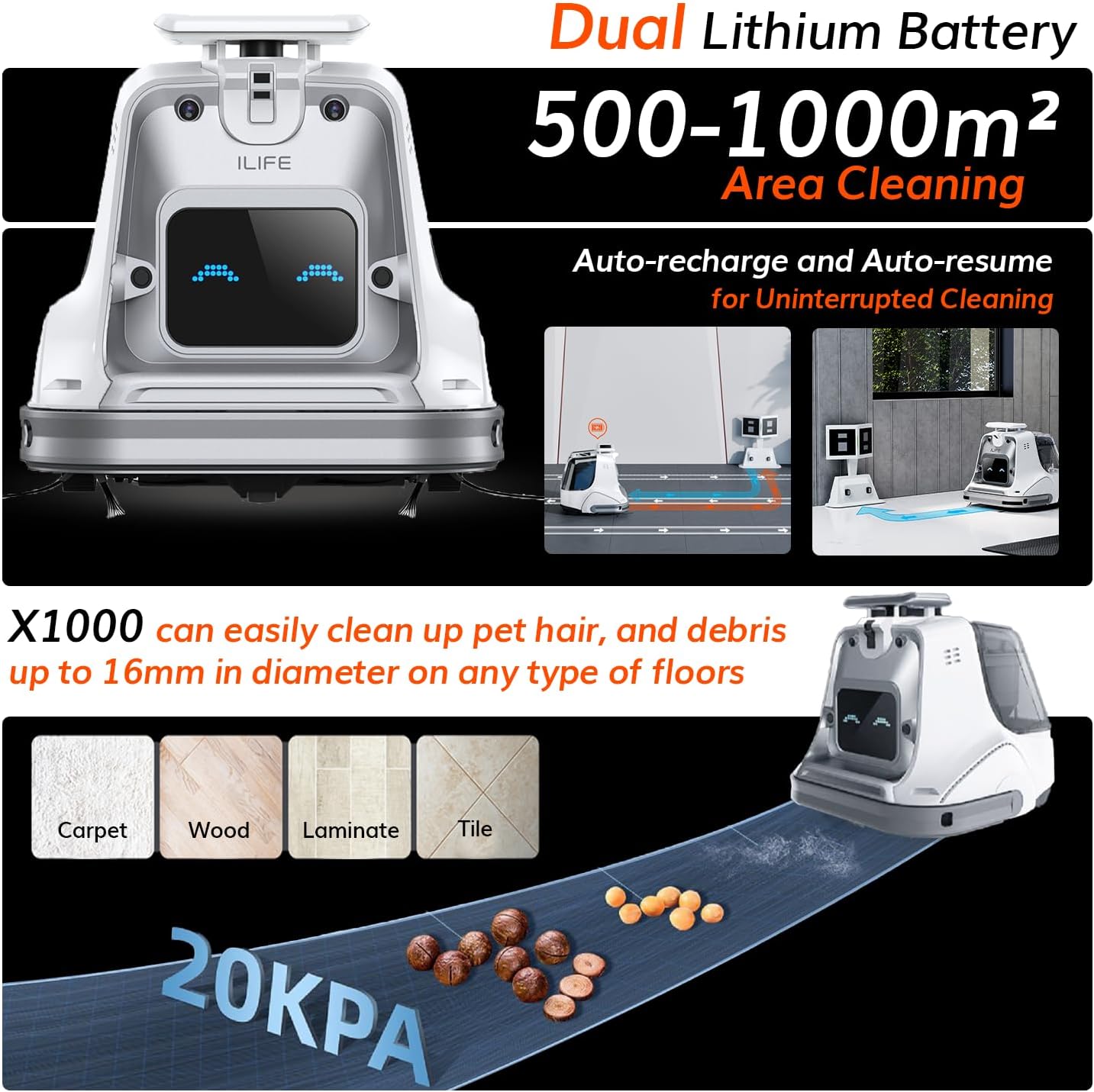
Figura 6.1: The ILIFE X1000 effectively cleans debris up to 16mm on carpet, wood, laminate, and tile floors, featuring dual lithium batteries for 500-1000m² area cleaning and auto-recharge/resume for uninterrupted operation.
7. Solució De Problemes
If you encounter issues with your ILIFE X1000, refer to the following common problems and solutions.
| Problema | Causa possible | Solució |
|---|---|---|
| El robot no s'encén | Bateria baixa; interruptor apagat | Place robot on charging dock; Ensure power switch is ON. |
| El robot no es pot carregar | Contactes de càrrega bruts; Base d'acoblament sense alimentació | Clean charging contacts; Check power adapter connection. |
| El robot s'enganxa sovint | Obstacles; Cables solts | Clear cleaning path; Use no-go zones in app. |
| Mal rendiment de neteja | Full dustbin; Clogged filters/brushes | Empty dustbin; Clean or replace filters/brushes. |
| Error de connexió de l'aplicació | Incorrect Wi-Fi; Robot offline | Ensure 2.4GHz Wi-Fi; Restart robot and router; Re-pair in app. |
For issues not listed here, or if problems persist, please contact ILIFE customer support.
8. Especificacions
Technical specifications for the ILIFE X1000 Robotic Vacuum Cleaner.
| Característica | Especificació |
|---|---|
| Marca | ILIFE |
| Nom del model | X1000 |
| Potència d'aspiració | 20,000 Pa |
| Tecnologia de navegació | 3D Time-of-Flight (ToF) Sensors, LiDAR Technology, AI Stereo Camera |
| Dust-Box Capacity | 3 litres |
| Tipus de bateria | Dual Lithium Battery |
| Temps d'execució | Fins a 200 minuts |
| Àrea de cobertura | Fins a 1000 m² |
| Mètode de control | Aplicació, pantalla tàctil |
| Dispositius compatibles | Amazon Echo, Google Home, telèfons intel·ligents |
| Tipus de filtre | Filtre de 4 capes, filtre d'alta eficiència, HEPA, microfiltre |
| Dimensions del producte | 14.8 cm de llargada x 14.65 cm d'amplada x 14.37 cm d'alçada |
| Pes de l'article | 24.9 lliures |
9. Garantia i Suport
ILIFE provides a limited warranty for the X1000 Robotic Vacuum Cleaner. Please refer to the warranty card included in your package for specific terms and conditions.
For technical support, warranty claims, or any questions regarding your ILIFE X1000, please contact ILIFE customer support through the official weblloc web o la informació de contacte que es proporciona a la documentació de la garantia.
També podeu visitar el ILIFE Store on Amazon per obtenir més informació i recursos de suport.


