1. Introducció
This manual provides instructions for the Jolly Line JL1719/COMP Universal TV Remote Control, designed for compatibility with Philips televisions. This remote is ready to use without requiring any programming.
Les característiques clau inclouen:
- Universal replacement remote control for Philips TV.
- Ready to use; no programming required.
- Disseny ergonòmic per a un maneig còmode.
2. Configuració
2.1 Instal·lació de la bateria
The remote control requires two (2) AAA 1.5V batteries (not included). Follow these steps to install them:
- Localitzeu la tapa del compartiment de la bateria a la part posterior del comandament a distància.
- Feu lliscar la coberta cap avall o premeu el pestell per obrir-la.
- Introduïu dues piles AAA, assegurant-vos que els terminals positiu (+) i negatiu (-) coincideixin amb les marques de l'interior del compartiment.
- Torneu a col·locar la tapa del compartiment de la bateria, fent-la lliscar fins que faci clic de manera segura.
Important: Ensure correct battery polarity. Do not mix old and new batteries, or different types of batteries.
2.2 Ús inicial
This Jolly Line remote control is pre-programmed for Philips TVs and does not require any configuration. Once batteries are installed, it is ready for immediate use with your compatible Philips television.
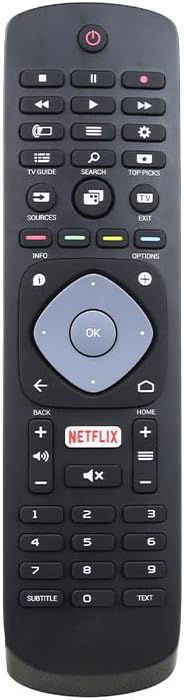
Figura 1: Frontal view of the Jolly Line JL1719/COMP Universal TV Remote Control, showing all buttons and their layout.
3. Instruccions de funcionament
Point the remote control directly at your Philips TV's infrared sensor. Ensure there are no obstructions between the remote and the TV.
3.1 Common Button Functions
- Potència (⏻): Encén o apaga el televisor.
- Botons numèrics (0-9): Selecciona els canals directament.
- Canal amunt/avall (▲/▼): Changes channels sequentially.
- Pujar/baixar el volum (+/-): Ajusta el volum del televisor.
- Silencia (🔇): Silencia o activa el so del televisor.
- Font/Entrada: Selects different input sources (HDMI, AV, etc.).
- Botons de navegació (amunt, avall, esquerra, dreta): Navigates menus and on-screen options.
- D'acord/Enter: Confirma les seleccions als menús.
- Tornar/Tornar: Torna a la pantalla o al menú anterior.
- Inici (⌂): Accesses the TV's main menu or smart TV interface.
- Netflix: Direct access button for the Netflix application.
- Informació: Mostra informació sobre el programa o l'entrada actual.
- Opcions: Accesses context-sensitive options for the current screen.
- Guia de TV: Obre la guia electrònica de programes.
- Cerca: Initiates a search function on the TV.
- Les millors opcions: Accesses recommended content or features.
- Sortida: Surt del menú o de l'aplicació actual.
- Play/Pause, Stop, Rewind, Fast Forward: Controla la reproducció multimèdia.
- Subtítol: Toggles subtitles on/off.
- Text: Accesses teletext or similar text-based services.
Note: Specific button functionalities may vary slightly depending on your Philips TV model.
4. Manteniment
4.1 Neteja del comandament a distància
Per netejar el comandament a distància, utilitzeu un drap suau i sec. Per a la brutícia resistent, netegeu-lo lleugerament.ampNetegeu el drap amb aigua o un netejador suau i no abrasiu. Eviteu utilitzar productes químics agressius o materials abrasius, ja que poden danyar la superfície o els components interns del comandament a distància.
4.2 Substitució de la bateria
Replace batteries when the remote control's response becomes sluggish or stops working. Refer to Section 2.1 for battery installation instructions. Always dispose of used batteries responsibly according to local regulations.
5. Solució De Problemes
Si teniu problemes amb el comandament a distància, proveu els passos següents per resoldre problemes:
- El comandament a distància no respon:
- Comproveu si les piles estan inserides correctament amb la polaritat correcta.
- Substitueix les piles per piles AAA noves.
- Assegureu-vos que no hi hagi obstacles entre el comandament a distància i el sensor d'infrarojos del televisor.
- Assegureu-vos que esteu dins de l'abast efectiu del sensor del televisor.
- Alguns botons no funcionen:
- This remote is designed for Philips TVs. Ensure your TV is a Philips model.
- Clean the remote control, especially around the unresponsive buttons, to remove any dirt or debris.
- Some advanced functions might not be supported by all Philips TV models.
- TV responds intermittently:
- Això podria indicar que la bateria està baixa. Canvieu les piles.
- Assegureu-vos que hi hagi una línia de visió clara amb el televisor.
If the problem persists after trying these steps, please refer to the support information in Section 7.
6. Especificacions
| Característica | Detall |
|---|---|
| Número de model | JL1719/COMP (Manufacturer Part Number), 33-03-0034 (Item Model Number) |
| Marca | GBC (Jolly Line Compatible Series) |
| Compatibilitat | televisor Philips |
| Piles necessàries | 2 x AAA 1.5V (no incloses) |
| Dimensions del producte | 7.09 x 1.97 x 0.79 polzades (1.5 x 5.3 x 20 cm) |
| Pes de l'article | 3.52 unces |
| Color | Negre |
| Característica especial | Ergonomic, Pre-Programmed |
| Màxim de dispositius compatibles | 1 (Televisió) |

Figure 2: The Jolly Line JL1719/COMP Universal TV Remote Control shown within its retail packaging.
7. Garantia i Suport
7.1 Informació de la garantia
Specific warranty details for the Jolly Line JL1719/COMP remote control are typically provided at the point of purchase or within the product packaging. Please retain your proof of purchase for any warranty claims. For detailed warranty terms, contact the seller or manufacturer directly.
7.2 Atenció al client
For further assistance, technical support, or inquiries regarding your Jolly Line JL1719/COMP Universal TV Remote Control, please contact the retailer from whom you purchased the product or the manufacturer, GBC. Contact information can usually be found on the product packaging or the seller's weblloc.


