1. Producte acabatview
The KALOR TECH Wi-Fi Smart Thermostat (Model AC829F) is designed for electric baseboard heating systems operating on 120-240V. It features an LCD display, Wi-Fi connectivity, and compatibility with popular smart home platforms like Alexa, Google Home, Smart Life, and Tuya App. This thermostat provides precise temperature control and energy management for your home.

Imatge 1.1: Frontal view of the KALOR TECH Wi-Fi Smart Thermostat displaying temperature in Fahrenheit.
Característiques principals:
- Control remot de l'aplicació: Manage your heating system from anywhere using the Smart Life or Tuya App.
- Compatibilitat amb l'Assistent de veu: Control your thermostat with voice commands via Alexa or Google Assistant.
- Configuració programable: Schedule heating cycles for optimal comfort and energy savings.
- Pantalla LCD: Clear display shows current temperature, target temperature, time, and Wi-Fi connectivity status.
- Pantalla Fahrenheit/Celsius: Supports both Fahrenheit (USA) and Celsius (Canada) temperature units.
- Proprietary Wall Plate: Includes a custom-designed wall plate for standard American and Canadian electrical boxes.
- Child-Lock Capable: Evita canvis no autoritzats a la configuració.
2. Informació de seguretat
Please read all safety warnings and installation instructions carefully before installing or operating this thermostat. Failure to follow these instructions may result in electric shock, fire, or property damage.
- Compatibilitat elèctrica: This thermostat is designed for 120-240V electric baseboard heating systems ONLY. It is NOT compatible with 24V central heating systems or single pole systems.
- Instal·lació professional recomanada: Si no teniu cap dubte sobre el cablejat elèctric, consulteu un electricista qualificat.
- Desconnexió d'alimentació: Always turn off power at the circuit breaker before installing or performing any maintenance on the thermostat.
- Xarxa Wi-Fi: Requereix accés a a 2.4 MHz Wi-Fi network for installation and smart features. It is not compatible with 5 GHz networks.
- Només per a ús interior: Aquest dispositiu està pensat per a ús interior en llocs secs.
3. Què hi ha a la caixa
Verifiqueu que tots els components siguin presents abans de començar la instal·lació:
- Digital Wi-Fi Thermostat (Model AC829F)
- Custom Wall Plate
- Installation Wires (Pigtail electrical wires)
- Cargols de muntatge
- Large-Print Instructions (This manual)
4. Configuració i instal·lació
Follow these steps for proper installation of your KALOR TECH Smart Thermostat. Ensure power is OFF at the circuit breaker before proceeding.
- Apagueu l'alimentació: Locate the circuit breaker controlling your electric baseboard heater and turn off the power. Verify power is off using a voltage provador.
- Elimina el termòstat antic: Carefully remove your existing thermostat from the wall. Disconnect the wires, noting their connections if necessary.
- Placa de paret de muntatge: Secure the custom wall plate to your electrical box using the provided mounting screws. Ensure it is level and flush with the wall.
- Connecteu el termòstat: Connect the pigtail electrical wires from the thermostat to your home's electrical wiring. This thermostat is designed for 120-240V systems. Ensure all connections are secure and insulated.
- Attach Thermostat to Wall Plate: Align the thermostat with the mounted wall plate and gently push it into place until it clicks securely.
- Restaura l'alimentació: Turn the power back on at the circuit breaker. The thermostat display should illuminate.
- Configuració inicial: Follow the on-screen prompts for initial setup, including time and date.
- Connecta't a Wi-Fi:
- Download the "Smart Life" or "Tuya App" from your smartphone's app store.
- Registreu-vos o inicieu sessió al vostre compte.
- Add a new device (usually by tapping the "+" icon). Select "Thermostat" or "Heater".
- Follow the in-app instructions to connect your thermostat to your 2.4 MHz Wi-Fi network. This may involve putting the thermostat into pairing mode (refer to the thermostat's display for specific instructions, often indicated by a blinking Wi-Fi icon).
5. Instruccions de funcionament
5.1. Funcionament manual
The thermostat features a clear LCD display and touch controls for direct operation.
- Botó d'encesa: Located at the top right, press to turn the thermostat On/Off.
- Ajust de temperatura: Use the "+" and "-" buttons (bottom right) to increase or decrease the target temperature.
- Botó de mode (M): Located at the bottom left, press to cycle through operating modes (e.g., Manual, Program).
- Botó del rellotge: Located at the bottom left, press to adjust time settings.
- Mostra informació: The LCD shows current room temperature, set target temperature, time, and Wi-Fi status.

Image 5.1: The thermostat displaying temperature in Celsius, indicating its dual unit capability.
5.2. App Control (Smart Life / Tuya App)
Once connected to Wi-Fi, you can control your thermostat remotely via the Smart Life or Tuya App.
- Ajust remot de la temperatura: Change the target temperature from anywhere.
- Programació: Create custom heating schedules for different days and times to optimize energy usage.
- Selecció del mode: Switch between manual and programmed modes.
- Bloqueig per a nens: Enable or disable the child lock feature to prevent accidental changes.
- Unitat de temperatura: Adjust the display unit between Fahrenheit and Celsius within the app settings.
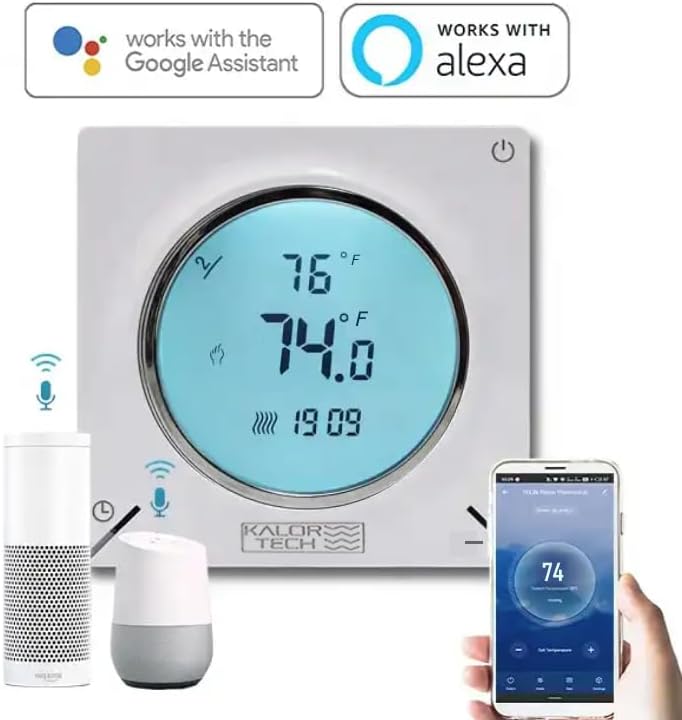
Image 5.2: The thermostat integrated with Google Assistant and Alexa devices, demonstrating app control via a smartphone.
5.3. Voice Control (Alexa / Google Home)
Integra el teu termòstat amb Amazon Alexa o Google Home per a un control per veu còmode.
- Enllaça el compte: In your Alexa or Google Home app, enable the "Smart Life" or "Tuya Smart" skill/action. Link your Smart Life/Tuya account to your voice assistant account.
- Descobriu els dispositius: Demana al teu assistent de veu que "Descobreixi dispositius" o inicia la detecció manualment a l'aplicació.
- Comandaments de veu: Un cop descobert, podeu utilitzar ordres com ara:
- "Alexa, configura [Nom del termòstat] a 72 graus."
- "Ei Google, quina és la temperatura a [Nom de l'habitació]?"
- "Alexa, activa [Nom del termòstat]."
- "Hey Google, lower the temperature in [Room Name] by 2 degrees."
6. Manteniment
The KALOR TECH Smart Thermostat requires minimal maintenance to ensure optimal performance.
- Neteja: Wipe the thermostat's display and casing amb un suau, damp cloth. Do not use abrasive cleaners, solvents, or spray cleaners directly on the unit.
- Pols: Periodically dust the vents on the thermostat to prevent accumulation that could affect temperature sensing.
- Actualitzacions de programari: Ensure your Smart Life/Tuya App is up to date to receive the latest features and performance improvements. Firmware updates for the thermostat may also be pushed through the app.
7. Solució De Problemes
Si teniu problemes amb el termòstat, consulteu els problemes i solucions més comuns següents:
| Problema | Causa possible | Solució |
|---|---|---|
| El termòstat no s'encén. | No power from circuit breaker; incorrect wiring. | Check circuit breaker and ensure it is ON. Verify wiring connections are secure and correct (120-240V). |
| No es pot connectar a la Wi-Fi. | Incorrect Wi-Fi password; 5 GHz network; thermostat not in pairing mode; weak signal. | Ensure correct 2.4 MHz Wi-Fi network and password. Put thermostat into pairing mode (blinking Wi-Fi icon). Move thermostat closer to router if signal is weak. |
| La lectura de temperatura sembla inexacta. | Sensor obstruction; calibration needed. | Ensure no objects are blocking the thermostat's vents. Check the app for a temperature calibration setting (offset adjustment) and adjust if available. |
| Display goes dark quickly. | Default display timeout setting. | This is a normal power-saving feature. The display will illuminate when touched or interacted with. There may be a setting in the app to adjust display brightness or timeout, if available. |
| El control per veu no funciona. | Account not linked; device not discovered; incorrect commands. | Ensure Smart Life/Tuya skill/action is enabled and linked in your Alexa/Google Home app. Ask voice assistant to "Discover devices." Use correct voice commands as listed in section 5.3. |
8. Especificacions
| Marca | KALOR TECH |
| Nom del model | AC829F |
| Voltage | 120-240V |
| Font d'alimentació | Elèctric amb cable |
| Tecnologia de connectivitat | Hard-wired, Wireless (Wi-Fi 2.4 MHz) |
| Tipus de controlador | Hand Control, IFTTT, Google Assistant, Amazon Alexa |
| Tipus de visualització | LCD |
| Tipus de control de temperatura | Heating in Fahrenheit/Celsius |
| Tipus de muntatge | Muntatge de paret |
| Pes de l'article | 0.5 lliures (aproximadament 8 unces) |
| Color | Blanc |
| Fabricant | Dorado Services, LLC |
9. Garantia i Suport
For warranty information and technical support, please contact the manufacturer, Dorado Services, LLC, or refer to the product's official weblloc web. Conserveu el rebut de compra com a comprovant de compra.
Nota: No hi havia vídeos oficials de productes del venedor disponibles per incrustar en aquest manual.


