Introducció
The Logitech K585 Multi-Device Slim Wireless Keyboard is designed for seamless multi-tasking across various devices. This manual provides comprehensive instructions for setting up, operating, maintaining, and troubleshooting your keyboard to ensure optimal performance and longevity.

The Logitech K585 keyboard, showcasing its slim design and rose color, with a built-in cradle for devices.
Què hi ha a la caixa
Verifiqueu que tots els components siguin presents al vostre paquet:
- Teclat sense fil prim multidispositiu Logitech K585
- 2 AAA batteries (pre-installed or separate)
- Logitech Unifying USB receiver
- User documentation (this manual)

An illustration of the items included in the product packaging: the K585 keyboard and two AAA batteries.
Configuració
1. Instal·lació de la bateria
The keyboard requires two AAA batteries for operation. If not pre-installed, open the battery compartment located on the top edge of the keyboard, insert the batteries, and close the compartment. The Unifying USB receiver is also stored in this compartment.
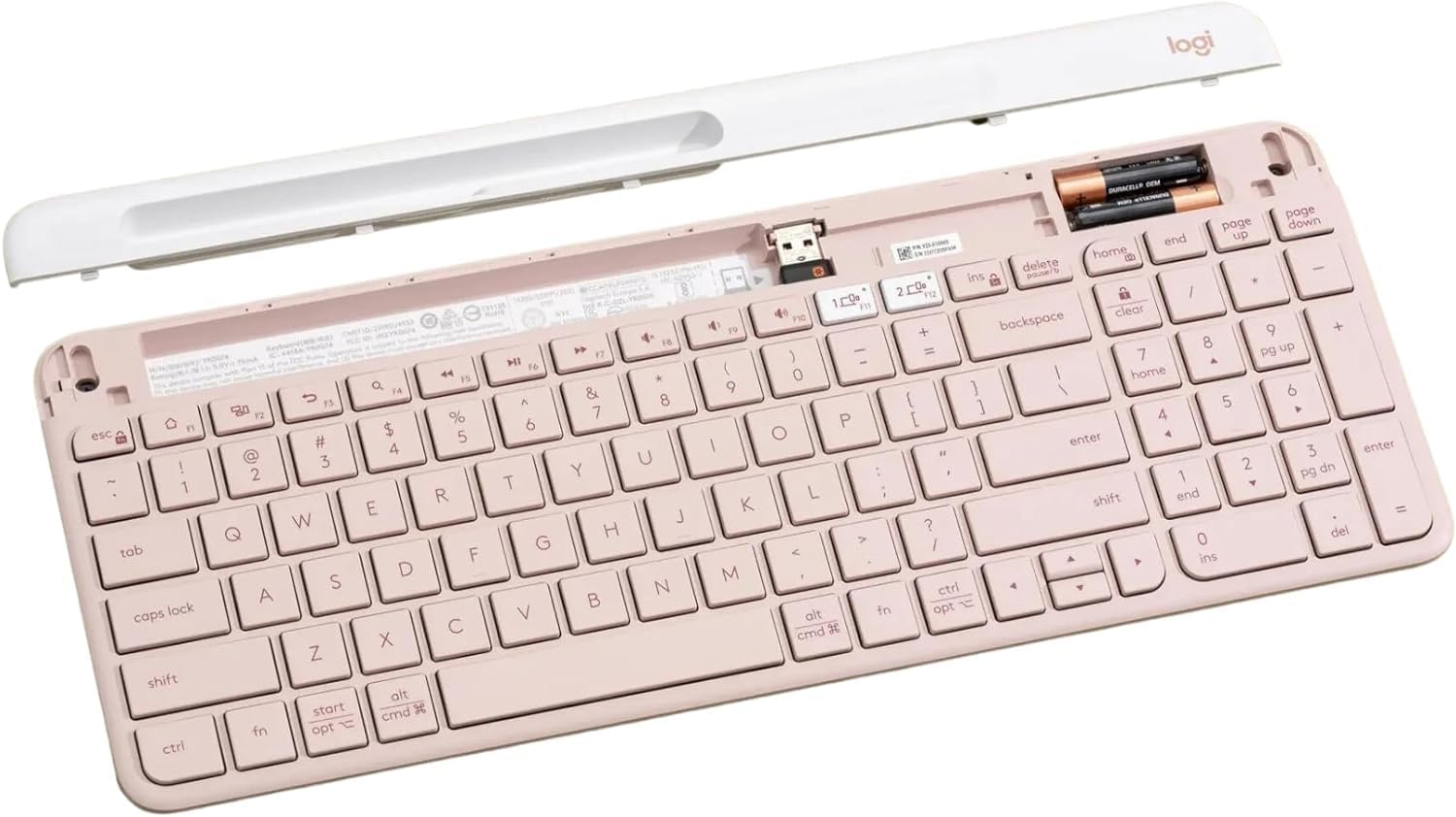
L'interior view of the keyboard, highlighting the battery slots and the dedicated storage for the USB receiver.
2. Connecting via USB Receiver
- Remove the Unifying USB receiver from the battery compartment.
- Connecteu el receptor USB a un port USB disponible de l'ordinador.
- Turn on the keyboard using the power switch located on the right side.
- El teclat s'hauria de connectar automàticament al dispositiu.
3. Connexió mitjançant Bluetooth
The K585 keyboard supports Bluetooth Low Energy (BLE) for wireless connection.
- Assegureu-vos que el teclat estigui encès.
- Press and hold one of the Easy-Switch keys (1 or 2) for three seconds until the LED light above the key starts blinking rapidly. This indicates pairing mode.
- On your device (computer, tablet, smartphone), go to Bluetooth settings and select
Documents relacionats - K585 ROSE

Guia de configuració del teclat multidispositiu Logitech K585
Guia de configuració completa per al teclat sense fil Logitech K585 Multi-Device Slim. Apreneu a instal·lar piles, connectar-lo mitjançant un receptor USB o Bluetooth, emparellar-lo amb diversos dispositius i seleccionar dissenys de sistemes operatius.
Manual d'usuari del teclat Bluetooth multidispositiu Logitech K480
A comprehensive guide to setting up, connecting, and troubleshooting the Logitech K480 Multi-Device Bluetooth Keyboard for seamless operation with computers, tablets, and smartphones across various operating systems.
Teclat multidispositiu Logitech K780: guia de característiques, configuració i connectivitat
Exploreu el teclat multidispositiu Logitech K780. Aquesta guia explica les seves característiques, com connectar-lo a ordinadors, telèfons i tauletes mitjançant Bluetooth Smart o el receptor Unifying, i les funcions millorades per a diversos sistemes operatius.
Teclat multidispositiu Logitech K780: característiques, connectivitat i guia de configuració
Descobreix el teclat multidispositiu Logitech K780, un teclat versàtil dissenyat per canviar sense problemes entre ordinadors, telèfons intel·ligents i tauletes. Aquesta guia detalla les seves característiques, les opcions de connectivitat dual (Bluetooth Smart i Unifying Receiver), les funcions millorades i les instruccions de configuració per a diversos sistemes operatius.
Tastiera Logitech K780 Multi-Device: Funcionalitat, Connexió i Disseny
Guia completa de la tecla Logitech K780 Multi-Device, que cobreix les seves funcions, connecteu-vos a més dispositius mitjançant Bluetooth Smart i Unifying, milloren les funcions i dos dissenys per a diversos sistemes operatius.
Teclat multidispositiu Logitech K780: connectivitat perfecta per a tots els vostres dispositius
Exploreu el teclat multidispositiu Logitech K780. Apreneu a connectar i utilitzar aquest teclat versàtil amb l'ordinador, la tauleta i el telèfon intel·ligent mitjançant Unifying o Bluetooth Smart per millorar la productivitat. Descobriu les seves funcions, la configuració i l'emparellament de diversos dispositius.