1. Introducció
Thank you for choosing the ATTACK SHARK Ajazz AK820 Mechanical Keyboard. This 75% TKL keyboard is designed for gaming and productivity, featuring hot-swappable switches, customizable RGB backlighting, and a convenient multi-function knob. This manual provides detailed instructions for setup, operation, maintenance, and troubleshooting to ensure optimal performance and longevity of your keyboard.
2. Característiques clau
- Disseny del 75% (82 tecles): Compact design retaining essential arrow and function keys, optimizing desk space. Features N-key rollover for simultaneous key presses.
- Multi-Function Metal Knob: Allows independent control of volume level and mute function. Compatible with Mac and Windows operating systems.
- Gasket Mounted Design: Coupled with a Flex-cut PC plate and 5 layers of sound insulation (Poron sandwich cotton, IXPE under-axis pad, PET premium sound pad, bottom cotton, bottom silicone) to maximally reduce noise and provide a softer, more elastic typing feel.
- Hot-Swappable Mechanical Sea Salt Switches: High-quality PCB supports 3/5-pin hot-swap, allowing easy switch replacement without soldering. Pre-lubed Sea Salt Linear switches offer a smooth and pleasing typing experience with a 50 million keystroke lifespan.
- Retroil·luminació RGB: South-facing LEDs with 1.6M RGB. Offers 20 lighting effects changeable via "FN+|" and customizable via driver software. Double-shot PBT keycaps provide superior shine-through.
3. Contingut del paquet
- ATTACK SHARK Ajazz AK820 Mechanical Keyboard
- Cable USB-C
- Extractor de tecles/interruptors 2 en 1

Image 1: The ATTACK SHARK Ajazz AK820 Mechanical Keyboard and its included USB-C cable.

Imatge 2: Un sobreview highlighting the 82-key layout and key features like Knob Design, Gasket Mount, PBT Keycaps, RGB, 75% Layout, and Hot Swap capability.
4. Guia de configuració
4.1 Connexió del teclat
- Localitza el port USB-C a la part posterior o lateral del teclat.
- Connecteu un extrem del cable USB-C proporcionat al teclat.
- Connect the other end of the USB-C cable to an available USB port on your computer (Laptop or PC).
- The keyboard is plug-and-play and should be automatically recognized by your operating system (Windows/Mac).

Image 3: The keyboard displaying its RGB backlighting, illustrating the 16.8 million colors and FN key combinations for controlling lighting modes.
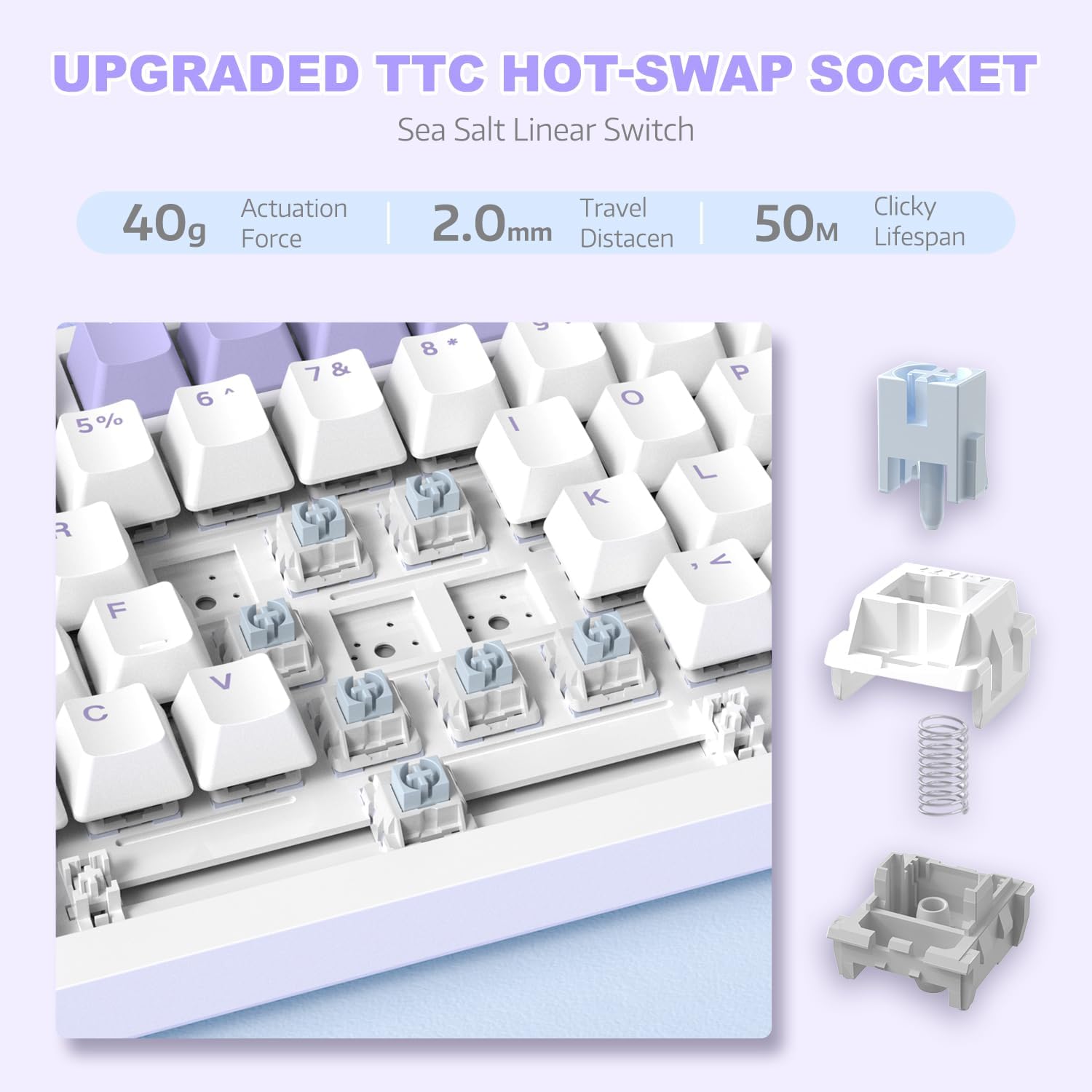
Imatge 4: Una imatge detallada view of the hot-swappable switch socket, demonstrating how switches can be easily removed and replaced.
5. Instruccions de funcionament
5.1 Multi-Function Knob Control
The metal knob located on the top right of the keyboard provides convenient multimedia control:
- Turn Clockwise: Augmenta el volum.
- Turn Counter-clockwise: Disminuir el volum.
- Prémer: Silencia/activa el so de l'àudio.

Image 5: The multimedia knob, illustrating its functions for adjusting volume and muting audio.
5.2 Control de retroil·luminació RGB
The keyboard features vibrant RGB backlighting with multiple effects. Use the following key combinations to control the lighting:
- FN + | (Backslash): Cycle through 20 different lighting effects.
- FN + X: Turn RGB backlighting ON/OFF.
- Refer to the included quick guide for additional lighting customization options or download the dedicated driver software for advanced control.
5.3 Interruptors i tecles de canvi en calent
The AK820 supports hot-swapping, allowing you to change mechanical switches and keycaps without soldering.
- Eliminació de les tecles: Use the keycap puller tool to gently grip the keycap and pull upwards until it detaches from the switch.
- Eliminació dels interruptors: Use the switch puller (the other end of the 2-in-1 tool) to grip the top and bottom clips of the switch. Gently pull upwards until the switch detaches from the PCB.
- Instal·lació d'interruptors: Align the pins of the new 3-pin or 5-pin mechanical switch with the holes on the PCB. Press down firmly until the switch clicks into place. Ensure pins are not bent.
- Instal·lació de les tecles: Align the cross-stem of the keycap with the stem of the switch and press down firmly until it is seated.

Image 6: Highlighting the durable PBT keycaps, known for their oil and wear resistance.
5.4 Compatibilitat del sistema operatiu
The keyboard is compatible with both Windows and Mac operating systems. No special drivers are typically required for basic functionality.

Image 7: Visual representation of the keyboard's compatibility with both Mac and Windows operating systems.
6. Manteniment
6.1 Neteja del teclat
- Desconnecteu el teclat de l'ordinador abans de netejar-lo.
- Feu servir una llauna d'aire comprimit per treure la pols i les restes que hi ha entre les tecles.
- For surface cleaning, use a soft, lint-free cloth lightly dampEsbandiu amb aigua o una solució de neteja suau. Eviteu la humitat excessiva.
- No ruixeu solucions de neteja directament sobre el teclat.
6.2 Cura de les tecles i els interruptors
- When removing keycaps or switches, do so gently to avoid damaging the components.
- Store spare keycaps and switches in a clean, dry place.

Image 8: An exploded diagram illustrating the multi-layer noise reduction installation, including PORON sandwich cotton, IXPE switch pads, PET voice actor pdd, bottom cotton, and bottom silicone.
7. Solució De Problemes
7.1 El teclat no respon
- Assegureu-vos que el cable USB-C estigui connectat correctament tant al teclat com a l'ordinador.
- Prova de connectar el teclat a un port USB diferent de l'ordinador.
- Prova el teclat en un altre ordinador per descartar un problema específic de l'ordinador.
- Reinicieu l'ordinador.
7.2 La retroiluminació RGB no funciona/és incorrecta
- Premeu FN + X to ensure the RGB is turned on.
- Premeu FN + | (Backslash) per alternar entre els diferents modes d'il·luminació.
- If using custom settings, ensure the driver software is installed and configured correctly.
7.3 Keys Not Registering (Anti-Ghosting)
The AK820 features N-key rollover (NKRO) to prevent ghosting. If specific keys are not registering:
- Ensure the keycap and switch are properly seated. Gently press down on the keycap to ensure it's fully attached.
- If a specific switch is faulty, use the hot-swap feature to replace it with a new one.

Image 9: Illustration of the 82-key anti-ghosting feature, demonstrating the ability to register multiple simultaneous key presses.
7.4 Video Demonstration: AK820 Keyboard Overview
Vídeo 1: Un oficial acabatview of the AK820 75% Wired RGB Gasket Mechanical Keyboard, demonstrating its features including the volume knob, hot-swappable switches, and RGB lighting effects.
8. Especificacions
| Característica | Detall |
|---|---|
| Número de model | AK820 |
| Dimensions del producte | 12.87 x 5.35 x 1.57 polzades |
| Pes de l'article | 2.05 lliures |
| Fabricant | ATACA AL TAURON |
| Tecnologia de connectivitat | Cablejat (USB-C) |
| Descripció del teclat | Jocs |
| Nombre de claus | 82 |
| Tipus de canvi | Sea Salt Linear Switch (Hot-Swappable) |
| Material de claus | PBT |
| Il·luminació de fons | RGB (South-facing LEDs) |
| Característiques especials | 5 Layers of sound insulation cotton, CNC Metal Knob, Hot-Swappable |
| Dispositius compatibles | Laptop, PC (Windows, Mac) |
9. Garantia i Suport
For warranty information and technical support, please refer to the official ATTACK SHARK weblloc web o contacteu directament amb el seu servei d'atenció al client. Conserveu el rebut de compra com a comprovant de compra per a qualsevol reclamació de garantia.
Fabricant: ATACA AL TAURON
Data de primera disponibilitat: 15 de desembre de 2023


