1. Introducció
Gràcies per la compraasing the MUSE M-1803 DJ Portable Sono-Speaker. This device is designed to provide high-quality audio and vibrant lighting for your gatherings. It features Bluetooth connectivity for wireless music streaming, multiple input options, and a long-lasting battery. Please read this manual carefully before using the product to ensure proper operation and to maximize its lifespan.

Figure 1.1: The MUSE M-1803 DJ Portable Sono-Speaker, showcasing its compact design and dynamic multi-colored lighting.
2. Característiques del producte
The MUSE M-1803 DJ Portable Sono-Speaker comes equipped with a range of features designed for an immersive audio experience:
- Connectivitat Bluetooth: Seamlessly stream music wirelessly from your smartphone, tablet, or laptop.
- Alta potència de sortida: Delivers 150 watts of audio power for clear and robust sound.
- Multi-colored Ambient Lighting: Enhance your atmosphere with dynamic, customizable LED lights.
- Pantalla LED blanca: Provides clear information on current mode and settings.
- Llarga vida útil de la bateria: Built-in lithium battery offers up to 5 hours of continuous music playback.
- Entrades de micròfon duals: Connect two wired microphones for karaoke or duets.
- Port USB-C: For convenient charging of the speaker's internal battery.
- Reproducció USB: Reprodueix MP3 files directament des d'una unitat USB.
- Entrada AUX: Connect external audio devices via a 3.5mm auxiliary cable.
- Adjustable Bass & Treble: Fine-tune your audio output to suit your preferences.

Figure 2.1: Key features of the M-1803 DJ speaker, including Bluetooth streaming, 5-hour music playtime, microphone connection, and multi-colored party lights.

Figura 2.2: Detallat a sobreview of the speaker's functions, highlighting its lighting options, display, connectivity, audio adjustments, battery life, and power output.
3. Contingut del paquet
Si us plau, comproveu el paquet per veure si hi ha els elements següents:
- MUSE M-1803 DJ Portable Sono-Speaker
- Micròfon per cable
- Cable de càrrega USB-C
- Manual d'usuari (aquest document)

Figure 3.1: The speaker's accessories, including the USB-C charging cable and the wired microphone, alongside a view of the speaker's rear panel with various ports and a carry handle.
4. Informació de seguretat
Per garantir un funcionament segur i evitar danys, observeu les precaucions següents:
- No exposeu l'altaveu a l'aigua ni a una humitat excessiva. Aquest producte no és impermeable.
- No desmunteu, repareu ni modifiqueu la unitat. Envieu totes les tasques de manteniment a personal qualificat.
- Mantingueu l'altaveu allunyat de la llum solar directa, de fonts de calor i de flames obertes.
- Assegureu-vos que hi hagi una ventilació adequada al voltant de l'altaveu durant l'ús.
- Feu servir només el cable de càrrega proporcionat o un cable USB-C certificat per carregar.
- Do not use abrasive cleaners or solvents on the speaker's surface.
- Mantenir fora de l'abast dels nens.
- Eviteu escoltar a volums excessivament alts durant períodes prolongats per evitar danys auditius.
5. Configuració
5.1 Càrrega de l'altaveu
Before first use, fully charge the speaker's internal battery. Connect the supplied USB-C charging cable to the USB-C port on the speaker and the other end to a compatible USB power adapter (not included) or a computer's USB port. The LED display will indicate charging status.
5.2 Engegada/apagada
Press and hold the Power button (usually located on the top panel) for a few seconds to turn the speaker ON or OFF. The LED display will light up when the speaker is powered on.
5.3 Connexió del micròfon
Insert the plug of the wired microphone into one of the microphone input jacks on the speaker's rear panel. Ensure it is fully inserted for proper connection.
6. Instruccions de funcionament
6.1 Vinculació Bluetooth
- Turn on the MUSE M-1803 DJ speaker. The LED display will show "bt" (Bluetooth) and the speaker will enter pairing mode, indicated by a blinking Bluetooth icon or "bt" on the display.
- Enable Bluetooth on your audio device (smartphone, tablet, etc.).
- Cerca "MUSE M-1803 DJ" in the list of available Bluetooth devices.
- Select "MUSE M-1803 DJ" to connect. Once paired, the speaker will emit a confirmation sound, and the "bt" indicator on the display will become solid.
- Ara pots reproduir àudio en streaming sense fil des del dispositiu a l'altaveu.
6.2 Playing Music from USB
Inseriu una unitat flash USB que contingui àudio MP3 files into the USB port on the speaker. The speaker will automatically switch to USB mode and begin playing the first compatible audio file. Use the playback controls (Play/Pause, Next/Previous Track) on the speaker to manage your music.
6.3 Ús de l'entrada AUX
Connect an external audio device (e.g., MP3 player, computer) to the AUX input jack on the speaker using a 3.5mm audio cable (not included). The speaker will automatically switch to AUX mode. Control playback and volume from your connected device.
6.4 Adjusting Volume and Audio Settings
Use the dedicated volume controls on the speaker's top panel to adjust the master volume. The speaker also features controls for adjusting Bass and Treble levels to customize your sound profile.
6.5 Controlling Ambient Lights
The speaker features multi-colored ambient lighting. Use the dedicated light control button (if available) to cycle through different light modes or turn the lights on/off. Refer to the control panel layout for specific button functions.
6.6 Using the Microphone for Karaoke
Once the wired microphone is connected, simply speak or sing into it. The microphone's audio will be mixed with the music playing through the speaker. Adjust microphone volume (if available) and echo effects (if applicable) using the controls on the speaker.
7. Manteniment
7.1 Neteja
Wipe the speaker's surface with a soft, dry, lint-free cloth. Do not use liquid cleaners, aerosols, or solvents. Ensure no moisture enters the ports or openings.
7.2 Emmagatzematge
When not in use for extended periods, store the speaker in a cool, dry place, away from direct sunlight and extreme temperatures. It is recommended to charge the battery periodically (e.g., every 3 months) to maintain its health.
8. Solució De Problemes
| Problema | Causa possible | Solució |
|---|---|---|
| L'altaveu no s'encén. | La bateria està esgotada. | Connect the speaker to a power source using the USB-C cable and charge it. |
| No hi ha so de l'altaveu. | El volum és massa baix; mode d'entrada incorrecte; dispositiu no està connectat correctament. | Increase speaker volume and source device volume. Ensure correct input mode (Bluetooth, USB, AUX) is selected. Reconnect the device. |
| L'aparellament de Bluetooth falla. | L'altaveu no està en mode d'emparellament; el dispositiu és massa lluny; interferències. | Ensure speaker is in pairing mode (blinking "bt"). Move device closer to speaker. Turn off other Bluetooth devices nearby. Forget "MUSE M-1803 DJ" on your device and try pairing again. |
| El micròfon no funciona. | Microphone not fully inserted; microphone volume too low. | Ensure the microphone plug is fully inserted into the jack. Increase microphone volume on the speaker. |
9. Especificacions
| Número de model: | M-1803D |
| Marca: | MUSA |
| Potència de sortida: | 150 watts (màx.) |
| Connectivitat: | Bluetooth, USB, AUX (3.5mm) |
| Bateria: | Necessita 1 bateria de ions de liti |
| Temps de joc: | Fins a 5 hores |
| Dimensions (L x A x A): | 24.2 x 24.6 x 30.3 cm |
| Pes: | 3.4 kg |
| Components inclosos: | Speaker, Wired Microphone, USB-C Charging Cable |
| Mètode de control: | App (as per specifications, though physical controls are primary) |
| Característiques especials: | Bluetooth, USB port, Multi-colored ambient light, White LED display, Adjustable Bass & Treble |
| Impermeable: | No |
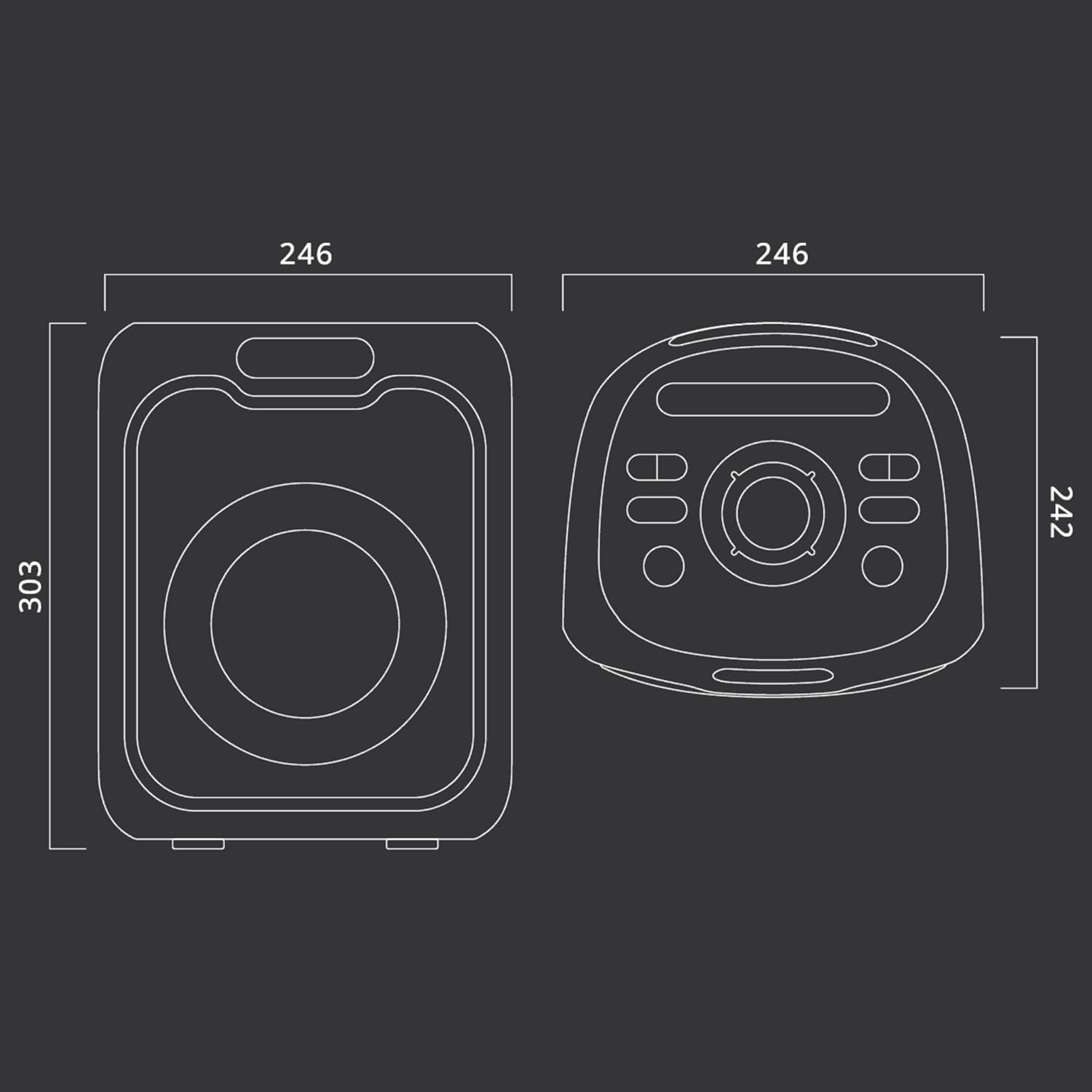
Figure 9.1: Dimensional drawing of the MUSE M-1803 DJ speaker, with measurements in millimeters (246mm width, 303mm height, 242mm depth).
10. Garantia i Suport
This MUSE M-1803 DJ Portable Sono-Speaker comes with a Garantia limitada. For specific details regarding the warranty period and coverage, please refer to the warranty card included in your package or contact MUSE customer support.
Atenció al client:
For technical assistance, troubleshooting, or warranty claims, please contact MUSE customer support through their official website or the contact information provided on your product packaging. Please have your model number (M-1803D) and purchase details ready when contacting support.