Introducció
This manual provides comprehensive instructions for the installation, operation, and maintenance of your Zapco ADSP-Z12 IV-10A 12-Channel DSP Amplifier. Please read this manual thoroughly before using the product to ensure proper function and to prevent damage.
Informació de seguretat
Observeu sempre les precaucions de seguretat següents:
- Ensure the unit is installed by a qualified professional to prevent electrical hazards or damage to your vehicle's electrical system.
- Disconnect the vehicle's battery before making any electrical connections.
- No exposeu la unitat a la humitat ni a temperatures extremes.
- Use only specified power and signal cables.
- Avoid placing the unit in locations where it could obstruct vehicle operation or safety devices.
Producte acabatview i Característiques
The Zapco ADSP-Z12 IV-10A is a high-performance 12-channel Digital Sound Processor (DSP) integrated with a 10-channel amplifier. It is designed to provide advanced audio control and powerful amplification for a superior sound experience.
Característiques principals:
- Cirrus Logic CS47048 DSP Processor (150 MHz/32 bit/192 KHz)
- 12-Channel DSP processing
- 10-Canals Amplifier output (80W x 10 @ 4Ω, 120W x 10 @ 2Ω, 240W x 5 @ 4Ω Bridged)
- Coaxial and Optical Digital Inputs (24 bit-192 KHz)
- High-Level (Speaker) and Low-Level (Pre) Inputs
- Advanced Equalization (Graphic & Parametric)
- Time Alignment and Polarity control
- Included Dash Remote Control
- USB and 6-pin Mini DIN for PC/Display Connection
- HD-Bluetooth Streaming capability (with optional HD-BT module)
Configuració
1. Desembalatge i inspecció
Traieu amb cura amplifier from its packaging. Inspect the unit for any signs of damage. Retain the packaging for future transport or service.
2. Muntatge del Ampmés viu
The ADSP-Z12 IV-10A is designed for surface mounting. Choose a secure, dry location with adequate ventilation, away from direct sunlight or heat sources. Ensure the mounting surface is strong enough to support the unit's weight (approximately 9 pounds).
- Dimensions: 11.46 inches (L) x 8.39 inches (W) x 1.97 inches (H).
- Use appropriate screws and mounting hardware (not included) to secure the unit.
3. Connexions de cablejat
All wiring should be performed with the vehicle's battery disconnected. Refer to the diagrams below for proper connection points.

Figure 1: Power and Speaker Terminals. This image displays the rear panel of the Zapco ADSP-Z12 IV-10A amplifier, showing the power input terminals (+12V BAT, REM IN, GND) on the right, and the speaker output terminals (CH1-CH10, with bridging options) on the left. A green REM OUT terminal is also visible.
Connexions d'alimentació:
- +12V BAT: Connect to the positive terminal of the vehicle's battery via a fused power cable. The fuse should be located within 18 inches of the battery.
- GND: Connect to a clean, unpainted metal chassis ground point in the vehicle. Ensure a solid connection.
- REM EN: Connect to the remote turn-on output of your head unit or other signal source. This activates the ampmés viu.
- REM OUT: Provides a remote turn-on signal for additional components.
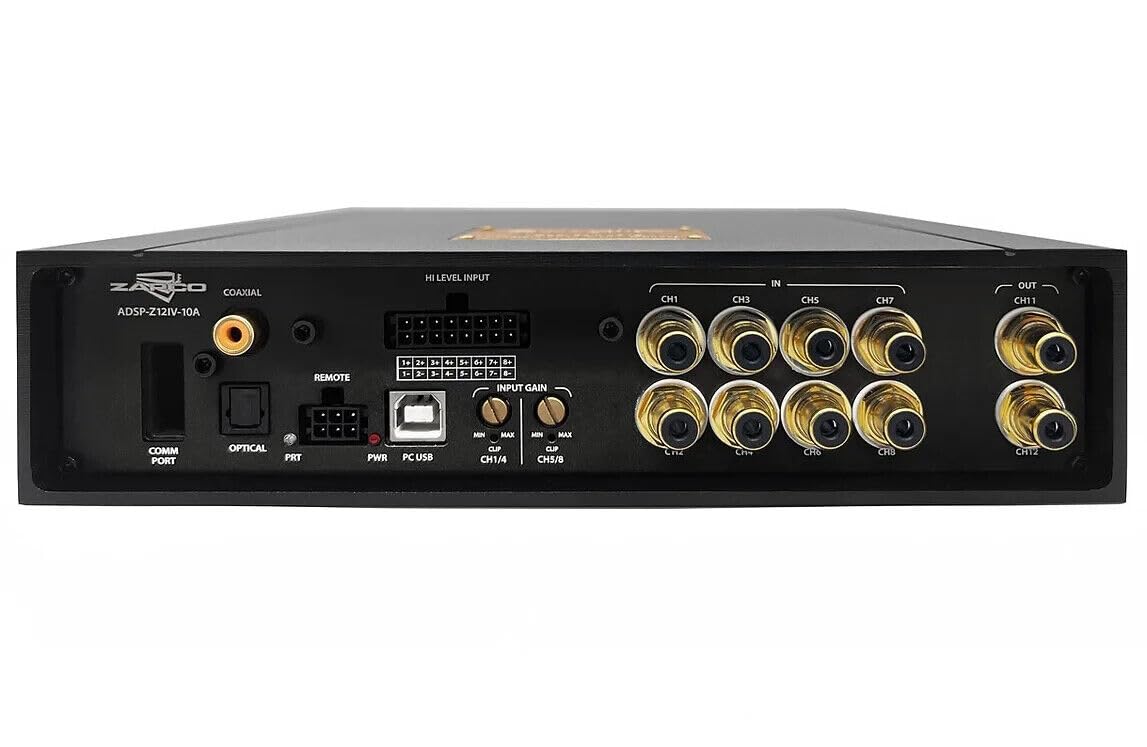
Figure 2: Input and DSP Connections. This image shows the front panel of the Zapco ADSP-Z12 IV-10A amplifier, detailing the various input and control ports. From left to right: COMM PORT, OPTICAL input, COAXIAL input, REMOTE port, PRT (Protection) indicator, PWR (Power) indicator, PC USB port, HI LEVEL INPUT terminals, and INPUT GAIN controls (CH1/4, CH5/8).
Entrades de senyal:
- HI LEVEL INPUT: Connect speaker-level outputs from your head unit. Use the provided harness.
- Low Level (Pre) Input: (Not explicitly labeled on image, but mentioned in description) Connect RCA pre-out signals from your head unit.
- OPTICAL Digital IN: Connect a digital audio source via an optical cable.
- COAXIAL Digital IN: Connect a digital audio source via a coaxial cable.
Connexions de sortida:
- Speaker Outputs (CH1-CH10): Connect your speakers to the corresponding terminals. Observe correct polarity (+/-). The amplifier supports 4Ω and 2Ω loads, and 4Ω bridged configurations.
- OUT (CH11, CH12): These are DSP processed low-level outputs for connecting additional ampaixecadors.
Connexions de control:
- PC USB: Connect to a computer for DSP software configuration.
- COMANDAMENT: Connect the included dash remote control.
- COMM PORT: For future expansion or specific accessories.
Instruccions de funcionament
1. Engegada i configuració inicials
Once all connections are secure, reconnect the vehicle's battery. The PWR indicator on the amplifier should illuminate. If the PRT indicator lights up, check all connections for shorts or improper wiring.
The ADSP-Z12 IV-10A requires configuration via its dedicated DSP software on a PC. Connect your computer to the amplifier via the PC USB port. Install the Zapco DSP software (available from the Zapco website) and follow the on-screen instructions to set up your audio system, including:
- Input selection and gain adjustment.
- Crossover settings for each channel.
- Equalization (F/R EQ: 1-6 ch Gr. & Par./31 poles; Effect EQ: 7-8 ch Gr. & Par./11 poles).
- Time Alignment (Range: 0-15 ms, Steps: 0.02 ms; Max Delay: 515 cm, Steps: 0.68 cm).
- Polarity (0/180°).
- Channel muting and soloing.
2. Using the Dash Remote Control
The included dash remote control provides convenient access to essential functions without needing a PC connection.
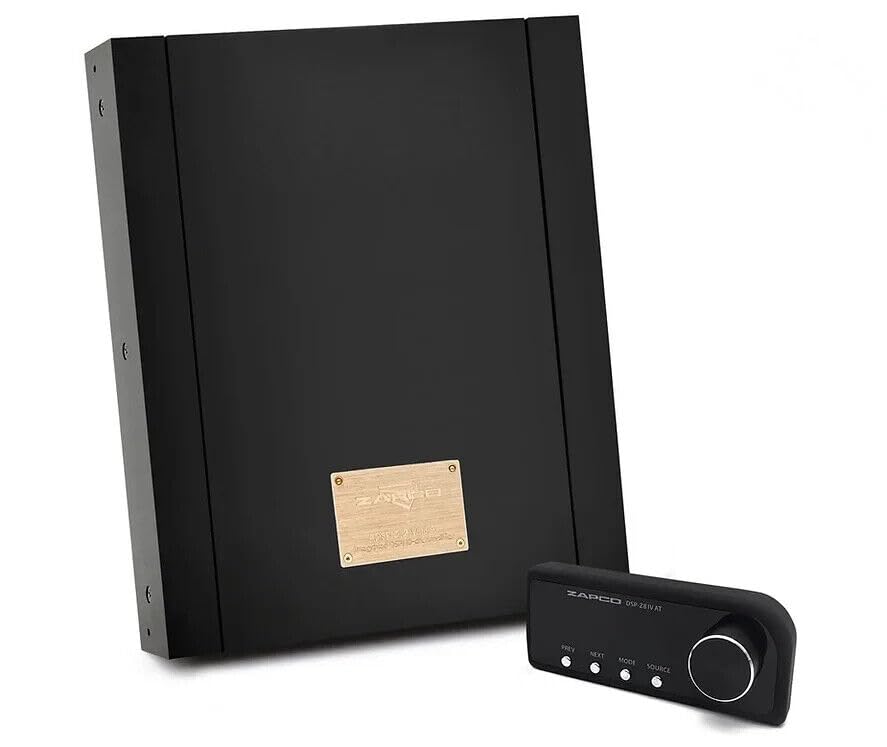
Figura 3: Amplifier and Dash Remote Control. This image displays the Zapco ADSP-Z12 IV-10A amplifier alongside its compact dash remote control. The remote features buttons for PREV, NEXT, MODE, SOURCE, and a rotary knob for volume adjustment.
Functions typically controlled by the dash remote include:
- Volume adjustment (rotary knob).
- Source selection (e.g., Analog, Optical, Coaxial, Bluetooth).
- Preset recall (if configured in DSP software).
- Track navigation (PREV/NEXT) for digital sources or Bluetooth.
3. HD-Bluetooth Streaming (Optional)
If you have the optional HD-BT module, connect it to the designated port. This allows for high-definition audio streaming from compatible Bluetooth devices. Pair your device with the amplifier following standard Bluetooth pairing procedures. Select Bluetooth as the source using the dash remote or DSP software.
Manteniment
The Zapco ADSP-Z12 IV-10A is designed for reliable operation with minimal maintenance. Follow these guidelines:
- Neteja: Use a soft, dry cloth to wipe the exterior of the unit. Do not use harsh chemicals, solvents, or abrasive cleaners.
- Ventilació: Assegureu-vos que el amplifier's cooling fins are not obstructed. Adequate airflow is crucial for preventing overheating.
- Connexions: Periodically check all power and signal connections to ensure they are secure and free from corrosion.
Resolució de problemes
If you experience issues with your ADSP-Z12 IV-10A, consult the following table before contacting support.
| Problema | Causa possible | Solució |
|---|---|---|
| No power / PWR indicator off | Fusible fundit, connexió d'alimentació/terra fluixa, no hi ha senyal d'encesa remota. | Check fuse on power cable. Verify +12V, GND, and REM IN connections. Ensure head unit is on. |
| PRT indicator illuminated | Sobreescalfament, curtcircuit al cablejat de l'altaveu, baix volumtage. | Allow unit to cool. Check speaker wiring for shorts. Verify vehicle battery voltage. |
| Sense sortida d'àudio | Incorrect input selection, low gain settings, muted channels, incorrect DSP configuration. | Check source selection on remote/DSP software. Adjust input gain. Verify channels are not muted in DSP software. Review DSP settings. |
| So distorsionat | Input gain too high, speaker impedance mismatch, damaged speakers. | Reduce input gain. Ensure speaker impedance matches amplifier specifications. Inspect speakers for damage. |
Especificacions
| Característica | Detall |
|---|---|
| Processador DSP | Cirrus Logic CS47048, 150 MHz/32 bit/192 KHz |
| Canals DSP | 12 canals |
| ADC | Cirrus Logic CS47048, 32 bit/192 KHz |
| ADC Dynamic Range/THD | 108 dB/-98 dB |
| DAC | Cirrus Logic CS47048, 32 bit/192 KHz |
| DAC Dynamic Range/THD | 140 dB/-120 dB |
| Low Level (Pre) Sensitivity | 1-5 VRMS |
| High Level (Spk In) Sensitivity | 2-20 V |
| Optical Digital IN | 24 bit-192 KHz |
| Coaxial Digital IN | 24 bit-192 KHz |
| Resposta en freqüència (-3 dB) | 10 Hz - 22.5 kHz |
| S/N Input | 110 dBA (D) - 106 dBA (A) |
| Relació S/N Amp + DSP (max. power) | 95 dBA |
| THD+N Input | 0.002% (D) - 0.005% (A) |
| THD+N Amplif. + DSP Analog Input | 0.07 % |
| Crosstalk at 1 Khz (DSP only) | 90 dB |
| Conversació Amplifier + DSP | 45 dB |
| Amp Power @ 4Ω | 10 x 80 watts |
| Amp Power @ 2Ω | 10 x 120 watts |
| Amp Power @ 4Ω Bridged | 5 x 240 watts |
| F/R EQ | 1-6 ch Graphic & Parametric / 31 poles |
| Effect EQ | 7-8 ch Graphic & Parametric / 11 poles |
| Mut/Solo | Sí, cada canal |
| Time Alignment (Range/Steps) | 0-15 ms / 0.02 ms |
| Max Delay (Cm/Steps) | 515 cm / 0.68 cm |
| Polaritat | 0/180° |
| Control remot | Inclòs |
| HD-BT Streaming | With optional HD-BT module |
| PC/Display Connection | USB/6-pin Mini DIN |
| Unit Dimensions (W x L x H) | 213mm (8.39 in) x 291mm (11.46 in) x 50mm (1.97 in) |
| Pes | 9 lliures |
| Tipus de muntatge | Muntatge en superfície |
Garantia i Suport
Per obtenir informació sobre la garantia i assistència tècnica, consulteu la pàgina oficial de Zapco. weblloc web o poseu-vos en contacte amb el vostre distribuïdor autoritzat de Zapco. Conserveu el rebut de compra com a comprovant de compra per a reclamacions de garantia.
Per obtenir més ajuda, visiteu el Botiga Zapco a Amazon o el Zapco oficial weblloc.


