1. Introducció
This manual provides essential information for the safe and efficient operation of your KOORUI 25E3Q 165Hz QHD Gaming Monitor. Please read this manual thoroughly before using the product and retain it for future reference. The KOORUI 25E3Q is a 24.5-inch QHD (2560x1440) IPS panel monitor featuring a 165Hz refresh rate, 1ms response time, Adaptive Sync technology, and HDR10 support, designed for an enhanced visual experience.
2. Informació de seguretat
- Assegureu-vos que el monitor estigui col·locat sobre una superfície estable i plana per evitar caigudes accidentals.
- No exposeu el monitor a la pluja ni a la humitat per evitar descàrregues elèctriques o incendis.
- Keep the monitor away from direct sunlight, heat sources, or extreme temperatures.
- Feu servir només l'adaptador de corrent i els cables que s'inclouen amb el monitor.
- No bloquejar les obertures de ventilació.
- Desconnecteu el monitor de la presa de corrent abans de netejar-lo.
- Demaneu tot el servei a personal de servei qualificat.
3. Contingut del paquet
Verifiqueu que tots els elements que s'enumeren a continuació siguin presents al paquet del producte:
- KOORUI 25E3Q Monitor
- Suport de monitor (base i coll)
- Adaptador d'alimentació i cable d'alimentació
- Cable HDMI
- Cable DisplayPort
- Manual d'usuari
4. Instruccions de configuració
4.1 Muntatge del suport
- Traieu amb cura el monitor del seu embalatge, mantenint la pantalla protegida.
- Fixeu el coll del suport al panell del monitor.
- Fixeu la base del suport al coll del suport amb els cargols proporcionats.
- Col·loqueu el monitor muntat sobre una superfície plana i estable.
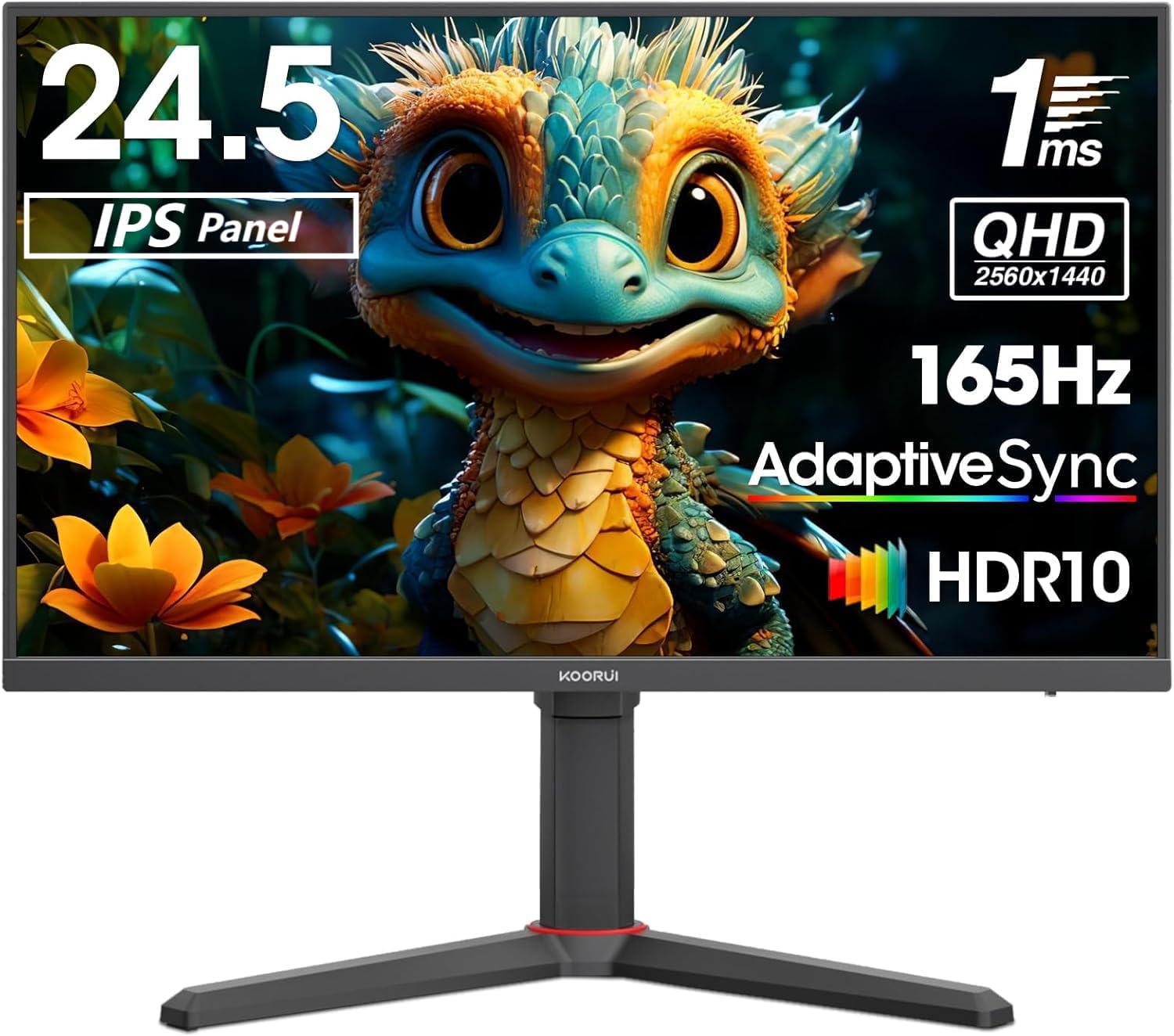
Imatge: Frontal view of the KOORUI 25E3Q Gaming Monitor with its stand assembled. The screen displays a colorful image of a fantasy creature.
4.2 Instal·lació del suport de paret VESA (opcional)
The monitor supports a 75x75mm VESA mounting pattern. When using a VESA mount, ensure you use M4 x 10mm screws. The mounting plate may require specific screw lengths due to the monitor's design, particularly for the bottom two holes which are slightly deeper. Consider using slightly smaller spacers for these deeper holes if necessary.
4.3 Cables de connexió
- Connexió d'alimentació: Connect the power cable to the power adapter, then connect the adapter to the monitor's power input and a wall outlet.
- Connexió de vídeo:
- DisplayPort: For optimal performance, including 165Hz refresh rate and Adaptive Sync, connect the DisplayPort cable from your computer's graphics card to the monitor's DisplayPort input.
- HDMI: Connect the HDMI cable from your computer's graphics card to one of the monitor's HDMI inputs.
5. Instruccions de funcionament
5.1 Engegada/apagada
Premeu el botó d'engegada (normalment situat a la part posterior o inferior del monitor) per encendre o apagar el monitor. L'indicador lluminós d'engegada s'il·luminarà quan el monitor estigui encès.
5.2 Navegació en pantalla (OSD)
The monitor features a joystick control, typically located on the back-right, for navigating the OSD menu. Push the joystick in to open the OSD, then move it up, down, left, or right to select and adjust settings.
5.3 Ajust de la posició del monitor
The KOORUI 25E3Q monitor stand allows for various adjustments to optimize your viewExperiència:
- Ajust d'alçada: The monitor can be adjusted vertically by approximately 100mm.
- Ajust d'inclinació: The screen can be tilted from -5 degrees (forward) to 20 degrees (backward).
- Rotation (Pivot): The monitor can be rotated 90 degrees to switch between horizontal (landscape) and vertical (portrait) orientations.

Image: Diagram illustrating the adjustable features of the monitor stand, including height adjustment (100mm), tilt adjustment (-5 to 20 degrees), and 90-degree rotation for portrait mode.
5.4 Configuració principal de l'OSD
- Brillantor/Contrast: Adjust these settings to suit your environment and preference. Note that the monitor can be very bright, and a brightness setting of 0 might be suitable for some users.
- Configuració de color: Modify color temperature, gamma, and other color-related options.
- Font d'entrada: Seleccioneu manualment entre les entrades DisplayPort i HDMI.
- Freqüència d'actualització: The monitor supports up to 165Hz natively. An overclock option to 170Hz may be available in the OSD or graphics card settings.
- Temps de resposta: Options like "Fast" and "Faster" are available to reduce motion blur.
- Sincronització adaptativa: Enable this feature to synchronize the monitor's refresh rate with your graphics card's frame rate, reducing screen tearing and stuttering. This feature is compatible with DisplayPort connections.
- HDR (alt rang dinàmic): Enable HDR10 for enhanced contrast and color depth with compatible content.

Image: A split-screen comparison demonstrating the effect of Adaptive Sync. The left side shows a smooth image with Adaptive Sync ON, while the right side shows screen tearing with Adaptive Sync OFF during fast-paced motion.

Image: A graphic illustrating the high refresh rate capability of the monitor, showing a comparison between 165Hz and 100Hz, emphasizing smoother motion at higher refresh rates.

Image: A visual comparison between a QHD IPS panel and an FHD VA panel, demonstrating the superior clarity and vibrant colors offered by the QHD IPS panel of the KOORUI 25E3Q monitor.
6. Manteniment
- Neteja de la pantalla: Netegeu suaument la pantalla amb un drap suau i sense borrissol. Per a marques difícils, netegeu suaument.ampNetegeu el drap amb aigua o un netejador de pantalles no abrasiu. No ruixeu el netejador directament sobre la pantalla.
- Neteja de la Casing: Feu servir un drap suau i sec per netejar el monitor casing. Eviteu utilitzar detergents forts o productes de neteja abrasius.
- Ventilació: Ensure the ventilation holes on the monitor are not blocked to prevent overheating.
7. Solució De Problemes
| Problema | Causa possible | Solució |
|---|---|---|
| No hi ha imatge a la pantalla |
|
|
| La imatge és borrosa o distorsionada |
|
|
| Parpelleig o esquinçament de la pantalla |
|
|
| No audio (if applicable) |
|
|
8. Especificacions
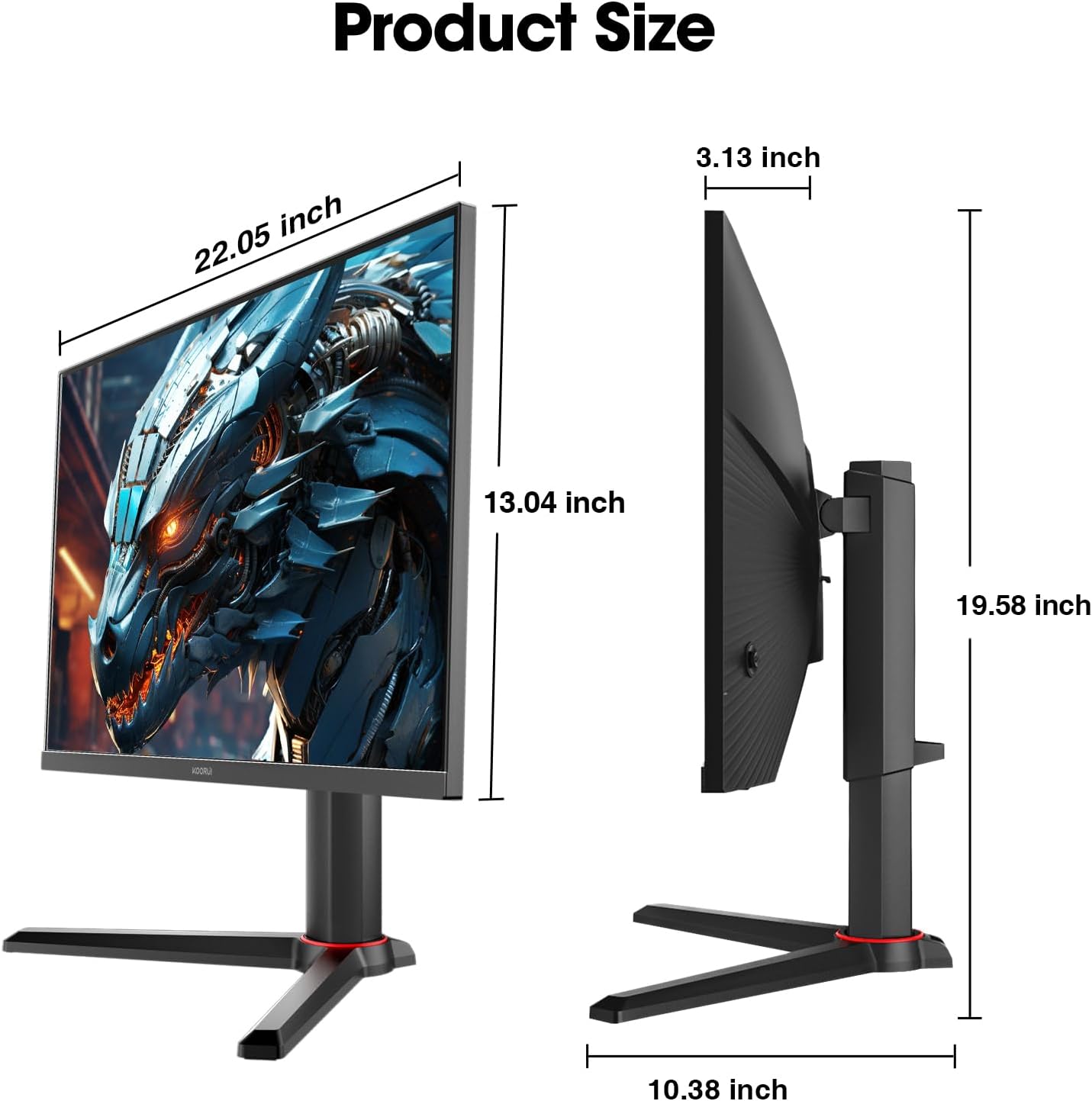
Image: Diagram showing the physical dimensions of the KOORUI 25E3Q monitor, including screen width (22.05 inches), screen height (13.04 inches), total height with stand (19.58 inches), and stand depth (10.38 inches).
| Característica | Detall |
|---|---|
| Marca | KOORUI |
| Número de model | KR-25E3Q |
| Mida de la pantalla | 24.5 polzades |
| Tipus de panell | IPS |
| Resolució | 2560 x 1440 (QHD) |
| Relació d'aspecte | 16:9 |
| Freqüència d'actualització | 165Hz (up to 170Hz overclock) |
| Temps de resposta | 1ms (GTG) |
| Relació de contrast | 1000:1 (Typical), 20,000,000:1 (Dynamic) |
| Viewangle ing | 178 degrees (Horizontal/Vertical) |
| Surface Description | Mat |
| Suport HDR | HDR10 |
| Sincronització adaptativa | Sí |
| Interfície del maquinari | HDMI, DisplayPort |
| Muntatge VESA | 75x75mm |
9. Garantia i Suport
For warranty information or technical support, please refer to the warranty card included in your package or visit the official KOORUI weblloc web. Conserveu el rebut de compra com a comprovant de compra per a reclamacions de garantia.


