Introducció
The EasySMX X10 Wireless PC Controller is a versatile gaming controller designed for a superior gaming experience across multiple platforms. Featuring advanced Hall Effect joysticks and triggers, mechanical keys, and a long-lasting battery, it offers precise control and comfort. This manual provides detailed instructions for setup, operation, and maintenance of your controller.

Figure 1: EasySMX X10 Wireless PC Controller (Dark Purple variant shown)
Característiques clau
- Magnetic Swappable Faceplate: Customize the controller's appearance with easily interchangeable faceplates.
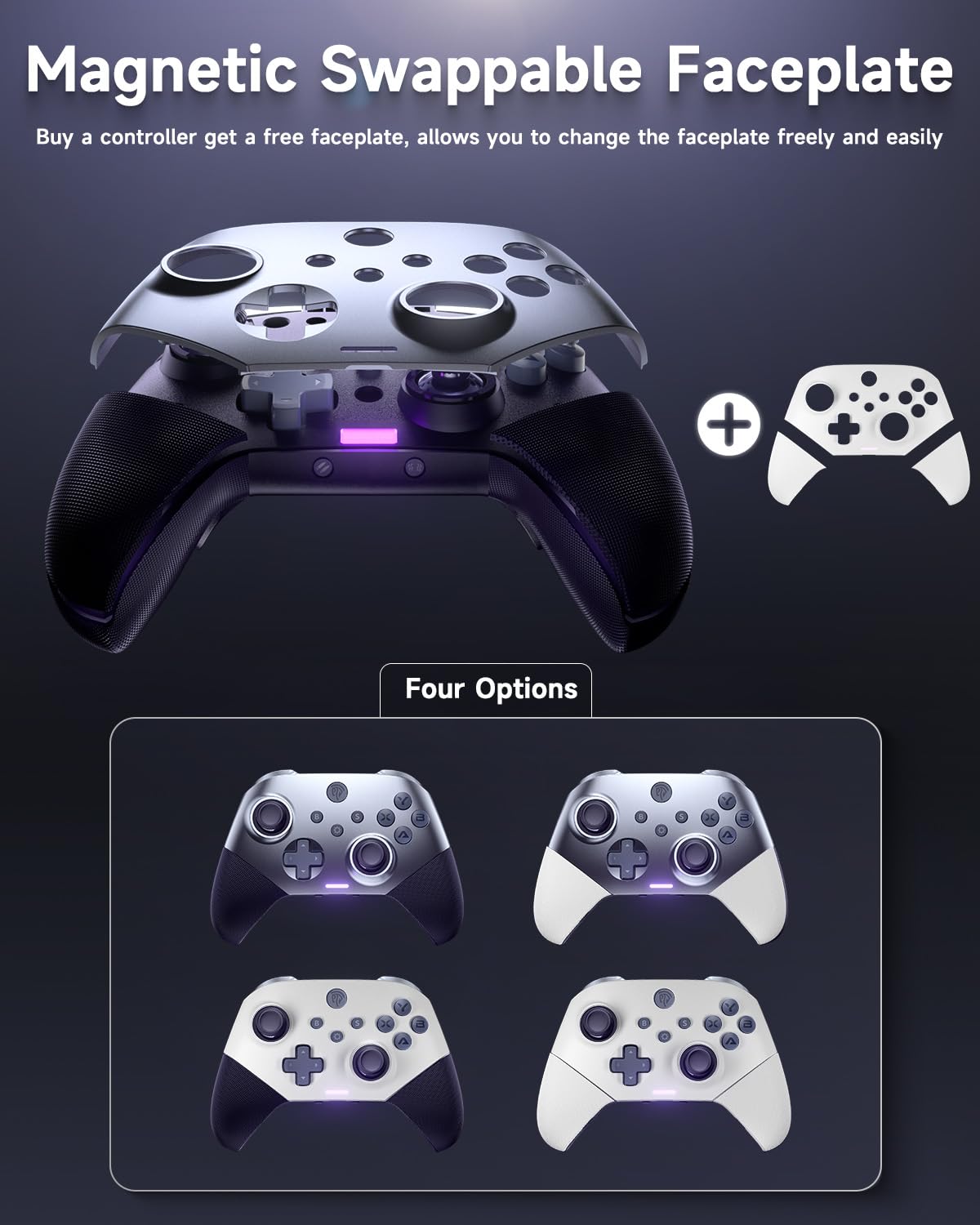
Figure 2: Magnetic Swappable Faceplate feature, showing different color options.
- Joysticks i disparadors d'efecte Hall: Equipped with contactless Hall sensors for precise, drift-free, and long-lasting input.

Figure 3: Diagram illustrating Hall Effect Joysticks for enhanced precision.

Figure 4: Diagram illustrating Hall Effect Triggers with 0.1mm accuracy.
- 40 hores de durada de la bateria: A 1000mAh upgraded battery provides extended gameplay on a single charge.

Figure 5: Visual representation of the controller's 1000mAh battery capacity and 40-hour playtime.
- All Triple Mechanical Keys: Enjoy tactile and responsive feedback with durable mechanical buttons.

Figura 6: Primer pla view of the mechanical A, B, X, Y buttons, highlighting their design.
- Compatibilitat versàtil: Compatible with PC, Switch, iOS, and Android devices.

Figure 7: Infographic showing compatibility with various platforms including PC, Steam Deck, Tesla, Raspberry Pi, Smartphones, Android TV, and Nintendo Switch consoles.
- Customizable Back Keys and APP: Includes 2 custom back keys (M1, M2) and supports an app for button remapping.
Contingut del paquet
Si us plau, comproveu el contingut del paquet en desempaquetar-lo:
- EasySMX X10 Wireless PC Controller
- USB 2.4G Wireless Dongle
- USB-C Charging Cable (5FT Braided)
- Swappable Faceplate (White)
- Manual d'usuari (aquest document)
Disseny del controlador
Familiarize yourself with the buttons and components of your EasySMX X10 controller:
| Component | Descripció |
|---|---|
| Manets analògics esquerra/dreta | Joysticks d'efecte Hall per a un moviment precís de 360 graus. |
| Botons A/B/X/Y | Mechanical action buttons for in-game commands. |
| D-Pad | Coixinet direccional per a una entrada direccional precisa. |
| LB/RB Buttons | Botons a l'espatlla. |
| LT/RT Triggers | Hall Effect linear triggers for analog input. |
| M1/M2 Back Buttons | Programmable back paddles for custom functions. |
| Botó d'inici | Powers on/off the controller and accesses system menus. |
| Select/Start Buttons | Standard menu navigation buttons. |
| Botó de commutació | Switch between different connection modes (NS, BT, Wired). |
| Port USB-C | Per a càrrega i connexió per cable. |
Guia de configuració
1. Càrrega del controlador
Before first use, fully charge the controller. Connect the supplied USB-C cable to the controller's USB-C port and the other end to a USB power source (e.g., PC, USB wall adapter). The charging indicator light will show charging status and turn off when fully charged. A full charge takes approximately 3.5 hours.
2. Connexió a dispositius
The EasySMX X10 supports multiple connection methods:
2.1. 2.4G Wireless Connection (PC, Steam Deck, Tesla, Raspberry Pi)
- Insert the 2.4G USB dongle into an available USB port on your device.
- Engegueu el controlador prement el botó Inici.
- Ensure the toggle button on the back of the controller is set to the 2.4G wireless mode.
- The controller will automatically connect to the dongle. The indicator light will become solid when connected.
Video 1: Demonstrates how to pair the EasySMX X10 Controller with a PC using the 2.4G wireless dongle.
2.2. Bluetooth Connection (PC, Smartphones, Android TV, Steam Deck)
- Assegureu-vos que el Bluetooth del vostre dispositiu estigui activat.
- Engegueu el controlador prement el botó Inici.
- Set the toggle button on the back of the controller to Bluetooth mode.
- On your device, search for new Bluetooth devices and select "EasySMX X10" (or similar) from the list.
- The controller's indicator light will become solid once paired.
Video 2: Guide on pairing the EasySMX X10 Controller with an iOS device via Bluetooth.
Video 3: Instructions for pairing the EasySMX X10 Controller with an Android mobile device using Bluetooth.
2.3. Wired Connection (PC, Android TV, Smartphones)
Connect the controller directly to your device using the supplied USB-C cable. The controller will automatically be recognized as a wired gamepad.
3. Swapping Faceplates
The EasySMX X10 features a magnetic swappable faceplate for customization. Gently lift the existing faceplate from the controller to detach it. Align the new faceplate with the controller's body and allow the magnets to snap it into place.
Instruccions de funcionament
1. Encendre/apagar
- Encès: Premeu el botó Inici.
- Apagar: Press and hold the Home button for 3-5 seconds until the controller powers off. The controller will also automatically power off after a period of inactivity to save battery.
2. Customizable Back Keys (M1/M2)
The M1 and M2 back buttons can be programmed to replicate other button inputs or complex macros. Refer to the EasySMX companion app for detailed customization options.
Video 4: Demonstrates how to easily remap buttons using the EasySMX companion application.
3. Funció Turbo
The Turbo function allows a button to be pressed repeatedly as long as it is held down. To activate/deactivate Turbo for a button, press and hold the desired button, then press the Turbo button (if available, or refer to app for assignment). Repeat the process to clear the Turbo setting.
4. Adjustable Dual Vibration
The controller features dual vibration motors for immersive feedback. Vibration intensity can typically be adjusted through the connected device's settings or the EasySMX companion app.
5. 6-Axis Gyro Motion Control
For compatible games and platforms (e.g., Nintendo Switch), the built-in 6-axis gyro provides motion control capabilities. Ensure your game supports this feature.
Manteniment
- Mantingueu el controlador net netejant-lo amb un drap suau i sec.
- Eviteu exposar el controlador a temperatures extremes, humitat o llum solar directa.
- No desmunteu el controlador, ja que això podria anul·lar la garantia i causar danys.
- Guardeu el controlador en un lloc segur quan no l'utilitzeu per evitar danys accidentals.
Resolució de problemes
| Problema | Possible solució |
|---|---|
| El controlador no s'encén. | Ensure the controller is charged. Connect it to a power source using the USB-C cable and allow it to charge for at least 15 minutes before attempting to power on again. |
| El controlador no es connecta al dispositiu. |
|
| Input lag or dropped connections (Wireless). |
|
| Els botons o els joysticks no responen/es desplacen. |
|
| Squeaky triggers. | This can sometimes occur with new mechanical components. Continued use may reduce the sound. If persistent and affecting functionality, contact customer support. |
Especificacions
| Característica | Detall |
|---|---|
| Número de model | X10 |
| Connectivitat | 2.4G Wireless, Bluetooth, Wired (USB-C) |
| Compatibilitat | PC, Switch, iOS, Android, Steam Deck, Android TV, Tesla, Raspberry Pi |
| Joysticks i disparadors | Sensors d'efecte Hall |
| Botons | Triple Mechanical Keys (A/B/X/Y), Programmable M1/M2 Back Buttons |
| Capacitat de la bateria | Polímer de liti de 1000 mAh |
| Durada de la bateria | Fins a 40 hores (aprox.) |
| Temps de càrrega | Aprox. 3.5 hores |
| Dimensions | 6.1 x 2.36 x 4.25 polzades |
| Pes | 1.37 lliures |
| Característiques especials | Magnetic Swappable Faceplate, Adjustable Dual Vibration, 6-Axis Gyro Motion Control, Turbo Function, Companion App Support |
Garantia i Suport
EasySMX products come with a standard manufacturer's warranty. For detailed warranty information, technical support, or service inquiries, please visit the official EasySMX website or contact their customer support team. Please retain your proof of purchase for warranty claims.
EasySMX Official Weblloc: www.easysmx.com


