Introducció
Thank you for choosing the Joyroom Jdots Series JR-DB2 TWS Earbuds. This manual provides detailed instructions on how to set up, operate, maintain, and troubleshoot your new earbuds. Please read this manual carefully before use to ensure optimal performance and longevity of your device.
Informació de seguretat
- No desmuntis ni modifiquis els auriculars ni l'estoig de càrrega.
- Mantingueu el dispositiu allunyat de temperatures extremes, humitat i líquids.
- Eviteu l'exposició prolongada a nivells de volum elevats per evitar danys auditius.
- Netegeu els auriculars i l'estoig de càrrega només amb un drap suau i sec.
- Eliminar el dispositiu de manera responsable d'acord amb la normativa local.
Contingut del paquet
Si us plau, comproveu el paquet per veure si hi ha els elements següents:
- Joyroom Jdots Series JR-DB2 TWS Earbuds (Left and Right)
- Estoig de càrrega
- Cable de càrrega USB
- Manual d'usuari
Producte acabatview
Familiarize yourself with the components of your JR-DB2 earbuds and charging case.
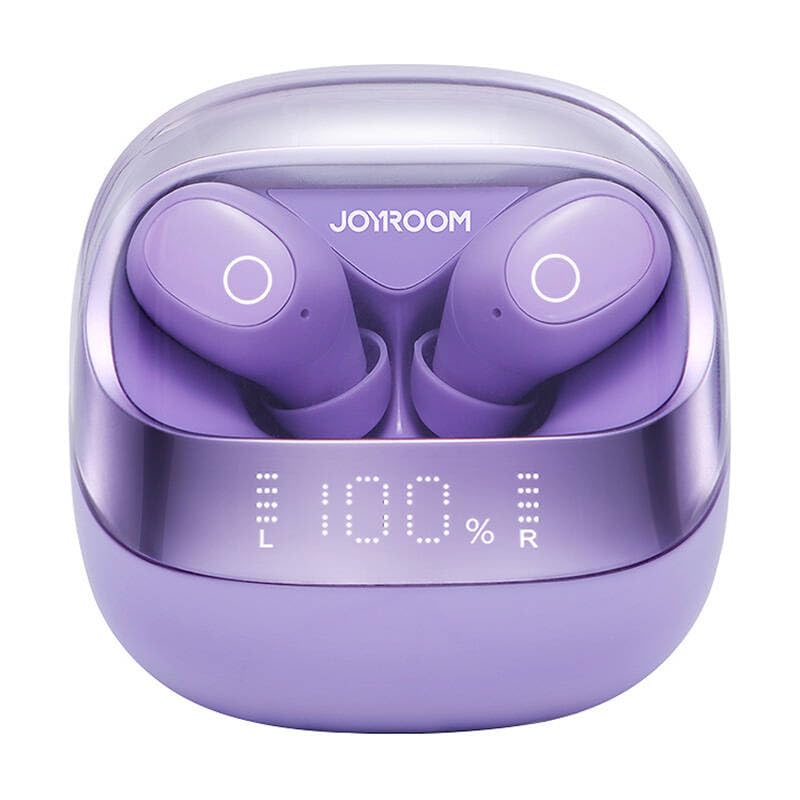
Imatge 1: Davant view of the Joyroom JR-DB2 TWS Earbuds placed inside their charging case. The image displays the compact design of the case and the ergonomic shape of the earbuds, highlighting the overall product aesthetics.
- Auriculars: Auriculars esquerre (E) i dret (R) amb zones de control tàctil i contactes de càrrega.
- Estoig de càrrega: Houses the earbuds for charging and storage, features a charging port and LED indicator.
Configuració
1. Càrrega dels auriculars i l'estoig
Abans del primer ús, carregueu completament els auriculars i l'estoig de càrrega.
- Col·loca els auriculars a l'estoig de càrrega. Assegura't que els contactes de càrrega estiguin alineats.
- Connecteu el cable de càrrega USB al port de càrrega de la carcassa i a una font d'alimentació (per exemple, un adaptador de paret USB, un port USB de l'ordinador).
- The LED indicator on the charging case will show the charging status. A full charge is indicated when the LED stops blinking or turns solid.
- Charging time for the case is approximately 1.5-2 hours. Earbuds charge automatically when placed in the case.
Imatge 2: Primer pla view of the Joyroom JR-DB2 charging case with a USB-C cable connected to its charging port. The image illustrates the correct way to connect the charging cable to power the case.
2. Emparellament amb el dispositiu
Els auriculars entraran automàticament en mode d'emparellament quan es treguin de l'estoig de càrrega.
- Obre l'estoig de càrrega i treu els dos auriculars. S'encendran automàticament i intentaran emparellar-se entre si.
- Al telèfon intel·ligent o al dispositiu amb Bluetooth, aneu a la configuració de Bluetooth.
- Cerca available devices and select "JR-DB2" de la llista.
- Once connected, you will hear a confirmation sound, and the earbuds' indicator lights will turn off or blink slowly.
- Si l'emparellament falla, torna a col·locar els auriculars a l'estoig, tanca la tapa, espera uns segons i repeteix els passos.
Instruccions de funcionament
Portant els auriculars
Per a una qualitat de so i una comoditat òptimes, assegureu-vos que els auriculars es portin correctament.
- Identifica els auriculars esquerre (E) i dret (R).
- Introduïu suaument cada auricular al canal auditiu corresponent.
- Rotate the earbud slightly until it fits snugly and comfortably.
Imatge 3: A person demonstrating how to properly wear the Joyroom JR-DB2 TWS Earbuds. The image shows an earbud securely placed in the ear, highlighting its ergonomic fit.
Controls tàctils
The JR-DB2 earbuds feature intuitive touch controls on each earbud.
| Acció | Funció |
|---|---|
| Toc únic (E/D) | Reproduir / Pausar música, Respondre / Finalitzar trucada |
| Doble toc (dreta) | Pista següent |
| Doble toc (esquerra) | Pista anterior |
| Toc tres vegades (dreta) | Puja el volum |
| Toc tres vegades (esquerra) | Baixa el volum |
| Long Press (2s, L/R) | Reject call, Activate Voice Assistant |
Manteniment
Neteja
- Regularly clean the earbuds and charging case to prevent dirt buildup.
- Feu servir un drap suau, sec i sense borrissol per netejar les superfícies.
- Per a la brutícia persistent, lleugerament dampNetegeu el drap amb aigua i eixugueu-lo immediatament.
- No utilitzeu productes químics agressius, aerosols ni netejadors abrasius.
- Assegureu-vos que els contactes de càrrega dels auriculars i de la funda estiguin nets i secs.
Emmagatzematge
- Quan no els utilitzeu, guardeu els auriculars a la seva funda de càrrega per protegir-los i mantenir-los carregats.
- Guardeu el dispositiu en un lloc fresc i sec, allunyat de la llum solar directa i de temperatures extremes.
Resolució de problemes
Si trobeu problemes, proveu les solucions següents:
| Problema | Solució |
|---|---|
| Els auriculars no es combinen amb el dispositiu |
|
| Només funciona un auricular |
|
| Sense so |
|
| La funda de càrrega no es carrega |
|
Especificacions
| Característica | Detall |
|---|---|
| Número de model | JR-DB2 |
| Marca | SALA DE JOIES |
| Connectivitat | Sense fil (Bluetooth) |
| Color | Black (Note: Product may be available in other colors) |
| Material | Acrílic |
| Dispositius compatibles | Bluetooth-enabled devices (e.g., smartphones, tablets, laptops) |
| UPC / EAN | 6941237112057 |
Garantia i Suport
Joyroom products are designed with quality and reliability in mind. For warranty information, please refer to the warranty card included in your product packaging or visit the official Joyroom website. For technical support or further assistance, please contact Joyroom customer service through their official channels.
Sovint podeu trobar les dades de contacte d'assistència a la pàgina web del fabricant weblloc: www.joyroom.com


