1. Introducció
Thank you for choosing the Irfora FJ3383M Smart Weather Station. This device provides comprehensive indoor and outdoor environmental data, including temperature, humidity, atmospheric pressure, and weather forecasts. It also features a clock with alarm functions, moon phase display, and sunrise/sunset times. This manual will guide you through the setup, operation, and maintenance of your weather station.

Image 1: Irfora FJ3383M Smart Weather Station with its wireless outdoor sensor.
2. Contingut del paquet
Si us plau, comproveu el paquet per veure si hi ha els elements següents:
- 1 x Weather Station Unit
- 1 x Sensor exterior sense fil
- 1 x USB Power Cable (1.5m)
- 1 x User Manual (English, German, French, Italian, Spanish)
3. Característiques del producte
- Large Color Display: Elegant design with a large color screen displaying time, calendar, week, comfort index, atmospheric pressure, tide, moon phase, indoor/outdoor temperature and humidity, weather forecast, trend prediction, and local sunrise/sunset times.
- Sensor exterior sense fil: Supports wall mounting or table stand. Features RF 433.92MHz transmission frequency with a range of up to 60 meters in open areas. The sensor is IPX4 waterproof. Up to 3 wireless outdoor sensors can be connected (one sensor is included).
- Switchable Formats: Temperature display in Celsius (℃) or Fahrenheit (℉). Pressure display in inHg or hPa/mb. Time display in 12-hour or 24-hour format with two alarms.
- Retroil·luminació ajustable: Backlight with 4 brightness levels and a night mode. The backlight can remain continuously on when powered by the USB cable. Includes a snooze function (off or 5-60 minutes).
- Temperature and Frost Alarm: Suitable for various environments. A temperature and frost alarm can be set. The weather station will emit an alarm when the outdoor temperature falls below the preset value.
- Calendari perpetu: Displays calendar information up to the year 2099.
- Multi-language Day Display: Weekdays available in 8 languages: English, French, Italian, Spanish, Dutch, Danish, Polish, German.

Image 2: The weather station's display showing multiple functions simultaneously.

Image 3: The indoor weather station receiving data from the wireless outdoor sensor.
4. Configuració
4.1 Powering the Weather Station
- Unitat principal: Insert 2 x LR6 AA batteries (not included) into the battery compartment. For continuous backlight and optimal performance, connect the included USB power cable to the DC 5V 600mA input port and plug it into a compatible USB power adapter (not included).
- Sensor sense fils: Insert 2 x LR6 AA batteries (not included) into the battery compartment of the outdoor sensor.
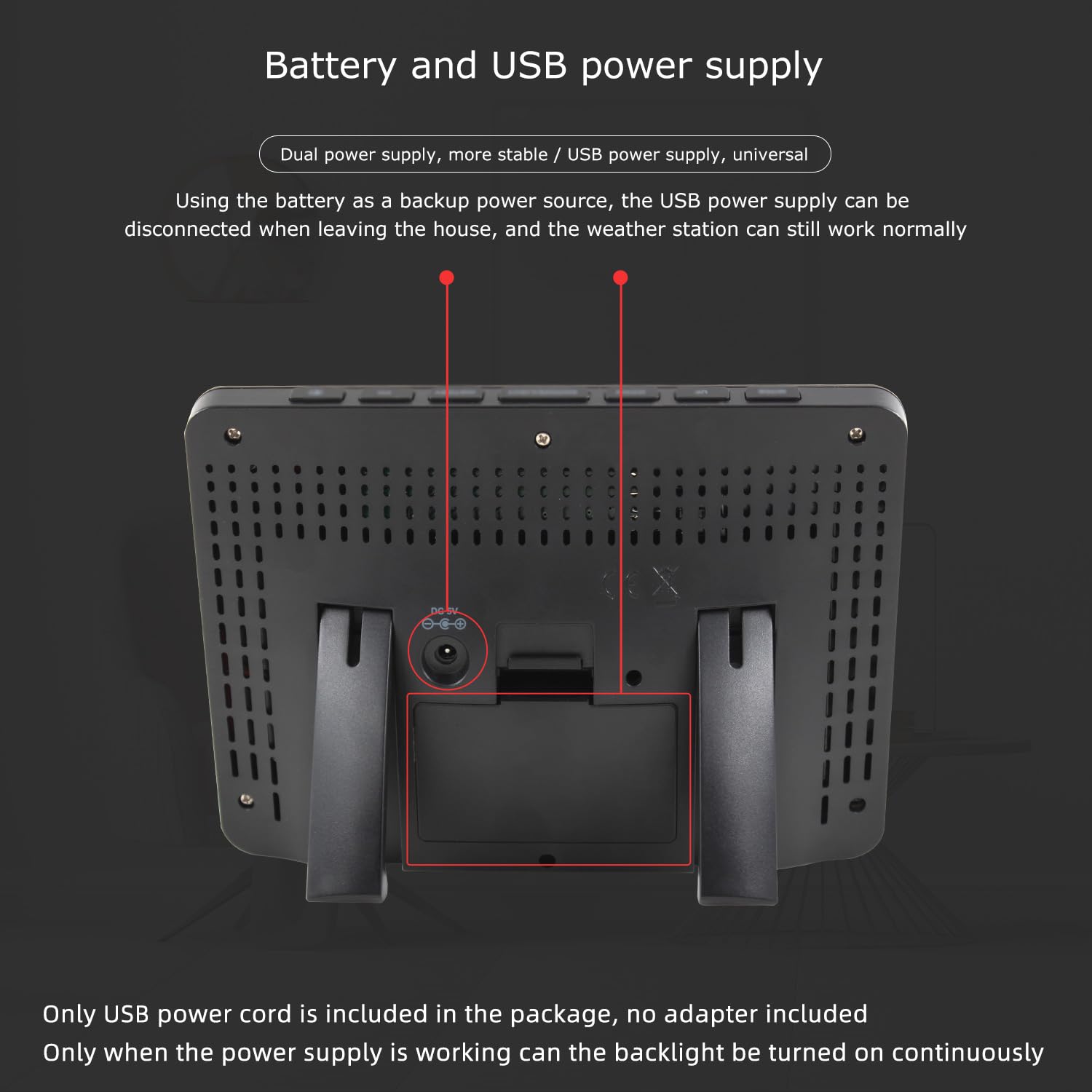
Imatge 4: posterior view of the weather station showing battery compartment and USB power input.
4.2 Col·locació del sensor
Place the wireless outdoor sensor in a location that provides accurate readings and is protected from direct sunlight and heavy precipitation. Ensure it is within the 60-meter transmission range of the main unit.

Imatge 5: Ex.amples of suitable locations for the wireless outdoor sensor.
4.3 Sincronització inicial
After powering both units, the weather station will automatically attempt to connect with the outdoor sensor. This may take a few minutes. Ensure both units are within range.
5. Instruccions de funcionament
5.1 Mostra finalview
The weather station's display provides various information. Refer to the diagram below for a detailed breakdown of each display area.

Image 6: Functional description of the weather station display.
5.2 Configuració de l'hora i la data
Consult the included user manual for specific button functions to set the time, date, and calendar. The perpetual calendar supports dates up to 2099.
5.3 Selecció d'unitats
You can switch between Celsius (℃) and Fahrenheit (℉) for temperature, inHg and hPa/mb for atmospheric pressure, and 12-hour or 24-hour format for time. Refer to the user manual for button instructions.
5.4 Funció d'alarma i repetició
The weather station features two alarms. Set the alarm times as per the manual. When an alarm sounds, press the snooze button to temporarily silence it for 5 to 60 minutes, or press any other button to stop the alarm.
5.5 Ajust de la llum de fons
When powered by the USB cable, the backlight can be set to 4 different brightness levels or a night mode. The backlight remains continuously on in USB power mode. When operating on batteries only, the backlight will typically illuminate briefly after a button press to conserve power.
5.6 Sunrise and Sunset Times
The device can display local sunrise and sunset times. After receiving the product, you can set this feature according to a city code provided in the instruction manual. If a city code is not used, you can manually set the sunrise and sunset times.

Image 7: Display section for sunrise and sunset times, including city selection.
6. Especificacions
| Rang de temperatura interior | -9.9 ℃ to 50 ℃ (15 ℉ to 122 ℉) |
| Interval de temperatura exterior | -40 ℃ a 70 ℃ (-40 ℉ a 158 ℉) |
| Rang d'humitat (interior i exterior) | 20% RH a 95% RH |
| Interval de pressió atmosfèrica | 600 hPa/mb to 1100 hPa/mb (17.72 inHg to 32.50 inHg) |
| Wireless Sensor Transmission Frequency | 433.92 MHz |
| Wireless Sensor Transmission Range | Fins a 60 metres (zona oberta) |
| Wireless Sensor Water Resistance | IPX4 |
| Font d'alimentació de la unitat principal | 2 x LR6 AA batteries (not included) or DC 5V 600mA via USB cable |
| Font d'alimentació del sensor exterior | 2 x LR6 AA batteries (not included) |
| Longitud del cable USB | 1.5 metres |
| Material | ABS |
| Dimensions de l'article (L x A x A) | 16.1 x 11.5 x 3.2 cm (6.34 x 4.53 x 1.26 polzades) |
| Pes de l'article | 214 g |
| Número de model | TYHDEE25157 |

Image 8: Visual representation of the indoor and outdoor temperature measurement ranges.
7. Manteniment
To ensure the longevity and accuracy of your weather station:
- Netegeu la pantalla i casinNetegeu amb un drap suau i sec. Eviteu productes de neteja o dissolvents abrasius.
- Replace batteries in both the main unit and the outdoor sensor when the low battery indicator appears on the display.
- Ensure the outdoor sensor's battery compartment is securely closed to maintain its IPX4 water resistance.
- Avoid exposing the main unit to extreme temperatures, direct sunlight, or high humidity.
8. Solució De Problemes
- Sense lectura de temperatura/humitat exterior:
- Comproveu si les piles del sensor exterior estan correctament instal·lades i no estan esgotades.
- Ensure the outdoor sensor is within the transmission range of the main unit.
- Try re-synchronizing the sensor by removing and reinserting batteries in both units, then placing them close together during power-up.
- Hora/data incorrecta:
- Manually set the time and date using the instructions in the full user manual.
- Verify the 12/24-hour format setting.
- Problemes de visualització:
- If the display is dim or flickering, check the main unit's batteries or ensure the USB power cable is properly connected.
- Adjust the backlight brightness settings.
- Temperature/Frost Alarm Not Working:
- Ensure the alarm function is enabled and the threshold temperature is correctly set.
9. Garantia i Suport
Warranty information for the Irfora FJ3383M Smart Weather Station is not explicitly provided in the product details. For specific warranty terms or technical support, please contact the manufacturer, Irfora, or your point of purchase.
Regarding spare parts, information on their availability is currently not provided.
Note: The product supports up to three outdoor sensors simultaneously. One sensor is included by default. If additional sensors are required, please contact customer service for ordering under SPU: E23975.