Introducció
This manual provides comprehensive instructions for the setup, operation, and maintenance of your Blaupunkt 43QD7050 43-inch 4K Ultra HD QLED Google TV. Please read this manual thoroughly before using the television to ensure proper functionality and safety.

Imatge: Frontal view of the Blaupunkt 43QD7050 QLED Google TV, highlighting its display and features.
Informació important de seguretat
Seguiu sempre les precaucions de seguretat bàsiques quan utilitzeu aquest televisor per reduir el risc d'incendi, descàrrega elèctrica i lesions. Conserveu aquest manual per a futures consultes.
- No exposeu el televisor a la pluja ni a la humitat.
- No bloquejar les obertures de ventilació.
- Assegureu-vos de la connexió a terra adequada per al cable d'alimentació.
- Desendolleu el televisor durant tempestes o quan no l'utilitzeu durant períodes prolongats.
- Demaneu tot el servei a personal de servei qualificat.
Què hi ha a la caixa
Verifiqueu que hi hagi tots els components en desembalar el televisor.
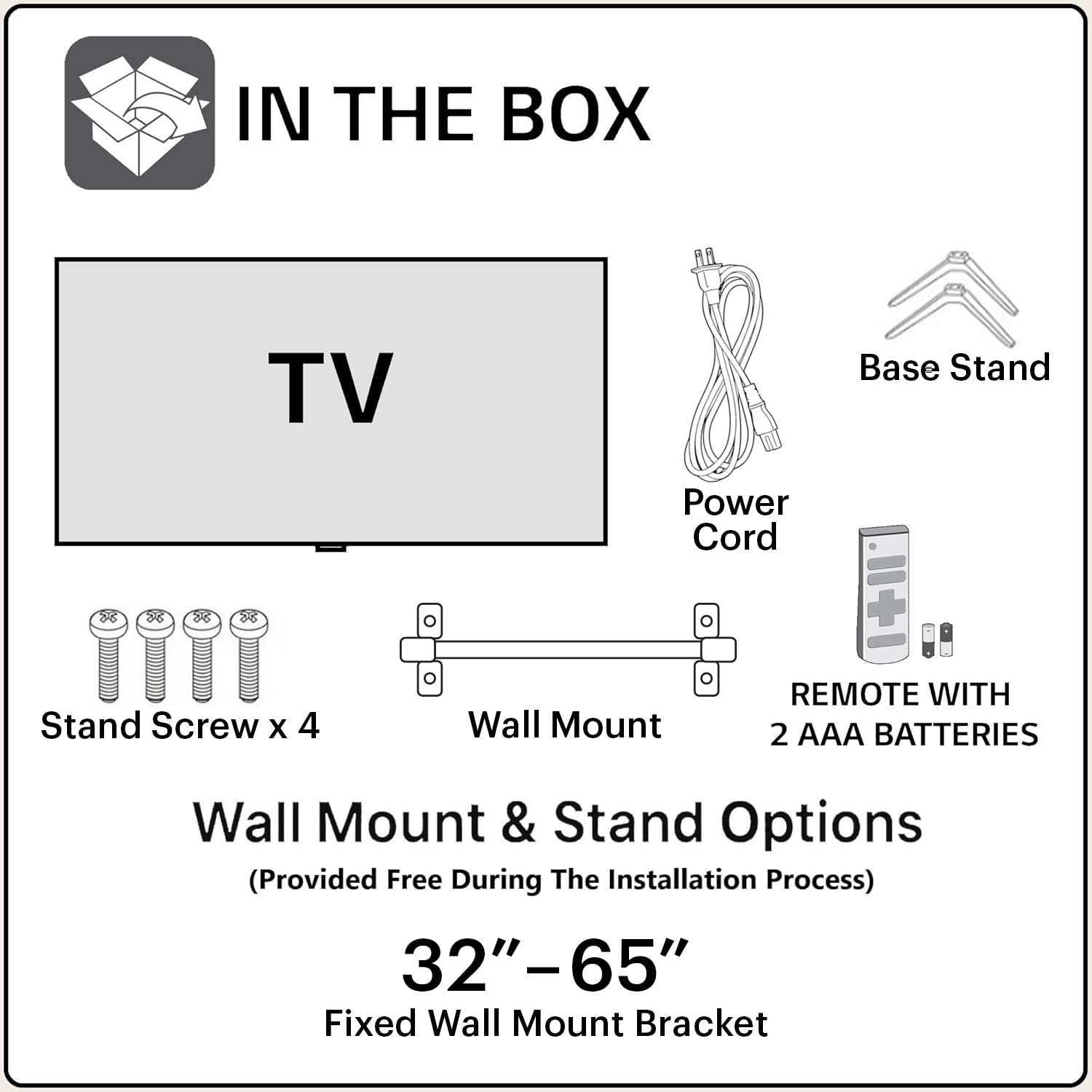
Image: Diagram showing the items included in the product packaging: TV, remote control, wall mount, stand screws, power cord, and AAA batteries.
- 1 x Blaupunkt 43QD7050 LED TV
- 1 x comandament a distància
- 1 x Wall Mount Bracket (for 32"-65" models)
- 2 piles AAA (per al comandament a distància)
- 1 x cable d'alimentació
- 1 x Base Stand Set (with 4 stand screws)
- Manual d'usuari (aquest document)
Físic acabatview
Davant View

Imatge: Frontal view of the television, showcasing the screen and minimal bezels.
lateral View

Imatge: Side profile del televisor, il·lustrant el seu disseny prim.
posterior View i Ports

Imatge: Part posterior view of the television, detailing the location of various input and output ports.
The rear panel of the TV includes various ports for connectivity:
- Ports HDMI (x3): For connecting devices like gaming consoles, set-top boxes, and Blu-ray players. One port supports eARC.
- Ports USB (x2): Per connectar dispositius d'emmagatzematge USB.
- Port Ethernet: Per a connexió a Internet per cable.
- Entrada d'antena/cable: Per connectar una antena o un cable de televisió.
- Sortida d'àudio: Per connectar sistemes d'àudio externs.
- Entrada d'alimentació: Per connectar el cable d'alimentació.
Guia de configuració
1. Instal·lació del suport (opcional)
If you choose to place the TV on a stand, follow these steps:
- Col·loqueu amb cura el televisor cap per avall sobre una superfície suau i plana per evitar que es faci malbé la pantalla.
- Align the base stands with the screw holes on the bottom of the TV.
- Fixeu cada suport amb els cargols proporcionats.
2. Muntatge a la paret (opcional)
The TV comes with a wall mount bracket. Professional installation is recommended for wall mounting. Ensure the wall can support the weight of the TV.
- Refer to the wall mount bracket's instructions for specific installation details.
- Ensure adequate ventilation around the mounted TV.
3. Connexió de perifèrics
Connect your external devices to the appropriate ports on the TV's rear panel.
- HDMI: Use HDMI cables to connect devices like set-top boxes, gaming consoles, or Blu-ray players.
- USB: Inseriu unitats USB per a la reproducció de contingut multimèdia.
- Ethernet: Connecteu un cable Ethernet per a una connexió a Internet per cable estable.
- Potència: Connecteu el cable d'alimentació a l'entrada d'alimentació del televisor i després a una presa de corrent.

Image: Visual representation of the TV's connectivity options including HDMI, Bluetooth, Dual Band Wi-Fi, and USB.
4. Engegada inicial i configuració de Google TV
- Connecteu el televisor a una presa de corrent.
- Premeu el botó d'engegada del comandament a distància o del televisor.
- Seguiu les instruccions que apareixen a la pantalla per completar la configuració inicial, inclosa la selecció d'idioma, la connexió de xarxa (Wi-Fi o Ethernet) i l'inici de sessió al compte de Google.
Instruccions de funcionament
Funcions de control remot

Image: Layout of the Blaupunkt TV remote control, showing buttons for power, navigation, volume, and quick access to streaming services.
El comandament a distància us permet navegar per les funcions del televisor:
- Botó d'encesa: Encén o apaga el televisor.
- Teclat de navegació (Amunt/Avall/Esquerra/Dreta/D'acord): Per a la navegació i selecció de menús.
- Botó enrere: Torna a la pantalla anterior.
- Botó d'inici: Accedeix a la pantalla d'inici de Google TV.
- Pujar/baixar el volum: Ajusta el nivell de volum.
- Botó de silenci: Silencia o activa el so.
- Botons d'accés ràpid: Botons dedicats per a Netflix, Prime Video, YouTube i altres serveis.
- Botó de l'Assistent de Google: Activa el control per veu.
Google TV Interface Navigation
Google TV organizes your content from various streaming services into a personalized home screen.

Image: Screenshot of the Google TV interface, displaying personalized movie and show recommendations and a unified watchlist.
- Use the navigation pad to browse through recommended content, apps, and settings.
- Select an item by pressing the OK botó.
- Access the full list of installed apps from the "Apps" tab.
Funcions intel·ligents
- Voice Control (Google Assistant): Press the Google Assistant button on your remote and speak commands to search for content, control smart home devices, or get information.
- Replica de pantalla: Cast content from your compatible smartphone or tablet to the TV using the built-in casting feature.
- Aplicacions i jocs: Access a wide range of applications and games from the Google Play Store.

Image: Display of the TV screen showcasing a selection of over 10,000 available apps and games, including popular streaming services.
Manteniment
- Neteja de la pantalla: Netegeu suaument la pantalla amb un drap suau i sense borrissol. Per a les marques difícils, utilitzeu un netejador de pantalles dissenyat específicament per a televisors, aplicant-lo al drap, no directament a la pantalla.
- Neteja de l'armari: Feu servir un drap suau i sec per netejar el moble del televisor. No utilitzeu productes de neteja abrasius ni dissolvents.
- Actualitzacions de programari: The TV may receive automatic software updates. Ensure your TV is connected to the internet to receive these updates, which improve performance and add new features.
Resolució de problemes
Consulteu aquesta secció per obtenir solucions a problemes comuns.
| Problema | Possible solució |
|---|---|
| Sense poder | Ensure the power cord is securely plugged into both the TV and a working electrical outlet. Check the power indicator light on the TV. |
| No hi ha imatge, però hi ha so | Check the input source. Press the "Input" button on the remote to cycle through sources. Ensure external devices are powered on and connected correctly. |
| No hi ha so, però hi ha imatge | Check the volume level and ensure the TV is not muted. Verify audio settings in the TV menu. If using external speakers, check their connections and power. |
| El comandament a distància no funciona | Substituïu les piles del comandament a distància. Assegureu-vos que no hi hagi cap obstacle entre el comandament a distància i el sensor d'infrarojos del televisor. |
| Poca qualitat d'imatge | Check the cable connections. Adjust picture settings (brightness, contrast, sharpness) in the TV menu. For external devices, ensure they are outputting at the correct resolution. |
| Problemes de connexió Wi-Fi | Restart your router and modem. Go to the TV's network settings and reconnect to your Wi-Fi network. Ensure the TV is within range of your router. |
Especificacions
Detailed technical specifications for the Blaupunkt 43QD7050 QLED Google TV.

Image: Diagram illustrating the physical dimensions of the Blaupunkt 43QD7050 TV, including screen size, width, height, and depth.
| Característica | Detall |
|---|---|
| Model | 43QD7050 |
| Mida de la pantalla | 43 polzades (108 cm) |
| Tecnologia de visualització | QLED |
| Resolució | 4K Ultra HD (3840 x 2160) |
| Freqüència d'actualització | 60 Hz |
| Sistema operatiu | Google TV |
| Sortida de so | 60 watts |
| Funcions d'àudio | Dolby Digital Plus, DTS TruSurround, CyberSound Gen2 Technology |
| Connectivitat | Dual Band Wi-Fi, 3 HDMI ports (eARC support), 2 USB ports, Ethernet, Bluetooth |
| Característiques especials | 4K HDR, Google Assistant, Screen Mirroring, HDR 10+ |
| Memòria (RAM/emmagatzematge) | 2 GB RAM / 16 GB Storage |
| Dimensions del producte (LxWxH) | 97 x 10 x 55 cm (sense suport) |
| Pes de l'article | 5.9 kg |
| Any model | 2024 |

Image: Representation of the MediaTek MT9602 processor, highlighting its quad-core ARM Cortex A53 CPU and Mali-G52MC1 GPU for performance.
Garantia i Suport
Your Blaupunkt 43QD7050 television comes with a manufacturer's warranty.
- Garantia del producte: 1 any des de la data de compra.
- Remote Accessories Warranty: 6 mesos des de la data de compra.
- Reclamació de garantia: The brand warranty can be availed using the purchase invoice.
- Elements no coberts: Light bleeding and dot issues (Mura issues) occurring within acceptable Mura Inspection standards (2% guideline) are not considered panel defects and are not covered.
For customer support, service requests, or further inquiries, please contact:
- Contacte gratuït: 1800-274-4342
- ID de correu electrònic: consumercare@blaupunkttv.in
- Adreça del fabricant: B-29,30,31, Phase-II, Noida, Gautam Buddha Nagar, Uttar Pradesh, 201301, India.
Please have your product model number (43QD7050) and purchase invoice ready when contacting support.


