Introducció
This manual provides essential information for the installation, operation, and maintenance of your XTRONS 12.3 Inch Android 14 Car Stereo. This unit is specifically designed for BMW X1 E84 models manufactured between 2009 and 2015, equipped with the CIC System. It integrates advanced features to enhance your in-car experience while retaining original vehicle functionalities.
Què hi ha a la caixa
Carefully unpack the contents and ensure all items listed below are present:
- 1 x Arnès de cablejat ISO
- 1 x cable d'àudio
- 1 x Antena GPS
- 1 x pinces
- 1 x antena 4G
- 1 x cable USB
- 1 x Instrucció d'instal·lació
- 1 x Manual d'usuari

Image: All accessories included with the XTRONS Car Stereo.
Especificacions
Key technical specifications of the XTRONS 12.3 Inch Android 14 Car Stereo:
- Mida de la pantalla: 12.3 polzades
- Resolució: 1920 x 720
- Sistema operatiu: Android 14
- Processador: Octa-core (2 x Cortex-A75, 6 x Cortex-A55)
- RAM: 4 GB DDR4
- ROM: 64 GB EMMC 5.1
- Connectivitat: Global 4G LTE, Dual-Band Wi-Fi (2.4GHz/5GHz), Bluetooth 5.0, USB
- Característiques especials: Wireless Car Play, Wireless/Wired Android Auto, Built-in DSP, Multi-task Display, Picture-in-Picture (PIP), GPS Navigation
- Tipus de muntatge: Muntatge al quadre de comandament
- Mode de sortida d'àudio: estèreo

Imatge: Més deview of XTRONS Car Stereo's core specifications.
Configuració
Instal·lació acabadaview
The installation process involves removing the original head unit and connecting the new XTRONS unit using the provided wiring harness. It is crucial to follow the detailed steps outlined in the dedicated "Installation Instruction" manual included in the package. Professional installation is highly recommended to ensure correct wiring and functionality, especially when dealing with vehicle-specific systems.
Esquema de cablejat
The provided ISO wiring harness connects the XTRONS unit to your vehicle's electrical system. Ensure all connectors are securely plugged in. The diagram below illustrates the various ports and their functions:

Image: Wiring harness connections for the XTRONS Car Stereo.
- Port ISO per connectar al reproductor de CD original
- Arnès de cablejat ISO
- SORTIDA D'ÀUDIO, Sortida d'àudio
- REVERSE-IN, cable de control de marxa enrere
- P. CAM, ACC de càmera
- ACC
- Micròfon, port de micròfon
- CAM IN, Entrada de càmera
- Port USB 1
- Port USB 2
- Antena 4G
- Antena GPS
- Port LVDS
- Ranura per a targeta SIM 4G
Notes de compatibilitat
This unit is designed to work exclusively with BMW X1 E84 models (2009-2015) that feature the original CIC System. Before installation, verify your vehicle's system type. If your vehicle lacks an audio AUX input, an external FM transmitter may be required for audio integration.
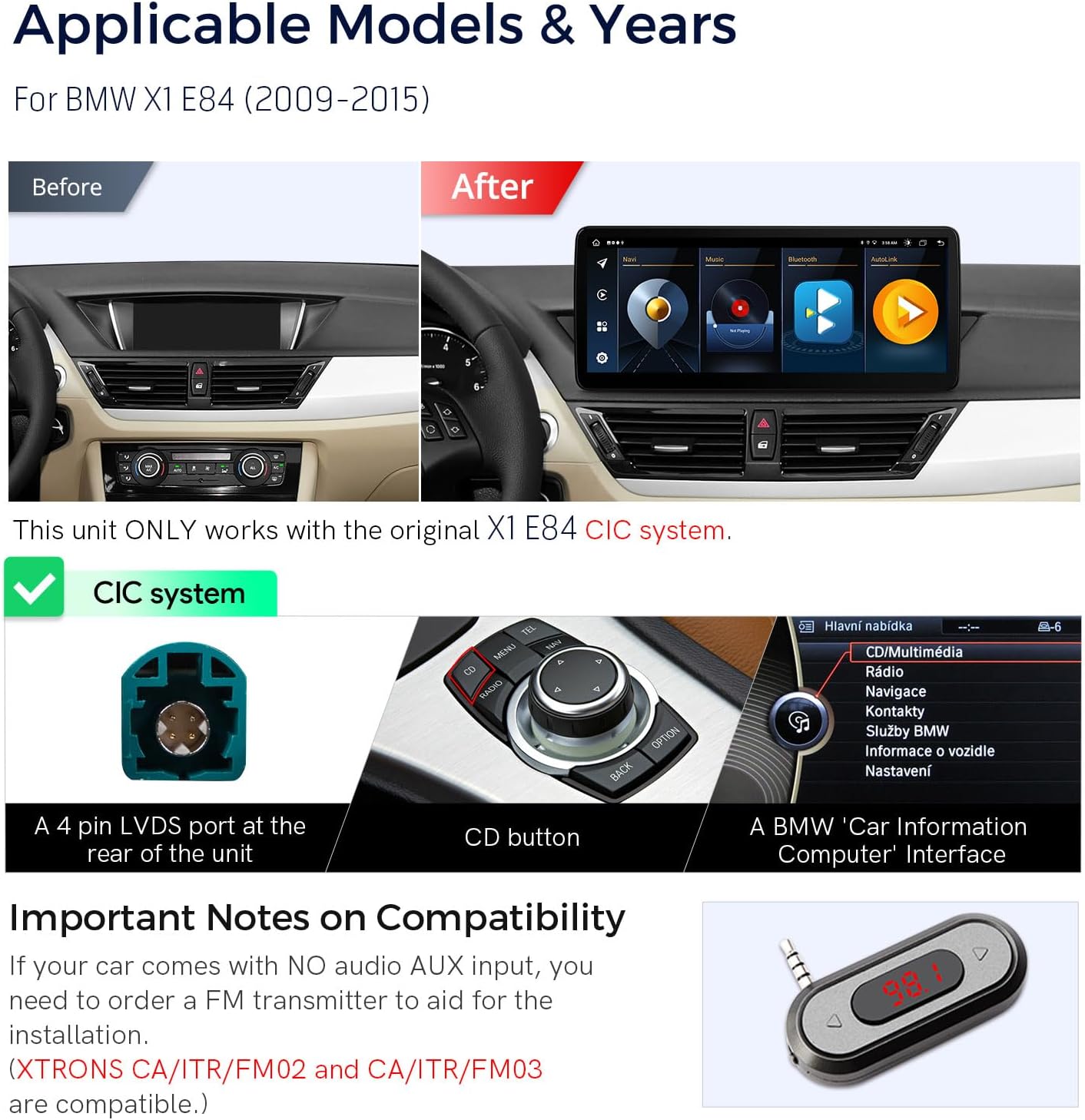
Image: Visual guide for BMW X1 E84 CIC system compatibility.
Instruccions de funcionament
Pantalla i interfície
The 12.3-inch IPS touch screen offers a 1920x720 HD display with a 178° viewing angle, ensuring clear and vibrant visuals. The responsive touch interface allows for smooth navigation through menus and applications. You can customize the user interface with various themes to suit your preference.

Image: Display features including multi-tasking and Picture-in-Picture.
Wireless Connectivity (CarPlay & Android Auto)
The unit supports built-in wireless Apple CarPlay and wireless/wired Android Auto. Connect your iPhone via Bluetooth for CarPlay, or your Android phone wirelessly via Bluetooth or with a USB cable. This allows seamless access to compatible smartphone apps, including navigation, calls, music, and voice assistants like Siri or Google Assistant, directly from the car stereo screen.
Video: Official product video demonstrating the XTRONS Android Car Stereo's features, including wireless CarPlay and Android Auto functionality, for BMW X1 E84 CIC systems.

Image: Displaying smartphone integration features.
Global 4G LTE Connectivity
The unit features Global 4G LTE connectivity. Simply insert a Micro-SIM card (not included) into the designated slot to access mobile broadband internet. This allows for online navigation, streaming, and app usage directly from the head unit without relying on your phone's hotspot. Note that 4G supports internet data only, not phone calls.

Image: Global 4G LTE and Wi-Fi connectivity options.
Dual Wi-Fi Band
The unit supports both 2.4GHz and 5GHz Wi-Fi bands, providing faster and more flexible internet connection speeds. This ensures a stable connection for online services and content streaming.
DSP incorporat
A built-in Digital Sound Processor (DSP) allows for advanced audio customization. Adjust equalizer settings, balance, delay, and filter options to optimize your music listening experience to your preference.
Multi-task Display & Picture-in-Picture (PIP)
Leverage the large screen to run two applications simultaneously side-by-side, such as navigation and music. The Picture-in-Picture (PIP) mode allows you to watch videos in a small window while navigating or using other apps, ensuring you don't miss any content.
Funcions originals conservades
The XTRONS unit is designed to seamlessly integrate with and retain many of your BMW's original functions, including:
- iDrive System control
- Original fiber optic sound system
- Original radio and CD player
- Vehicle's original Bluetooth functionality
- Pantalla de càmera de seguretat
- Steering wheel control functions

Imatge: Més deview of original car functions retained by the unit.
Manteniment
Atenció General
To ensure the longevity and optimal performance of your car stereo, follow these general care guidelines:
- Clean the screen regularly with a soft, lint-free cloth. Avoid using abrasive cleaners or solvents that could damage the display.
- Mantingueu la unitat lliure de pols i deixalles.
- Eviteu exposar la unitat a temperatures extremes o a la llum solar directa durant períodes prolongats.
- Assegureu-vos que tots els cables estiguin connectats correctament i que no estiguin pinçats ni danyats.
Actualitzacions de programari
Periodically check for available software updates. Updates can provide new features, performance improvements, and bug fixes. Refer to the XTRONS website or contact customer support for information on how to download and install the latest firmware.
Resolució de problemes
If you encounter any issues with your XTRONS Car Stereo, refer to the following common troubleshooting steps:
- Sense energia: Verify that the ISO wiring harness is correctly connected and that the vehicle's fuse for the stereo is intact.
- Sense so: Check all audio cable connections. Ensure the original fiber optic sound system is properly integrated. Review the DSP settings to confirm audio output is enabled and configured correctly.
- La pantalla tàctil no respon: Try restarting the unit by turning off the vehicle's ignition and then restarting. If the issue persists, check for any available software updates.
- Pèrdua de senyal GPS: Assegureu-vos que l'antena GPS estigui connectada correctament i col·locada en un lloc amb visibilitat clara view of the sky, free from obstructions.
- Problemes de connexió Bluetooth: Confirm that Bluetooth is enabled on both the car stereo and your mobile device. Delete any previous pairings and attempt to re-pair the devices.
- Funcionalitat intermitent: Ensure all connections are tight and free from corrosion. Check for any loose wires.
For issues not covered here, please consult the detailed User Manual or contact XTRONS customer support.
Garantia i Suport
The XTRONS 12.3 Inch Android 14 Car Stereo is backed by a 1 any de garantia. This warranty covers manufacturing defects and ensures your rights and interests are protected.
For technical assistance, warranty claims, or any product-related inquiries, please do not hesitate to contact XTRONS customer service. You can reach us via Amazon email, and our professional technical support team will respond promptly.
For information on optional accessories or support items that can further enhance your unit's capabilities, please visit the official XTRONS webo poseu-vos en contacte amb el nostre equip d'assistència.


