1. Introducció
This manual provides instructions for the Brookstone 3-in-1 Wireless Charging Station. This device is designed to simultaneously charge compatible iPhone models, Apple Watch, and AirPods.
Contingut del paquet
- 1 x Estació de càrrega sense fil Brookstone 3 en 1
- 1 x cable USB-C
- 1 x Guia d'usuari

Image: The Brookstone 3-in-1 Wireless Charging Station in white, shown charging an iPhone, Apple Watch, and AirPods simultaneously. The iPhone is magnetically attached to the upright stand, the Apple Watch is on its dedicated charger, and the AirPods case rests on the base.
2. Característiques del producte
- Càrrega sense fil 3 en 1: Charges iPhone (MagSafe compatible), Apple Watch, and AirPods simultaneously.
- Alineació magnètica: Strong magnetic connection for secure iPhone placement.
- Flexible Viewing: Supports charging in both portrait and landscape modes for iPhone.
- Càrrega ràpida sense fil: Delivers up to 15W for iPhone and 5W for Apple Watch and AirPods.
- Característiques de seguretat avançades: Protecció integrada contra sobreintensitat, sobrevoltage, overheating, short circuits, and foreign object detection.

Imatge: Un primer pla view of the 3-in-1 magnetic charging stand, highlighting its ability to charge an iPhone, Apple Watch, and AirPods together. The iPhone is shown horizontally, the Apple Watch is on its charger, and AirPods are on the base.
3. Instruccions de configuració
- Connectar l'alimentació: Insert the provided USB-C cable into the charging port on the back of the charging station. Connect the other end of the USB-C cable to a compatible power adapter (not included). A power adapter with 9V-3A output is recommended for optimal performance.
- Encès: Once connected to power, the charging station will be ready for use. A small LED indicator on the front of the base may illuminate.
- Col·locació: Col·loqueu l'estació de càrrega sobre una superfície plana i estable.

Image: A visual comparison showing a cluttered desk with multiple charging cables (labeled 'Before') next to a tidy desk featuring the Brookstone 3-in-1 Wireless Charging Station (labeled 'After'), demonstrating improved organization.
4. Instruccions de funcionament
Carregant el teu iPhone
- Align your MagSafe-compatible iPhone with the magnetic charging pad on the upright stand. The magnets will automatically snap the phone into place.
- The iPhone can be charged in both portrait and landscape orientations.
- Ensure the phone is centered on the charging pad for optimal charging.
Carregant el teu Apple Watch
- Place your Apple Watch onto the dedicated charging module located on the upright stand.
- Ensure the watch is properly seated and the charging icon appears on the watch screen.
Càrrega dels AirPods
- Place your AirPods charging case (compatible with wireless charging) onto the flat charging pad on the base of the station.
- Ensure the AirPods case is centered on the charging pad. The charging indicator on the AirPods case should illuminate.

Image: An iPhone is shown magnetically attached to the charging stand, displaying a charging animation. Text indicates "15W OUTPUT" and "STRONG MAGNETIC, SNAP-CHARGER-USE".
5. Compatibilitat
The Brookstone 3-in-1 Wireless Charging Station is compatible with the following devices:
- iPhone: iPhone 15, 14, 13, 12 Pro Max, Pro, Mini, and Plus series (MagSafe compatible).
- Apple Watch: Apple Watch Ultra, Ultra 2, Series 8, 7, SE, 6, 5, 4, 3, and 2.
- AirPods: AirPods Pro, AirPods (3rd Generation), AirPods (2nd Generation) with wireless charging case.
- Altres dispositius: Android phones with Qi2 or Qi with compatible magnet cases/rings may also be supported.
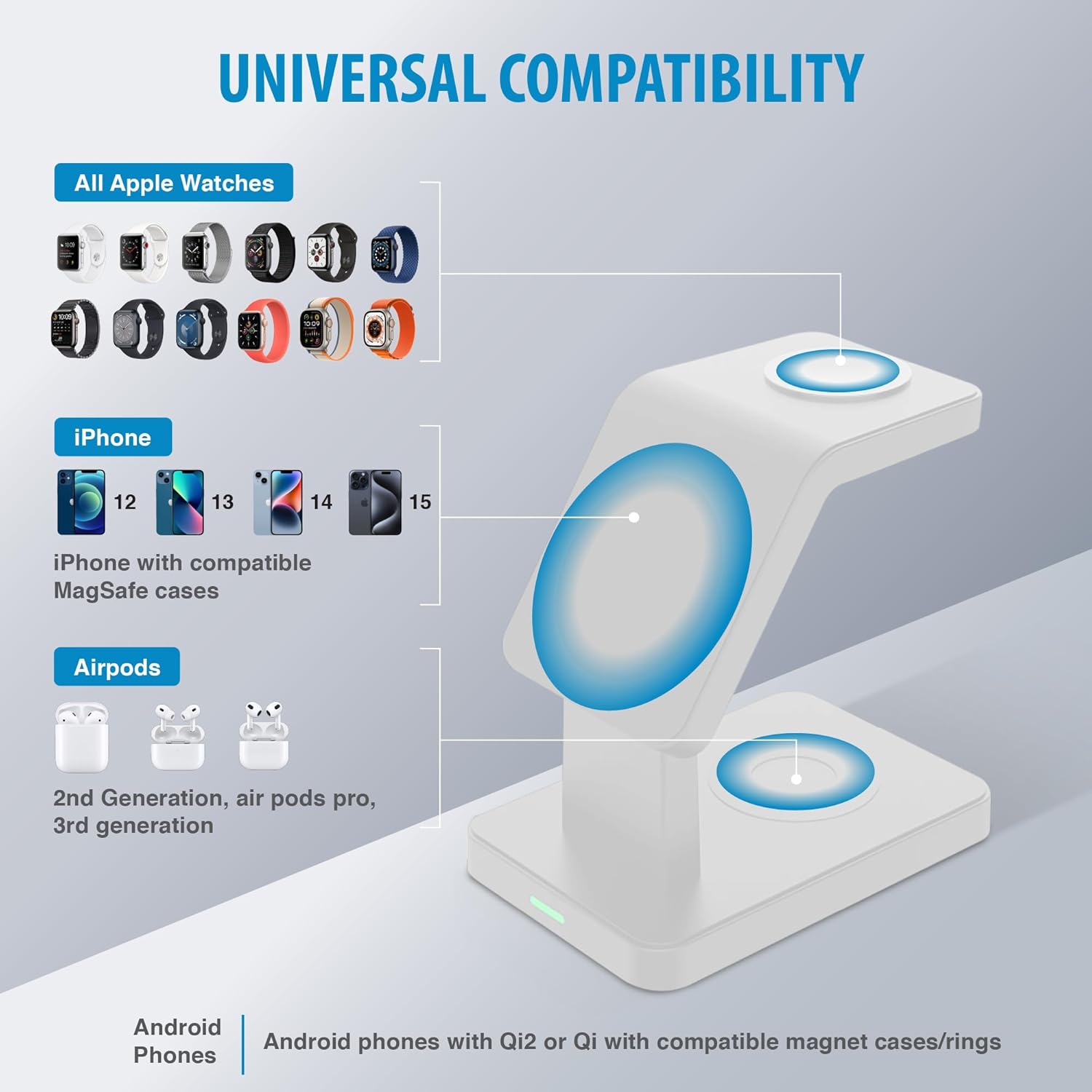
Image: A diagram titled "UNIVERSAL COMPATIBILITY" showing icons for various Apple Watch models, iPhone models (12, 13, 14, 15), and AirPods (2nd Gen, Pro, 3rd Gen), indicating their compatibility with the charging station.
6. Pautes de seguretat
To ensure safe operation and prolong the life of your charging station, please observe the following:
- No desmunteu ni modifiqueu el dispositiu.
- Mantingueu el dispositiu allunyat de l'aigua, la humitat i les altes temperatures.
- Eviteu deixar caure o sotmetre el dispositiu a forts impactes.
- Use only the provided USB-C cable and a compatible power adapter.
- Do not place metal objects or foreign materials on the charging pads, as this may interfere with charging or cause overheating.
- The charging station incorporates intelligent protection against overcurrent, overvoltage, overheating, short circuits, magnetic field interference, and foreign object detection.

Image: Three icons illustrating the safety features of the charging station: a shield with a lightning bolt for over-current protection, a thermometer for over-temperature protection, and a voltage symbol for over-voltagprotecció.
7. Manteniment
To maintain your charging station in optimal condition:
- Netegeu la superfície amb un drap suau i sec.
- No utilitzeu productes químics ni productes de neteja abrasius.
- Ensure the charging pads are free of dust and debris for efficient charging.
8. Solució De Problemes
- El dispositiu no es carrega:
- Assegureu-vos que l'estació de càrrega estigui connectada correctament a una font d'alimentació.
- Verify that your device is correctly aligned on the charging pad.
- Check if your device is compatible with wireless charging or MagSafe.
- Remove any thick phone cases or cases that are not MagSafe compatible, as they may interfere with charging.
- Ensure no foreign objects (e.g., metal, credit cards) are between the device and the charging pad.
- Càrrega lenta:
- Use a power adapter that meets the recommended specifications (e.g., 9V-3A).
- Assegureu-vos que el dispositiu estigui centrat a la base de càrrega.
- Charging multiple devices simultaneously may affect individual charging speeds.
- LED indicator is too bright:
- The LED indicates power status. If the brightness is disruptive, consider placing the unit in a location where the light is less visible or using a small piece of opaque tape to cover the LED.
- Phone magnet not strong enough:
- Ensure your phone case is MagSafe compatible. Non-MagSafe cases may weaken the magnetic connection.
- Verify that the phone is correctly aligned with the magnetic charging pad.
9. Especificacions tècniques
| Número de model | BK15-3M1D-WT |
| Dimensions del producte | 5 x 5 x 5 polzades |
| Pes de l'article | 14.9 unces |
| Entrada Voltage | 12 Volts (requires compatible power adapter) |
| Sortida de l'iPhone | Fins a 15 watts |
| Sortida d'Apple Watch | 5 watts |
| Sortida d'AirPods | 5 watts |
| Tipus de connector | USB tipus C |
| Característica especial | Magnètic |
| Color | Blanc |
10. Garantia i Suport
Per obtenir informació sobre la garantia o assistència tècnica, consulteu la documentació inclosa amb la compra o visiteu el lloc web oficial de Brookstone. weblloc web. Conserveu el comprovant de compra per a reclamacions de garantia.


