Introducció
This manual provides comprehensive instructions for the operation and maintenance of your Raddy RF886 Portable Digital Radio. The RF886 is a versatile multi-band radio offering AM, FM, Shortwave (SW), VHF, and Weather Band (WB) reception, along with Bluetooth connectivity. Please read this manual thoroughly before using the device to ensure proper function and safety.

Image: Raddy RF886 Portable Shortwave Radio with multi-band capabilities.
Informació de seguretat
- Do not expose the radio to extreme temperatures, direct sunlight, or high humidity.
- Eviteu deixar caure la ràdio ni sotmetre-la a impactes forts.
- Do not attempt to disassemble or modify the radio. This will void the warranty and may cause damage.
- Keep the radio away from water and other liquids.
- Use only the provided charging cable for recharging the battery.
- Eliminar la bateria d'acord amb la normativa local.
Contingut del paquet
Verifiqueu que tots els elements siguin presents al paquet:
- 1 x Raddy RF886 Radio
- 1 x Wire Antenna (9.85 ft)
- 1 x cable de càrrega USB tipus C

Image: The Raddy RF886 radio and its included wire antenna.
Producte acabatview
The Raddy RF886 features a compact design with intuitive controls and a clear LCD display. Key components include:
- Antena telescòpica: For enhanced reception.
- Pantalla LCD: Shows frequency, band, time, battery status, and other information.
- Botons de control: For power, tuning, band selection, memory, and other functions.
- Ponent: Integrated for audio output.
- Port USB tipus C: Per carregar la bateria interna.
- Auriculars Jack: Per a una escolta privada.
- Flashlight/SOS Light: Located on the side/top of the unit.

Image: The compact size of the Raddy RF886, highlighting its dimensions (124x67x29 mm / 4.9x2.6x1.1 in) and weight (150g / 5.3 oz).
Configuració
1. Carregant la bateria
The Raddy RF886 is equipped with a built-in rechargeable Lithium Ion battery. Before first use, fully charge the radio.
- Connect the supplied USB Type-C charging cable to the radio's charging port.
- Connect the other end of the cable to a standard USB power adapter (not included) or a computer's USB port.
- The battery indicator on the LCD display will show charging status. Charging is complete when the indicator shows full.

Image: The Raddy RF886 connected via USB-C for charging, showing the 1000mAh battery capacity.
2. Connexió d'antena
For optimal reception, especially on Shortwave (SW) and VHF bands, extend the telescopic antenna fully. For even stronger reception, utilize the included 9.85 ft wire antenna.
- Antena telescòpica: Gently pull the telescopic antenna upwards until fully extended. Adjust its angle for best reception.
- Wire Antenna: Plug the 3.5mm jack of the wire antenna into the antenna input port on the radio. Extend the wire antenna as much as possible, ideally hanging it vertically or horizontally in an open area.
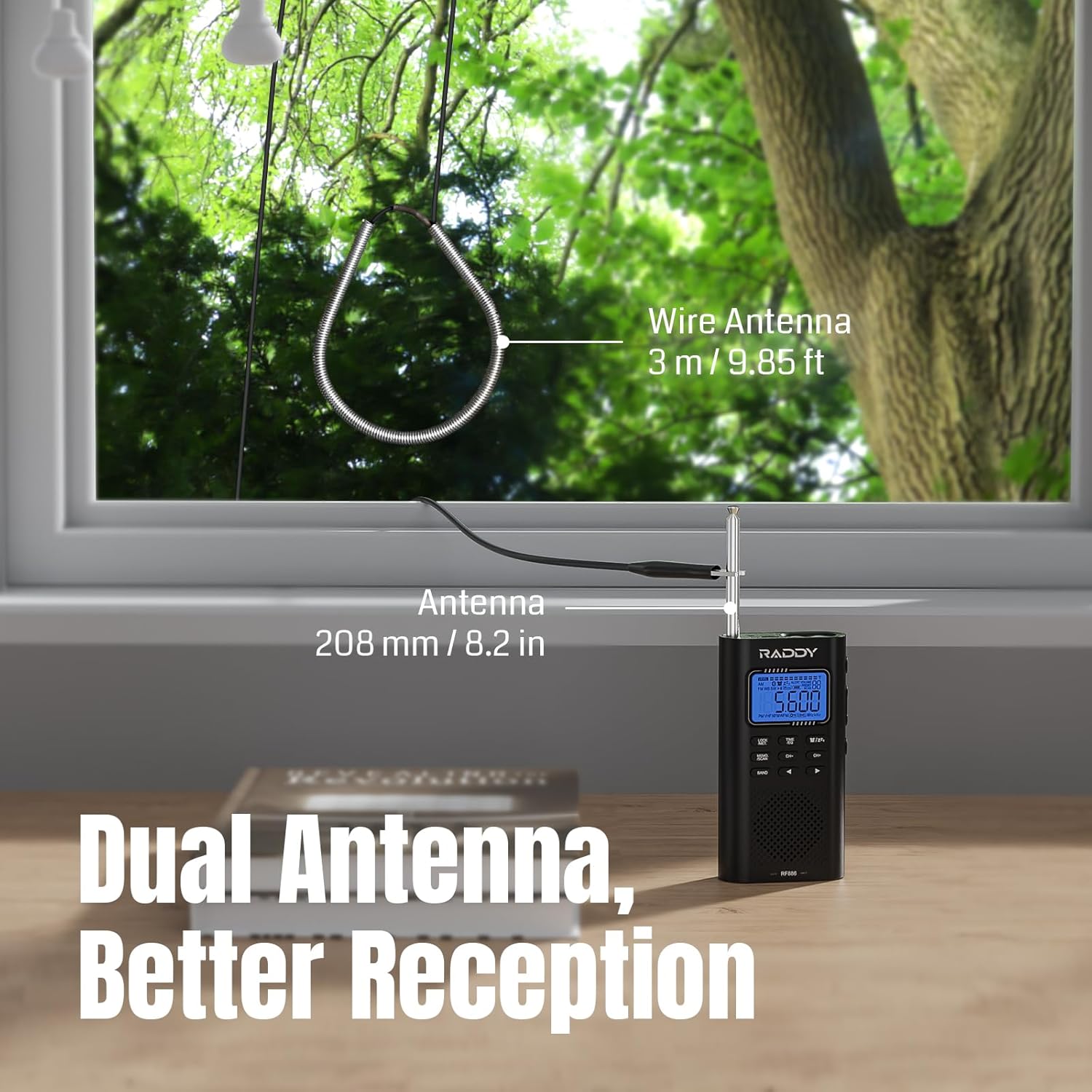
Image: Illustration of the Raddy RF886 using both its built-in telescopic antenna and the external 9.85 ft wire antenna for improved reception.
Instruccions de funcionament
1. Encendre/apagar
- Manteniu premut el botó PODER botó per encendre o apagar la ràdio.
- Una breu premsa de la PODER button acts as a mute/unmute function when the radio is on.
2. Band Selection (AM/FM/SW/VHF/WB)
Premeu el botó BANDA button repeatedly to cycle through the available frequency bands: AM, FM, Shortwave (SW), VHF, and Weather Band (WB).

Image: The Raddy RF886 displaying its multi-band reception capabilities (AM/FM/SW/VHF/WB).
3. Tuning and Station Search
- Sintonització manual: Utilitza el CH+ i CH- buttons to adjust the frequency in small increments.
- Fast Tuning: Mantén premut CH+ or CH- for faster frequency scanning.
- Auto Search (ATS): Manteniu premut el botó MEMO/SCAN button to initiate an automatic station search. The radio will scan and store available stations in memory.
- Cerca manual: Premeu breument MEMO/SCAN button to manually scan for the next available station.

Image: Icons representing Auto Search & Stored and Manual Search & Stored functions on the Raddy RF886.
4. Station Storage and Recall
- Emmagatzematge d'una estació: Sintonitza l'emissora desitjada. Prem i mantén premut el botó MEMO/SCAN button until the memory location flashes. Use CH+ or CH- to select a memory slot, then press MEMO/SCAN de nou per confirmar.
- Recuperació d'una estació: Premeu breument MEMO/SCAN button to enter memory mode, then use CH+ or CH- to navigate through stored stations.
5. Alerta meteorològica de la NOAA
The RF886 supports 7 NOAA weather bands and features a weather alert function to keep you informed about hazardous weather conditions.
- Canvia a la WB band using the BANDA botó.
- To activate the weather alert, press the ALERTA button. The radio will monitor for NOAA alerts and sound an alarm when one is detected.

Image: The Raddy RF886 with an extended antenna, illustrating its NOAA Reception & Alert feature for various weather hazards.
6. Connectivitat Bluetooth
The radio can connect to Bluetooth devices to function as a portable speaker.
- Premeu el botó BANDA button until "BT" appears on the display.
- On your Bluetooth device (e.g., smartphone), search for "RF886" in the Bluetooth settings and pair with it.
- Once connected, audio from your device will play through the radio's speaker.
- The radio offers six different sound effects (EQ modes) in Bluetooth mode. Use the EQ botó per anar-hi ciclant.

Image: The Raddy RF886 connected via Bluetooth 5.0 to a smartphone, indicating its wireless audio streaming capability.

Image: Icons representing various sound effects (Pop, Rock, Country, Normal, Classic, Jazz) available in Bluetooth mode.
7. Ús d'auriculars
For private listening, plug 3.5mm headphones (not included) into the headphone jack on the radio. The internal speaker will automatically mute.

Image: A person listening to the Raddy RF886 with headphones, highlighting its FM Stereo support.
8. Flashlight and SOS Function
- Llanterna: Premeu el botó dedicat LLUM botó per encendre o apagar la llanterna.
- Funció SOS: Manteniu premut el botó SOS button to activate the SOS alarm and flashing light. Press again to deactivate.

Image: The Raddy RF886 with its flashlight illuminated, showing icons for charging, SOS, and flashlight features.
9. Configuració de l'hora i l'alarma
The radio includes a clock and alarm function.
- Hora de configuració: En el mode de visualització de l'hora, premeu i manteniu premut el botó HORA/SET botó. Ús CH+ i CH- to adjust hours and minutes, then press HORA/SET per confirmar cada configuració.
- Configuració d'alarma: In time display mode, briefly press the ALARMA button. The alarm icon will flash. Use CH+ i CH- to set the alarm time, then press ALARMA per confirmar.
- Activació/desactivació de l'alarma: Premeu breument ALARMA botó per activar o desactivar l'alarma.

Image: The Raddy RF886 displaying time and an alarm clock icon, indicating its alarm function.
Manteniment
- Neteja: Feu servir un drap suau i sec per netejar l'exterior de la ràdio. No utilitzeu productes de neteja abrasius ni dissolvents.
- Cura de la bateria: To prolong battery life, avoid fully discharging the battery frequently. Recharge the radio regularly, even if not in use for extended periods.
- Emmagatzematge: When storing the radio for a long time, ensure it is fully charged and store it in a cool, dry place.
Resolució de problemes
| Problema | Causa possible | Solució |
|---|---|---|
| Sense poder | La bateria està esgotada. | Charge the radio using the provided USB Type-C cable. |
| Mala recepció | Antena no estesa; senyal feble; interferències. | Fully extend the telescopic antenna. Connect the external wire antenna. Try moving to an open area away from electronic devices. |
| Bluetooth no connectat | Radio not in BT mode; device not discoverable; already paired with another device. | Ensure the radio is in BT mode. Make sure your device's Bluetooth is on and discoverable. Disconnect from other Bluetooth devices. |
| No hi ha so de l'altaveu | Volume too low; headphones connected; radio muted. | Increase volume. Disconnect headphones. Press the POWER button briefly to unmute. |
Especificacions
| Característica | Detall |
|---|---|
| Model | RF886 |
| Dimensions (L x A x A) | 124 x 67 x 29 mm (4.9 x 2.6 x 1.1 polzades) |
| Pes | 150 g (5.3 unces) |
| Bandes de freqüència | AM, FM, Shortwave (SW), VHF, Weather Band (WB) |
| Rang de VHF | 30.00-199.975 MHz |
| Shortwave Range | 3.20-21.95 MHz |
| NOAA Weather Bands | 7 channels with alert function |
| Versió Bluetooth | BT 5.0 |
| Tipus de bateria | 1 x Ió de liti (inclosa) |
| Port de càrrega | USB tipus C |
| Mostra | LCD |
| Components inclosos | RF886 radio, Wire antenna, Charging cable |
Garantia i Suport
For warranty information, technical support, or customer service inquiries, please refer to the official Raddy website or contact their customer support directly. Details can typically be found on the product packaging or the manufacturer's official online channels.
Visita el Raddy Store on Amazon per a més productes i informació.


