Introducció
Thank you for choosing the Brookstone 4-in-1 Wireless Charging Station. This device is designed to simplify your charging experience by providing a centralized solution for your iPhone, Apple Watch, and AirPods, along with an integrated digital clock. Please read this manual carefully before use to ensure proper operation and to maximize the lifespan of your product.
Contingut del paquet
- Brookstone 3-in-1 Wireless Charger with Clock
- 1 x cable USB-C
- 1 x Guia d'usuari
Note: A power adapter (charging block) is not included and must be supplied by the user.
Producte acabatview
The Brookstone 4-in-1 Wireless Charging Station features dedicated charging areas for your smartphone, smartwatch, and earbuds, alongside a digital alarm clock. Key components include:
- SmartWatch Charging Area
- Adjustable Brightness Button
- Adjustable Volume Button
- Botó de mode
- Alarm Clock Display
- Wireless Airpod Charging Display
- Zona de càrrega del telèfon
- Output Port (USB)
- Port d'entrada (USB-C)
- Detachable Charging Port (for Apple Watch)
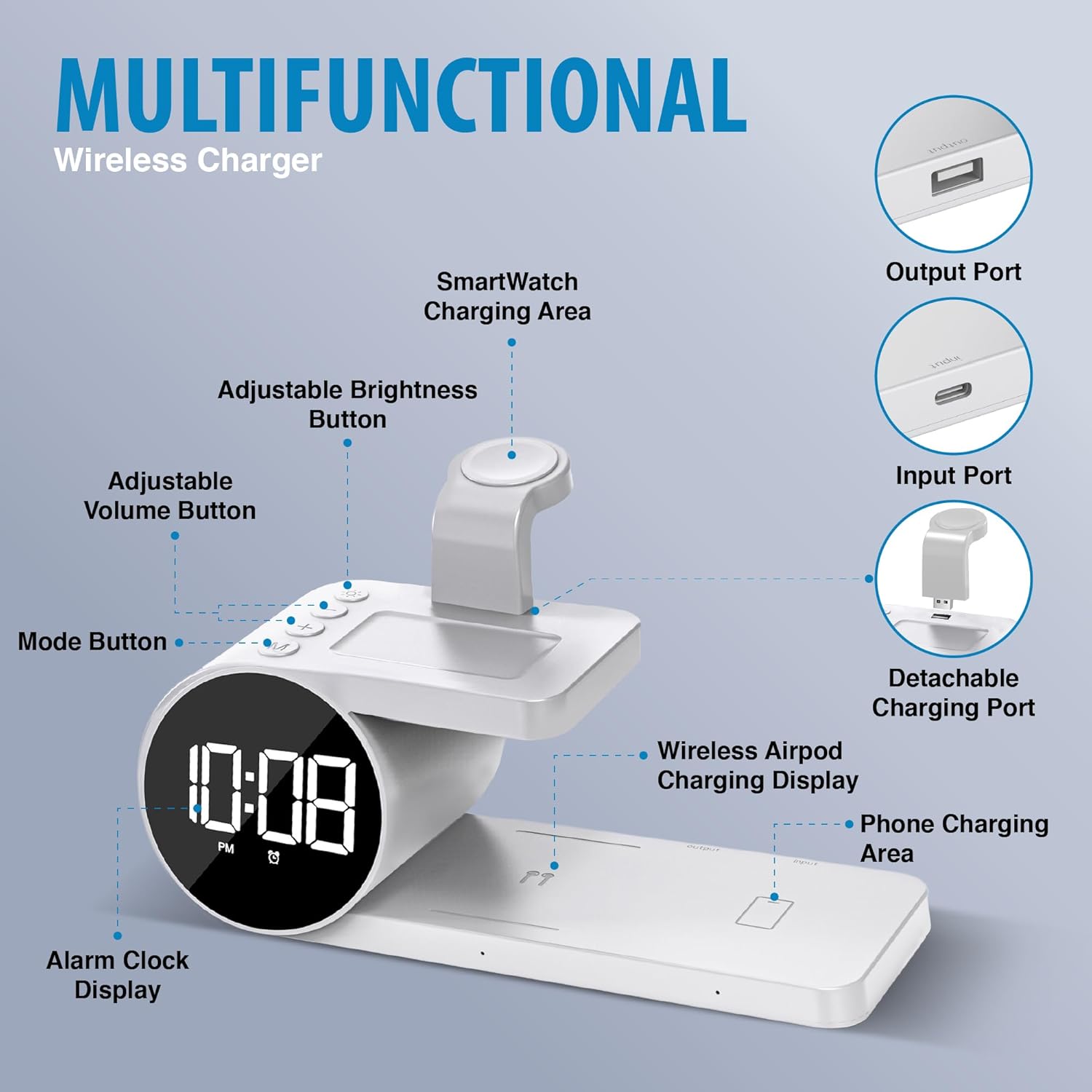
Figure 1: Product components and features.
Instruccions de configuració
Connexió d'alimentació:
Connect the provided USB-C cable to the Input Port on the back of the charging station. Connect the other end of the USB-C cable to a compatible USB power adapter (not included). Ensure the power adapter provides sufficient wattage for optimal charging (e.g., 15W for iPhone, 5W for your other devices).

Figure 2: Input (USB-C) and Output (USB) ports.
Attach Apple Watch Charging Port:
Insert the detachable Apple Watch charging port into the designated slot on the top platform of the charging station. Ensure it is securely seated.
Figure 3: Detachable Apple Watch charging port installation.
Configuració del rellotge:
Once powered on, the digital clock will illuminate. Use the Mode button to cycle through settings (time, alarm). Use the '+' and '-' buttons to adjust values. Refer to the "Operating Instructions" section for detailed clock and alarm settings.
Instruccions de funcionament
Dispositius de càrrega
The charging station is compatible with various Apple devices, including iPhone 12/13/14/15 series (with compatible MagSafe cases), all Apple Watch series (Ultra, Ultra 2, 8, 7, SE, 6, 5, 4, 3, 2), and AirPods Pro/3/2.
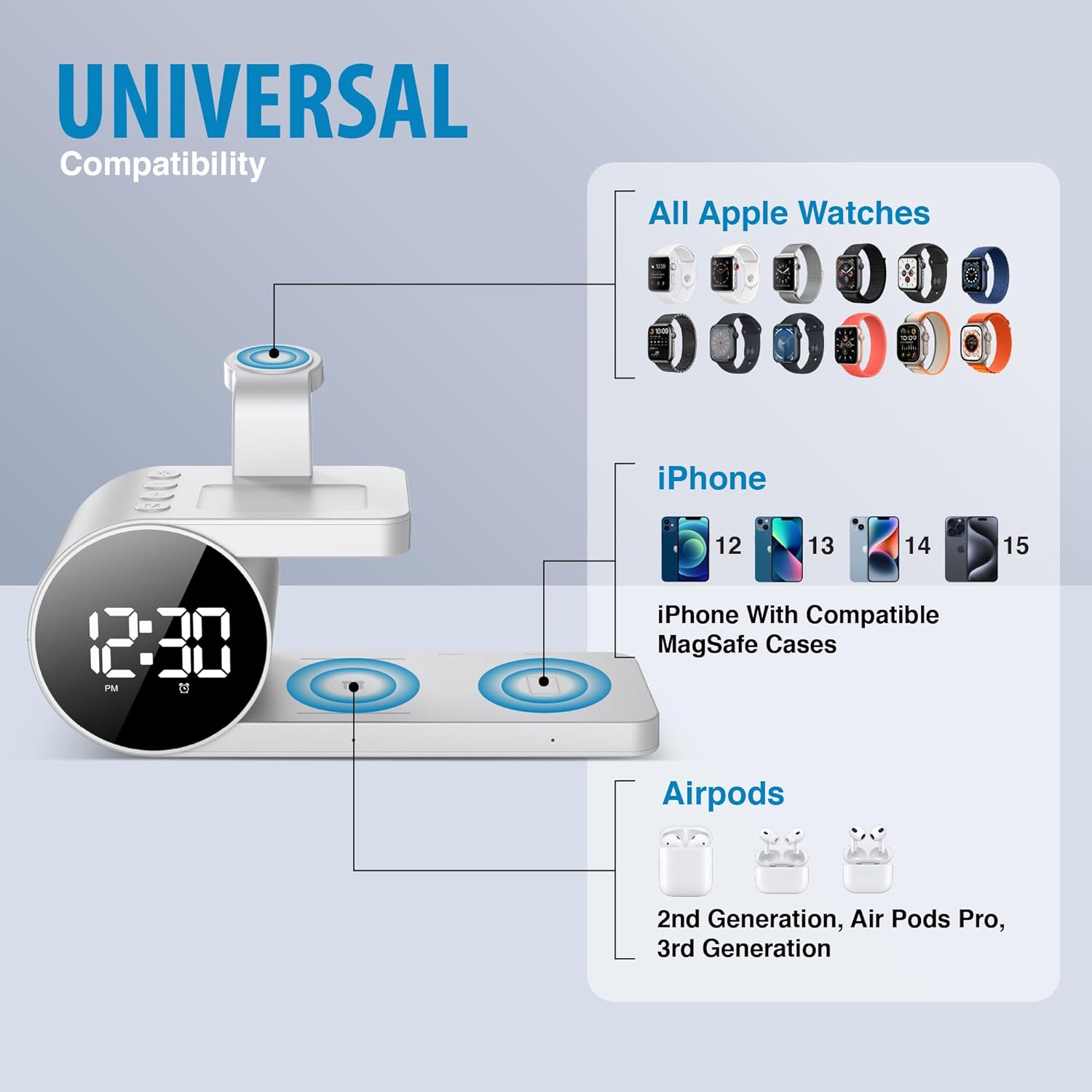
Figura 4: Compatibilitat de dispositius a través deview.
Càrrega d'iPhone:
Place your iPhone on the designated phone charging area (flat pad). The built-in magnets will help align your device for optimal wireless charging. A charging indicator may appear on your phone screen.
Càrrega d'Apple Watch:
Place your Apple Watch onto the detachable charging port. Ensure the watch is securely positioned and begins charging.
Càrrega d'AirPods:
Place your AirPods case on the dedicated AirPods charging area. A charging indicator on the station or your AirPods case will confirm charging.

Figure 5: Devices placed on the charging station.
Digital Clock Functions
Hora de configuració:
Press the 'Mode' button once to enter time setting mode. Use the '+' and '-' buttons to adjust hours and minutes. Press 'Mode' again to confirm and move to the next setting.
Configuració d'alarma:
Press the 'Mode' button twice to enter alarm setting mode. Use the '+' and '-' buttons to set the alarm time. Press 'Mode' again to confirm. The alarm icon will appear on the display when active.
Ajust de brillantor:
Use the 'Adjustable Brightness Button' (sun icon) to cycle through different brightness levels for the digital clock display.
Ajust de volum:
Use the 'Adjustable Volume Button' (speaker icon) to adjust the alarm volume.
Format 12/24 hores:
The clock supports both 12-hour (with AM/PM indicator) and 24-hour formats. Refer to the specific instructions in the included user guide for switching between formats, as this may vary.

Figure 6: Digital clock features.
Manteniment
- Mantingueu neta l'estació de càrrega netejant-la amb un drap suau i sec.
- Eviteu utilitzar netejadors abrasius o dissolvents.
- No exposeu el dispositiu a l'aigua ni a una humitat excessiva.
- Ensure proper ventilation around the device during use.
Resolució de problemes
| Problema | Causa possible | Solució |
|---|---|---|
| El dispositiu no es carrega. |
|
|
| Clock display is dim or off. |
|
|
| L'alarma no sona. |
|
|
Si els problemes persisteixen, poseu-vos en contacte amb l'atenció al client.
Especificacions
| Número de model | BK15-5QC1D-WT |
| Dimensions del producte | 8 x 4 x 2 polzades |
| Pes de l'article | 0.634 unces |
| Tecnologia de connectivitat | Sense fil |
| Tipus de connector | USB Type C (Input) |
| Entrada Voltage | 12 Volts |
| Max iPhone Output | Fins a 15 watts |
| Max Other Device Output | Fins a 5 watts |
| Característiques especials | Removable Parts, Digital Alarm Clock, Adjustable Brightness/Volume |
Vídeo oficial del producte
Aquest vídeo ofereix una visió generalview of the Brookstone 3-in-1 Wireless Charging Stand with Digital Clock, demonstrating its features and functionality, including multi-device charging and the digital clock display.
Garantia i Suport
The Brookstone wireless charging station with clock comes with a 1 any de garantia from the date of purchase. This warranty covers any defects in materials or workmanship under normal use.
For technical support, warranty claims, or further assistance, please contact Brookstone customer service. Refer to the contact information provided in the original product packaging or visit the official Brookstone weblloc.
Manufacturer: M&S Accessory Network


