Producte acabatview
The Montech AX 120 ARGB Fan is designed to enhance your PC's cooling performance and aesthetic appeal. Featuring a modern hexagonal RGB ring with 20 LEDs, this fan offers vibrant illumination. It incorporates advanced PWM controls for smart fan speed adjustments based on system temperature, ranging from 600 RPM to 1600 RPM. Engineered for quiet operation, it maintains noise levels under 27.9 dB(A) through optimized frames and blades. The fan is built with a high-end HDB bearing, ensuring a lifespan of 40,000 hours, and includes integrated anti-vibration pads to reduce resonance noise.

Figura 1: Part frontal view of the Montech AX 120 ARGB Fan, showcasing its hexagonal RGB lighting.
Què hi ha a la caixa
Upon unboxing your Montech AX 120 ARGB Fan, you will find the following components:
- Montech AX 120 ARGB Fan (1 unit)
- Mounting Screws (typically included for installation)
Configuració i instal·lació
Proper installation ensures optimal performance and longevity of your Montech AX 120 ARGB Fan. Follow these steps carefully:
1. Prepareu el vostre sistema
- Assegureu-vos que l'ordinador estigui apagat i desendollat de la presa de corrent.
- Open your PC case to access the fan mounting locations.
2. Muntatge del ventilador
Identify the desired mounting location within your PC case (e.g., front, rear, top, bottom). The fan can be configured for intake or exhaust airflow depending on its orientation.

Figura 2: posterior view of the fan, indicating the power connector and product information.
- Position the fan against the mounting holes in your case.
- Secure the fan using the provided mounting screws. Ensure they are tightened firmly but do not overtighten to avoid damaging the fan frame. The fan features integrated anti-vibration pads at each corner to minimize noise from resonance.
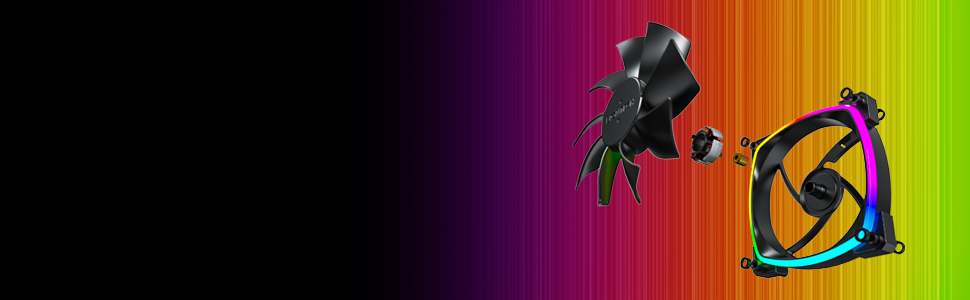
Figure 3: Detail of the integrated anti-vibration pads on the fan frame.
3. Connecting the Fan
The Montech AX 120 ARGB Fan uses a 4-pin connector for both power and PWM control, and a separate ARGB connector for lighting.
- Connect the 4-pin fan cable to an available 4-pin fan header on your motherboard. This allows for PWM (Pulse Width Modulation) control of the fan speed.
- Connect the ARGB cable to a compatible 3-pin 5V ARGB header on your motherboard or an ARGB controller. Nota: Do not connect to a 12V RGB header, as this may damage the LEDs.

Figura 4: Example of Montech AX 120 ARGB Fans installed in a PC system.
Instruccions de funcionament
Control de velocitat del ventilador (PWM)
The Montech AX 120 ARGB Fan supports PWM control, allowing your motherboard or fan controller to dynamically adjust the fan speed based on system temperature. This ensures efficient cooling when needed and quiet operation during lighter loads.
- Interval de velocitat: 600 RPM to 1600 RPM.
- Configure fan curves in your motherboard's BIOS/UEFI settings or through compatible software provided by your motherboard manufacturer.
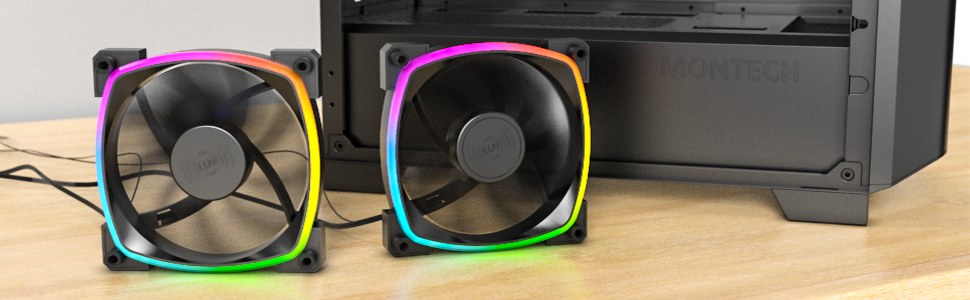
Figure 5: Visual representation of PWM fan speed adjustment.
Control d'il·luminació ARGB
The fan's addressable RGB lighting can be controlled via your motherboard's ARGB software (e.g., ASUS Aura Sync, MSI Mystic Light Sync, GIGABYTE RGB Fusion, ASRock Polychrome Sync) or a dedicated ARGB controller. This allows for synchronization with other ARGB components and customization of lighting effects.
Silent Performance
The Montech AX 120 ARGB Fan is engineered for quiet operation, with noise levels typically under 27.9 dB(A) at maximum speed. This is achieved through optimized blade design and the inclusion of anti-vibration pads.

Figure 6: The fan's low noise output, measured at approximately 27.0 dB.
Manteniment
Un manteniment regular ajuda a garantir la longevitat i el rendiment òptim del ventilador.
- Neteja: Periodically clean the fan blades and frame to remove dust buildup. Use compressed air or a soft brush. Ensure the fan is powered off and disconnected before cleaning.
- Bearing Lifespan: The fan features a Hydro Dynamic Bearing (HDB) with an estimated lifespan of 40,000 hours, providing long-term reliability without requiring lubrication.

Figura 7: Explotat view illustrating the fan's durable components, including the HDB bearing.
Resolució de problemes
If you encounter issues with your Montech AX 120 ARGB Fan, refer to the following common problems and solutions:
| Problema | Causa possible | Solució |
|---|---|---|
| El ventilador no gira |
|
|
| La il·luminació ARGB no funciona |
|
|
| Excés de soroll o vibració |
|
|
Especificacions
| Característica | Detall |
|---|---|
| Número de model | AX120 PWM BLACK |
| Dimensions | 4.72 x 4.72 x 0.98 polzades (120 mm x 120 mm x 25 mm) |
| Pes | 5.93 unces |
| Velocitat del ventilador | 600 - 1600 RPM (controlades per PWM) |
| Nivell de soroll | 27.9 dB(A) (màx.) |
| Flux d'aire | (Information not provided in source, typically measured in CFM) |
| Pressió estàtica | (Information not provided in source, typically measured in mmH2O) |
| Tipus de rodament | Rodament hidrodinàmic (HDB) |
| Vida útil | 40,000 hores |
| Connector d'alimentació | PWM de 4 pins |
| Connector ARGB | ARGB de 3 pins i 5 V |
| Voltage | 12 Volts (Fan), 5 Volts (ARGB) |
| Wattage | 4.2 watts |
| Material | Plàstic |
| Dispositius compatibles | PC de jocs |
Garantia i Suport
For warranty information and technical support, please refer to the official Montech weblloc web o contacteu directament amb el seu servei d'atenció al client. Els termes i condicions de la garantia poden variar segons la regió i el distribuïdor.
Montech Official Weblloc: www.montechpc.com


