Introducció
Thank you for choosing the EPOMAKER MS68 Wireless Mechanical Gaming Keyboard. This manual provides essential information for setting up, operating, and maintaining your keyboard. The MS68 features a durable CNC aluminum alloy case, versatile tri-mode connectivity (Bluetooth 5.0, 2.4GHz wireless, and wired USB-C), a customizable 0.85-inch TFT screen, and VIA programmability for personalized key mapping and macros. Its gasket-mount design and five layers of sound-dampening materials ensure a comfortable and satisfying typing experience.
Què hi ha a la caixa
- EPOMAKER MS68 Wireless Mechanical Gaming Keyboard
- Cable USB-C
- Extractor de tecles
- Tirador de commutació
- Extra Switches (quantity may vary)
- Dongle USB de 2.4 GHz
- Manual d'usuari (aquest document)

Image: Contents of the EPOMAKER MS68 package, showing the keyboard, USB-C cable, keycap puller, switch puller, extra switches, and the user manual.
Configuració
1. Sobrecàrrega físicaview
The EPOMAKER MS68 features a robust CNC anodized aluminum alloy case, providing both durability and a premium aesthetic. The keyboard is designed with a fixed elevation for ergonomic typing.

Imatge: Lateral view of the EPOMAKER MS68 keyboard, highlighting the USB-C port, the connectivity mode switch (2.4G, BT, USB), and the OS layout switch (Mac, Win).
2. Modes de connectivitat
The MS68 supports three connection types: Wired (USB-C), 2.4GHz Wireless, and Bluetooth 5.0.
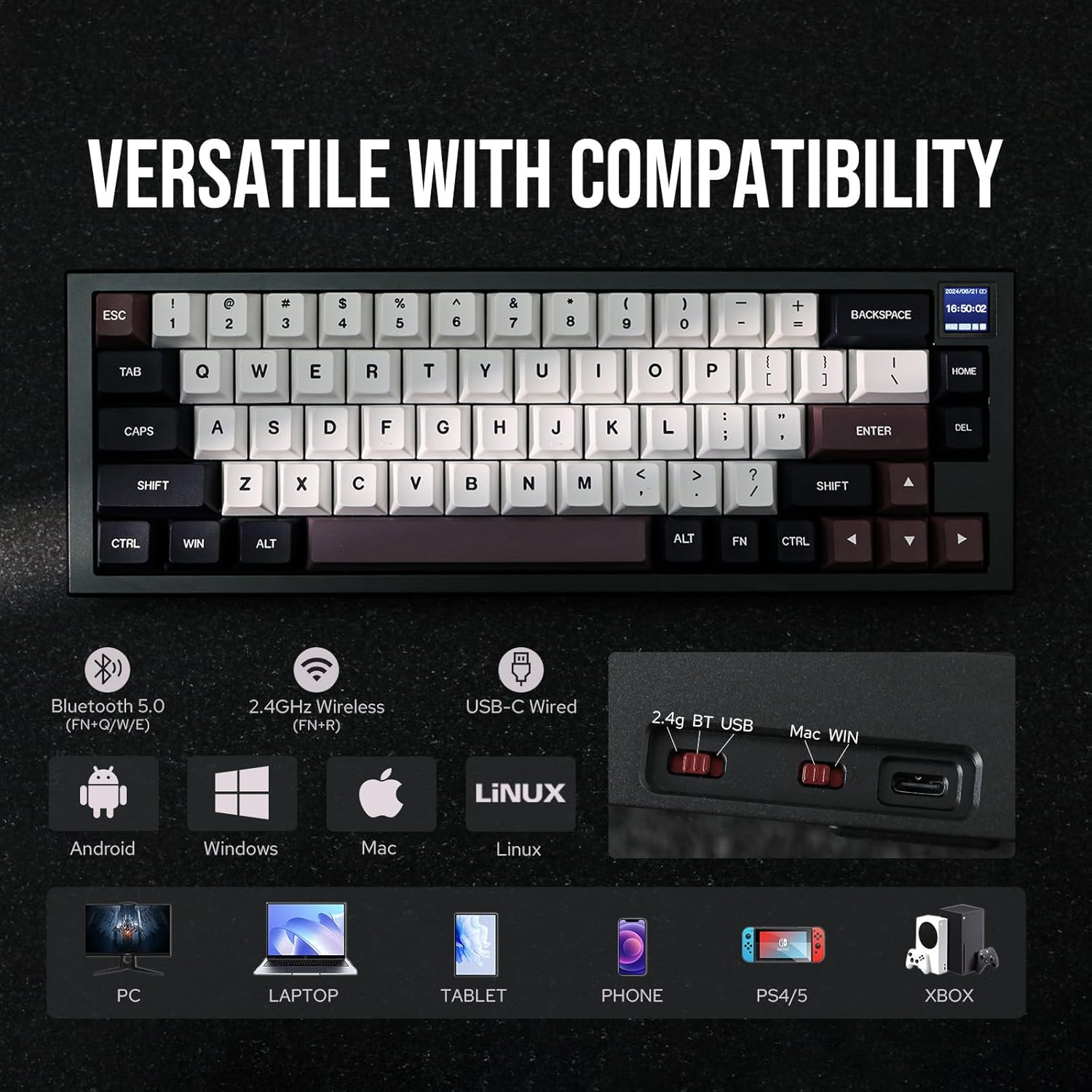
Image: The EPOMAKER MS68 keyboard illustrating its tri-mode connectivity (Bluetooth 5.0, 2.4GHz Wireless, USB-C Wired) and compatibility with various devices including PC, Laptop, Tablet, Phone, PS4/5, and Xbox.
Mode per cable:
- Connect the provided USB-C cable to the keyboard's USB-C port and to your computer.
- Ensure the connectivity switch on the top edge of the keyboard is set to "USB".
Mode sense fil de 2.4 GHz:
- Insert the 2.4GHz USB dongle into an available USB port on your computer.
- Set the connectivity switch on the keyboard to "2.4G".
- El teclat s'hauria de connectar automàticament. Si no, premeu FN + R per iniciar l'aparellament.
Mode Bluetooth 5.0:
- Set the connectivity switch on the keyboard to "BT".
- Mantén premut FN + Q, FN + W, o FN + E for 3-5 seconds to enter pairing mode for one of the three Bluetooth channels. The screen will indicate pairing status.
- On your device (computer, tablet, smartphone), search for Bluetooth devices and select "EPOMAKER MS68" to connect.
- You can switch between paired Bluetooth devices by pressing FN + Q, FN + W, o FN + E.
3. Operating System Layout Switch
Use the OS layout switch on the top edge of the keyboard to select between Windows ("Win") and macOS ("Mac") layouts. This ensures correct key functionality for your operating system.
Instruccions de funcionament
1. 0.85-inch TFT Screen
The integrated 0.85-inch TFT screen displays useful information such as date, time, battery status, connectivity mode, and operating system. It also supports custom GIFs and images.

Image: Close-up of the EPOMAKER MS68's 0.85-inch TFT screen, showing its ability to display date, time, battery, connectivity, OS, and custom GIFs/photos. This screen enhances both functionality and aesthetics.
To customize the screen with GIFs or images, download the "Image Custom Tool" from the official EPOMAKER weblloc.
2. VIA Programmability
The MS68 is fully programmable with VIA software, allowing you to remap keys, create macros, and customize lighting effects across multiple layers.
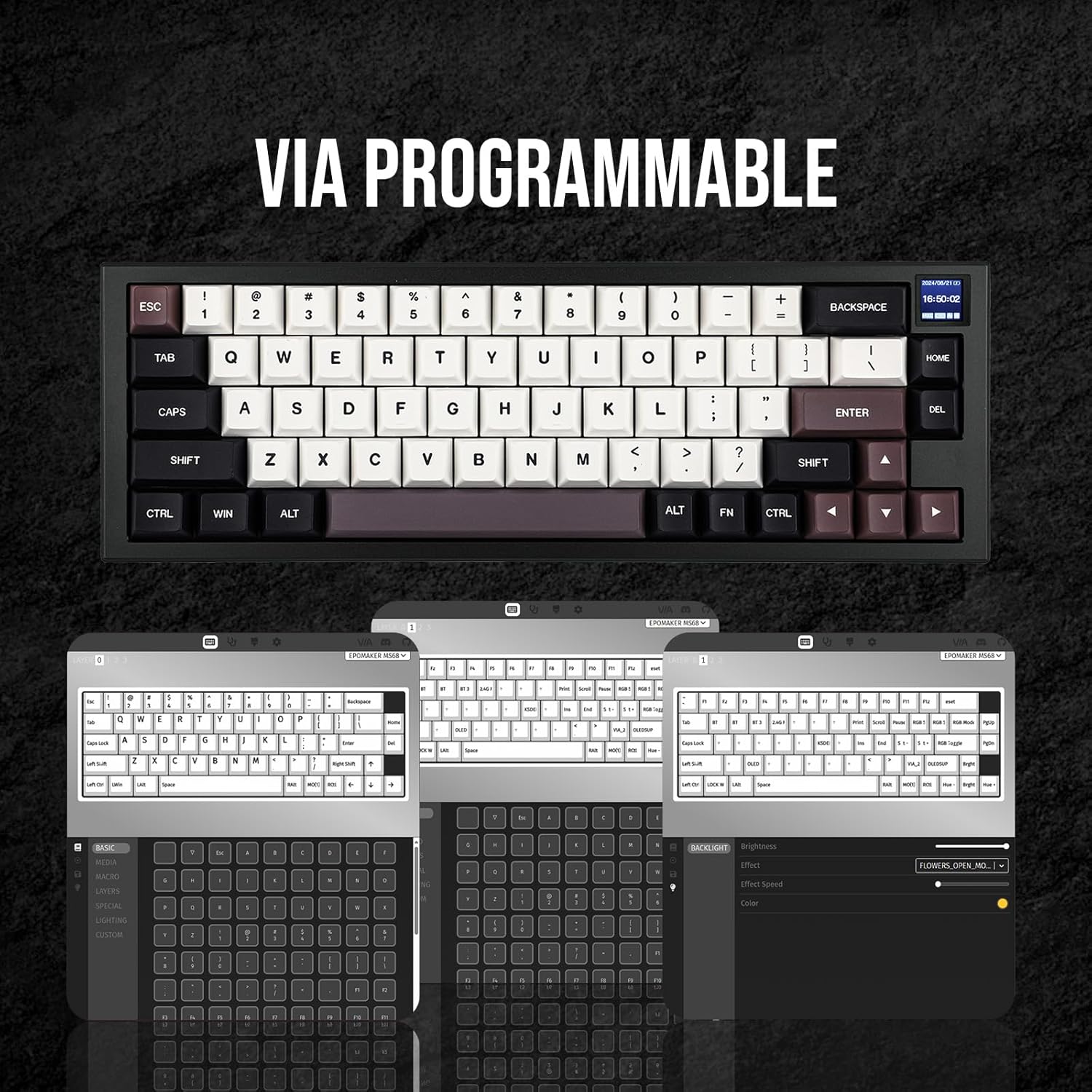
Image: Screenshot of the VIA software interface, showing options for key remapping, macro creation, and lighting customization for the EPOMAKER MS68 keyboard.
Download the VIA software and the corresponding JSON file for the MS68 from the official EPOMAKER weblloc (www.epomaker.com).
3. RGB Lighting Controls
The keyboard features south-facing RGB lighting with various effects. Use the following key combinations to control the lighting:
- FN + Intro: Toggle RGB lighting ON/OFF
- FN + \|: Cycle through RGB lighting effects
- FN + ↑: Augmenta la brillantor
- FN + ↓: Disminueix la brillantor
- FN + ]}: Increase effect speed
- FN + [{: Decrease effect speed
- FN + →: Change hue (forward)
- FN + ←: Change hue (backward)
- FN + ;:: Decrease saturation
- FN + '": Increase saturation
Manteniment
1. Commutadors intercanviables en calent
The MS68 features a hot-swappable PCB, allowing you to change mechanical switches without soldering. This enables customization of typing feel and sound.
- Use the provided switch puller to carefully remove the existing switch by gripping it firmly and pulling upwards.
- Alineeu els pins del nou interruptor amb els forats de la placa de circuit imprès. Assegureu-vos que els pins estiguin rectes per evitar que es dobleguin.
- Premeu suaument el nou interruptor al seu lloc fins que faci clic de manera segura.

Image: A hand using a switch puller to remove a mechanical switch from the EPOMAKER MS68 keyboard, demonstrating its hot-swappable feature.
The keyboard comes with EPOMAKER Wisteria Linear switches, known for their smooth operation. Other switch options like Flamingo and Sea Salt Silent are also compatible.
Video: A demonstration of the typing sound difference between EPOMAKER Wisteria Linear switches and Sea Salt Silent switches on the MS68 keyboard.
Video: A demonstration comparing the typing sound of EPOMAKER Wisteria Linear switches versus Flamingo switches on the MS68 keyboard.
2. Keycap Removal and Replacement
The MS68 comes with durable Cherry profile dye-sub PBT keycaps. You can replace them with other compatible keycaps using the provided keycap puller.
- Use the keycap puller to gently grip the keycap and pull straight upwards.
- To replace, align the new keycap with the switch stem and press down firmly until it is seated.
3. Neteja
To maintain your keyboard's appearance and functionality, regularly clean it.
- Feu servir un raspall suau o aire comprimit per eliminar la pols i les restes que hi ha entre les tecles.
- For stubborn dirt, remove the keycaps and wipe the keyboard surface with a slightly damp, drap sense borrissol. Eviteu la humitat excessiva.
- Ensure the keyboard is completely dry before reattaching keycaps or using it.
Resolució de problemes
1. Problemes de connectivitat
- Error d'emparellament Bluetooth: Assegureu-vos que el teclat estigui en mode d'emparellament Bluetooth (FN + Q/W/E held for 3-5 seconds) and your device's Bluetooth is enabled and searching. Try pairing to a different channel.
- La xarxa sense fil de 2.4 GHz no es connecta: Verify the 2.4GHz dongle is securely plugged into a USB port and the keyboard switch is set to "2.4G". Try pressing FN + R tornar a emparellar.
- Wired Mode Disconnecting: If the keyboard disconnects in wired mode, ensure the USB-C cable is fully inserted and undamaged. Try a different USB port or cable.
2. Software Issues (VIA / Image Custom Tool)
- El programari VIA no detecta el teclat:
- Ensure you have downloaded the correct VIA software and the specific JSON file for the MS68 from the official EPOMAKER weblloc.
- In VIA settings, navigate to the "Design" tab (if hidden, enable it in VIA settings) and ensure "Use V2 definitions (deprecated)" is disabled. You may need to toggle this setting and reload the JSON file.
- Ensure the keyboard is connected via USB-C when using VIA.
- Image Custom Tool Not Launching: If you encounter missing DLL errors, install the latest Microsoft Visual C++ Redistributable packages. Ensure the keyboard is connected via USB-C for device detection.
3. Key Functionality
- Windows/Mac Switch Malfunction: If the keyboard defaults to Mac mode even when the switch is set to Win, try toggling the physical switch to Mac and then back to Win. A firmware update might be available to address this.
- Rattling Stabilizers or Double Key Presses: These can sometimes occur. If persistent, consider contacting EPOMAKER support for assistance or exploring switch/stabilizer lubrication.
4. Durada de la bateria
The MS68 is equipped with a 3000mAh battery. Actual battery life may vary based on usage, RGB lighting intensity, and connectivity mode. If battery life seems shorter than expected, ensure the keyboard is fully charged and consider reducing RGB brightness or disabling it when not needed.
Especificacions
| Característica | Detall |
|---|---|
| Marca | EPOMAKER |
| Número de model | MS68 |
| Tecnologia de connectivitat | Sense fil 2.4G, Bluetooth 5.0, USB-C amb cable |
| Descripció del teclat | Teclat mecànic per a jocs |
| Característiques especials | Backlit (RGB), CNC Aluminum Alloy Shell, Ergonomic, Hot-Swappable, VIA Programmable, 0.85" TFT Screen |
| Material de claus | PBT subtitulat de colorant |
| Keycap Profile | Cherry Profile |
| Dimensions del producte | 12.8 x 4.37 x 1.61 polzades |
| Pes de l'article | 3.87 lliures |
| Capacitat de la bateria | 3000 mAh |
| Dispositius compatibles | Consola de jocs, ordinador portàtil, PC, telèfon intel·ligent, tauleta |
Garantia i Suport
EPOMAKER products typically come with a standard manufacturer's warranty. For specific warranty details, please refer to the warranty card included with your product or visit the official EPOMAKER weblloc.
If you encounter any issues or require technical assistance, please contact EPOMAKER customer support through their official weblloc web o la informació de contacte que es proporciona a l'embalatge del producte.
Official EPOMAKER Weblloc: www.epomaker.com


