1. Introducció
This manual provides detailed instructions for the setup, operation, and maintenance of your Irfora Portable Mini Thermal Printer. Please read this manual thoroughly before using the device to ensure proper functionality and longevity.
The Irfora Portable Mini Thermal Printer is a compact and lightweight device designed for efficient receipt and ticket printing. It supports wireless Bluetooth and USB connections, making it compatible with various operating systems including iOS, Android, and Windows. Its thermal printing technology eliminates the need for ink cartridges, offering a cost-effective and convenient printing solution for various retail and service environments.
2. Contingut del paquet
Si us plau, verifiqueu que tots els elements que s'enumeren a continuació estiguin inclosos al vostre paquet:
- 1 x Portable Mini Thermal Printer
- 1 x cable USB
- 1 x Thermal Paper Roll (58mm)
- 1 x Manual d'usuari (aquest document)
3. Producte acabatview
Familiarize yourself with the components of your thermal printer:

Figura 3.1: Labeled components of the printer. Key parts include the Power Button, Feed Button, USB Port, Paper Cover, Power Indicator, Function Indicator, and Battery compartment.
- Botó d'encesa: S'utilitza per encendre o apagar la impressora.
- Botó d'alimentació: Used to advance the thermal paper.
- Port USB: Per carregar i connectar per cable a un ordinador.
- Paper Cover: Protects the thermal paper roll and printing mechanism.
- Indicador d'alimentació: S'il·lumina per mostrar l'estat de l'alimentació.
- Indicador de funció: Indicates various operational states.
- Bateria: Rechargeable lithium battery located in the compartment.
4. Especificacions
Detailed technical specifications of the Irfora Portable Mini Thermal Printer:
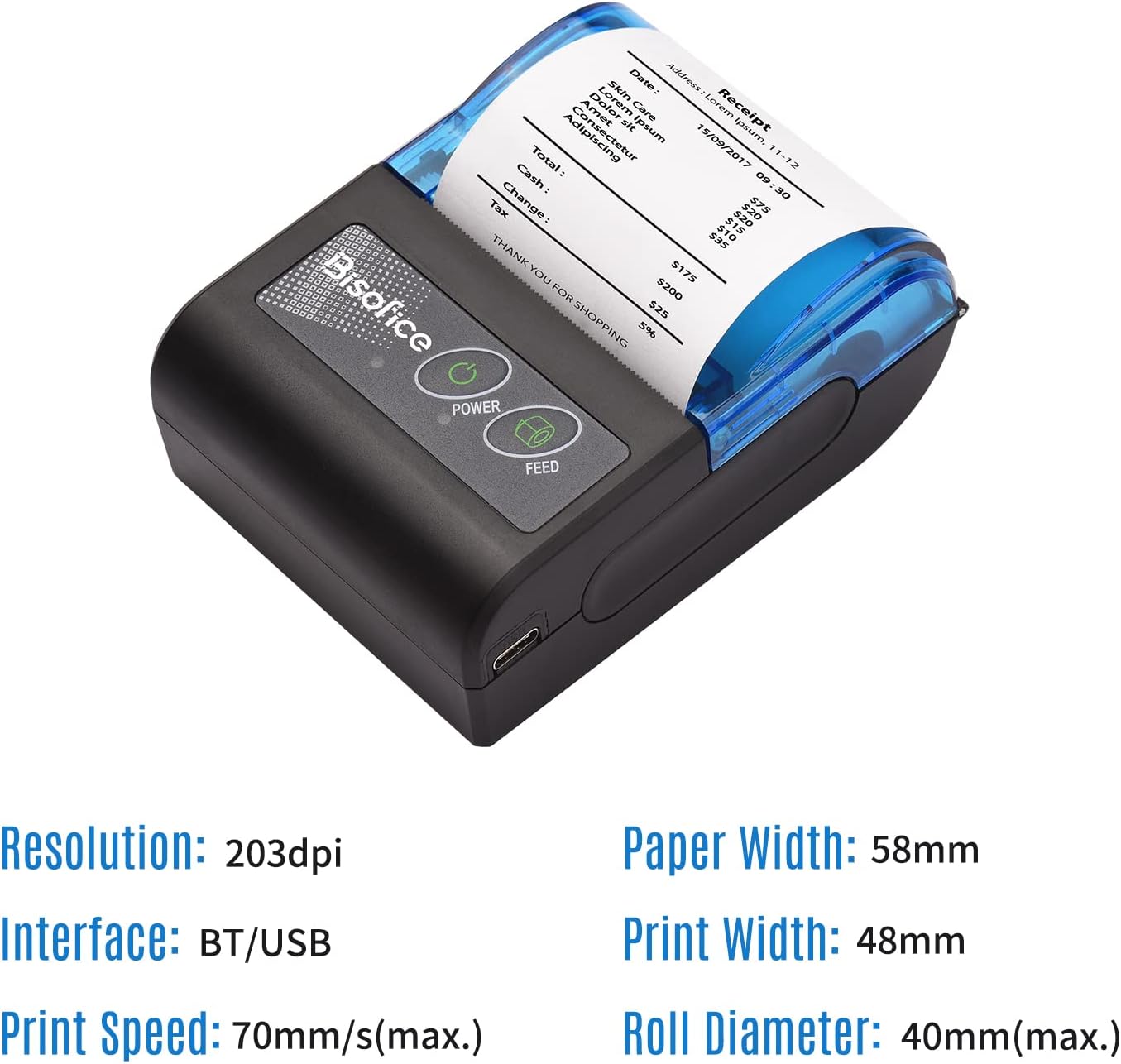
Figura 4.1: Visual representation of key printer specifications.
| Característica | Especificació |
|---|---|
| Marca | Irfora |
| Color | Negre i blau |
| Material | Plàstic |
| Print Paper Width | 58 mm |
| Valid Printing Width | 48 mm |
| Resolució | 8 punts/mm (203 ppp) |
| Velocitat d'impressió | 70 mm/s (màx.) |
| Diàmetre del rotlle | 40 mm (màx.) |
| Barcode Type (1D) | UPC-A, UPC-E, EAN13, EAN8, CODE39, CODE93, CODE128, CODABAR, ITF |
| Barcode Type (2D) | CODI QR |
| Interfície | Bluetooth (BT) / USB |
| Bateria de liti incorporada | 1500mAh / 7.4V |
| Compatibilitat de sistemes operatius | Android, iOS, Windows |
| Condició de funcionament | -5 ℃ ~ 50 ℃ |
| Condició d'emmagatzematge | -40 ℃ ~ 60 ℃ |
| Mida de l'article | 10.2 * 7.4 * 4.5 cm / 4.0 * 2.9 * 1.8 polzades |
| Pes de l'article | 190 g / 6.7 oz |
| Mida del paquet | 15.8 * 11.7 * 5.9 cm / 6.2 * 4.6 * 2.3 polzades |
| Pes del paquet | 309 g / 10.9 oz |

Figura 4.2: Printer dimensions for physical reference.
5. Configuració
5.1 Càrrega de la impressora
Before first use, ensure the printer is fully charged. Connect the provided USB cable to the printer's USB port and the other end to a compatible USB power adapter (not included) or a computer's USB port.
- The power indicator light will show charging status.
- Una càrrega completa normalment triga unes hores.
5.2 Càrrega de paper tèrmic
- Gently open the paper cover by sliding the latch or pressing the release button (refer to Figure 3.1).
- Insert the 58mm thermal paper roll into the compartment, ensuring the printing side of the paper faces the print head. The paper should feed smoothly from the bottom of the roll.
- Estireu un petit tros de paper més enllà del capçal d'impressió.
- Close the paper cover firmly until it clicks into place. Ensure the paper is straight and not jammed.
5.3 Connexió de la impressora
The printer supports both Bluetooth and USB connections.

Figura 5.1: Printer connectivity options: Bluetooth and USB.
5.3.1 Bluetooth Connection (for iOS/Android)
- Turn on the printer by pressing and holding the Power Button until the indicator light illuminates.
- On your mobile device (smartphone or tablet), go to Bluetooth settings and enable Bluetooth.
- Cerca available devices. The printer should appear as a device like "Printer_XXXX" or similar.
- Seleccioneu la impressora que voleu emparellar. Si us demana un PIN, introduïu "0000" o "1234".
- Once paired, you can use compatible printing applications to send print jobs.

Figura 5.2: The printer offers wide compatibility with various operating systems.
5.3.2 USB Connection (for Windows)
- Connect the printer to your Windows computer using the provided USB cable.
- Enceneu la impressora.
- Instal·lació del controlador: You will need to install the printer driver.
- Seguiu les instruccions a la pantalla per completar la instal·lació del controlador.
- Once the driver is installed, the printer should be recognized by your computer and ready for use.
6. Instruccions de funcionament
6.1 Impressió bàsica
After successful setup and connection:
- Open the application from which you wish to print (e.g., a POS application, text editor).
- Select the print option within the application.
- Choose the "Irfora Portable Mini Thermal Printer" from the list of available printers.
- Ajusteu la configuració d'impressió si cal (per exemple, la mida del paper, l'orientació).
- Confirm the print job. The printer will begin printing the receipt or ticket.

Figura 6.1: Printer in operation, producing a receipt.
6.2 Compatible Applications (for Mobile Devices)
The printer is suitable for use with various smartphone applications. Please ensure your cellphone is compatible with these software solutions:
- Loyverse: (Retail/Clothing)
- iREAP: (Retail/Inventory)
- CasierStock: (Shopping/Inventory Management)
- Kyte: (Mobile Sales)
These applications facilitate printing receipts directly from your mobile device via Bluetooth connection.

Figura 6.2: The printer's compact size makes it easy to carry and use on the go.

Figura 6.3: Example of the printer in a professional setting, such as a hotel.
7. Manteniment
7.1 Neteja de la impressora
Una neteja regular ajuda a mantenir la qualitat d'impressió i allarga la vida útil de la impressora.
- Capçal d'impressió: Feu servir un bastonet de cotó lleugeramentampened with isopropyl alcohol to gently wipe the print head. Allow it to dry completely before use. Do not touch the print head with bare hands.
- Exterior: Wipe the exterior of the printer with a soft, dry cloth. Avoid using abrasive cleaners or solvents.
- Ruta del paper: Traieu la pols o les restes de paper del camí del paper amb un raspall suau o aire comprimit.
Precaució:
- Always turn off the printer and disconnect it from power before cleaning.
- Do not use water directly on the printer.
7.2 Cura de la bateria
- Charge the battery regularly, even if the printer is not in frequent use, to maintain battery health.
- Eviteu descarregar completament la bateria amb freqüència.
- Guardeu la impressora en un lloc fresc i sec quan no la feu servir durant períodes prolongats.
8. Solució De Problemes
If you encounter issues with your printer, refer to the following common problems and solutions:
| Problema | Causa possible | Solució |
|---|---|---|
| La impressora no s'encén. | Bateria baixa o sense energia. | Charge the printer using the USB cable. Ensure the power adapter is working. |
| No paper feed. | Paper jammed or incorrectly loaded. | Open the paper cover, clear any jam, and re-load the paper correctly. Ensure the roll is not empty. |
| Mala qualitat d'impressió (línies tènues i en blanc). | Print head dirty or thermal paper issues. | Clean the print head (refer to Maintenance section). Ensure you are using thermal paper and it is loaded correctly. Try a new roll of paper. |
| No es pot connectar per Bluetooth. | Bluetooth not enabled, printer not discoverable, or incorrect pairing. | Ensure Bluetooth is enabled on both devices. Restart the printer and your mobile device. Re-attempt pairing. Check PIN (0000 or 1234). |
| L'ordinador no reconeix la impressora (USB). | Driver not installed or USB cable issue. | Install the correct printer driver (refer to Setup section). Try a different USB port or cable. Restart the computer and printer. |
| Printer prints garbled text. | Incorrect driver or communication error. | Ensure the correct driver is installed. Restart the printer and the printing application. |


