Introducció
Thank you for choosing the JLab JBuds Lux ANC Wireless Headphones. This manual provides essential information for setting up, operating, maintaining, and troubleshooting your new headphones. Please read it carefully to ensure optimal performance and longevity of your device.

Figure 1: JLab JBuds Lux ANC Wireless Headphones, Sage color.
Configuració
1. Components inclosos
- JLab JBuds Lux ANC Wireless Headphones
- Cable de càrrega USB-C
- Manual d'usuari (aquest document)
2. Carregant els auriculars
- Locate the USB-C charging port on your headphones.
- Connect the provided USB-C cable to the headphones and a compatible USB power source.
- Allow approximately 2.5 hours for a full charge. A full charge provides up to 70 hours of playtime (40+ hours with Active Noise Cancelling on).
3. Emparellament Bluetooth
- Assegureu-vos que els vostres auriculars estiguin apagats.
- Premeu i manteniu premut el botó d'engegada fins que l'indicador LED parpellegi en blau i vermell, cosa que indica el mode d'emparellament.
- On your device (smartphone, tablet, laptop), go to Bluetooth settings and select "JBuds Lux ANC" from the list of available devices.
- Un cop connectat, l'indicador LED es tornarà blau continu.
- For Android devices, Google Fast Pair allows for effortless pairing.
4. JLab App Customization
Download the JLab App from your device's app store to customize your sound experience. The app allows you to adjust ANC/Be Aware settings, touch controls, sound preferences (JLab Signature, Balance, Bass Boost), and set safe hearing volume limits. You can also receive software updates through the app.

Figure 2: Customizing settings via the JLab App.
Funcionament dels auriculars
1. Controls
The headphones feature intuitive button and app controls. Refer to the included quick start guide for a detailed diagram of button functions for playback, volume, calls, and mode switching.
2. Smart Active Noise Cancelling (ANC) & Be Aware Mode
Activate Smart Active Noise Cancelling to eliminate external distractions up to 35 dB, providing an immersive audio experience. Switch to Be Aware mode to allow ambient sounds to pass through, keeping you connected to your surroundings for safety or convenience.

Figure 3: Utilizing Smart ANC and Be Aware Mode.
3. Spatial Audio Compatibility
Experience immersive sound with Spatial Audio, compatible with applications such as Dolby Atmos, Tempest 3D AudioTech, and Windows Sonic. This feature enhances audio depth and clarity, making you feel part of the action.
4. Bluetooth Multipoint & Wireless Share Mode
- Bluetooth multipunt: Seamlessly connect to and toggle between two devices simultaneously, such as your phone and laptop, for added convenience.
- Wireless Share Mode: Share audio wirelessly between two JBuds Lux headphones, allowing two users to listen to the same content.
5. Crystal Clear Calls
Equipped with cutting-edge noise-canceling microphones, these headphones ensure clear and uninterrupted communication during calls. External disturbances are minimized for an impeccable conversation experience.

Figure 4: Clear communication with noise-canceling microphones.
Comfort & Design
1. Cloud Foam Comfort
The Form-Fit Earcups are ergonomically shaped to the natural outline of the ear. The 1-inch Cloud Foam cushions and adjustable hinges provide customized comfort for extended wear during travel, workouts, or commutes.

Figura 5: Detallada view of Cloud Foam earcups for ultimate comfort.
2. Disseny plegable
The headphones feature a foldable design with rotating earcups, making them easy to store and carry, enhancing portability for on-the-go use.
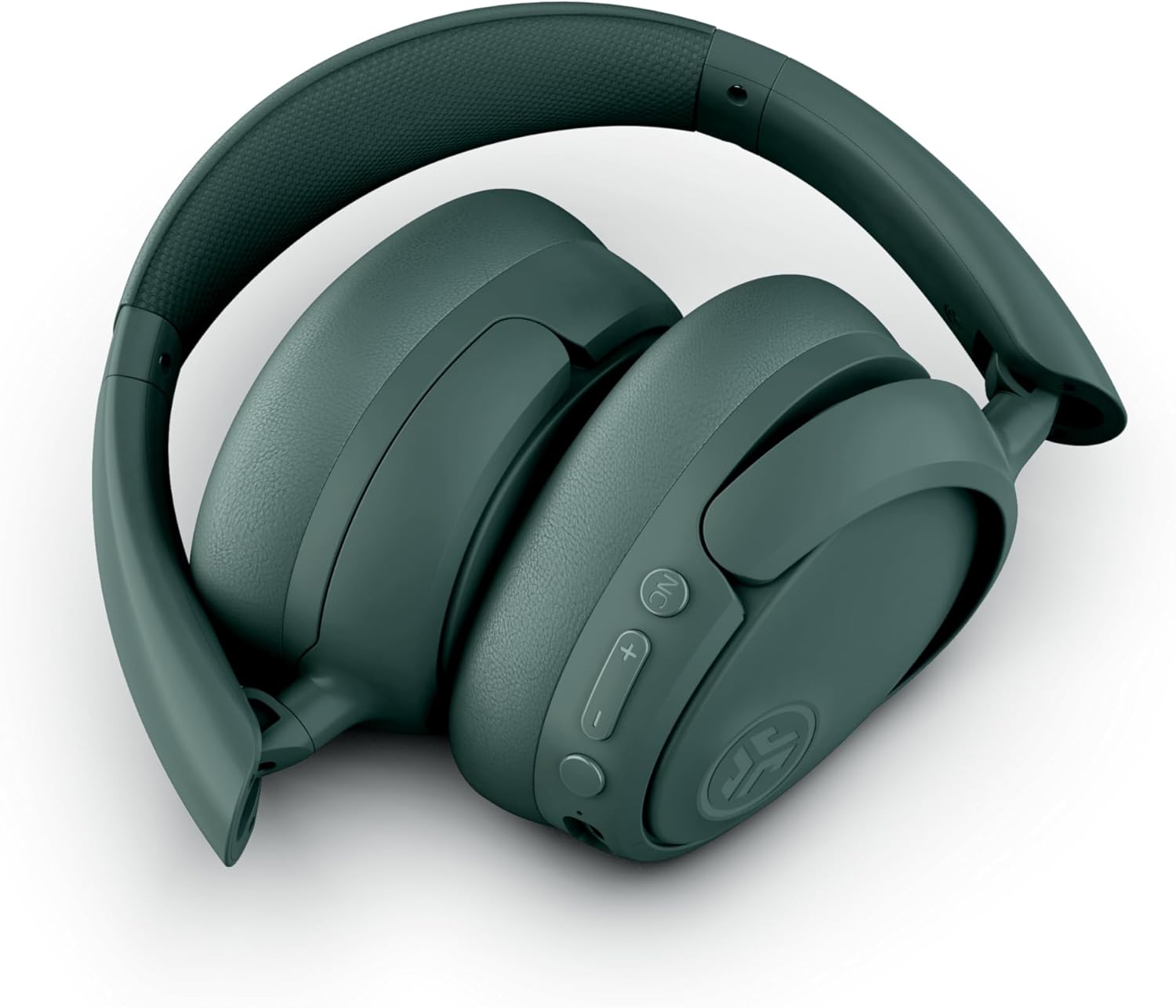
Figura 6: Disseny plegable per facilitar l'emmagatzematge i la portabilitat.
Manteniment
- Neteja: Feu servir un drap suau i sec per netejar els auriculars. Eviteu utilitzar productes químics agressius o materials abrasius.
- Emmagatzematge: When not in use, store the headphones in a cool, dry place, preferably in their folded position to protect them from damage.
- Resistència a l'aigua: The headphones are water resistant. Avoid submerging them in water or exposing them to excessive moisture.
Resolució de problemes
- Sense energia: Assegureu-vos que els auriculars estiguin completament carregats.
- No es pot emparellar: Assegura't que el Bluetooth estigui activat al dispositiu i que els auriculars estiguin en mode d'emparellament. Prova de reiniciar tots dos dispositius.
- Sense so: Comproveu els nivells de volum tant dels auriculars com del dispositiu connectat. Assegureu-vos que els auriculars estiguin correctament emparellats.
- ANC no funciona: Verify that Active Noise Cancelling is enabled via the button on the headphones or through the JLab App.
- Qualitat de trucada baixa: Ensure the microphones are not obstructed and you are in an area with good signal strength.
Especificacions
| Característica | Detall |
|---|---|
| Nom del model | JBuds Lux ANC |
| Tecnologia de connectivitat | Sense fil (Bluetooth 5.4) |
| Forma de l'auricular | Sobre l'orella |
| Control de soroll | Active Noise Cancellation, Be Aware mode |
| Durada de la bateria | Up to 70 Hours (40+ Hours with ANC) |
| Temps de càrrega | 2.5 hores |
| Interval Bluetooth | 10 metres |
| Tipus de control | Button and App Control |
| Pes de l'article | 235 grams (8.3 unces) |
| Dimensions del producte | 6.13 x 3.23 x 7.47 polzades |
| Nivell de resistència a l'aigua | Resistent a l'aigua |
| Material | Pell sintètica, Plàstic |
Garantia i Suport
Per obtenir informació sobre la garantia, el registre del producte i l'assistència tècnica, visiteu el lloc web oficial de JLab. website or contact JLab customer service. Details can typically be found on the manufacturer's weblloc o a l'embalatge del producte.


