Introducció
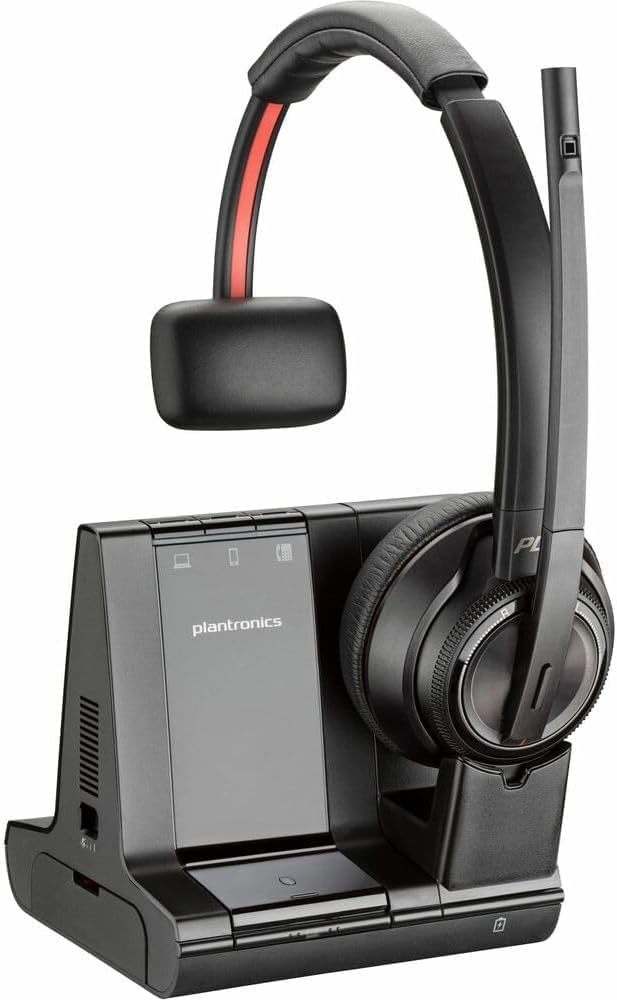
The Poly Savi 8200 Office 8210 Headset is designed for hybrid workers, offering wireless freedom and superior audio clarity. This headset integrates long-range DECT™ technology with USB plug-and-play convenience, ensuring secure, private, and clear conversations. It is built for comfort and productivity in both home and office environments.
Producte acabatview
The Poly Savi 8210 headset provides exceptional sound quality and comfort for extended use. Its design focuses on minimizing distractions and maximizing concentration during calls and meetings.

Característiques clau
- So superior: Provides exceptional quality sound with greater immersion and Hi-fi stereo audio.
- Cancel·lació activa de soroll (ANC): Tunes out nearby noise for enhanced concentration.
- Micròfon amb cancel·lació de soroll: Features close conversation limiting to ensure your voice is heard clearly.
- Boom de micròfon flexible: Allows for optimal positioning.
- Llibertat sense fil: Utilizes DECT™ 6.0 technology for long-range mobility up to 137 m/450 ft (line of sight).
- Connectivitat multidispositiu: Plug-and-play to PC/Mac via universal USB D400 adapter, and compatible with mobile and desk phones.
- Controls intuïtius: Dedicated mute, call answer/end, and volume controls on the headset.
- Disseny còmode: Over-the-head earpiece shape with soft ear-cups for all-day wear.
- SoundGuard DIGITAL: Sound leveling and acoustic limiting for hearing protection.
- Llarga vida útil de la bateria: Up to 13 hours talk time and 50 hours standby time.
Configuració i connectivitat
The Poly Savi 8210 headset offers versatile connectivity options to seamlessly integrate into your workflow.
- Base Unit Connection: Connect the headset base unit to your PC/Mac via the universal USB D400 adapter. The base also supports 3-way connectivity for computer, desk phone, and mobile devices.
- Vinculació d'auriculars: The headset is typically pre-paired with its base. If re-pairing is needed, follow the instructions in the full user guide.
- Connectivitat Bluetooth: For mobile devices, enable Bluetooth on your device and pair with the headset.
- Interval sense fil: Enjoy a wireless range of up to 450 ft (line of sight) with DECT™ 6.0 technology.
Instruccions de funcionament
Utilize the headset's intuitive controls for efficient call management.
- Controls de trucada: Use the dedicated buttons on the earcup to answer/end calls and adjust volume.
- Funció de silenci: A dedicated mute button allows for quick muting and unmuting of the microphone.
- Posicionament del micròfon: Adjust the flexible microphone boom for optimal voice pickup.
- Estil de vestir: The headset features an over-the-head design for comfortable wear.
Càrrega i bateria
Ensure your headset is always ready for use with proper charging practices.
- Càrrega: Place the headset on its charging base. The base connects via USB to a power source.
- Durada de la bateria: The headset provides up to 13 hours of talk time and up to 50 hours of standby time on a full charge.
- Temps de càrrega: A full charge typically takes 3 hours. The 490mAh lithium-ion polymer battery is rechargeable and replaceable.
Manteniment
To ensure longevity and optimal performance of your Poly Savi 8210 headset, follow these general maintenance guidelines:
- Neteja: Regularly wipe the headset and base with a soft, dry cloth. Avoid using harsh chemicals or abrasive materials.
- Emmagatzematge: When not in use, store the headset on its charging base or in a protective case to prevent damage.
- Cura de la bateria: Avoid fully discharging the battery frequently. Charge the headset regularly to maintain battery health.
- Condicions ambientals: Mantingueu els auriculars allunyats de temperatures extremes, humitat i llum solar directa.
Resolució de problemes
If you encounter issues with your Poly Savi 8210 headset, try the following basic troubleshooting steps:
- Sense àudio/Àudio deficient: Ensure the headset is properly connected to the base and your device. Check volume settings on both the headset and your connected device.
- Problemes de connectivitat: Verify that the USB D400 adapter is securely plugged into your computer. For Bluetooth, ensure the headset is paired and within range of your mobile device.
- Problemes de càrrega: Confirm the charging base is powered and the headset is correctly seated on the base. Check the charging cable for any damage.
- El micròfon no funciona: Ensure the microphone boom is positioned correctly and not muted. Check microphone settings on your connected device.
- Interferència: Move away from other wireless devices or large metal objects that might cause interference.
Especificacions
| Característica | Detall |
|---|---|
| Nom del model | Oficina Savi 8200 |
| Número de model de l'article | 8210 |
| Marca | POLY |
| Control de soroll | Cancel·lació activa del soroll |
| Resposta de freqüència | 20 Hz-20 kHz |
| Tecnologia de connectivitat | Sense fil |
| Tecnologia de comunicació sense fils | Bluetooth / DECT 6.0 |
| Versió Bluetooth | 4.2 |
| abast sense fils | Fins a 450 peus (línia de visió) |
| Dispositius compatibles | Most softphone applications, PCs, laptops, Macs with USB-A ports |
| Tipus de control | Control de veu |
| Pes de l'article | 4 unces |
| Dimensions del producte | 9.7 x 8.2 x 8.8 polzades |
| Durada de la bateria (temps de conversa) | Fins a 13 hores |
| Durada de la bateria (mode d'espera) | Fins a 50 hores |
| UPC | 197497168921 |
Vídeo oficial del producte
Garantia i Suport
For warranty information, technical support, or further assistance with your Poly Savi 8200 Office 8210 Headset, please refer to the official Poly weblloc web o poseu-vos en contacte amb el servei d'atenció al client. Conserveu el rebut de compra per a reclamacions de garantia.


