1. Producte acabatview
The MokerLink 16-Port Gigabit Ethernet Switch is an unmanaged network switch designed for expanding network connectivity in home or small office environments. It features 16 Gigabit Ethernet ports, offering high-speed data transfer with plug-and-play simplicity. The fanless metal design ensures quiet and stable operation.

Figura 1: Mésview of the MokerLink 16-Port Gigabit Ethernet Switch, highlighting its full Gigabit ports, plug and play functionality, power-saving features, wall-mountable design, LED indicators, and fanless operation.
Característiques principals:
- 16 ports Gigabit Ethernet: Provides 16 10/100/1000Mbps RJ45 ports for high-speed network connections.
- Plug and Play: Requires no configuration, making setup quick and easy.
- Disseny sense ventilador: Ensures silent operation, suitable for various environments.
- C de metall resistentasing: Offers robust protection and efficient heat dissipation.
- Eficient energètic: Features power-saving functionality (IEEE 802.3az EEE support) to reduce energy consumption.
- Col·locació flexible: Supports desktop or wall-mount installation.
2. Contingut del paquet
Verifiqueu que tots els elements siguin presents al paquet:
- 1 x MokerLink 16-Port Gigabit Ethernet Switch
- 1 x Power Adapter (DC 12V / 1.0A)
- 1 x Manual d'usuari (aquest document)
3. Configuració i instal·lació
Follow these steps to set up your MokerLink Gigabit Ethernet Switch:
- Trieu una ubicació: Place the switch on a stable desktop or mount it on a wall. Ensure adequate ventilation around the device.
- Connectar l'alimentació: Insert the DC plug of the power adapter into the switch's DC input port. Plug the other end of the power adapter into a standard electrical outlet. The power LED indicator will illuminate.
- Connectar dispositius de xarxa: Connect your network devices (e.g., computers, printers, network-attached storage, routers, IP cameras, wireless access points) to any of the 16 RJ45 ports using standard Ethernet cables. The switch supports auto MDI/MDIX, so crossover cables are not required.
- Verifica la connexió: Once a device is connected, the corresponding port's LED indicator will light up (green for link, flashing for data transmission).
- Muntatge a la paret (opcional): If wall mounting, use appropriate screws and anchors (not included) with the mounting holes on the switch.
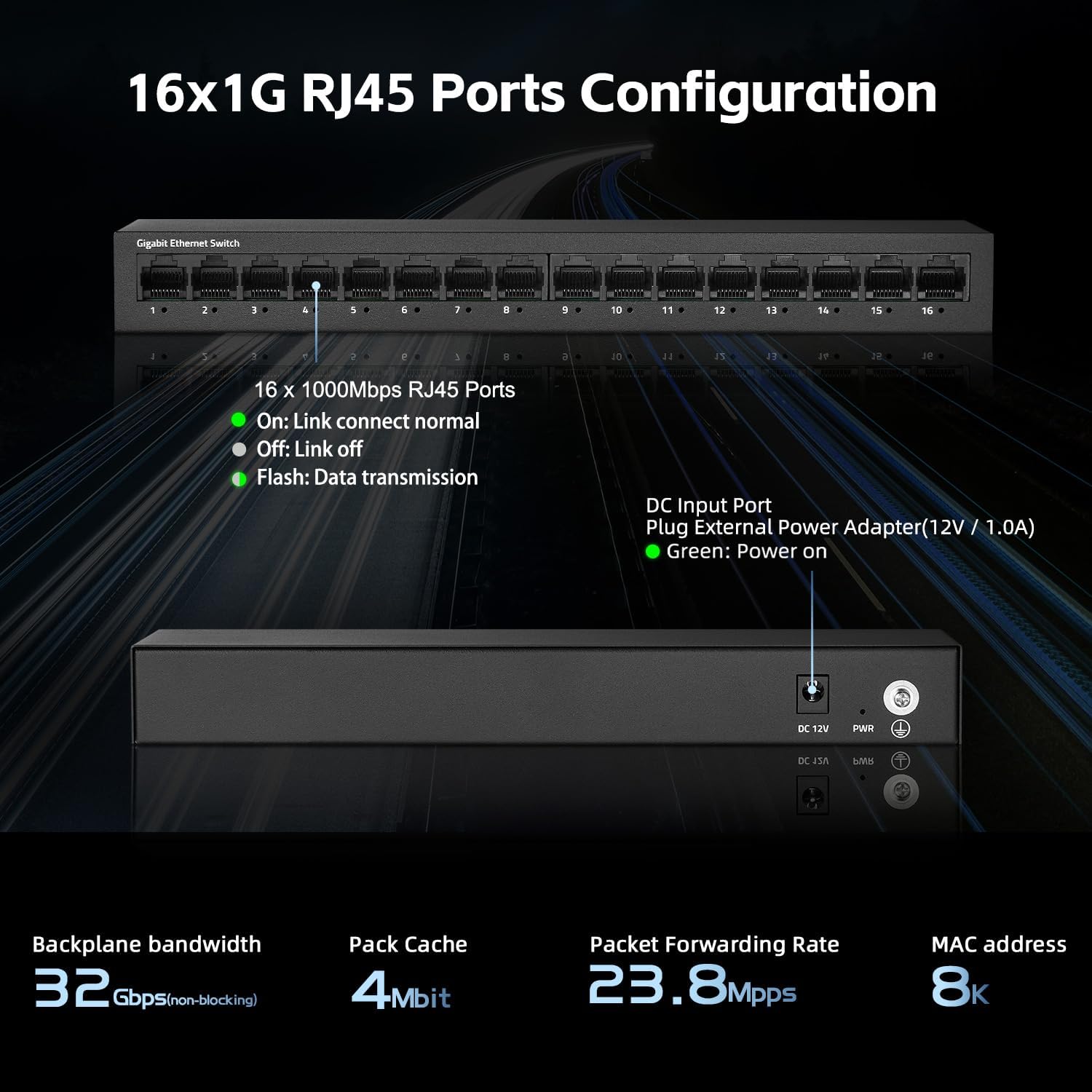
Figura 2: posterior view of the switch showing the DC input port and power LED indicator.

Figure 3: Ethernet cables connected to the switch ports.

Figura 4: Example of the switch mounted on a wall, demonstrating its flexible placement options.
4. Instruccions de funcionament
The MokerLink 16-Port Gigabit Ethernet Switch is an unmanaged device, meaning it operates automatically without requiring user configuration. Simply connect your devices, and the switch will handle network traffic efficiently.
Indicadors LED:
| Indicador | Estat | Descripció |
|---|---|---|
| LED d'encesa | Verd | L'interruptor està engegat. |
| Port Link/Act LEDs (1-16) | Verd (sòlid) | A device is connected to the port, and the link is active. |
| Verd (intermitent) | Les dades s'estan transmetent o rebent a través del port. | |
| Apagat | No device is connected, or the connected device is powered off/inactive. |

Figura 5: Primer pla view of the port LED indicators, showing a green light for an active link.
Funcions automàtiques:
- Negociació automàtica: Each port automatically detects the link speed of the connected network device (10/100/1000Mbps) and adjusts for compatibility and optimal performance.
- MDI/MDIX automàtic: Automatically detects the type of Ethernet cable (straight-through or crossover) and adjusts accordingly, eliminating the need for specific cable types.
- Non-Blocking Wire Speed: All ports can simultaneously transmit and receive data at their full wire speed without congestion.
5. Manteniment i cura
To ensure the longevity and optimal performance of your MokerLink switch, follow these maintenance guidelines:
- Medi ambient: Operate the switch within its specified temperature range (0°C to 45°C). Avoid placing it in direct sunlight, near heat sources, or in areas with high humidity.
- Neteja: Feu servir un drap suau i sec per netejar l'exterior de l'interruptor. No utilitzeu netejadors líquids ni en aerosol.
- Ventilació: Ensure that the ventilation holes on the sides of the switch are not blocked to allow for proper heat dissipation. The fanless design relies on natural convection.
- Font d'alimentació: Use only the provided power adapter. If the adapter is damaged, replace it with an equivalent approved adapter.
- Gestió de cables: Organize network cables neatly to prevent strain on the ports and accidental disconnections.

Figure 6: The switch features a fanless metal design for efficient heat dissipation and energy saving.
6. Solució De Problemes
If you encounter issues with your MokerLink switch, refer to the following common troubleshooting steps:
- Sense energia:
- Assegureu-vos que l'adaptador de corrent estigui connectat correctament tant a l'interruptor com a una presa de corrent que funcioni.
- Comproveu si la presa de corrent funciona connectant-hi un altre dispositiu.
- Verify the power LED on the switch is illuminated.
- Cap enllaç/activitat en un port:
- Assegureu-vos que el cable Ethernet estigui connectat correctament tant al port del commutador com al dispositiu de xarxa.
- Check the status of the connected network device (e.g., computer is powered on, network adapter is enabled).
- Prova un cable Ethernet diferent.
- Proveu de connectar el dispositiu a un port diferent de l'interruptor.
- Verify the link/activity LED for the port is illuminated (solid green for link, flashing for activity).
- Velocitat de xarxa lenta:
- Ensure all connected devices and cables support Gigabit Ethernet (1000Mbps). The switch will operate at the lowest common speed.
- Comproveu si hi ha trànsit de xarxa excessiu o aplicacions que consumeixen molta amplada de banda i que s'executen en dispositius connectats.
- Restart the switch by unplugging and replugging the power adapter.
- Connexió intermitent:
- Inspect Ethernet cables for damage.
- Ensure the switch is placed in a stable environment, free from excessive heat or electromagnetic interference.
- Check for loose power or Ethernet cable connections.
7. Especificacions
| Característica | Descripció |
|---|---|
| Model | 16*1G Unmanaged |
| Ports | 16 ports RJ45 de 10/100/1000 Mbps |
| Capacitat de commutació | 32 Gbps |
| Tarifa d'enviament de paquets | 23.8 Mpps |
| Taula d'adreces MAC | 8K |
| Marc Jumbo | 9K (Standard for Gigabit Ethernet) |
| Normes | IEEE 802.3, IEEE 802.3u, IEEE 802.3ab, IEEE 802.3x, IEEE 802.3az |
| Tipus d'interfície | RJ45 |
| Mètode de transmissió | Emmagatzema i reenvia |
| Font d'alimentació | External Power Adapter (DC 12V / 1.0A) |
| Consum d'energia | Low power consumption (Energy Efficient Ethernet support) |
| Indicadors LED | Power, Link/Act (per port) |
| Dimensions (L x A x A) | Aproximadament 10.16 x 5.04 x 3.23 polzades (25.8 x 12.8 x 8.2 cm) |
| Pes de l'article | Aproximadament 1.65 lliures (0.75 kg) |
| Material de la caixa | Metall |
| Temperatura de funcionament | De 0 °C a 45 °C (32 °F a 113 °F) |
| Humitat de funcionament | 10% a 90% sense condensació |
| Instal·lació | Desktop or Wall-Mount |

Figure 7: Visual representation of the switch's high port speed and switching capacity.
8. Vídeos oficials de productes
The following videos provide additional information and visual guidance for the MokerLink 16-Port Gigabit Ethernet Switch:
Vídeo 1: Producte acabatview (0:38)
Aquest breu vídeo ofereix una visió ràpidaview of the MokerLink 16-Port Gigabit Ethernet Switch, highlighting its main features and design.
Video 2: Detailed Features and Usage (2:11)
A more in-depth video demonstrating the features and typical usage scenarios of the Gigabit Ethernet Switch.
Video 3: Installation and Connectivity (1:38)
This video guides you through the physical installation and connection process for the switch.
Video 4: Key Highlights (0:36)
A concise video highlighting important aspects and benefits of the MokerLink switch.
Video 5: Advanced Overview (1:25)
This video offers a more advanced look at the switch's capabilities and performance.
Video 6: Quick Feature Spotlight (0:20)
A very brief video focusing on a specific feature or benefit of the switch.
Video 7: Comprehensive Demonstration (2:59)
This comprehensive video provides a full demonstration of the MokerLink 16-Port Gigabit Ethernet Switch, from unboxing to operation.
9. Garantia i Suport
Informació de la garantia: For details regarding the product warranty, please refer to the warranty card included with your purchase or contact the seller/manufacturer directly. Warranty terms may vary by region and retailer.
Suport tècnic: If you require technical assistance or have questions not covered in this manual, please contact MokerLink customer support through their official weblloc web o el distribuïdor on vau comprar el producte.
Per a més informació, visiteu el Botiga MokerLink a Amazon.


