1. Introducció
This manual provides essential instructions for the safe and efficient operation of your GROVIEW Mini projector Bluetooth, model Groview-B2D-US. Please read this manual thoroughly before using the projector and retain it for future reference.
El Groview-B2D-US is a compact and portable projector featuring electric focus, Bluetooth 5.1 connectivity, and a fully sealed optical engine designed for reduced noise and extended lifespan. It supports Full HD 1080P input with a native 720P resolution and offers a digital zoom function.
2. Informació de seguretat
- No mireu directament a la lent del projector quan estigui encès.amp està activat.
- Assegureu-vos que hi hagi una ventilació adequada al voltant del projector per evitar el sobreescalfament. No bloquegeu les obertures de ventilació.
- Feu servir només l'adaptador de corrent que s'inclou amb el projector.
- No exposeu el projector a la pluja, la humitat ni a temperatures extremes.
- Eviteu col·locar el projector sobre superfícies inestables.
- No intenteu desmuntar ni reparar el projector vosaltres mateixos. Poseu-vos en contacte amb personal de servei qualificat per obtenir ajuda.
- Mantingueu el projector lluny dels nens i de les mascotes.
3. Què hi ha a la caixa
Verifiqueu que tots els elements estiguin presents a l'embalatge:
- 1 x Groview Electric Focus Projector
- 1 x cable HDMI
- 1 x cable d'alimentació
- 1 x comandament a distància
- 1 x Manual d'usuari (aquest document)
4. Producte acabatview
4.1 Components del projector
The following image illustrates the main components of the Groview Mini Projector.

4.2 Ports d'entrada/sortida
The rear panel of the projector features various ports for connecting external devices.
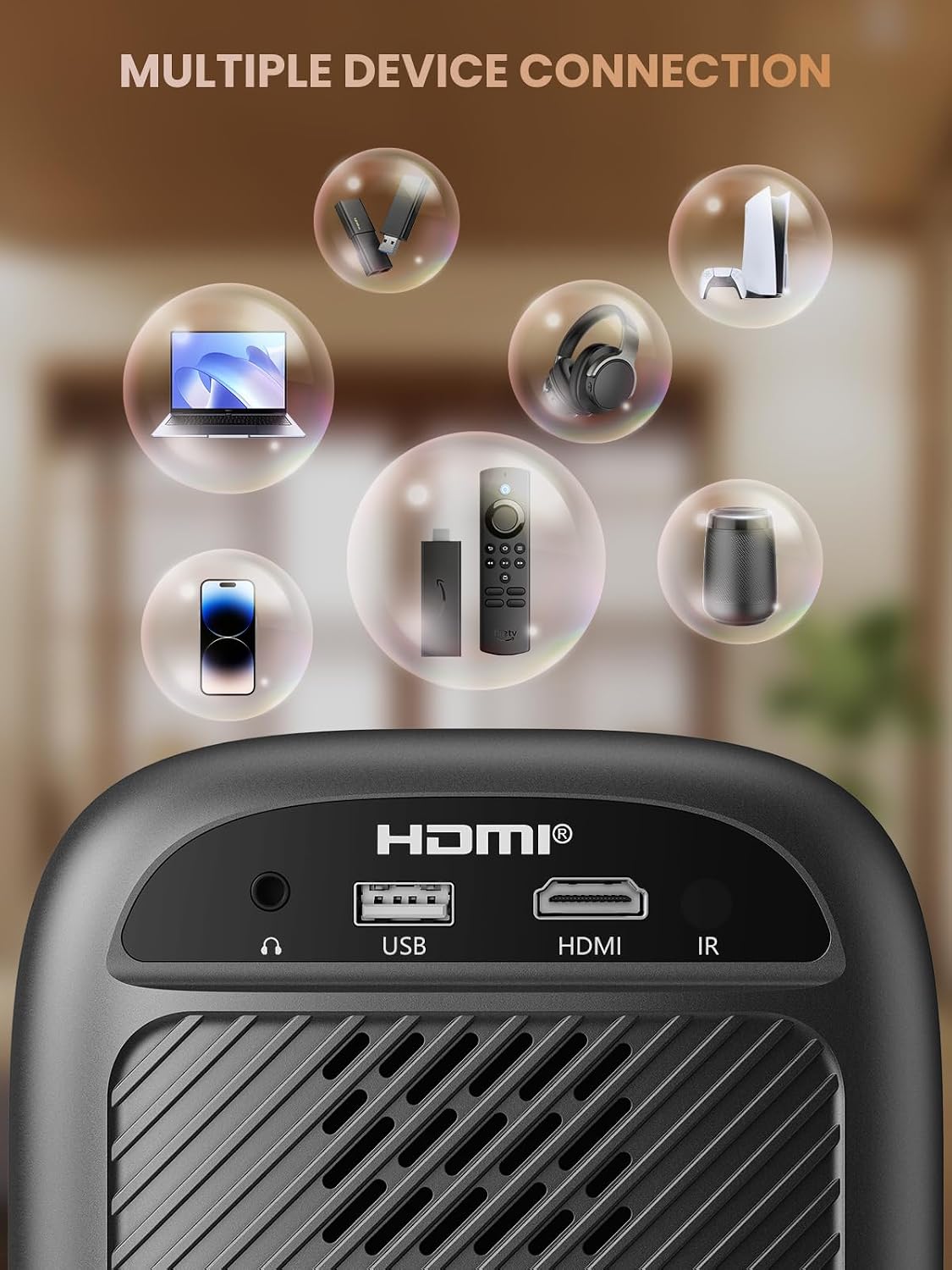
- Port HDMI: Connects to devices such as TV sticks, laptops, game consoles, and Blu-ray players.
- Port USB: Es connecta a unitats flash USB per a la reproducció de contingut multimèdia.
- Audio Port (3.5mm Jack): Es connecta a altaveus externs o auriculars.
- Receptor IR: Per a senyals de comandament a distància.
5. Configuració
5.1 Connexió d'alimentació
- Connecteu el cable d'alimentació a l'entrada d'alimentació del projector.
- Connecteu l'altre extrem del cable d'alimentació a una presa de corrent.
5.2 Col·locació del projector
Place the projector on a stable, flat surface. For optimal image quality, position the projector perpendicular to the projection surface (wall or screen). The projector can create a large image from a relatively short distance.
5.3 Ajust del focus
El Groview-B2D-US features electric focus, allowing for precise image clarity adjustment using the remote control.

- Enceneu el projector.
- Apunteu el comandament a distància al projector.
- Press the dedicated focus buttons (usually marked with 'F+' and 'F-' or similar icons) on the remote until the projected image is sharp and clear.
5.4 Correcció Keystone
The projector includes a keystone adjustment slider on the rear panel. This allows you to correct trapezoidal distortion if the projector is not perfectly aligned with the screen. Adjust the slider until the image appears rectangular.
5.5 Encès inicial
Premeu el botó d'engegada del projector o del comandament a distància per engegar el dispositiu. El projector s'iniciarà i mostrarà la interfície principal.
6. Instruccions de funcionament
6.1 Connexió de dispositius
El projector ofereix diverses opcions de connectivitat:
- HDMI: Connect an HDMI cable from your source device (e.g., TV Stick, laptop, game console) to the projector's HDMI port. Select the HDMI input source from the projector's menu.
- USB: Insert a USB flash drive into the USB port. The projector's media player will typically detect the drive automatically, allowing you to browse and play supported media files.
- Bluetooth 5.1: Connect to external Bluetooth speakers or headphones for enhanced audio.

- Enable Bluetooth on your external audio device and set it to pairing mode.
- Al projector, navegueu fins al menú de configuració de Bluetooth.
- Seleccioneu el dispositiu de la llista de dispositius disponibles per emparellar-lo.
Note: Bluetooth does not support smartphone mirroring.
6.2 Smartphone Connection Methods
To connect a smartphone, an adapter is required:

- Dispositius iOS: Use a Lightning to HDMI adapter cable.
- Dispositius Android: Use a Micro USB/Type C to HDMI adapter cable or a Google Chromecast.
6.3 Navegació i menú
Use the arrow buttons on the remote control to navigate through the projector's on-screen menu. The 'OK' or 'Enter' button confirms selections, and the 'Back' or 'Return' button goes back to the previous menu.
6.4 Digital Zoom Function
The projector features a digital zoom function, allowing you to adjust the image size from 75% to 100% without moving the projector.

Access the zoom settings through the projector's menu and use the remote control to adjust the desired size.
6.5 Ús del control remot
The included remote control operates the projector's functions. Ensure batteries are correctly installed. Note: A coin may be needed to open the battery compartment.
7. Manteniment
7.1 Neteja
- Lent: Netegeu suaument la lent amb un drap suau i sense borrissol dissenyat específicament per a superfícies òptiques. No utilitzeu productes de neteja abrasius.
- Exterior: Netegeu l'exterior del projector amb un drap suau i sec. Per a marques difícils, feu un drap lleugerament sec.amp es pot fer servir un drap, seguit d'un de sec.
7.2 Dust-proof Design
El Groview-B2D-US features a fully sealed optical engine, which helps prevent dust and debris from entering the projector and affecting image quality or lifespan.

7.3 Emmagatzematge
When not in use, store the projector in a cool, dry place, away from direct sunlight and extreme temperatures. Use the lens cap to protect the lens from dust and scratches.
8. Solució De Problemes
- Sense imatge: Check power connection, input source selection, and ensure the lens cap is removed. Verify the connected device is powered on and outputting a signal.
- Imatge borrosa: Adjust the electric focus using the remote control. Ensure the projector is placed at an appropriate distance from the screen.
- Sense so: Check the volume settings on both the projector and the connected source device. If using Bluetooth, ensure the external audio device is properly paired and its volume is up.
- El control remot no funciona: Comproveu les piles del comandament a distància i assegureu-vos que no hi hagi obstacles entre el comandament a distància i el receptor d'infrarojos del projector.
- Avís de sobreescalfament: Ensure ventilation openings are not blocked. Turn off the projector and allow it to cool down before restarting.
For further assistance, please contact Groview atenció al client.
9. Especificacions
| Característica | Especificació |
|---|---|
| Marca | Groview |
| Número de model | Groview-B2D-US |
| Resolució nativa | 1280 x 720 píxels |
| Resolució suportada | Full HD de 1080P |
| Tecnologia de connectivitat | 3.5mm Jack, Bluetooth 5.1, HDMI, USB |
| Característiques especials | Electric Focus, Fully Sealed Optical Engine, Mini size & Lightweight, 150" Display, Digital Zoom (75%-100%) |
| Usos recomanats | Interior/Exterior |
| Pes de l'article | 2.99 lliures |
| Dimensions del producte | 4.8 x 5.7 x 6.9 polzades |
| Color | Gris |
10. Garantia i Suport
Groview products are designed for reliability and performance. For information regarding warranty coverage and customer support, please refer to the warranty card included with your purchase or visit the official Groview website. Our service team is available to assist with any product-related inquiries.


