1. Introducció
Thank you for choosing TTQ Open Ear Headphones, Model CT26. These true wireless sports earbuds are designed to provide a comfortable listening experience while allowing you to remain aware of your surroundings. Featuring Bluetooth 5.3 connectivity, IPX7 waterproofing, and crystal-clear call quality, they are ideal for various activities including running, cycling, workouts, and driving. This manual will guide you through the setup, operation, and maintenance of your new headphones.
2. Contingut del paquet
Si us plau, verifiqueu que tots els elements siguin presents al vostre paquet:
- TTQ Open Ear Headphones (Left and Right Earbuds)
- Estoig de càrrega
- Cable de càrrega USB-C
- Manual d'usuari

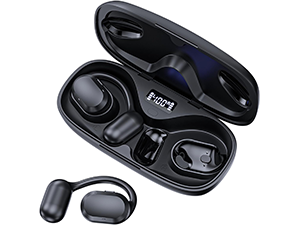
Imatge: The TTQ Open Ear Headphones, Model CT26, displayed within their open charging case. The case features an LED digital power display indicating the battery level of both the case and the individual earbuds.
3. Producte acabatview
The TTQ CT26 headphones feature an innovative open-ear design with flexible earhooks, ensuring comfort and stability during extended use. This design allows ambient sounds to be heard, enhancing safety in outdoor environments.

Imatge: A person wearing the TTQ Open Ear Earbuds, demonstrating how the open-ear design sits comfortably outside the ear canal, allowing for situational awareness.

Imatge: Two individuals cycling outdoors, both wearing TTQ Open Ear Headphones. This illustrates the product's suitability for sports and activities where awareness of surroundings is crucial for safety.
4. Configuració
4.1 Càrrega dels auriculars i l'estoig
Before first use, fully charge the headphones and the charging case. Connect the provided USB-C charging cable to the charging port on the case and a power source. The LED display on the charging case will show the battery percentage, and individual earbud charge indicators will light up during charging.
- A full charge provides up to 8 hours of music playtime or 9 hours of call time for the earbuds.
- L'estoig de càrrega estén el temps de reproducció total fins a 36 hores.

Imatge: The TTQ charging case with its lid open, showcasing the digital LED display that indicates the battery percentage of the case and the charging status of the earbuds. A USB-C charging port is visible at the front.
4.2 Emparellament amb el dispositiu
- Assegureu-vos que els auriculars estiguin carregats.
- Open the charging case. The earbuds will automatically enter pairing mode, indicated by a flashing light (if applicable, refer to product specific light indicators).
- Al dispositiu (telèfon intel·ligent, tauleta, ordinador), aneu a la configuració de Bluetooth i activeu el Bluetooth.
- Cerca available devices and select "CT26" from the list.
- Un cop connectats, els auriculars indicaran que l'emparellament s'ha realitzat correctament (per exemple, una indicació de veu o una llum fixa).
Els auriculars es tornaran a connectar automàticament a l'últim dispositiu emparellat quan es treguin de l'estoig, si el Bluetooth està habilitat al dispositiu.

Imatge: A visual representation of Bluetooth 5.3 technology, showing a smartphone's Bluetooth settings screen with 'CT26' listed as a connected device, illustrating the stable and fast connection capability.
5. Instruccions de funcionament
The TTQ CT26 headphones feature a physical button for easy control of various functions.
Imatge: A diagram illustrating the single button controls on the earbud, detailing actions for pause/play, answer/hang up, rejection, volume adjustment, switching songs, and activating Siri.
5.1 Reproducció de música
- Reproduir/pausa: Press the button once (x1).
- Següent cançó: Press the button twice (x2).
- Cançó anterior: Press the button three times (x3).
- Pujar/baixar el volum: Press and hold the button for 2 seconds (Hold 2s).
5.2 Gestió de trucades
- Respondre/Finalitzar la trucada: Press the button once (x1).
- Rebutja la trucada: Press and hold the button for 2 seconds (Hold 2s).
The headphones feature dual-mic noise-cancelling technology for clearer calls by reducing environmental noise.

Imatge: A man wearing TTQ Open Ear Headphones while holding a smartphone, illustrating the intelligent noise cancellation feature that boosts human voice and reduces environmental noise for clearer calls.
5.3 Assistent de veu
- Activar l'assistent de veu (Siri, Google Assistant, etc.): Press the button three times (x3).
6. Manteniment
To ensure the longevity and optimal performance of your TTQ Open Ear Headphones, follow these maintenance guidelines:
- Neteja: Regularly wipe the earbuds and charging case with a soft, dry, lint-free cloth. Avoid using abrasive materials or harsh chemicals.
- Resistència a l'aigua: The headphones are IPX7 waterproof, meaning they can withstand submersion in up to 1 meter of water for 30 minutes. They are resistant to sweat and rain, making them suitable for workouts. However, they are not designed for swimming or prolonged submersion. Ensure the charging port is dry before charging.
- Emmagatzematge: Quan no els utilitzeu, guardeu els auriculars a la funda de càrrega per protegir-los de la pols i els danys. Guardeu-los en un lloc fresc i sec, allunyat de temperatures extremes.

Imatge: TTQ Open Ear Headphones and their charging case on a wet surface with water splashes, demonstrating their IPX7 waterproof rating, indicating resistance to rain and sweat.
7. Solució De Problemes
If you encounter issues with your TTQ Open Ear Headphones, please refer to the following common solutions:
- Sense so/Volum baix:
- Assegureu-vos que els auriculars estiguin correctament emparellats i connectats al dispositiu.
- Comproveu el nivell de volum tant dels auriculars com del dispositiu connectat.
- Assegureu-vos que els auriculars estiguin carregats.
- Problemes d'aparellament:
- Assegureu-vos que el Bluetooth estigui habilitat al vostre dispositiu.
- Ensure the headphones are in pairing mode (flashing indicator).
- Desactiva el Bluetooth en altres dispositius propers que puguin estar intentant connectar-se.
- Forget/remove "CT26" from your device's Bluetooth list and try pairing again.
- Restart both your device and the headphones (by placing them back in the case and taking them out).
- Problemes de càrrega:
- Assegureu-vos que el cable de càrrega estigui connectat correctament tant a la carcassa com a la font d'alimentació.
- Prova un cable USB-C i un adaptador de corrent diferents.
- Assegura't que els contactes de càrrega dels auriculars i de la funda estiguin nets i lliures de residus.
- Connexió intermitent:
- Ensure your device is within the Bluetooth range (up to 10 meters/33 feet).
- Eviteu obstruccions físiques entre els auriculars i el dispositiu.
- Minimitzar les interferències d'altres dispositius sense fil.
Si el problema persisteix després de provar aquests passos, poseu-vos en contacte amb l'atenció al client.
8. Especificacions
| Característica | Especificació |
|---|---|
| Nom del model | CT26 |
| Tecnologia de connectivitat | Sense fil (Bluetooth) |
| Tecnologia de comunicació sense fils | Bluetooth 5.3 |
| Interval Bluetooth | 10 metres (33 peus) |
| Nivell de resistència a l'aigua | IPX7 impermeable |
| Col·locació de l'orella | Orella oberta |
| Factor de forma | True Wireless |
| Durada de la bateria (auriculars) | 8 Hours (Music) / 9 Hours (Calls) |
| Temps de reproducció total amb estoig de càrrega | Fins a 36 hores |
| Tipus de controlador d'àudio | Conductor dinàmic |
| Mida del controlador d'àudio | 16.2 mil·límetres |
| Interval de freqüència | 20 Hz - 20,000 Hz |
| Control de soroll | Cancel·lació activa de soroll (per a trucades) |
| Mètode de control | Botó físic |
| Port de càrrega | USB-C |
| Pes de l'article | 7.8 unces (0.22 quilograms) |
| Material | Plàstic |
| UPC | 717977781312 |
9. Atenció al client
For any questions, concerns, or if you receive a defective product, please do not hesitate to contact TTQ customer support. We are committed to providing solutions within 24 hours.
Please visit the official TTQ store on Amazon for more information and support resources: TTQ Store


