1. Introducció
This manual provides detailed instructions for the installation, operation, and maintenance of your Xiaomi Outdoor Camera CW300. This camera is an entry-level outdoor Pan-Tilt-Zoom (PTZ) camera designed for various outdoor monitoring needs, including doors, shops, and farms. It features 2.5K ultra-clear picture quality, 4MP resolution, smart full-color night vision, bidirectional gimbal movement, IP66 water and dust resistance, and AI human tracking.
2. Producte acabatview
Familiaritzeu-vos amb els components de la vostra càmera exterior Xiaomi CW300.

Figura 2.1: Frontal view of the Xiaomi Outdoor Camera CW300, showing the lens, status indicator, and light sensor.
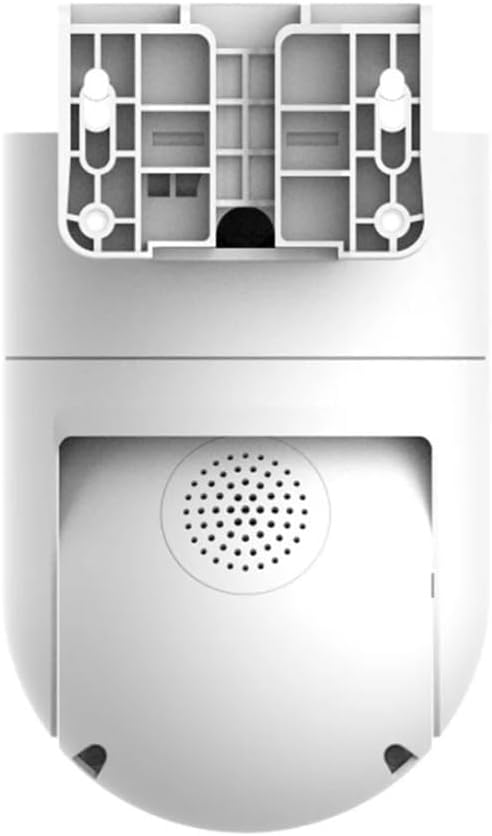
Figura 2.2: Esquena view of the camera, highlighting the integrated speaker for two-way audio and alarm functions.
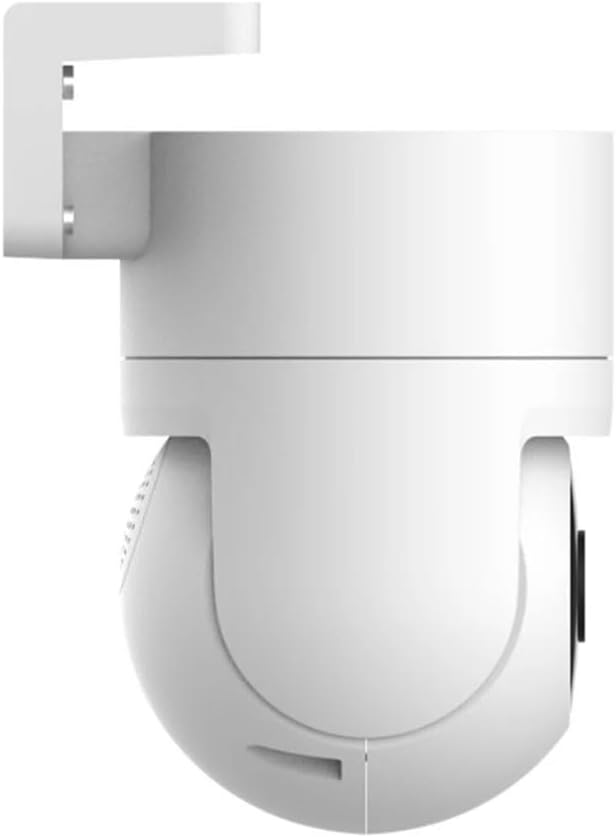
Figura 2.3: lateral view of the camera, illustrating its compact design and mounting bracket.
3. Guia de configuració
3.1 Desembalatge i inspecció inicial
Traieu amb cura tots els components de l'embalatge. Verifiqueu que tots els elements que figuren a la llista d'embalatge siguin presents i no estiguin danyats.
3.2 Connexió d'alimentació
Connect the camera to a suitable power source using the provided power adapter. Ensure the connection is secure to prevent interruptions.
3.3 Instal·lació i emparellament de l'aplicació
- Descarrega't el Aplicació Mi Home/Xiaomi Home from your device's app store (Google Play Store or Apple App Store).
- Obre l'aplicació i crea o inicia la sessió al teu compte Xiaomi.
- Toqueu la icona "+" a la cantonada superior dreta per afegir un dispositiu nou.
- Select the "Xiaomi Outdoor Camera CW300" from the list of available devices.
- Follow the on-screen instructions to connect the camera to your Wi-Fi network and complete the pairing process. Ensure your Wi-Fi signal is strong at the installation location.
3.4 Muntatge de la càmera
The camera can be mounted on a wall or pole. Choose a location that provides optimal viewing angles and is within Wi-Fi range.
- Muntatge a la paret: Use the provided mounting bracket and screws to secure the camera to a sturdy wall.
- Muntatge al pal: Utilize the included straps or clamps to attach the camera securely to a pole.

Figura 3.1: Example of the camera mounted on a pole, demonstrating flexible installation options.
4. Instruccions de funcionament
4.1 Viu View i Enregistrament
Access the live feed from your camera via the Mi Home/Xiaomi Home app. You can initiate manual recordings or set up continuous recording and event-triggered recording.
4.2 Control de panoràmica, inclinació i zoom (PTZ)
The bidirectional gimbal allows for 360° coverage. Use the controls within the app to remotely adjust the camera's viewing angle (pan and tilt) and zoom in on specific areas.
4.3 Smart Full-Color Night Vision
The camera features intelligent full-color night vision. When a human shape is detected at night, the camera automatically activates its white light, providing a clear, colored image even in dark environments.

Figure 4.1: The camera's intelligent full-color night vision in action, illuminating a dark area.
4.4 AI Human Tracking and Alarm
The camera intelligently tracks human movements. When a person is detected in the surveillance area, the camera automatically tracks and records their movement. Simultaneously, it triggers an acoustic alarm with high-frequency flashing lights to deter intruders and sends an alarm message to your Mi Home/Xiaomi Home app.
4.5 Àudio bidireccional
Utilize the built-in microphone and speaker for two-way communication through the app, allowing you to speak to visitors or deter unwanted individuals.
4.6 Reproducció de vídeo
Review foo gravattage stored on a microSD card (not included) or cloud storage (subscription may be required) directly from the Mi Home/Xiaomi Home app.
5. Manteniment
5.1 Neteja de la càmera
Despite its IP66 water and dust resistance, regular cleaning is recommended to ensure optimal performance and image clarity. Use a soft, damp cloth to wipe the camera body and lens. Avoid abrasive cleaners or solvents.

Figure 5.1: The camera's IP66 rating ensures durability against water and dust, as shown in rainy conditions.
5.2 actualitzacions de microprogramari
Periodically check the Mi Home/Xiaomi Home app for available firmware updates. Keeping your camera's firmware up-to-date ensures you have the latest features, security enhancements, and bug fixes.
5.3 Gestió d'emmagatzematge
If using a microSD card, regularly check its storage capacity and back up important recordings. Consider setting up automatic deletion of older footage if continuous recording is enabled.
6. Solució De Problemes
| Problema | Causa possible | Solució |
|---|---|---|
| La càmera no es connecta a la Wi-Fi | Incorrect Wi-Fi password, weak signal, camera too far from router. | Verify Wi-Fi password. Move camera closer to router or use a Wi-Fi extender. Restart camera and router. |
| Mala qualitat d'imatge | Lent bruta, il·luminació insuficient, problemes d'amplada de banda de la xarxa. | Clean the camera lens. Ensure adequate lighting for optimal performance. Check your internet speed. |
| La detecció de moviment no funciona | Sensitivity settings too low, detection zone not configured correctly, obstructions. | Adjust motion detection sensitivity in the app. Redraw detection zones. Ensure no physical obstructions block the view. |
| La càmera no s'encén | Power adapter issue, power outlet issue. | Comproveu la connexió del cable d'alimentació. Proveu una altra presa de corrent. Assegureu-vos que l'adaptador de corrent funciona correctament. |
| Regional compatibility issues | Camera is designed for a specific region not matching your Mi Home/Xiaomi Home app region. | Ensure your Mi Home/Xiaomi Home app region setting matches the region for which the camera was manufactured. You may need to change your app's region or create a new account for the correct region. |
7. Especificacions
| Característica | Detall |
|---|---|
| Model | CW300 |
| Resolució | 4MP (2.5K Ultra-Clear) |
| Connectivitat | Wi-Fi |
| Classificació de protecció d'entrada (IP). | IP66 (resistent a l'aigua i la pols) |
| Visió nocturna | Smart Full-Color Night Vision (Infrared Light Source) |
| Moviment | Bidirectional Gimbal (Pan-Tilt) |
| Seguiment | AI Human Tracking |
| Tipus d’alarma | Motion Only (Acoustic and Visual Alarm) |
| Mètode de control | Voice (via Mi Home/Xiaomi Home app) |
| Entrada de potència | 12 V, 3 W |
| Dimensions (L x A x A) | 6.61 x 3.94 x 4.84 polzades |
| Pes | 1.85 lliures (840 grams) |
| Material | Metall |
| Temperatura de funcionament | Fins a 60°C |
| Ús recomanat | Seguretat exterior |
| Piles necessàries | No |
| Tipus d'enfocament | Enfocament manual |
| Tipus de zoom | Zoom òptic |
| Format de captura de vídeo | MP4 |
8. Vídeo oficial del producte
Vídeo 8.1: Un breu resumview of the Xiaomi Outdoor Camera CW300, showcasing its key features such as 2.5K ultra-clear picture quality, full-color night vision, 360° coverage, and IP66 water and dust resistance. This video provides a visual demonstration of the product's capabilities and design.
9. Garantia i Suport
Information regarding the product warranty and customer support was not available in the provided data. Please refer to the official Xiaomi website or contact Xiaomi customer service for detailed warranty terms, technical support, and service options for your Xiaomi Outdoor Camera CW300.
You can often find support resources, FAQs, and contact information on the manufacturer's official product page or support section.


