Introducció
The iKiKin BM6 Bluetooth Car Battery Monitor is a diagnostic tool designed to assess the health and performance of 12-volt vehicle batteries. This device connects to your vehicle's battery and communicates wirelessly via Bluetooth 4.0 with a dedicated mobile application. It provides real-time data and performs various tests to help users understand their battery's condition, cranking power, and charging system efficiency. This manual provides detailed instructions for the proper installation, operation, and maintenance of your BM6 battery monitor.

Image: The iKiKin BM6 Bluetooth Car Battery Monitor is compatible with a wide range of 12V vehicles, including cars, motorcycles, trucks, and electric cars.
Informació de seguretat
Always exercise caution when working with vehicle batteries. Improper handling can lead to serious injury or damage to the vehicle. Please observe the following safety guidelines:
- Utilitzeu l'equip de protecció individual adequat, incloent-hi ulleres i guants de seguretat.
- Ensure the vehicle's ignition is off before connecting or disconnecting the battery monitor.
- Connect the negative (black) terminal first, then the positive (red) terminal. When disconnecting, remove the positive (red) terminal first, then the negative (black) terminal.
- Eviteu el curtcircuit dels terminals de la bateria.
- Mantingueu el dispositiu allunyat de la calor excessiva, la humitat i les substàncies corrosives.
- No intenteu obrir ni modificar el dispositiu.
Contingut del paquet
The iKiKin BM6 12V Bluetooth Car Battery Monitor package includes:
- 1 x iKiKin BM6 Car Battery Tester
- 1 x Manual d'usuari
Producte acabatview
The iKiKin BM6 is a compact and efficient device designed for comprehensive 12V battery system analysis. It offers a range of functions accessible via a smartphone application, providing users with critical information about their vehicle's battery health.
Característiques principals:
- Àmplia compatibilitat: Compatible with all 12-volt vehicle batteries, including lead-acid and lithium batteries.
- Suport en diversos idiomes: Supports Chinese, English, Spanish, French, Italian, Norwegian, Polish, Romanian, Russian, Slovak, Arabic, Czech, and German.
- Monitorització de la bateria: Proporciona vol en temps realtage, charge, and temperature readings.
- Prova d'arrencada: Evaluates the starting system's performance.
- Prova de càrrega: Assesses the alternator's charging efficiency.
- Trip Monitor: Records driving habits and battery performance over time.
- Automatic Low Voltage Alarma: Notifies the user via the app if the battery voltage drops below a set threshold within Bluetooth range.
- Dades històriques Review: Stores and allows review of past test results and battery data.
- Car Location Function: Records parking locations and provides navigation assistance via the app.

Image: The iKiKin BM6 device connected to a battery, with its companion app displaying real-time battery status.
Guia de configuració
1. Instal·lació física
- Ensure the vehicle's ignition is off and the engine is cool.
- Localitza la bateria de 12 V del teu vehicle.
- Connect the black 'U' terminal of the BM6 monitor to the negative (-) pole of the battery.
- Connect the red 'U' terminal of the BM6 monitor to the positive (+) pole of the battery.
- Ensure connections are secure. The device is designed for continuous connection.
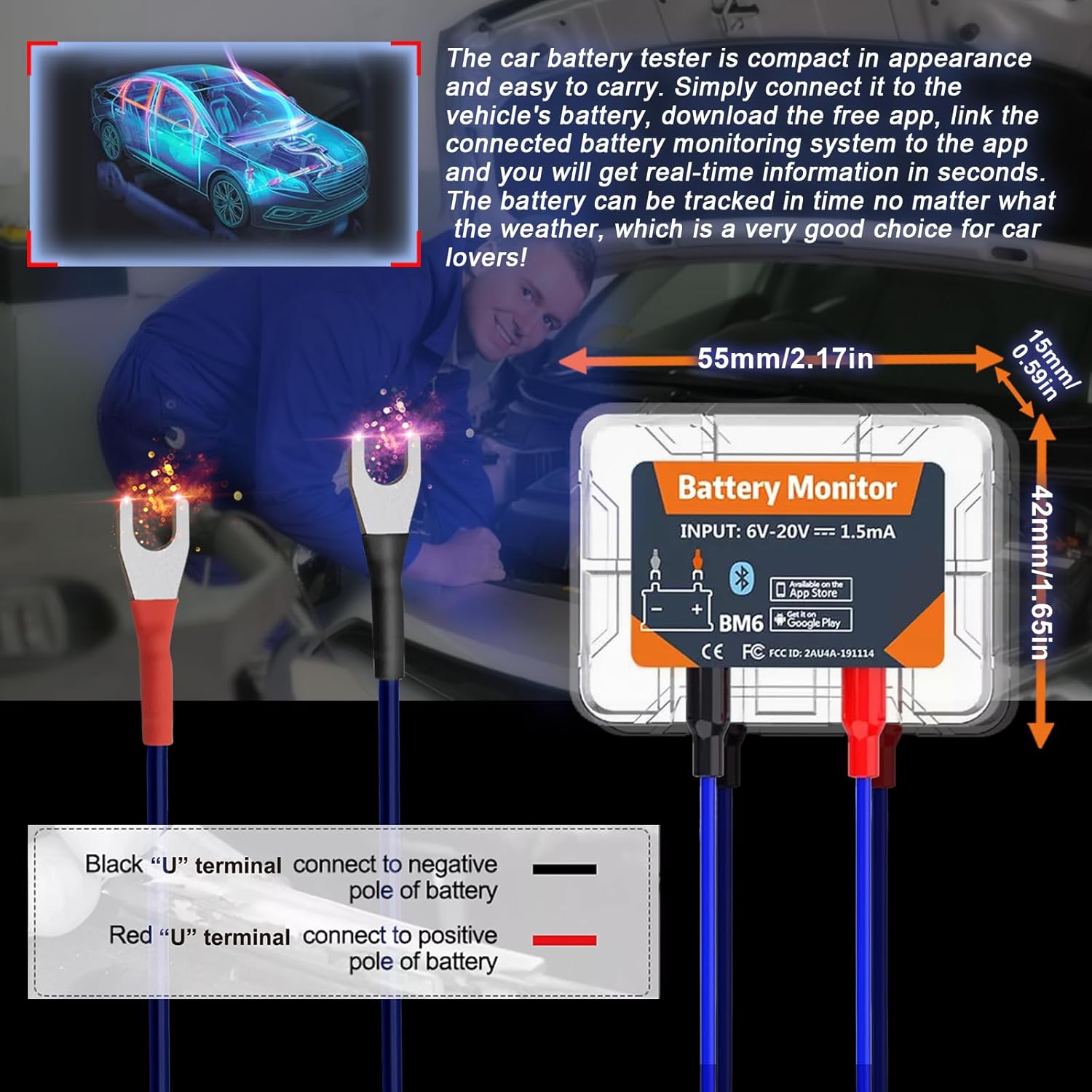
Image: Proper connection of the BM6 monitor to a vehicle battery terminals.
2. Instal·lació de l'aplicació
- Scan the QR code provided on the product packaging or in the user manual, or search for "BM6" in your device's app store (Google Play for Android, App Store for iOS).
- Download and install the "BM6" application.
- The app requires iOS 7.1 or later, or Android 4.3 or later.
3. Vinculació de dispositius
- Open the "BM6" app on your smartphone.
- Grant necessary permissions to the app, including Bluetooth and location access, as prompted. Location access is required for scanning nearby Bluetooth Low Energy (BLE) devices.
- The app should automatically detect and connect to the BM6 device. If not, navigate to the device management section within the app and select "Add Device". You may need to scan the serial number barcode on the device.
- Once connected, the app will display real-time battery information.
Video: A demonstration of the iKiKin BM6 Bluetooth Car Battery Monitor, including unboxing, connection to a battery, app installation, and basic app functions like battery monitoring, cranking test, and charging test.
Instruccions de funcionament
1. Battery Monitoring
Upon successful connection, the app's main screen will display real-time battery data, including:
- Estat de càrrega (SoC): Percenttage de càrrega de la bateria.
- Voltage: Volum actual de la bateriatage.
- Temperatura: Temperatura de la bateria.
- A graphical representation of voltage al llarg del temps.
The app will also indicate if the battery status is "OK" or if there are any abnormalities.
2. Prova d'arrencada
The Cranking Test evaluates the vehicle's starting system. Follow the in-app instructions:
- Assegureu-vos que el motor estigui apagat.
- Select "Cranking Test" in the app.
- Start the vehicle's engine as instructed by the app.
- The app will measure the cranking voltage and time, providing an assessment of the starter's performance.
3. Prova de càrrega
The Charging Test assesses the alternator and charging system. This test typically involves three steps:
- Prova de velocitat en ralentí: With the engine idling, turn on all electrical equipment (headlights, AC, car interior lights, etc.) and follow the app's prompts.
- Prova d'alta velocitat: Keep the engine at 2500-3000 RPM and follow the app's prompts.
- Prova de ondulació del díode: With the engine idling, turn off all electrical equipment and follow the app's prompts.
The app will display the idle charging voltage, high-speed charging voltage, and diode ripple voltage, indicating the health of your charging system.

Image: The BM6 app displaying results from cranking and charging system tests.
4. Trip Monitor and Historical Data
The app records battery data during trips, allowing you to review historical performance and driving habits. This feature helps in understanding long-term battery trends and identifying potential issues.
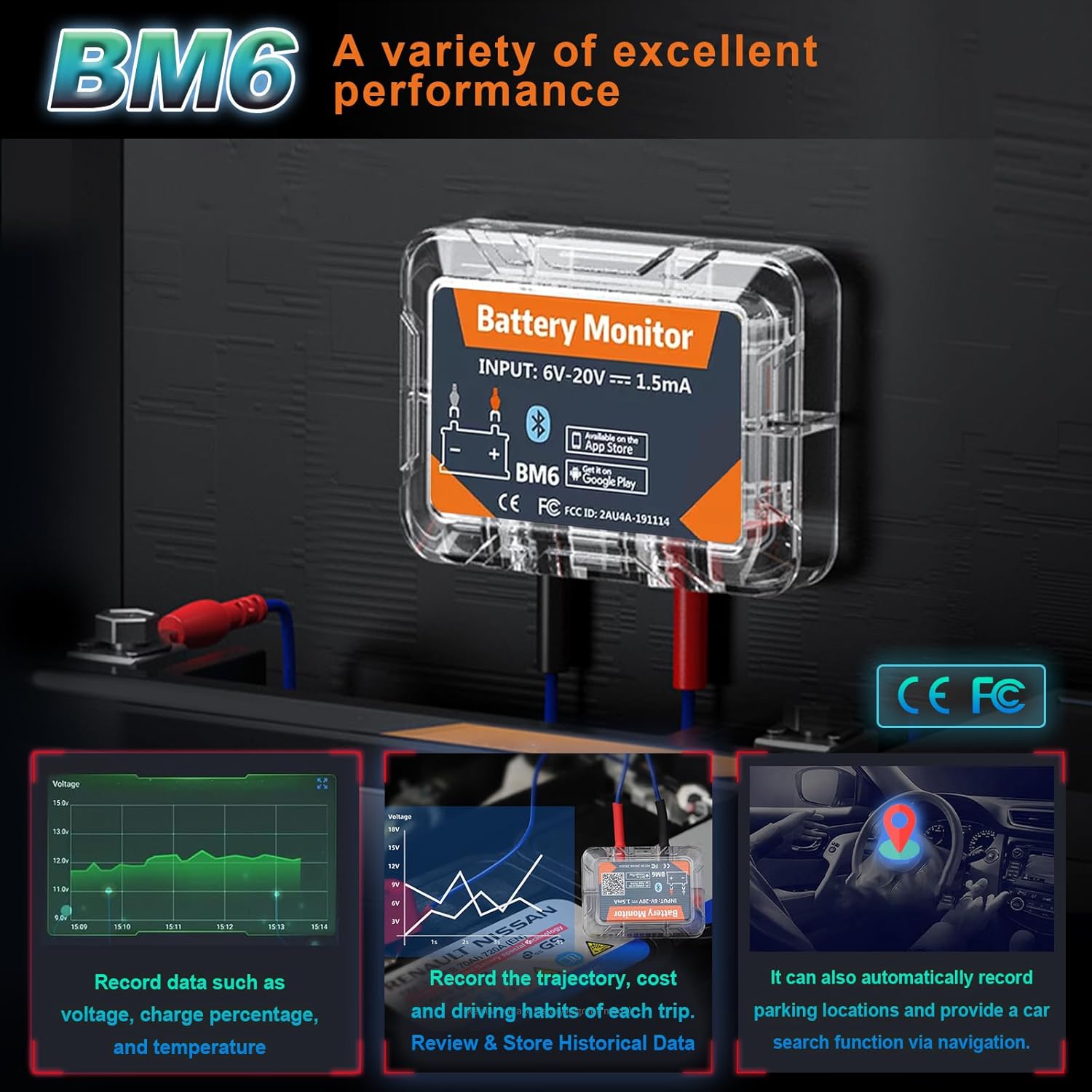
Image: The BM6 monitor's ability to record various data points and assist with car location.
5. Multi-Battery Management
The BM6 app supports monitoring multiple devices simultaneously. You can add and manage several BM6 units from a single app interface, making it suitable for users with multiple vehicles.
Manteniment
To ensure the longevity and accurate performance of your iKiKin BM6 battery monitor:
- Keep the device clean and free from dirt, dust, and moisture.
- Regularly check the connections to the battery terminals to ensure they are secure and free from corrosion.
- Store the device in a cool, dry place if it is removed from the vehicle for an extended period.
- Assegureu-vos que l'aplicació estigui actualitzada a la darrera versió per obtenir un rendiment òptim i noves funcions.
Resolució de problemes
If you encounter issues with your iKiKin BM6 battery monitor, consider the following:
- El dispositiu no es connecta a l'aplicació:
- Assegureu-vos que el Bluetooth estigui habilitat al vostre telèfon intel·ligent.
- Verify that the BM6 device is correctly connected to the vehicle battery.
- Check if the app has the necessary permissions (especially location) enabled.
- Reinicieu l'aplicació i proveu de tornar a connectar-vos.
- Ensure the device is within Bluetooth range (typically 10 meters).
- Lectures inexactes:
- Verify that the battery terminals are clean and the connections are tight.
- Ensure the battery type selected in the app (Lead-Acid or Lithium) matches your vehicle's battery.
- If using a custom battery profile, ensure the voltage corresponding to power settings are accurate.
- L'aplicació no funciona correctament:
- Actualitza l'aplicació a la darrera versió.
- Esborra la memòria cau de l'aplicació o torna-la a instal·lar.
- Assegureu-vos que el sistema operatiu del vostre telèfon intel·ligent estigui actualitzat.
- Automatic Alarm Function Not Working:
- Check app notification settings on your phone to ensure they are enabled for the BM6 app.
- Comproveu que el baix voltage threshold is set correctly within the app.
Especificacions
| Característica | Detall |
|---|---|
| Marca | iKiKin |
| Número de model | BM6 |
| Compatibilitat | All 12-volt vehicle batteries (Lead-Acid, Lithium) |
| Connectivitat | Bluetooth 4.0 |
| Vol. Operatiutage | 6 V - 20 V |
| Consum actual | 1.5 mA |
| Sistema operatiu compatible | iOS 7.1 and Later, Android 4.3 and Later |
| Dimensions del paquet | 6.06 x 4.8 x 0.91 polzades |
| Pes de l'article | 2.4 unces |
| Fabricant | iKiKin |
Garantia i Suport
For warranty information and technical support, please refer to the contact details provided with your product packaging or visit the official iKiKin weblloc web. Conserveu el rebut de compra com a comprovant de compra per a qualsevol reclamació de garantia.


