1. Introducció
Thank you for choosing the TIMESS Atomic Analog Wall Clock. This clock is designed for precise timekeeping, automatically synchronizing with the WWVB radio signal from the U.S. National Institute of Standards and Technology (NIST). It features a clear analog display, an integrated LCD for date and temperature, and silent operation. This manual provides detailed instructions for setup, operation, and maintenance to ensure optimal performance of your clock.
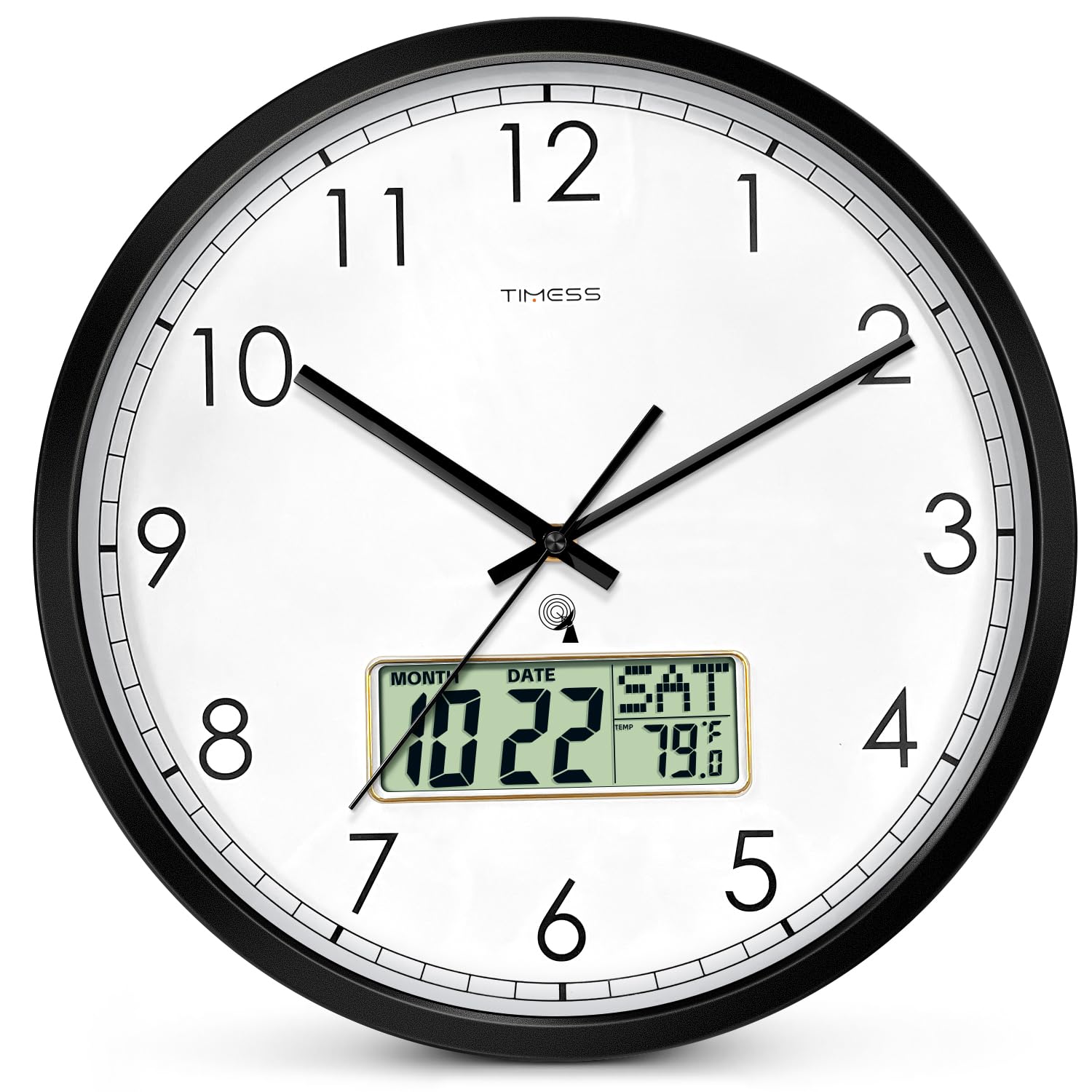
Figura 1: Frontal view of the TIMESS Atomic Analog Wall Clock. This clock features a large, easy-to-read dial with an integrated LCD display at the bottom for additional information.
2. Informació de seguretat
- Use only 1.5V AA alkaline batteries. Do not mix old and new batteries, or different types of batteries.
- Traieu les piles si no fareu servir el rellotge durant un període prolongat per evitar fuites.
- No exposeu el rellotge a temperatures extremes, llum solar directa ni humitat elevada.
- Keep the clock away from strong magnetic fields, which may interfere with its operation.
- No intenteu desmuntar ni reparar el rellotge vosaltres mateixos. Poseu-vos en contacte amb el servei d'atenció al client per obtenir ajuda.
3. Contingut del paquet
- 1 x TIMESS Atomic Analog Wall Clock (Model: TIMESS-M22)
- 1 x Manual d'usuari
4. Instruccions de configuració
4.1 Instal·lació de la bateria
- Localitzeu el compartiment de la bateria a la part posterior del rellotge.
- Insert one new AA alkaline battery (1.5V) into the designated slot, ensuring correct polarity (+/-).
- Tanqueu bé la tapa del compartiment de la bateria.
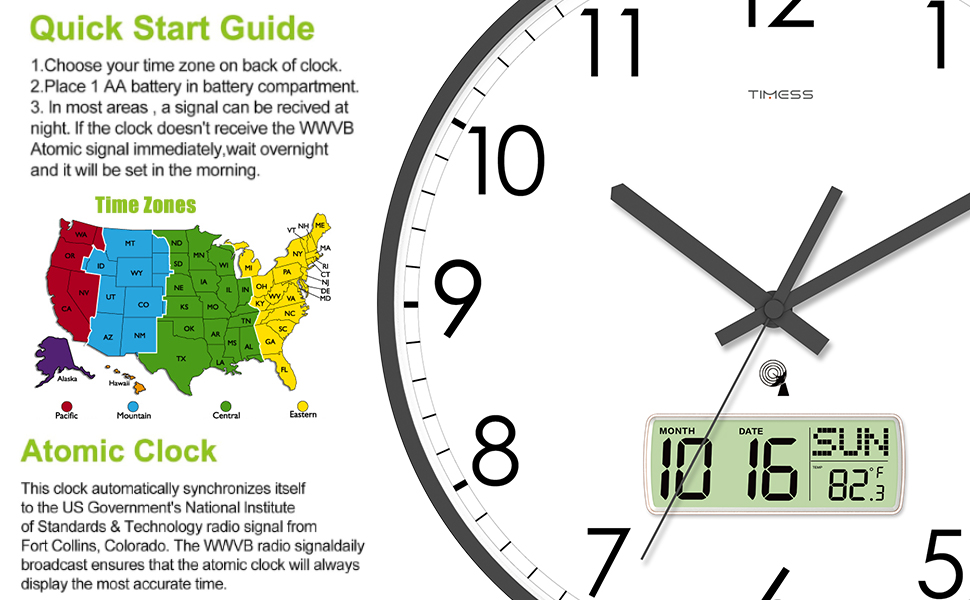
Figura 2: posterior view of the clock, illustrating the battery compartment and setting switches.
4.2 Time Zone and DST Selection
Before the atomic clock can work correctly, you must select your time zone and Daylight Saving Time (DST) setting.
- Interruptor DST: Slide the DST switch to the "ON" position if your area observes Daylight Saving Time. If your area does not observe DST (e.g., Arizona and Indiana), slide the switch to "OFF".
- Time Zone Switch (P/M/C/E): Select the correct time zone for your area by sliding the corresponding switch:
- P: Hora del Pacífic
- M: Temps de Muntanya
- C: Hora Central
- E: Hora de l'Est

Figure 3: Close-up of the clock mechanism, showing the DST and Time Zone selection switches.
4.3 Sincronització automàtica del temps
After battery installation and time zone selection, the clock will begin searching for the WWVB radio signal.
- The second hand will make one full revolution and stop at the 12 o'clock position.
- The minute and hour hands will then move to the 12 o'clock position.
- The clock will search for the WWVB radio signal.
- Strong Signal: If a strong signal is received, the clock will set itself within 3 to 10 minutes.
- Weak or No Signal: If the signal is weak or not received immediately, the clock will search for the signal on the odd hours (e.g., 1 AM, 3 AM, 5 AM, 9 PM, 11 PM). It may take overnight for the clock to synchronize in some areas.
- Once synchronized, the clock will display the correct time, date, and temperature.

Figure 4: Quick Start Guide illustrating the steps for initial setup and atomic clock synchronization.
Video 1: This video demonstrates the initial setup process, including battery installation, time zone selection, and the automatic synchronization sequence of the TIMESS Atomic Analog Wall Clock.
5. Instruccions de funcionament
5.1 Reading the Analog Display
The large analog dial with bold numbers and clear hands provides easy readability of the current time. The clock features a silent, non-ticking sweep movement for a quiet environment.
5.2 Comprensió de la pantalla LCD
The integrated LCD display provides additional information:
- Month and Date: Displays the current month and day.
- Dia de la setmana: Shows the current day (e.g., MON, TUE).
- Temperatura: Mostra la temperatura ambient.

Figura 5: Detallada view of the LCD display, showing the month, date, day of the week, and temperature reading.
5.3 Canvi d'unitats de temperatura (°C/°F)
To switch between Celsius (°C) and Fahrenheit (°F) temperature display, locate the small button or switch labeled "°C/°F" on the back of the clock, usually near the LCD display unit. Press or slide it to toggle between the two units.
6. Manteniment
- Neteja: Wipe the clock with a soft, dry cloth. Do not use abrasive cleaners or chemicals, as they may damage the finish or display.
- Substitució de la bateria: Replace the AA alkaline battery annually or when the clock's performance degrades (e.g., second hand getting stuck, LCD display fading). Ensure correct polarity when replacing.
- Emmagatzematge: If storing the clock for an extended period, remove the battery to prevent leakage and potential damage.
7. Solució De Problemes
| Problema | Causa possible | Solució |
|---|---|---|
| Clock does not set automatically or displays incorrect time. |
|
|
| Second hand gets stuck or moves erratically. | Bateria feble. | Replace with a new AA alkaline battery. A weak battery may not provide enough power for consistent hand movement. |
| La pantalla LCD està en blanc o tènue. | Weak or depleted battery. | Substituïu-la per una pila alcalina AA nova. |
| Digital time on LCD does not match analog time. | This model's analog and digital displays are not synchronized. The analog display is the primary time source, synchronized by WWVB. The digital display is for date and temperature. | This is normal operation. The analog clock is the atomic time-synchronized display. |
8. Especificacions
| Característica | Detall |
|---|---|
| Marca | TEMPS |
| Número de model | TIMESS-M22 |
| Tipus de visualització | Analog with LCD Digital Display |
| Font d'alimentació | 1 x piles AA (no incloses) |
| Característiques especials | Atomic (WWVB Self-Setting), Calendar Display, Temperature Display (°F/°C Switchable), Silent Sweep Movement |
| Dimensions del producte | 14" d'amplada x 14" d'alçada (35.56 cm x 35.56 cm) |
| Material | Acrylonitrile Butadiene Styrene (ABS) Frame, HD Glass Panel |
| Tipus de muntatge | Muntatge de paret |
| Pes de l'article | 3.59 lliures (1.63 kg) |
| Ús interior/exterior | Indoor, Outdoor (protected from elements) |

Figure 6: Dimensional diagram of the TIMESS Atomic Analog Wall Clock.
9. Garantia i Suport
TIMESS products are manufactured to high-quality standards. For specific warranty information, please refer to the warranty card included with your purchase or visit the official TIMESS website. If you encounter any issues or have questions regarding your clock, please contact our customer support team for assistance.
Atenció al client: Please refer to your purchase documentation for contact details or visit the TIMESS brand store on Amazon: TIMESS Store


